element14 Community
element14 Community
    Register Log In
  • Site
  • Search
  • Log In Register
  • Community Hub
    Community Hub
    • What's New on element14
    • Feedback and Support
    • Benefits of Membership
    • Personal Blogs
    • Members Area
    • Achievement Levels
  • Learn
    Learn
    • Ask an Expert
    • eBooks
    • element14 presents
    • Learning Center
    • Tech Spotlight
    • STEM Academy
    • Webinars, Training and Events
    • Learning Groups
  • Technologies
    Technologies
    • 3D Printing
    • FPGA
    • Industrial Automation
    • Internet of Things
    • Power & Energy
    • Sensors
    • Technology Groups
  • Challenges & Projects
    Challenges & Projects
    • Design Challenges
    • element14 presents Projects
    • Project14
    • Arduino Projects
    • Raspberry Pi Projects
    • Project Groups
  • Products
    Products
    • Arduino
    • Avnet & Tria Boards Community
    • Dev Tools
    • Manufacturers
    • Multicomp Pro
    • Product Groups
    • Raspberry Pi
    • RoadTests & Reviews
  • About Us
  • Store
    Store
    • Visit Your Store
    • Choose another store...
      • Europe
      •  Austria (German)
      •  Belgium (Dutch, French)
      •  Bulgaria (Bulgarian)
      •  Czech Republic (Czech)
      •  Denmark (Danish)
      •  Estonia (Estonian)
      •  Finland (Finnish)
      •  France (French)
      •  Germany (German)
      •  Hungary (Hungarian)
      •  Ireland
      •  Israel
      •  Italy (Italian)
      •  Latvia (Latvian)
      •  
      •  Lithuania (Lithuanian)
      •  Netherlands (Dutch)
      •  Norway (Norwegian)
      •  Poland (Polish)
      •  Portugal (Portuguese)
      •  Romania (Romanian)
      •  Russia (Russian)
      •  Slovakia (Slovak)
      •  Slovenia (Slovenian)
      •  Spain (Spanish)
      •  Sweden (Swedish)
      •  Switzerland(German, French)
      •  Turkey (Turkish)
      •  United Kingdom
      • Asia Pacific
      •  Australia
      •  China
      •  Hong Kong
      •  India
      • Japan
      •  Korea (Korean)
      •  Malaysia
      •  New Zealand
      •  Philippines
      •  Singapore
      •  Taiwan
      •  Thailand (Thai)
      • Vietnam
      • Americas
      •  Brazil (Portuguese)
      •  Canada
      •  Mexico (Spanish)
      •  United States
      Can't find the country/region you're looking for? Visit our export site or find a local distributor.
  • Translate
  • Profile
  • Settings
Raspberry Pi
  • Products
  • More
Raspberry Pi
Raspberry Pi Forum Is it possible to design 3D woodturning projects with CAD on a Raspberry Pi
  • Blog
  • Forum
  • Documents
  • Quiz
  • Events
  • Polls
  • Files
  • Members
  • Mentions
  • Sub-Groups
  • Tags
  • More
  • Cancel
  • New
Join Raspberry Pi to participate - click to join for free!
Featured Articles
Announcing Pi
Technical Specifications
Raspberry Pi FAQs
Win a Pi
Raspberry Pi Wishlist
Actions
  • Share
  • More
  • Cancel
Forum Thread Details
  • Replies 3 replies
  • Subscribers 675 subscribers
  • Views 825 views
  • Users 0 members are here
  • woodturning
  • cad
  • raspberry_pi
  • Design
Related

Is it possible to design 3D woodturning projects with CAD on a Raspberry Pi

Former Member
Former Member over 11 years ago

Right sorry if this sounds a bit daft (I am a compleat novice at this computer, software & engineering thing) I am a professional woodturner and I stumbled Across the raspberry pi by accident and was wondering if it was capable of doing the following


i want to design my woodturning projects on the computer but find CAD 3D design completely mind boggling so i am looking to use something like this Creative Woodturner - Woodturning Design Software - See a stunning 3D view of your woodturning design its a program for windows that's used to design (via nodes and a 2D view) objects made on a lathe with a 3D CAD output it would be really helpful just to know if it's possible on a raspberry pi


all help is appreciated


Craftycraigy

Attachments:
image
  • Sign in to reply
  • Cancel
  • iagorubio
    iagorubio over 11 years ago

    Hello Craigh,


    Raspberry Pi is not that good for 3D rendering even while the GPU is not that bad, it's quite short on memory for this kind of task.


    I have a gantry CNC router and use to mechanize aluminium on it. It's not the same as a lathe - I would love to have one - but the tools at hand are quite close.


    The program you show does what is called 2 1/2 CAD design. You get a 2D CAD design, and extrude a height to make a 3D piece.


    Usually this is done to create a tool path to let a CNC enabled machine - router, mill or lathe - to read that paths and make the cuts, pockets and shapes designed by that CAD.


    If you want to know the tools I use for that - in my case I use to just cut few mm to few cm height pieces - for the 2D design I use LibreCAD, or Qcad - they have the same heritage.


    It's a 2D CAD where you draw the circles, pockets, contours and lines in 2D that define your design Home of LibreCAD, 2D-CAD


    In some cases - where the cuts involve text - I even use inkscape, that's an really easy to use SVG draw program-


    After that I use PyCAM. PyCAM is a python program that lets you load your 2D design and extrude it to 3D to let you make a 3D part. It also calculates the toolpaths for milling it, but I don't think it would work on a lathe. PyCAM - Toolpath Generation for 3-Axis CNC machining


    PyCAM can export to STL that's a very common 3D format. You can render it on Blender or any other 3D program.


    Sometimes I also load those 2D designs on OpenSCAD. OpenSCAD let you import any DXF 2D CAD file and mathematically extrude, transform, change color, move, join, split the part or do whatever you need with it.


    You can also use it directly, without importing the 2D CAD OpenSCAD - The Programmers Solid 3D CAD Modeller


    As example to draw a cube in OpenSCAD you just type "cube([2,2,2])".


    This is an example piece I made in 2 minutes on OpenSCAD - a motor horn to attach a wheel to a DC motor.


    image

    The rendering is in low res to make it render quicker, but the STL export of this piece is a perfect cylinder.


    This can be loaded in PyCAM to get it done in a mill or look for a STL to GCODE coverter to be done in a lathe.


    An example of LibreCAD 2D to 3D conversion on OpenSCAM would be my hexapod. Each piece is a separate 2D CAD design loaded on OpenSCAD to put it together.


    image

    Once you have the STL you can also load it on a 3D program to do some camera travels or animations.


    Here it goes a tiny low-res example of a traveling on the hexapod. It was made from the OpenSCAD generated STL on Blender.


    You don't have permission to edit metadata of this video.
    Edit media
    x
    image
    Upload Preview
    image


    All those programs, LibreCAD, Inkscape, PyCAM, PyCAD, OpenSCAD and even Blender could be made to work on the Raspberry but I don't recommend it at all.


    Most of them can run on Windows as well. All of them are free.


    You want a quick and good PC to make 3D design, raspberry it's not what you really need.


    My recommendation is to take some time to learn a bit of 3D and 2D - start with the former - design. It have a quite step learning curve, but the rewards are huge.


    Most people here have worked with some type of CAD program - such as EagleCAD - for PCB design. I am sure most of them will tell you the hardest part is the start, but It was worth every minute of their effort.


    I am not a professional and I dedicated very few time to learn CAD and CAM processing.


    I got some good results so far, and from my experience the hard part is just the start. Once you get the gist of one CAD program, you would be able to work in most of  them.


    Most of my work related to 2D and 3D CAD CAM was to use the designs on a CNC machine. If It were not for the CNC machining part, may be I would have not done so much effor.


    I always start my designs with pen and paper anyway.


    Hope this helps.


    Edit: after watching the demos of the software you posted looks like it's really easy to use. It does the 2 1/2 CAD modeling in vertical and mirroring, the results look quite nice. A pity it just let you export it as 3D or 2D image. Exporting to STL this tool would be really useful.

    • Cancel
    • Vote Up 0 Vote Down
    • Sign in to reply
    • Cancel
  • Former Member
    Former Member over 11 years ago

    Craig,


    If your interest is only in wood turning, you do not need 3D software.

    It would be nice, but it is not needed. Because all the parts that you make are created

    by rotation around a fixed axle, you only need to create a cross-section of the piece you need,

    and that is only 2D.


    Just my $0.02,

    Jean-Paul (AC9GH)

    • Cancel
    • Vote Up 0 Vote Down
    • Sign in to reply
    • Cancel
  • iagorubio
    iagorubio over 11 years ago

    Hi again Craig.


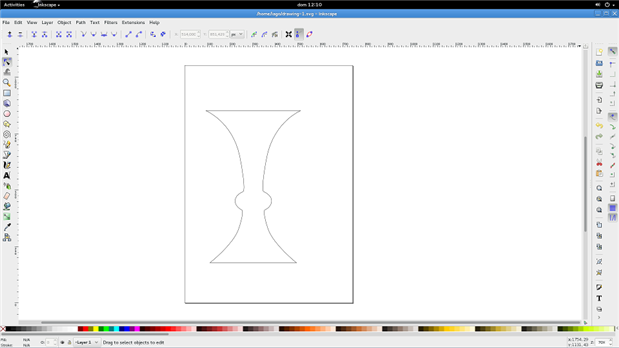
    Thanks to bring this up here. I have been fiddling with the way the program you posted do things and I've found a very easy way to create woodturning - or any lathe machined piece - with inkscape and OpenSCAD that fits quite well in my workflow.


    You just need in inkscape to clone one line and mirror it, so any edit you do in the first line, is done in its mirror.


    That way the two 2D profiles would be a slice of the part.


    https://dl.dropboxusercontent.com/u/88765973/inkscape_woodturn.webm (you need a webm player to watch this video, such as google chrome, opera, firefox browsers or explorer with WebM MF components http://www.webmproject.org/ie/ ).


    To finally make a slice, I close the paths just drawing a line between the top ends and bottom ends, and combine them using inkscape tools ( Combine Path and Join Node).


    image


    Now I have to export this 2D path to DXF to be imported by other tools. The most compatible way is just to divide the path in as many small lines as possible, because basic shapes are easily recognized among different tools.


    For this just use two Inkscape tools Extensions > Modify Paths > Add Nodes and after selecting all nodes the toolbar button "Make selected segments lines".


    Fullscreen 4331.contentimage_176457.html Download
    <html><head><title>Jive SBS</title></head>
    <body><font face="arial,helvetica,sans-serif">
    <b>Error</b><br><font size="-1">
    An general error occurred while processing your request.
    </font></font></body></html>


    After that I can just export it as DXF.


    Once we have that slice the only thing we have to do is to center it in one axis, extrude it a bit so it becomes a 3D part and copy the slice rotating it 360 times, one time for the circumference degrees. Of course we have to move it one degree more in each step to complete 0 to 360 degrees.


    This translated to OpenSCAD language would be, as seen on the video below:


    width = 531;
    
    for( i = [0:360] ){
         rotate(a=[0,i,0]){
              translate([-width/2,0,0])
                   linear_extrude(height=4)
                        import("file.dxf");
         }
    }


    The code on OpenSCAD to do it would be always the same just editing the width of the piece and changing the file name.


    In the video and the picture below I took the width of the bottom part, and the top was widder, so to center the piece I used a different translation. In this case -width/3.


    But is much easier to just use the part width so it will always be -width/2.


    https://dl.dropboxusercontent.com/u/88765973/openscad_woodturn.webm (you need a webm player to watch this video, such as google chrome, opera, firefox browsers or explorer with WebM MF components http://www.webmproject.org/ie/ ).


    After that the resulting STL can be loaded in a 3D program such as Blender or SolidWorks, or converted to gcode to make the part in a CNC lathe.


    Fullscreen 5811.contentimage_176458.html Download
    <html><head><title>Jive SBS</title></head>
    <body><font face="arial,helvetica,sans-serif">
    <b>Error</b><br><font size="-1">
    An general error occurred while processing your request.
    </font></font></body></html>
    

    I would not add more to this thread, because this is sightly out of topic here, as I don't think many people would be interested in 3D design, mills, lathes and routers here. But feel free to send me a private message if you need more information about how to add wood textures to the piece, or any other related topic.


    Edit: unfortunately looks like the videos don't work. I have changed the players for a Dropbox link. Will try to convert the videos later.

    • Cancel
    • Vote Up 0 Vote Down
    • Sign in to reply
    • Cancel
element14 Community

element14 is the first online community specifically for engineers. Connect with your peers and get expert answers to your questions.

  • Members
  • Learn
  • Technologies
  • Challenges & Projects
  • Products
  • Store
  • About Us
  • Feedback & Support
  • FAQs
  • Terms of Use
  • Privacy Policy
  • Legal and Copyright Notices
  • Sitemap
  • Cookies

An Avnet Company © 2025 Premier Farnell Limited. All Rights Reserved.

Premier Farnell Ltd, registered in England and Wales (no 00876412), registered office: Farnell House, Forge Lane, Leeds LS12 2NE.

ICP 备案号 10220084.

Follow element14

  • X
  • Facebook
  • linkedin
  • YouTube