element14 Community
element14 Community
    Register Log In
  • Site
  • Search
  • Log In Register
  • Community Hub
    Community Hub
    • What's New on element14
    • Feedback and Support
    • Benefits of Membership
    • Personal Blogs
    • Members Area
    • Achievement Levels
  • Learn
    Learn
    • Ask an Expert
    • eBooks
    • element14 presents
    • Learning Center
    • Tech Spotlight
    • STEM Academy
    • Webinars, Training and Events
    • Learning Groups
  • Technologies
    Technologies
    • 3D Printing
    • FPGA
    • Industrial Automation
    • Internet of Things
    • Power & Energy
    • Sensors
    • Technology Groups
  • Challenges & Projects
    Challenges & Projects
    • Design Challenges
    • element14 presents Projects
    • Project14
    • Arduino Projects
    • Raspberry Pi Projects
    • Project Groups
  • Products
    Products
    • Arduino
    • Avnet & Tria Boards Community
    • Dev Tools
    • Manufacturers
    • Multicomp Pro
    • Product Groups
    • Raspberry Pi
    • RoadTests & Reviews
  • About Us
    About the element14 Community
  • Store
    Store
    • Visit Your Store
    • Choose another store...
      • Europe
      •  Austria (German)
      •  Belgium (Dutch, French)
      •  Bulgaria (Bulgarian)
      •  Czech Republic (Czech)
      •  Denmark (Danish)
      •  Estonia (Estonian)
      •  Finland (Finnish)
      •  France (French)
      •  Germany (German)
      •  Hungary (Hungarian)
      •  Ireland
      •  Israel
      •  Italy (Italian)
      •  Latvia (Latvian)
      •  
      •  Lithuania (Lithuanian)
      •  Netherlands (Dutch)
      •  Norway (Norwegian)
      •  Poland (Polish)
      •  Portugal (Portuguese)
      •  Romania (Romanian)
      •  Russia (Russian)
      •  Slovakia (Slovak)
      •  Slovenia (Slovenian)
      •  Spain (Spanish)
      •  Sweden (Swedish)
      •  Switzerland(German, French)
      •  Turkey (Turkish)
      •  United Kingdom
      • Asia Pacific
      •  Australia
      •  China
      •  Hong Kong
      •  India
      •  Japan
      •  Korea (Korean)
      •  Malaysia
      •  New Zealand
      •  Philippines
      •  Singapore
      •  Taiwan
      •  Thailand (Thai)
      •  Vietnam
      • Americas
      •  Brazil (Portuguese)
      •  Canada
      •  Mexico (Spanish)
      •  United States
      Can't find the country/region you're looking for? Visit our export site or find a local distributor.
  • Translate
  • Profile
  • Settings
Raspberry Pi
  • Products
  • More
Raspberry Pi
Raspberry Pi Forum Driver fixes and updates to kernel 3.18.16 and 4.0.5
  • Blog
  • Forum
  • Documents
  • Quiz
  • Events
  • Polls
  • Files
  • Members
  • Mentions
  • Sub-Groups
  • Tags
  • More
  • Cancel
  • New
Join Raspberry Pi to participate - click to join for free!
Featured Articles
Announcing Pi
Technical Specifications
Raspberry Pi FAQs
Win a Pi
Raspberry Pi Wishlist
Actions
  • Share
  • More
  • Cancel
Forum Thread Details
  • Replies 180 replies
  • Subscribers 720 subscribers
  • Views 29111 views
  • Users 0 members are here
  • raspberry_pi
  • raspeberry_pi_accessories
Related

Driver fixes and updates to kernel 3.18.16 and 4.0.5

hiassoft
hiassoft over 11 years ago

Edit: Current kernel versions and install/config instructions are also available from my webpage http://www.horus.com/~hias/cirrus-driver.html


During the last few weeks I fixed various issues in the Wolfson/Cirrus driver and rebased it so it works with the current RPi kernel versions (3.18.16 and 4.0.5).


You can download the patches from my GitHub repository. The 3.18 kernel with Cirrus drivers is in the cirrus-3.18.y branch, the 4.0 kernel with Cirrus drivers is in the cirrus-4.0.y branch. I'll rebase and update these branches from time to time so that the Cirrus driver and my changes will stay on top of the commit list.


If you just want to have an updated 3.18.16 kernel you can download precompiled binaries from here. Just unpack the tarball in the root directory. Before you do that it might be a good idea to update the firmware files (bootcode.bin, start*.elf and fixup*.dat in the boot directory) to the latest version.


Here's a list of my changes:

- Added the FLL1 setup back so that switching between 44.1kHz and 48kHz (and other sample rates) works fine.

- Don't register Arizona IRQ if it's set to 0. The Cirrus driver uses polling here and if we register an interrupt handler for irq 0 we get lots of "spurious interrupt" messages spamming dmesg in kernel 3.19 and newer. IRQ 0 is wrong anyway.

- Include DCVDD patches from the Cirrus linux-drivers repository. These patches make sure the WM8804 chip is initialized properly. Without this patch I sometimes had SPDIF audio out only on the right channel.

- Disable spidev0 in Cirrus device tree overlay. That's mainly a safety precaution so that userspace programs trying to access spi0.0 won't interfere with the WM8804 reset line. I'm not 100% sure this is needed at all, so maybe I'll remove it some time later.


And some important notes:

I haven't included the mmap patch, this is already supported in the upstream kernels but currently disabled by default. To enable mmap support add the following line to config.txt:

dtoverlay=i2s-mmap


If you compile the kernel on your own please note that the devicetree overlays have now been moved to arch/arm/boot/dts/overlays.


Kernel 4.0 now uses spi_bcm2835 by default (the older spi_bcm2708 module is available via a devicetree overlay) so you have to extend your /etc/modprobe.d conf file and add a pre-depend for spi_bcm2835 as well. It's safe to have both the old and the new module in here, so just use this configuration:

softdep arizona-spi pre: arizona-ldo1
softdep spi-bcm2708 pre: fixed
softdep spi-bcm2835 pre: fixed


so long,


Hias

  • Sign in to reply
  • Cancel
  • clem57
    clem57 over 10 years ago in reply to e14 Contributor

    Somewhere along the line, /boot/config.txt was overwritten and had default settings which had i2c turned OFF.  I found this by running i2cdetect.  Once I corrected the settings in /boot/config.txt, it worked and I was able to use mplayer to play an MP3 file.

    That is great new. I am glad the i2cdetect led to the discovery what happened. Also for experts like hiassoft

    Clem

    • Cancel
    • Vote Up +1 Vote Down
    • Sign in to reply
    • Cancel
  • e14 Contributor
    e14 Contributor over 10 years ago

    Hi Matthias!


    Thank you for the amazing work here and for keeping the kernels updated.


    I wish what you are doing could replace the manual (or at least a big part of it) and the software download on the Cirrus Logic Audio Card page. I wasted quite a bit of time trying to get the outdated Wolfson / Cirrus Logic code to work. I'm pretty new to Element 14 so I don't know how to suggest it, but if there are any moderators here, this work should be linked to as the official version of how to get the card to work. I have a feeling people are wasting a lot of time (and maybe giving up) just because they don't realize the original manual is no longer correct.

    • Cancel
    • Vote Up 0 Vote Down
    • Sign in to reply
    • Cancel
  • clem57
    clem57 over 10 years ago in reply to e14 Contributor

    I wish what you are doing could replace the manual (or at least a big part of it) and the software download on the Cirrus Logic Audio Card page. I wasted quite a bit of time trying to get the outdated Wolfson / Cirrus Logic code to work. I'm pretty new to Element 14 so I don't know how to suggest it, but if there are any moderators here, this work should be linked to as the official version of how to get the card to work.

    spannerspencer What do you think?

    • Cancel
    • Vote Up 0 Vote Down
    • Sign in to reply
    • Cancel
  • e14 Contributor
    e14 Contributor over 10 years ago in reply to hiassoft

    Hi, I've been trying to get the 4.1x Kernel that you provide with the RPI 2 and cirrus audio card from the link : RPi Linux driver for Wolfson / Cirrus Logic Audio Card

    I am trying to incorporate this into a buildroot built pi2 image. I am using the rpi-linux/arch/arm/configs/bcm2709_defconfig configuration for the kernel and 4.1.19 kernel headers

    The rpi firmware which contains the config.txt and dtb overlays come from official rpi git ( 046effa13ebc4cc7601df4f06f4834bd0eebb0f8 which is think is latest ).


    my config.txt is :-

    arm_freq=900

    core_freq=250

    sdram_freq=450

    over_voltage=2

    dtoverlay=rpi-cirrus-wm5102-overlay

    dtoverlay=i2s-mmap


    I took the overlays for rpi-cirrus-wm5102-overlay.dtb , i2s-mmap-overlay.dtb from your 4.1 prebuilt kernel gz image

    ( a question about the overlays , does the reference in the contig.txt have to match exact file name . i.e. I've seen : dtoverlay=rpi-cirrus-wm5102  & dtoverlay=rpi-cirrus-wm5102 does the file name have to correspond exactly to the overlay dtb file name or does it automatically remove the -overlay part? )


    Also i've seen both raspi-blacklist.config and cirrus.config in different instructions up the page. Which is correct? why?

    Mine is cirrus.config and it contains


    softdep arizona-spi pre: arizona-ldo1

    softdep spi-bcm2708 pre: fixed

    softdep spi-bcm2835 pre: fixed

    softdep snd-soc-wm8804-i2c pre: snd-soc-rpi-wsp-preinit

    softdep snd-soc-rpi-wsp pre: snd-soc-wm8804-i2c


    is this correct?

    Am I missing something?


    here is extract of my dmesg where the audio card is attempted to be initialised. Could you tell me what is wrong here?


    4.074966] udevd[84]: starting version 3.1.5
    [4.124325] random: udevd urandom read with 78 bits of entropy available
    [4.183491] udevd[84]: specified group 'xenomai' unknown
    [4.557839] snd-rpi-wsp sound: ASoC: CPU DAI (null) not registered
    [5.199562] bcm2835-rng 3f104000.rng: hwrng registered
    [5.210740] snd-rpi-wsp sound: ASoC: CPU DAI (null) not registered
    [5.223868] snd-rpi-wsp sound: ASoC: CPU DAI (null) not registered
    [5.236290] snd-rpi-wsp sound: ASoC: CPU DAI (null) not registered
    [5.238387] bcm2708_i2c 3f804000.i2c: BSC1 Controller at 0x3f804000 (irq 79) (baudrate 100000)
    [5.240210] spi spi0.1: setting up native-CS1 as GPIO 7
    [5.240418] spi spi0.0: setting up native-CS0 as GPIO 8
    [5.256563] gpiomem-bcm2835 3f200000.gpiomem: Initialised: Registers at 0x3f200000
    [5.302334] snd-rpi-wsp sound: ASoC: CODEC DAI wm5102-aif1 not registered
    [5.413108] spi0.1 supply DCVDD not found, using dummy regulator
    [5.425351] wm8804 1-003a: Failed to read device ID: -5
    [5.436674] wm8804: probe of 1-003a failed with error -5
    [5.467651] arizona spi0.1: Unknown device ID: 0
    [5.481030] snd-rpi-wsp sound: ASoC: CODEC DAI wm5102-aif1 not registered
    [6.057559] NET: Registered protocol family 10
    [6.350161] smsc95xx 1-1.1:1.0 eth0: hardware isn't capable of remote wakeup
    [6.363772] IPv6: ADDRCONF(NETDEV_UP): eth0: link is not ready
    [7.117400] cfg80211: Calling CRDA to update world regulatory domain
    [7.957661] smsc95xx 1-1.1:1.0 eth0: link up, 100Mbps, full-duplex, lpa 0x45E1
    [7.970849] IPv6: ADDRCONF(NETDEV_CHANGE): eth0: link becomes ready
    • Cancel
    • Vote Up 0 Vote Down
    • Sign in to reply
    • Cancel
  • hiassoft
    hiassoft over 10 years ago in reply to e14 Contributor

    Hi Rob!


    The problem you're running into probably come from mixing dtbs/overlays. The dtbs/overlays are tied to the kernel, so always use the ones generated from "make dtbs / make dtbs_install".


    Use the GPU firmware (bootcode.bin, start_x.elf, fixup_x.elf) from the rpi-firmware repo and config.txt from there as a template. Compile the kernel from my github tree, using bcm2709_defconfig from that tree, and use kernel(7).img, modules and dtbs from there.


    As for overlays: better use "dtoverlay=rpi-cirrus-wm5102", without the "-overlay". With kernel 4.1 both versions will work but with kernel 4.4 that'll change - the overlay files are named "rpi-cirrus-wm5102.dtbo" there (instead of previously rpi-cirrus-wm5102-overlay.dtb) and the "-overlay" variants will no longer work.


    As for the modprobe file: Use cirrus.conf - putting the config into blacklist.conf as described in the original instructions is rather counter-intuitive IMO. Also you don't need the 2 last softdep lines with wm8804-i2c when using my 4.1.19 kernel, that was only needed for older kernels where I tried a different approach to fix wm8804 initialization issues (which I've now replaced by a better fix).


    so long,


    Hias

    • Cancel
    • Vote Up 0 Vote Down
    • Sign in to reply
    • Cancel
  • binauralhead
    binauralhead over 10 years ago

    Hi there, tried downloading some of the images, however, on extraction there are quite a few files that are already written, and asks if I want to overwrite them, some have different kb sizes, not sure what is going on there, any pointers?


    I have just received my first raspi3 with the cirrus logic card, works great on the piB with other images, but those "other" images do not work on the raspi3.


    Regards

    • Cancel
    • Vote Up 0 Vote Down
    • Sign in to reply
    • Cancel
  • hiassoft
    hiassoft over 10 years ago in reply to binauralhead

    Hi Alan!


    What exactly to you mean by "other" images? How did you extract the files, when did you get the "overwrite" messages?


    For the RPi3 you need the very latest kernel, currently 4.1.19. Also follow the instructions on my website:

    RPi Linux driver for Wolfson / Cirrus Logic Audio Card


    The precompiled kernel overwrites quite some files (kernel.img, dtb/overlay files, modules if you have kernel 4.1.19 already installed), but normally extracting with tar will silently overwrite them. Unless you forgot to extract as root or use sudo, then it can't overwrite these files and will complain loudly.


    so long,


    Hias

    • Cancel
    • Vote Up +1 Vote Down
    • Sign in to reply
    • Cancel
  • binauralhead
    binauralhead over 10 years ago in reply to hiassoft

    Hello Hias,


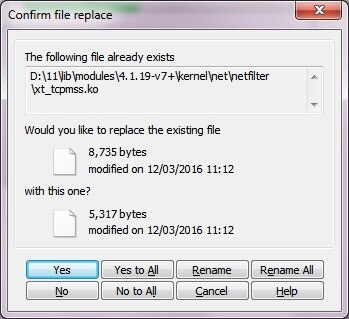
    When I extract the file cirrus-linux-4.1.19.tgz (using windows PC) extract to a new folder, as the image is being extracted, the files being written from the folder "lib" - there are quite a few files (9) with the same name, but different files sizes, I get prompted to either overwrite or skip them. Not sure why there are already files written as they should all be unique. Quite confused about that!


    The first two are shown below.


    image

    image


    Anyway I was hoping they would be extracted so that I could then copy them to the Pi3's SD card.


    I'm a bit of a noob, but have several Pi's, but not had any experience with Pi2's or Pi3's though.


    I'm just playing with a NOOBS image that can boot the Pi3, and seeing if I can manage to get darkice to install.


    But any help in the mean time would be welcomed.


    Regards

    Alan

    • Cancel
    • Vote Up 0 Vote Down
    • Sign in to reply
    • Cancel
  • hiassoft
    hiassoft over 10 years ago in reply to binauralhead

    Hi Alan!


    Ah, now I understand :-)


    You shouldn't extract the .tar.gz file on your PC, download it on your RPi and then extract it there using the commands from my webpage.


    sudo tar zxf cirrus-linux-4.1.19.tgz -C /


    sudo ensures the the command is run as root (and can overwrite the files / access the directories owned by root) and the -C / at the end ensures the files are extracted into the correct directories (/boot, /lib/modules etc).


    You also have to create the /etc/modprobe.d/cirrus.conf file as root, using an editor on the raspberry pi, for example using nano (that's one of the less-confusing editors on the RPi)


    sudo nano /etc/modprobe.d/cirrus.conf


    Ah, and don't forget to edit /boot/config.txt as described on my webpage.


    so long,


    Hias

    • Cancel
    • Vote Up +1 Vote Down
    • Sign in to reply
    • Cancel
  • binauralhead
    binauralhead over 10 years ago in reply to hiassoft

    Thank you for that image - I actually managed (only just before your email arrived) to do that very thing.

    I am slowly getting there, just trying to remember where the scripts were to test darkice!


    Not sure if any sound can be heard or recorded as yet, I've basically done it, with a reboot all seems fine (thanks to your work), just about to find the elusive scripts now, ha...


    Thank you so much for the work you do, though Cirrus should be doing that on OUR behalf eh..


    Thanks again!

    Alan

    • Cancel
    • Vote Up 0 Vote Down
    • Sign in to reply
    • Cancel
<>
element14 Community

element14 is the first online community specifically for engineers. Connect with your peers and get expert answers to your questions.

  • Members
  • Learn
  • Technologies
  • Challenges & Projects
  • Products
  • Store
  • About Us
  • Feedback & Support
  • FAQs
  • Terms of Use
  • Privacy Policy
  • Legal and Copyright Notices
  • Sitemap
  • Cookies

An Avnet Company © 2026 Premier Farnell Limited. All Rights Reserved.

Premier Farnell Ltd, registered in England and Wales (no 00876412), registered office: Farnell House, Forge Lane, Leeds LS12 2NE.

Follow element14

  • X
  • Facebook
  • linkedin
  • YouTube