element14 Community
element14 Community
    Register Log In
  • Site
  • Search
  • Log In Register
  • Community Hub
    Community Hub
    • What's New on element14
    • Feedback and Support
    • Benefits of Membership
    • Personal Blogs
    • Members Area
    • Achievement Levels
  • Learn
    Learn
    • Ask an Expert
    • eBooks
    • element14 presents
    • Learning Center
    • Tech Spotlight
    • STEM Academy
    • Webinars, Training and Events
    • Learning Groups
  • Technologies
    Technologies
    • 3D Printing
    • FPGA
    • Industrial Automation
    • Internet of Things
    • Power & Energy
    • Sensors
    • Technology Groups
  • Challenges & Projects
    Challenges & Projects
    • Design Challenges
    • element14 presents Projects
    • Project14
    • Arduino Projects
    • Raspberry Pi Projects
    • Project Groups
  • Products
    Products
    • Arduino
    • Avnet & Tria Boards Community
    • Dev Tools
    • Manufacturers
    • Multicomp Pro
    • Product Groups
    • Raspberry Pi
    • RoadTests & Reviews
  • About Us
    About the element14 Community
  • Store
    Store
    • Visit Your Store
    • Choose another store...
      • Europe
      •  Austria (German)
      •  Belgium (Dutch, French)
      •  Bulgaria (Bulgarian)
      •  Czech Republic (Czech)
      •  Denmark (Danish)
      •  Estonia (Estonian)
      •  Finland (Finnish)
      •  France (French)
      •  Germany (German)
      •  Hungary (Hungarian)
      •  Ireland
      •  Israel
      •  Italy (Italian)
      •  Latvia (Latvian)
      •  
      •  Lithuania (Lithuanian)
      •  Netherlands (Dutch)
      •  Norway (Norwegian)
      •  Poland (Polish)
      •  Portugal (Portuguese)
      •  Romania (Romanian)
      •  Russia (Russian)
      •  Slovakia (Slovak)
      •  Slovenia (Slovenian)
      •  Spain (Spanish)
      •  Sweden (Swedish)
      •  Switzerland(German, French)
      •  Turkey (Turkish)
      •  United Kingdom
      • Asia Pacific
      •  Australia
      •  China
      •  Hong Kong
      •  India
      •  Japan
      •  Korea (Korean)
      •  Malaysia
      •  New Zealand
      •  Philippines
      •  Singapore
      •  Taiwan
      •  Thailand (Thai)
      •  Vietnam
      • Americas
      •  Brazil (Portuguese)
      •  Canada
      •  Mexico (Spanish)
      •  United States
      Can't find the country/region you're looking for? Visit our export site or find a local distributor.
  • Translate
  • Profile
  • Settings
Raspberry Pi
  • Products
  • More
Raspberry Pi
Raspberry Pi Forum Pure Data on Raspberry Pi 2 with real-time kernel and Cirrus card?
  • Blog
  • Forum
  • Documents
  • Quiz
  • Events
  • Polls
  • Files
  • Members
  • Mentions
  • Sub-Groups
  • Tags
  • More
  • Cancel
  • New
Join Raspberry Pi to participate - click to join for free!
Featured Articles
Announcing Pi
Technical Specifications
Raspberry Pi FAQs
Win a Pi
Raspberry Pi Wishlist
Actions
  • Share
  • More
  • Cancel
Forum Thread Details
  • State Suggested Answer
  • Replies 14 replies
  • Answers 1 answer
  • Subscribers 707 subscribers
  • Views 2601 views
  • Users 0 members are here
  • real-time
  • cirrus
  • raspberry_pi
  • raspberrypi
  • kernel
  • puredata
Related

Pure Data on Raspberry Pi 2 with real-time kernel and Cirrus card?

dmlandrum
dmlandrum over 10 years ago

I'm aiming to create a Korg Wavedrum-like project. The idea is to have a tensioned drum head miked with two piezo contact mics (one at center and one at edge) feeding into the Cirrus card so the signals can be processed by PD into something more interesting. I'm not talking about just using the piezos as triggers: the audio they capture can be part of the final sound.


I know people have said the RPi is not a good platform for DSP, but I think for this application it will be good enough. The problem I'm having right now is with how to set up a real-time kernel on the RPi 2, which is what I'd like to use as it has more RAM and processor power. I've tried Google and the search here, but didn't find anything I understood. Is this possible, and does anyone know where some good information can be found on it? It's been a long time since I've used Linux, so I'm really rusty at the moment.


Thank you very much for your help.

  • Sign in to reply
  • Cancel
  • balearicdynamics
    0 balearicdynamics over 10 years ago in reply to dmlandrum

    Hello Darren,


    I have collected a really wide documentation on Cirrus while working on the audio part of the Meditech project. The problem is that I can't attach nothing to a comment post. Let me how can I send you some images and pdf.


    BTW, it seems I am a bit obsessed on the mutability of the Internet but when I find good documentation on some site, especially personal blogs or small forums, I print the pdf of the content just to avoid in future those damn error 404 from disappeared sites image Let me check if I can do attaching some images.


    Enrico

    • Cancel
    • Vote Up +1 Vote Down
    • Sign in to reply
    • Verify Answer
    • Cancel
  • balearicdynamics
    0 balearicdynamics over 10 years ago in reply to dmlandrum

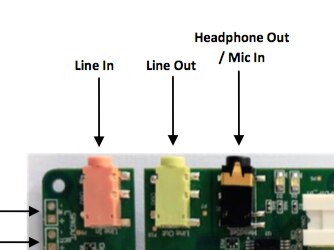
    Well, maybe I have got it image The following image is where the jack are positioned on the board and their meaning:

    image

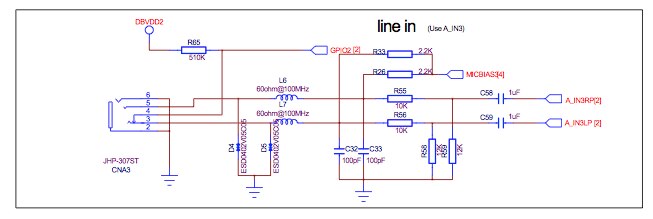
    So fron left to right, from the Cirrus Logic Audio Card schematics you can see:

    image

    A normal mono microphone line-in jack

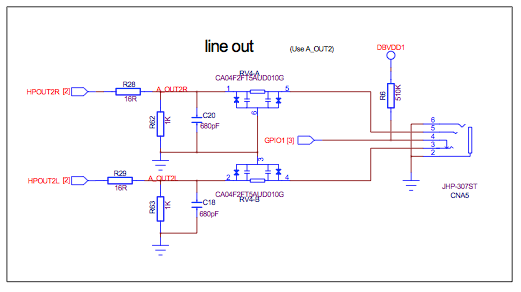
    image

    A normal stereo line-out jack

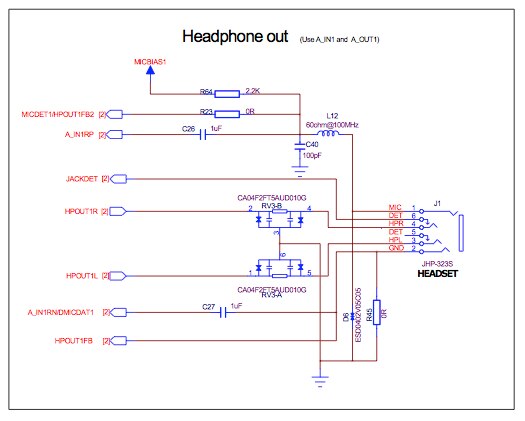
    image

    This is the jack that interest you. The order of the pins (as shown in the schematic) is the same of the earphone + microphone smartphone plugs.


    Take in account that the use of one input and output channel respect another (line in, headset, line out, speakers etc.) should be configured in the system with one of the available bash scripts.


    Enrico

    • Cancel
    • Vote Up +1 Vote Down
    • Sign in to reply
    • Verify Answer
    • Cancel
  • dmlandrum
    0 dmlandrum over 10 years ago in reply to balearicdynamics

    Okay, so I might have to use the line-in with a pair of external mic preamps, which isn't that big of a deal (I'll need a very high-impedance input for piezo contact mics anyway), as I'll still need a bipolar power supply (+/-12V should do) for balanced line drivers.


    I was really hoping there was a way to separately access all the functions of the chip, but this will do. Thank you for the help!

    • Cancel
    • Vote Up 0 Vote Down
    • Sign in to reply
    • Verify Answer
    • Cancel
  • balearicdynamics
    0 balearicdynamics over 10 years ago in reply to dmlandrum

    Hi Darren,


    I suggest you explore the content of the scripts that automatically set the different input and output lines of the board. It is part of the pre-installed RT Kernel and is explained in the manual. As you edit the sources you will see a good documented set of commands that probably are what you are searching for. These batches are just scripts that automate the presets but with a simple analysis you can do your own as needed. Let me know if you need help about this.


    Enrico

    • Cancel
    • Vote Up +1 Vote Down
    • Sign in to reply
    • Verify Answer
    • Cancel
<
element14 Community

element14 is the first online community specifically for engineers. Connect with your peers and get expert answers to your questions.

  • Members
  • Learn
  • Technologies
  • Challenges & Projects
  • Products
  • Store
  • About Us
  • Feedback & Support
  • FAQs
  • Terms of Use
  • Privacy Policy
  • Legal and Copyright Notices
  • Sitemap
  • Cookies

An Avnet Company © 2026 Premier Farnell Limited. All Rights Reserved.

Premier Farnell Ltd, registered in England and Wales (no 00876412), registered office: Farnell House, Forge Lane, Leeds LS12 2NE.

Follow element14

  • X
  • Facebook
  • linkedin
  • YouTube