element14 Community
element14 Community
    Register Log In
  • Site
  • Search
  • Log In Register
  • Community Hub
    Community Hub
    • What's New on element14
    • Feedback and Support
    • Benefits of Membership
    • Personal Blogs
    • Members Area
    • Achievement Levels
  • Learn
    Learn
    • Ask an Expert
    • eBooks
    • element14 presents
    • Learning Center
    • Tech Spotlight
    • STEM Academy
    • Webinars, Training and Events
    • Learning Groups
  • Technologies
    Technologies
    • 3D Printing
    • FPGA
    • Industrial Automation
    • Internet of Things
    • Power & Energy
    • Sensors
    • Technology Groups
  • Challenges & Projects
    Challenges & Projects
    • Design Challenges
    • element14 presents Projects
    • Project14
    • Arduino Projects
    • Raspberry Pi Projects
    • Project Groups
  • Products
    Products
    • Arduino
    • Avnet & Tria Boards Community
    • Dev Tools
    • Manufacturers
    • Multicomp Pro
    • Product Groups
    • Raspberry Pi
    • RoadTests & Reviews
  • About Us
  • Store
    Store
    • Visit Your Store
    • Choose another store...
      • Europe
      •  Austria (German)
      •  Belgium (Dutch, French)
      •  Bulgaria (Bulgarian)
      •  Czech Republic (Czech)
      •  Denmark (Danish)
      •  Estonia (Estonian)
      •  Finland (Finnish)
      •  France (French)
      •  Germany (German)
      •  Hungary (Hungarian)
      •  Ireland
      •  Israel
      •  Italy (Italian)
      •  Latvia (Latvian)
      •  
      •  Lithuania (Lithuanian)
      •  Netherlands (Dutch)
      •  Norway (Norwegian)
      •  Poland (Polish)
      •  Portugal (Portuguese)
      •  Romania (Romanian)
      •  Russia (Russian)
      •  Slovakia (Slovak)
      •  Slovenia (Slovenian)
      •  Spain (Spanish)
      •  Sweden (Swedish)
      •  Switzerland(German, French)
      •  Turkey (Turkish)
      •  United Kingdom
      • Asia Pacific
      •  Australia
      •  China
      •  Hong Kong
      •  India
      • Japan
      •  Korea (Korean)
      •  Malaysia
      •  New Zealand
      •  Philippines
      •  Singapore
      •  Taiwan
      •  Thailand (Thai)
      • Vietnam
      • Americas
      •  Brazil (Portuguese)
      •  Canada
      •  Mexico (Spanish)
      •  United States
      Can't find the country/region you're looking for? Visit our export site or find a local distributor.
  • Translate
  • Profile
  • Settings
Raspberry Pi
  • Products
  • More
Raspberry Pi
Raspberry Pi Forum PiFaceRelayPlus addressing
  • Blog
  • Forum
  • Documents
  • Quiz
  • Events
  • Polls
  • Files
  • Members
  • Mentions
  • Sub-Groups
  • Tags
  • More
  • Cancel
  • New
Join Raspberry Pi to participate - click to join for free!
Featured Articles
Announcing Pi
Technical Specifications
Raspberry Pi FAQs
Win a Pi
Raspberry Pi Wishlist
Actions
  • Share
  • More
  • Cancel
Forum Thread Details
  • State Not Answered
  • Replies 8 replies
  • Subscribers 683 subscribers
  • Views 754 views
  • Users 0 members are here
  • raspberry_pi
  • pifacerelayplus
Related

PiFaceRelayPlus addressing

casbreakwater
casbreakwater over 10 years ago

As they are addressable, I want to stack the relayplus boards.

I can use all the relays/inputs/outputs on a single plus board and extra board not a problem.

I am just not sure of the syntax and I cant find any documentation referring to the addressing of multiple boards.

I gather the address is set in the initialisation code ie pfr = pifacerelayplus.PiFaceRelayPlus(pifacerelayplus.RELAY).

Any one have any ideas?

  • Sign in to reply
  • Cancel
Parents
  • balearicdynamics
    0 balearicdynamics over 10 years ago

    Pat,


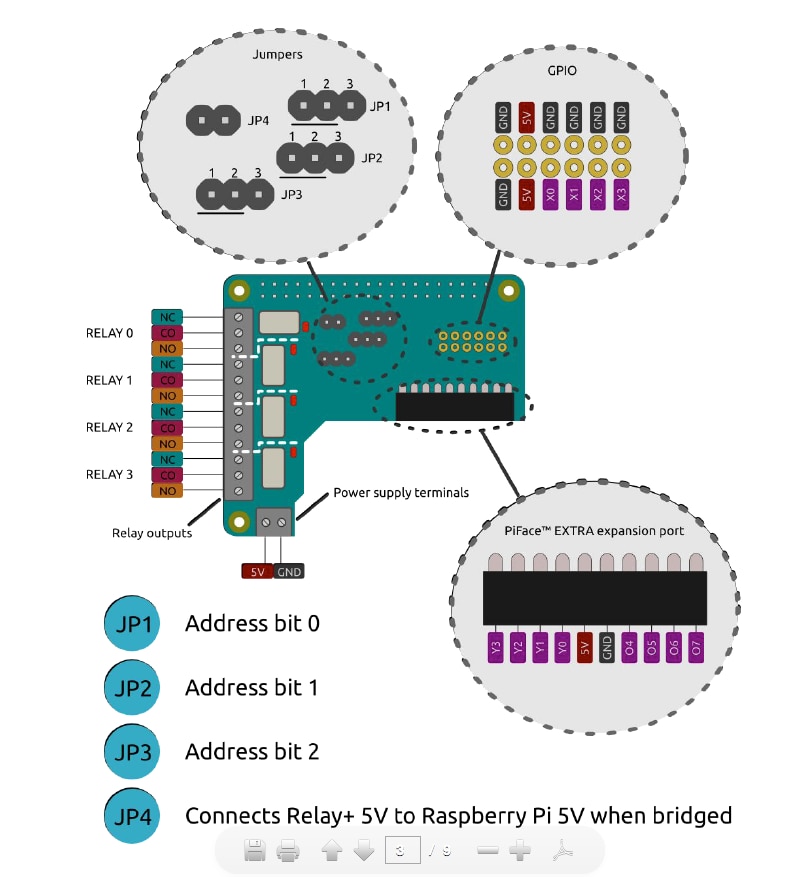
    as far as what I know and have tested with several PiFace boards, every board has onboard a couple of jumpers to setup the addressing so you can stack more than one but there is a limit of 8 boards max.

    The following image shows how the address bits can be set on the PiFace relay board:

    image

    while this is the link where you can download the complete manual of the board: http://www.piface.org.uk/assets/docs/PiFace-Relay-Plus_getting-started.pdf


    Always on the same mentioned manual, there is a paragraph reporting the following:


    your Relay+.

    pfr = pifacerelayplus.PiFaceRelayPlus(pifacerelayplus.RELAY)

    In this line the pifacerelayplus.RELAY refers to any PiFaceTm EXTRA board you have

    attached. Refer to that EXTRA board’s documentation for what you should put here.

    Then toggle (switches between off and on) the first relay, pause to see the result and then toggle

    it again with the following code:

    pfr.relays[0].toggle()

    time.sleep(2)

    pfr.relays[0].toggle()

    Save your program by pressing CtrlX

    then Y. Now run your program in the Terminal window to

    see LED0 flash and hear Relay0 click by typing the following:

    python3 relayonoff.py


    This means that if you have more than one stacked board, you simply should see more than the single board relays that - depending on the different sequential stacked boards addressing - are numbered in sequence. This is valid as general case but you should make a test in your specific case because I have not many relay boards here to test.

    These are links that I hope maybe useful:


    http://www.raspberryconnect.com/hardware-add-ons/item/156-piface-digital

    This is instead a link to the PiFace forum where it is explained how to address different boards: https://pifacedigital.wordpress.com/about/


    If this method does not works in Python it is possible that you should make a small change in the corresponding C++ library but probably it works.


    Enrico

    • Cancel
    • Vote Up 0 Vote Down
    • Sign in to reply
    • Verify Answer
    • Cancel
  • casbreakwater
    0 casbreakwater over 10 years ago in reply to balearicdynamics

    Thanks Peter and Enrico. I was looking at it as though you select the address and then access one of the relays relating to that addressed board. By what Enrico has posted it looks like the relays are just added to the original relay count. It will be interesting to see what happens when for example if I have the PiFaceRelayExtra board added (relays 0-7) and add another PiFaceRelayPlus board so that gives me relays 0 - 11 vs just two PiFaceRelayPlus boards (without the PiFaceRelayExtra board). Does the count go 0-7 again or does it go 0-3 and 8-11.

    It's would be a much easier and neater solution to have the boards individual address called and then select which relay you want on that board.

    Also when stacking the boards, do the GPIO pins get addressed the same way? There doesnt seem to be a lot of in depth info on these boards. Its a shame there isnt a schematic available too

    • Cancel
    • Vote Up 0 Vote Down
    • Sign in to reply
    • Verify Answer
    • Cancel
Reply
  • casbreakwater
    0 casbreakwater over 10 years ago in reply to balearicdynamics

    Thanks Peter and Enrico. I was looking at it as though you select the address and then access one of the relays relating to that addressed board. By what Enrico has posted it looks like the relays are just added to the original relay count. It will be interesting to see what happens when for example if I have the PiFaceRelayExtra board added (relays 0-7) and add another PiFaceRelayPlus board so that gives me relays 0 - 11 vs just two PiFaceRelayPlus boards (without the PiFaceRelayExtra board). Does the count go 0-7 again or does it go 0-3 and 8-11.

    It's would be a much easier and neater solution to have the boards individual address called and then select which relay you want on that board.

    Also when stacking the boards, do the GPIO pins get addressed the same way? There doesnt seem to be a lot of in depth info on these boards. Its a shame there isnt a schematic available too

    • Cancel
    • Vote Up 0 Vote Down
    • Sign in to reply
    • Verify Answer
    • Cancel
Children
  • Robert Peter Oakes
    0 Robert Peter Oakes over 10 years ago in reply to casbreakwater

    using your own program you could do that, but the library provided treats them as a contigious set of relays, the trick is to know the address of each board in the stack image

    • Cancel
    • Vote Up 0 Vote Down
    • Sign in to reply
    • Verify Answer
    • Cancel
element14 Community

element14 is the first online community specifically for engineers. Connect with your peers and get expert answers to your questions.

  • Members
  • Learn
  • Technologies
  • Challenges & Projects
  • Products
  • Store
  • About Us
  • Feedback & Support
  • FAQs
  • Terms of Use
  • Privacy Policy
  • Legal and Copyright Notices
  • Sitemap
  • Cookies

An Avnet Company © 2026 Premier Farnell Limited. All Rights Reserved.

Premier Farnell Ltd, registered in England and Wales (no 00876412), registered office: Farnell House, Forge Lane, Leeds LS12 2NE.

ICP 备案号 10220084.

Follow element14

  • X
  • Facebook
  • linkedin
  • YouTube