element14 Community
element14 Community
    Register Log In
  • Site
  • Search
  • Log In Register
  • Community Hub
    Community Hub
    • What's New on element14
    • Feedback and Support
    • Benefits of Membership
    • Personal Blogs
    • Members Area
    • Achievement Levels
  • Learn
    Learn
    • Ask an Expert
    • eBooks
    • element14 presents
    • Learning Center
    • Tech Spotlight
    • STEM Academy
    • Webinars, Training and Events
    • Learning Groups
  • Technologies
    Technologies
    • 3D Printing
    • FPGA
    • Industrial Automation
    • Internet of Things
    • Power & Energy
    • Sensors
    • Technology Groups
  • Challenges & Projects
    Challenges & Projects
    • Design Challenges
    • element14 presents Projects
    • Project14
    • Arduino Projects
    • Raspberry Pi Projects
    • Project Groups
  • Products
    Products
    • Arduino
    • Avnet & Tria Boards Community
    • Dev Tools
    • Manufacturers
    • Multicomp Pro
    • Product Groups
    • Raspberry Pi
    • RoadTests & Reviews
  • About Us
  • Store
    Store
    • Visit Your Store
    • Choose another store...
      • Europe
      •  Austria (German)
      •  Belgium (Dutch, French)
      •  Bulgaria (Bulgarian)
      •  Czech Republic (Czech)
      •  Denmark (Danish)
      •  Estonia (Estonian)
      •  Finland (Finnish)
      •  France (French)
      •  Germany (German)
      •  Hungary (Hungarian)
      •  Ireland
      •  Israel
      •  Italy (Italian)
      •  Latvia (Latvian)
      •  
      •  Lithuania (Lithuanian)
      •  Netherlands (Dutch)
      •  Norway (Norwegian)
      •  Poland (Polish)
      •  Portugal (Portuguese)
      •  Romania (Romanian)
      •  Russia (Russian)
      •  Slovakia (Slovak)
      •  Slovenia (Slovenian)
      •  Spain (Spanish)
      •  Sweden (Swedish)
      •  Switzerland(German, French)
      •  Turkey (Turkish)
      •  United Kingdom
      • Asia Pacific
      •  Australia
      •  China
      •  Hong Kong
      •  India
      • Japan
      •  Korea (Korean)
      •  Malaysia
      •  New Zealand
      •  Philippines
      •  Singapore
      •  Taiwan
      •  Thailand (Thai)
      • Vietnam
      • Americas
      •  Brazil (Portuguese)
      •  Canada
      •  Mexico (Spanish)
      •  United States
      Can't find the country/region you're looking for? Visit our export site or find a local distributor.
  • Translate
  • Profile
  • Settings
Raspberry Pi
  • Products
  • More
Raspberry Pi
Raspberry Pi Forum Cirrus Logic Audio Input problem
  • Blog
  • Forum
  • Documents
  • Quiz
  • Events
  • Polls
  • Files
  • Members
  • Mentions
  • Sub-Groups
  • Tags
  • More
  • Cancel
  • New
Join Raspberry Pi to participate - click to join for free!
Featured Articles
Announcing Pi
Technical Specifications
Raspberry Pi FAQs
Win a Pi
Raspberry Pi Wishlist
Actions
  • Share
  • More
  • Cancel
Forum Thread Details
  • State Verified Answer
  • Replies 3 replies
  • Subscribers 675 subscribers
  • Views 1550 views
  • Users 0 members are here
  • raspberry_pi
  • raspeberry_pi_accessories
Related

Cirrus Logic Audio Input problem

tringwebdesign
tringwebdesign over 9 years ago

My project is to build a seismometer and record ground vibrations. I have bought one of these:


http://www.mindsetsonline.co.uk/Catalogue/ProductDetail/slinky-seismometer-system?productID=79807b37-9d7c-472c-a1b8-a0b7f61ea1fb&catalogueLevelItemID=00000000-0000-0000-0000-000000000000


Which is really nice for £30. It has two wires coming off the copper coil at the base. I've then gone and got the Cirrus Logic audio card which is working as I can record audio from a headset/boom combo through the black headset input.


What I cannot figure out is how to connect up the two wires coming off the seismometer to get the signal it outputs into the cirrus logic card via either the black mic or pink line-in with Micbias? As the slinky is a Geophone (basically a reverse speaker), I am assuming it's output is mono.


I have managed to record it on my laptop, by connecting the two wires onto the L & R of a stripped 3.5mm stereo jack and into my laptop, via a 4-pin audio adaptor (as the lappy has a combined 3.5mm audio port) for audacity to record, but this doesn't work with the Cirrus Logic.


I suspect it's my ineptitude with understanding the 3.5mm audio jack specification. Any help would be appreciated.


https://www.tring-web-design.co.uk/2016/07/iot-project-raspberry-pi-seismometer/

  • Sign in to reply
  • Cancel
  • tringwebdesign
    0 tringwebdesign over 9 years ago

    So I did some fiddling around with some bought 3.5mm jacks, and seemingly lost the ability to record anything off the geophone. This looks like my problem: https://www.gearslutz.com/board/10447535-post2.html


    If I pull out the 4 pole 3.5mm connector from the laptop slightly i can record from the slinky. It picks up the TV volume, and a loud exhaust going past the house.


    Any ideas on how to wire this up permanently?

    • Cancel
    • Vote Up 0 Vote Down
    • Sign in to reply
    • Verify Answer
    • Cancel
  • hiassoft
    0 hiassoft over 9 years ago in reply to tringwebdesign

    I haven't used the headphone/MIC input myself yet, but according to the user manual that's a 4-pole TRRS input with GND on the second ring (counted from the tip) and MIC on the sleeve (tip and first ring are L/R headphone outputs).


    Connecting the seismometer to the second ring and sleeve could work.


    If the output is strong enough you could also use the line input. Hook up one wire to the sleeve and the other one to both tip and ring (so you get the same signal both on left and right channels).


    so long,


    Hias

    • Cancel
    • Vote Up 0 Vote Down
    • Sign in to reply
    • Reject Answer
    • Cancel
  • tringwebdesign
    0 tringwebdesign over 9 years ago in reply to hiassoft

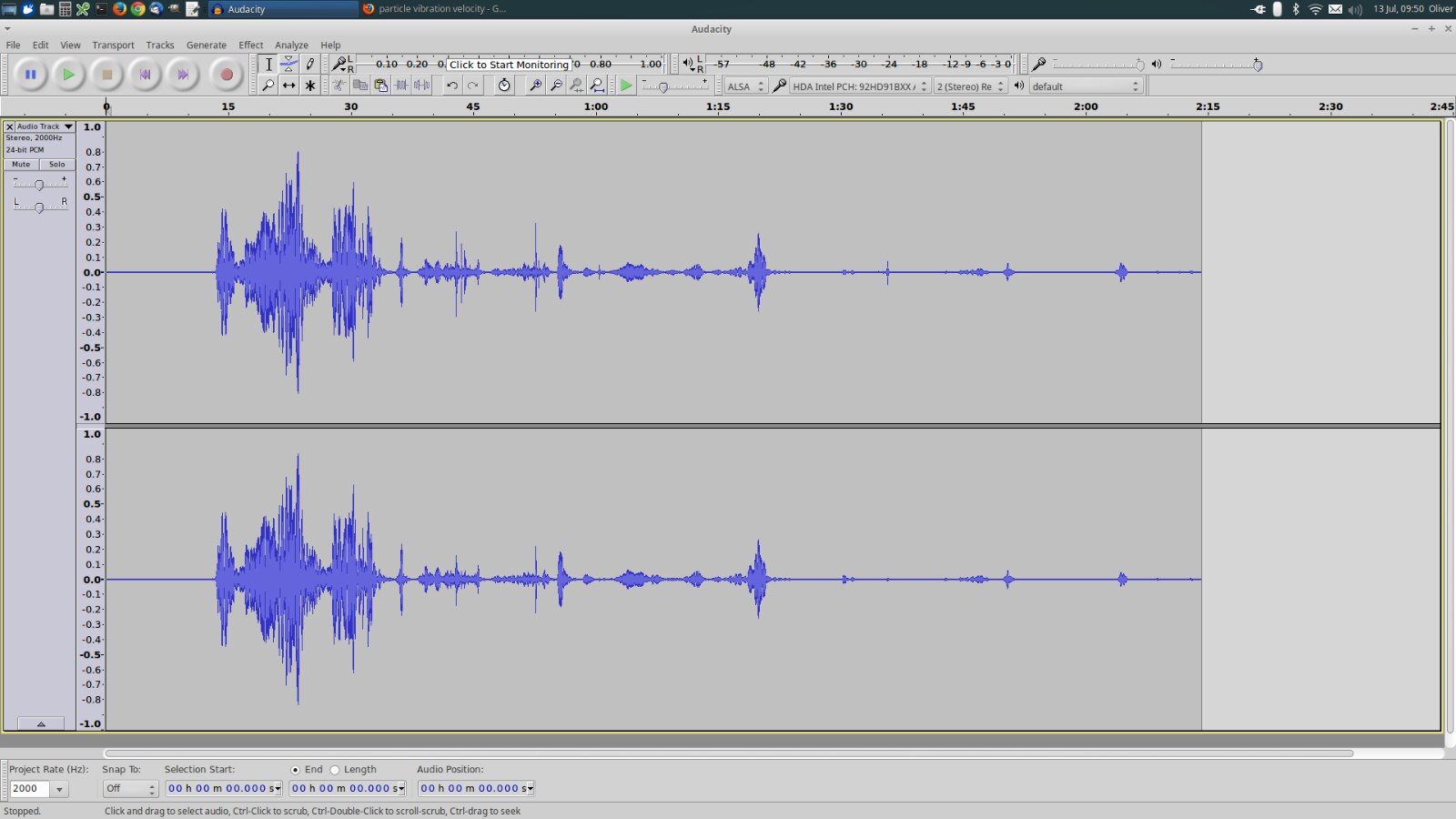
    Thanks Matthias, i'll give it a go. The slinky appears to be strong enough - picking up things like a conversation on the phone and me coughing in the same room as it. Below image is a 40ft artic-lorry trying to get into a turning which is about 15m from the device - he didn't make it. Interestingly Audacity appears to be able to record at frequencies lower than what the soundcard can handle (on my laptop - 8000hz) - must be some software processing going on there.


    All I need to do now I suppose is work out how to compare the waveforms coming off the slinky with other known waveforms so I can get a frame of reference as to what these vibrations actually mean in the real world. I would like to be able to get the slinky into our garden shed that has a concrete base with the rpi powered on batteries. The shed is about 25m away from the road and if the slinky is sensitive enough, as it appears to be, it should be a good location for it.


    image

    • Cancel
    • Vote Up 0 Vote Down
    • Sign in to reply
    • Verify Answer
    • Cancel
element14 Community

element14 is the first online community specifically for engineers. Connect with your peers and get expert answers to your questions.

  • Members
  • Learn
  • Technologies
  • Challenges & Projects
  • Products
  • Store
  • About Us
  • Feedback & Support
  • FAQs
  • Terms of Use
  • Privacy Policy
  • Legal and Copyright Notices
  • Sitemap
  • Cookies

An Avnet Company © 2025 Premier Farnell Limited. All Rights Reserved.

Premier Farnell Ltd, registered in England and Wales (no 00876412), registered office: Farnell House, Forge Lane, Leeds LS12 2NE.

ICP 备案号 10220084.

Follow element14

  • X
  • Facebook
  • linkedin
  • YouTube