element14 Community
element14 Community
    Register Log In
  • Site
  • Search
  • Log In Register
  • Community Hub
    Community Hub
    • What's New on element14
    • Feedback and Support
    • Benefits of Membership
    • Personal Blogs
    • Members Area
    • Achievement Levels
  • Learn
    Learn
    • Ask an Expert
    • eBooks
    • element14 presents
    • Learning Center
    • Tech Spotlight
    • STEM Academy
    • Webinars, Training and Events
    • Learning Groups
  • Technologies
    Technologies
    • 3D Printing
    • FPGA
    • Industrial Automation
    • Internet of Things
    • Power & Energy
    • Sensors
    • Technology Groups
  • Challenges & Projects
    Challenges & Projects
    • Design Challenges
    • element14 presents Projects
    • Project14
    • Arduino Projects
    • Raspberry Pi Projects
    • Project Groups
  • Products
    Products
    • Arduino
    • Avnet & Tria Boards Community
    • Dev Tools
    • Manufacturers
    • Multicomp Pro
    • Product Groups
    • Raspberry Pi
    • RoadTests & Reviews
  • About Us
  • Store
    Store
    • Visit Your Store
    • Choose another store...
      • Europe
      •  Austria (German)
      •  Belgium (Dutch, French)
      •  Bulgaria (Bulgarian)
      •  Czech Republic (Czech)
      •  Denmark (Danish)
      •  Estonia (Estonian)
      •  Finland (Finnish)
      •  France (French)
      •  Germany (German)
      •  Hungary (Hungarian)
      •  Ireland
      •  Israel
      •  Italy (Italian)
      •  Latvia (Latvian)
      •  
      •  Lithuania (Lithuanian)
      •  Netherlands (Dutch)
      •  Norway (Norwegian)
      •  Poland (Polish)
      •  Portugal (Portuguese)
      •  Romania (Romanian)
      •  Russia (Russian)
      •  Slovakia (Slovak)
      •  Slovenia (Slovenian)
      •  Spain (Spanish)
      •  Sweden (Swedish)
      •  Switzerland(German, French)
      •  Turkey (Turkish)
      •  United Kingdom
      • Asia Pacific
      •  Australia
      •  China
      •  Hong Kong
      •  India
      • Japan
      •  Korea (Korean)
      •  Malaysia
      •  New Zealand
      •  Philippines
      •  Singapore
      •  Taiwan
      •  Thailand (Thai)
      • Vietnam
      • Americas
      •  Brazil (Portuguese)
      •  Canada
      •  Mexico (Spanish)
      •  United States
      Can't find the country/region you're looking for? Visit our export site or find a local distributor.
  • Translate
  • Profile
  • Settings
Raspberry Pi
  • Products
  • More
Raspberry Pi
Raspberry Pi Forum Need help finding the right resource for:  Raspberry Pi™︎ 3 Model B Project Kit
  • Blog
  • Forum
  • Documents
  • Quiz
  • Events
  • Polls
  • Files
  • Members
  • Mentions
  • Sub-Groups
  • Tags
  • More
  • Cancel
  • New
Join Raspberry Pi to participate - click to join for free!
Featured Articles
Announcing Pi
Technical Specifications
Raspberry Pi FAQs
Win a Pi
Raspberry Pi Wishlist
Actions
  • Share
  • More
  • Cancel
Forum Thread Details
  • State Suggested Answer
  • Replies 4 replies
  • Answers 1 answer
  • Subscribers 680 subscribers
  • Views 671 views
  • Users 0 members are here
  • raspberry_pi_space
Related

Need help finding the right resource for:  Raspberry Pi™︎ 3 Model B Project Kit

Former Member
Former Member over 9 years ago

I just bought this project kit thinking there would be some documentation on getting even the most rudimentary things up and running.  I've checked out everything I can, and the only thing even close was the Chapter 10 - Sending Output ... but that has VERY little details, and doesn't actually show where to plug things in.

  • Sign in to reply
  • Cancel
Parents
  • shabaz
    0 shabaz over 9 years ago

    Hi Brian,


    Which project kit are you referring to, what is the link/URL to it?

    What does chapter 10 refer to (is there a link to the document or could you take a photo of the section you're referring to?).

    • Cancel
    • Vote Up +1 Vote Down
    • Sign in to reply
    • Verify Answer
    • Cancel
  • Former Member
    0 Former Member over 9 years ago in reply to shabaz

    Project Kit:    Raspberry Pi Raspberry PiTm 3 Model B Project Kit | 83-16563RK (8316563RK) | Raspberry Pi


    chapter on sending output:  https://s3.amazonaws.com/mcmelectronics/downloads/Raspberry+Pi/Raspberry_Pi_Sending_Output.pdf


    I ended up only being able to get one LED running using the Ribbon Cable and attachment for the bread board ... when I took that off, and just used jumper cables, I was able to get 3 LED's running.  I got a button attached to the breadboard, and am still having problems getting that to work correctly. 


    My project is to get 20 LEDs up and running, and accept input from 10 buttons.  If anyone has a resource to point me to, it would be greatly appreciated!

    • Cancel
    • Vote Up 0 Vote Down
    • Sign in to reply
    • Verify Answer
    • Cancel
Reply
  • Former Member
    0 Former Member over 9 years ago in reply to shabaz

    Project Kit:    Raspberry Pi Raspberry PiTm 3 Model B Project Kit | 83-16563RK (8316563RK) | Raspberry Pi


    chapter on sending output:  https://s3.amazonaws.com/mcmelectronics/downloads/Raspberry+Pi/Raspberry_Pi_Sending_Output.pdf


    I ended up only being able to get one LED running using the Ribbon Cable and attachment for the bread board ... when I took that off, and just used jumper cables, I was able to get 3 LED's running.  I got a button attached to the breadboard, and am still having problems getting that to work correctly. 


    My project is to get 20 LEDs up and running, and accept input from 10 buttons.  If anyone has a resource to point me to, it would be greatly appreciated!

    • Cancel
    • Vote Up 0 Vote Down
    • Sign in to reply
    • Verify Answer
    • Cancel
Children
  • shabaz
    0 shabaz over 9 years ago in reply to Former Member

    Hi Brian,


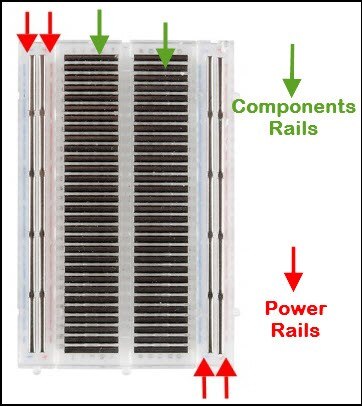
    There should be no difference to just using jumper cables vs. using the ribbon and breadboard. See below for for the internal connections inside a breadboard. Usually a multimeter can help with this type of thing, to confirm connections are present. Let me know if you need more help with using the breadboard.

    Regarding your 20 LED / 10 button requirement, it is hard to scale up a single LED and button to this larger number directly, because although there are 40 pins on the Pi's connector, some have dedicated uses. There are some tricks that sometimes are possible, but it complicates the software and hardware and is not a beginners topic. An easier way is to use a 'port expander' integrated circuit. Some information on it is here: Add Digital I/O Pins to Raspberry Pi Hardware Using MCP23017 - MATLAB & Simulink Example - MathWorks United Kingdom

    It basically allows the control of many LEDs (16) from just a couple of connections to the Pi. By using two of these ICs you can control twice as many (32) LEDs if desired. There is no single web link with all the information, but with googling you'll find more on this topic.

    You can use the same IC for commecting many switches or other input devices to the Pi using the method; the Pi uses just 2 connections to serve multiple port expander ICs. For information on inputs with port expanders see here: https://learn.adafruit.com/mcp230xx-gpio-expander-on-the-raspberry-pi/using-the-library


    image


    image

    • Cancel
    • Vote Up +1 Vote Down
    • Sign in to reply
    • Verify Answer
    • Reject Answer
    • Cancel
element14 Community

element14 is the first online community specifically for engineers. Connect with your peers and get expert answers to your questions.

  • Members
  • Learn
  • Technologies
  • Challenges & Projects
  • Products
  • Store
  • About Us
  • Feedback & Support
  • FAQs
  • Terms of Use
  • Privacy Policy
  • Legal and Copyright Notices
  • Sitemap
  • Cookies

An Avnet Company © 2026 Premier Farnell Limited. All Rights Reserved.

Premier Farnell Ltd, registered in England and Wales (no 00876412), registered office: Farnell House, Forge Lane, Leeds LS12 2NE.

ICP 备案号 10220084.

Follow element14

  • X
  • Facebook
  • linkedin
  • YouTube