element14 Community
element14 Community
    Register Log In
  • Site
  • Search
  • Log In Register
  • Community Hub
    Community Hub
    • What's New on element14
    • Feedback and Support
    • Benefits of Membership
    • Personal Blogs
    • Members Area
    • Achievement Levels
  • Learn
    Learn
    • Ask an Expert
    • eBooks
    • element14 presents
    • Learning Center
    • Tech Spotlight
    • STEM Academy
    • Webinars, Training and Events
    • Learning Groups
  • Technologies
    Technologies
    • 3D Printing
    • FPGA
    • Industrial Automation
    • Internet of Things
    • Power & Energy
    • Sensors
    • Technology Groups
  • Challenges & Projects
    Challenges & Projects
    • Design Challenges
    • element14 presents Projects
    • Project14
    • Arduino Projects
    • Raspberry Pi Projects
    • Project Groups
  • Products
    Products
    • Arduino
    • Avnet & Tria Boards Community
    • Dev Tools
    • Manufacturers
    • Multicomp Pro
    • Product Groups
    • Raspberry Pi
    • RoadTests & Reviews
  • About Us
  • Store
    Store
    • Visit Your Store
    • Choose another store...
      • Europe
      •  Austria (German)
      •  Belgium (Dutch, French)
      •  Bulgaria (Bulgarian)
      •  Czech Republic (Czech)
      •  Denmark (Danish)
      •  Estonia (Estonian)
      •  Finland (Finnish)
      •  France (French)
      •  Germany (German)
      •  Hungary (Hungarian)
      •  Ireland
      •  Israel
      •  Italy (Italian)
      •  Latvia (Latvian)
      •  
      •  Lithuania (Lithuanian)
      •  Netherlands (Dutch)
      •  Norway (Norwegian)
      •  Poland (Polish)
      •  Portugal (Portuguese)
      •  Romania (Romanian)
      •  Russia (Russian)
      •  Slovakia (Slovak)
      •  Slovenia (Slovenian)
      •  Spain (Spanish)
      •  Sweden (Swedish)
      •  Switzerland(German, French)
      •  Turkey (Turkish)
      •  United Kingdom
      • Asia Pacific
      •  Australia
      •  China
      •  Hong Kong
      •  India
      • Japan
      •  Korea (Korean)
      •  Malaysia
      •  New Zealand
      •  Philippines
      •  Singapore
      •  Taiwan
      •  Thailand (Thai)
      • Vietnam
      • Americas
      •  Brazil (Portuguese)
      •  Canada
      •  Mexico (Spanish)
      •  United States
      Can't find the country/region you're looking for? Visit our export site or find a local distributor.
  • Translate
  • Profile
  • Settings
Raspberry Pi
  • Products
  • More
Raspberry Pi
Raspberry Pi Forum Using the Cirrus Logic Audio Card/Raspberry Pi to playback and record at the same time
  • Blog
  • Forum
  • Documents
  • Quiz
  • Events
  • Polls
  • Files
  • Members
  • Mentions
  • Sub-Groups
  • Tags
  • More
  • Cancel
  • New
Join Raspberry Pi to participate - click to join for free!
Featured Articles
Announcing Pi
Technical Specifications
Raspberry Pi FAQs
Win a Pi
Raspberry Pi Wishlist
Actions
  • Share
  • More
  • Cancel
Forum Thread Details
  • State Suggested Answer
  • Replies 1 reply
  • Answers 1 answer
  • Subscribers 674 subscribers
  • Views 610 views
  • Users 0 members are here
  • cirrus-logic-audio-card
  • raspberrypi_project
  • cirrus logic audio card
Related

Using the Cirrus Logic Audio Card/Raspberry Pi to playback and record at the same time

kim3
kim3 over 8 years ago

I'm working with the Cirrus Logic Audio Card ((Cirrus Logic Audio Card for B+ and A+ onwards V1.02 ) and raspberry pi system in an attempt to use a transducer to play and record sound. At the moment, I am using the Playback_to_Lineout and Record_from_Linein Commands to play then record sounds and I have had success with this. However, at the moment, these two commands take about .5-.6s to run which is too long for my project (ideally the commands should run in 50ms). I have tried optimizing the code, and was able to reduce the time to about .4 seconds, but after reading the datasheet for the sound card (https://d3uzseaevmutz1.cloudfront.net/pubs/proDatasheet/WM5102_v4.2.pdf ), I saw that the sound card is capable of full-duplex which means that theoretically it should be able to record and play at the same time (although the datasheet did not specify at which sampling rates this was possible, I am using 192,000hz). Does anyone know either:

a. A way to minimize the time it takes to run the playback and record commands 

or

b. A command/a way to do both playback/record at the same time


Thanks so much!

  • Sign in to reply
  • Cancel
  • royleith
    0 royleith over 8 years ago

    Line In can be connected to Record and Line Out can be connected to Playback at the same time. Once the two amixer commands to do this have been issued, audio programs can use both patches. Audacity, for instance,  can record from Line In and monitor to Line Out, simultaneously.


    This is after you have switched from using HDMI or analogue sound to the Cirrus card by right-clicking on the loudspeaker icon in the system tray and selecting it. You don't have to configure the Cirrus card every time you run a playback or record command or program.


    The only ports that you cannot use at the same time are SPDIF In and SPDIF Out.


    You might note that the Cirrus card has two digital microphones on board that can record good quality sound. Also, it supports one electret microphone (Headset Mic) of the sort used by earbud/microphone combos with smartphones and supplies the necessary polarising voltage. Those microphones can make sensitive, good quality external audio transducers.


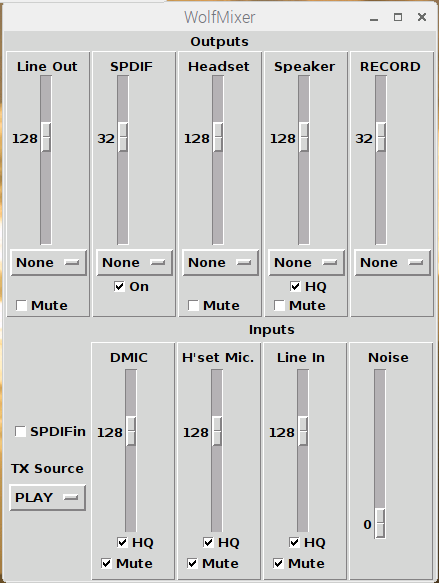
    You might find it easier to use a mixer program that sets patches and levels using a GUI. It also plugs in high pass filters when necessary. You will see that there are several options and features that you might find useful. The mixer brings them easily to hand.


    This is what the mixer looks like.


    image

    The buttons with 'None' in them can be used to connect any of the Inputs to the Output port. Each output port has a four channel mixer which can receive a signal from any input ports.The mixer uses only one of the four output port mixer channels so, in theory, you could connect all four to any output by using amixer commands. An input port can also be connected to several output ports using the mixer buttons.


    You can get all the files by pointing File Manager to the folder in which you want the files downloaded, going to 'Tools/Open Current Folder ' in Terminal and pasting the following line into Terminal.


       git clone https://github.com/royleith/wolfmixer.git


       The files will be downloaded into a 'Wolfmixer' sub-folder.


       README.txt has all the instructions on where to copy the (Python) programs to, what to do with the desktop files and how to get the programs into the Application Menu and on to the Panel.

    • Cancel
    • Vote Up 0 Vote Down
    • Sign in to reply
    • Verify Answer
    • Reject Answer
    • Cancel
element14 Community

element14 is the first online community specifically for engineers. Connect with your peers and get expert answers to your questions.

  • Members
  • Learn
  • Technologies
  • Challenges & Projects
  • Products
  • Store
  • About Us
  • Feedback & Support
  • FAQs
  • Terms of Use
  • Privacy Policy
  • Legal and Copyright Notices
  • Sitemap
  • Cookies

An Avnet Company © 2025 Premier Farnell Limited. All Rights Reserved.

Premier Farnell Ltd, registered in England and Wales (no 00876412), registered office: Farnell House, Forge Lane, Leeds LS12 2NE.

ICP 备案号 10220084.

Follow element14

  • X
  • Facebook
  • linkedin
  • YouTube