element14 Community
element14 Community
    Register Log In
  • Site
  • Search
  • Log In Register
  • Community Hub
    Community Hub
    • What's New on element14
    • Feedback and Support
    • Benefits of Membership
    • Personal Blogs
    • Members Area
    • Achievement Levels
  • Learn
    Learn
    • Ask an Expert
    • eBooks
    • element14 presents
    • Learning Center
    • Tech Spotlight
    • STEM Academy
    • Webinars, Training and Events
    • Learning Groups
  • Technologies
    Technologies
    • 3D Printing
    • FPGA
    • Industrial Automation
    • Internet of Things
    • Power & Energy
    • Sensors
    • Technology Groups
  • Challenges & Projects
    Challenges & Projects
    • Design Challenges
    • element14 presents Projects
    • Project14
    • Arduino Projects
    • Raspberry Pi Projects
    • Project Groups
  • Products
    Products
    • Arduino
    • Avnet & Tria Boards Community
    • Dev Tools
    • Manufacturers
    • Multicomp Pro
    • Product Groups
    • Raspberry Pi
    • RoadTests & Reviews
  • About Us
  • Store
    Store
    • Visit Your Store
    • Choose another store...
      • Europe
      •  Austria (German)
      •  Belgium (Dutch, French)
      •  Bulgaria (Bulgarian)
      •  Czech Republic (Czech)
      •  Denmark (Danish)
      •  Estonia (Estonian)
      •  Finland (Finnish)
      •  France (French)
      •  Germany (German)
      •  Hungary (Hungarian)
      •  Ireland
      •  Israel
      •  Italy (Italian)
      •  Latvia (Latvian)
      •  
      •  Lithuania (Lithuanian)
      •  Netherlands (Dutch)
      •  Norway (Norwegian)
      •  Poland (Polish)
      •  Portugal (Portuguese)
      •  Romania (Romanian)
      •  Russia (Russian)
      •  Slovakia (Slovak)
      •  Slovenia (Slovenian)
      •  Spain (Spanish)
      •  Sweden (Swedish)
      •  Switzerland(German, French)
      •  Turkey (Turkish)
      •  United Kingdom
      • Asia Pacific
      •  Australia
      •  China
      •  Hong Kong
      •  India
      • Japan
      •  Korea (Korean)
      •  Malaysia
      •  New Zealand
      •  Philippines
      •  Singapore
      •  Taiwan
      •  Thailand (Thai)
      • Vietnam
      • Americas
      •  Brazil (Portuguese)
      •  Canada
      •  Mexico (Spanish)
      •  United States
      Can't find the country/region you're looking for? Visit our export site or find a local distributor.
  • Translate
  • Profile
  • Settings
Raspberry Pi
  • Products
  • More
Raspberry Pi
Raspberry Pi Forum Raspberry pi startup issue
  • Blog
  • Forum
  • Documents
  • Quiz
  • Events
  • Polls
  • Files
  • Members
  • Mentions
  • Sub-Groups
  • Tags
  • More
  • Cancel
  • New
Join Raspberry Pi to participate - click to join for free!
Featured Articles
Announcing Pi
Technical Specifications
Raspberry Pi FAQs
Win a Pi
Raspberry Pi Wishlist
Actions
  • Share
  • More
  • Cancel
Forum Thread Details
  • State Not Answered
  • Replies 8 replies
  • Subscribers 676 subscribers
  • Views 813 views
  • Users 0 members are here
  • sd_card_
  • rasbian
  • raspberrypi
Related

Raspberry pi startup issue

Former Member
Former Member over 11 years ago

Hi there,

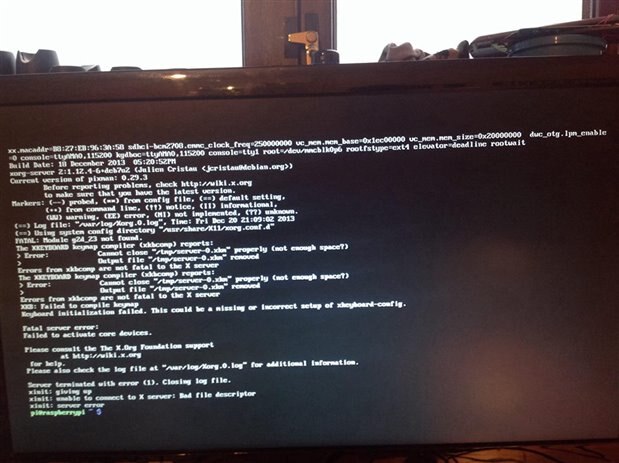
I Have recently bought a b model raspberry pi.I have formatted a 4gb sd card with the officially NOOBS release.i proceed to insert the sd card and install rasbian from the installation menu.it completely installs and reboots..it boots as far as the command line and when I try to run the command "startx" to boot into the desktop I am given a black screen and nothing happens!!!!

i Have formatted the sd card and tried many different sd cards and I am faced with the same result..


does anyone have a suggestion to this?


p.s it's not a issue with the board as I have an sd card with xbmc and it boots up and works 100%

  • Sign in to reply
  • Cancel
Parents
  • johnbeetem
    0 johnbeetem over 11 years ago

    There may be some useful suggestions at the RasPi Troubleshooting Wiki.


    I saw this sort of thing when I first used my RasPi because I had an iffy power supply.  RasPi ran fine if it wasn't doing much, but if the SoC required more power, e.g., when running X windows or compiling, the increased current to the processor caused my +5V to drop and the monitor blanked out.  This is easy to check if you have a voltmeter.


    Since you're running XBMC without problems, it's most likely something else, but you never know.

    • Cancel
    • Vote Up 0 Vote Down
    • Sign in to reply
    • Verify Answer
    • Cancel
  • Former Member
    0 Former Member over 11 years ago in reply to johnbeetem

    Hi John it doesn't seem to be a power issue as i am getting a steady 5v..I have attached a screen shot of a error i seem to be getting once i type "startx" It boots all other os fine eg Pidora,Xmbx and OpenELEC..But for some strange reason it wont boot rasbian.image

    • Cancel
    • Vote Up 0 Vote Down
    • Sign in to reply
    • Verify Answer
    • Cancel
  • Former Member
    0 Former Member over 11 years ago in reply to Former Member

    Try typing in sudo df to see if there's any free space on the sd card.  While the xkbcomp error itself shouldn't be fatal the messages give a hint that there may be no free space left, if the card has no free space left that could cause a range of other problems.

    • Cancel
    • Vote Up 0 Vote Down
    • Sign in to reply
    • Verify Answer
    • Cancel
Reply
  • Former Member
    0 Former Member over 11 years ago in reply to Former Member

    Try typing in sudo df to see if there's any free space on the sd card.  While the xkbcomp error itself shouldn't be fatal the messages give a hint that there may be no free space left, if the card has no free space left that could cause a range of other problems.

    • Cancel
    • Vote Up 0 Vote Down
    • Sign in to reply
    • Verify Answer
    • Cancel
Children
  • Former Member
    0 Former Member over 11 years ago in reply to Former Member

    Thanks Selsinork,

    I am currently running a 4gb Sd card.I have attached a picture of the result i get when i type sudo dfimage

    • Cancel
    • Vote Up 0 Vote Down
    • Sign in to reply
    • Verify Answer
    • Cancel
  • Former Member
    0 Former Member over 11 years ago in reply to Former Member

    Ok, so your problem is that the card is full, the first two lines where it says 100% usage is the problem.


    I've not used NOOBS, but what used to happen when you installed raspbian was that you got a 2GB partition and then on first boot it would re-size the partition to the full size of your card.  Perhaps this didn't work properly or was interrupted. Or maybe NOOBS is using the rest of the card for other things.

    Those first two lines where you see 2249608 under the 1K-blocks heading means you have a 2GB(ish) partition.


    if you do sudo fdisk -l (that's a lower case letter L) it'll give you a list of partitions and their sizes which may help work out what's happening.


    Standard advice would be to make sure you have the latest version of NOOBS and follow their instructions.  There's also some NOOBS details at  http://elinux.org/RPi_Easy_SD_Card_Setup but it all looks like it should be fairly simple.


    If all else fails, trying a larger SD card might help. Or else you could forget about NOOBS and try downloading the Raspbian image on it's own and writing that to your card.

    • Cancel
    • Vote Up 0 Vote Down
    • Sign in to reply
    • Verify Answer
    • Cancel
  • keithellis
    0 keithellis over 11 years ago in reply to Former Member

    Hi there,


    The easy way to expand the file system to use the full space it to type


    cd /usr/bin sudo ./raspi-config


    The second option from the top will maximize your partition to fill the SD card.

    • Cancel
    • Vote Up 0 Vote Down
    • Sign in to reply
    • Verify Answer
    • Cancel
element14 Community

element14 is the first online community specifically for engineers. Connect with your peers and get expert answers to your questions.

  • Members
  • Learn
  • Technologies
  • Challenges & Projects
  • Products
  • Store
  • About Us
  • Feedback & Support
  • FAQs
  • Terms of Use
  • Privacy Policy
  • Legal and Copyright Notices
  • Sitemap
  • Cookies

An Avnet Company © 2025 Premier Farnell Limited. All Rights Reserved.

Premier Farnell Ltd, registered in England and Wales (no 00876412), registered office: Farnell House, Forge Lane, Leeds LS12 2NE.

ICP 备案号 10220084.

Follow element14

  • X
  • Facebook
  • linkedin
  • YouTube