element14 Community
element14 Community
    Register Log In
  • Site
  • Search
  • Log In Register
  • Community Hub
    Community Hub
    • What's New on element14
    • Feedback and Support
    • Benefits of Membership
    • Personal Blogs
    • Members Area
    • Achievement Levels
  • Learn
    Learn
    • Ask an Expert
    • eBooks
    • element14 presents
    • Learning Center
    • Tech Spotlight
    • STEM Academy
    • Webinars, Training and Events
    • Learning Groups
  • Technologies
    Technologies
    • 3D Printing
    • FPGA
    • Industrial Automation
    • Internet of Things
    • Power & Energy
    • Sensors
    • Technology Groups
  • Challenges & Projects
    Challenges & Projects
    • Design Challenges
    • element14 presents Projects
    • Project14
    • Arduino Projects
    • Raspberry Pi Projects
    • Project Groups
  • Products
    Products
    • Arduino
    • Avnet & Tria Boards Community
    • Dev Tools
    • Manufacturers
    • Multicomp Pro
    • Product Groups
    • Raspberry Pi
    • RoadTests & Reviews
  • About Us
  • Store
    Store
    • Visit Your Store
    • Choose another store...
      • Europe
      •  Austria (German)
      •  Belgium (Dutch, French)
      •  Bulgaria (Bulgarian)
      •  Czech Republic (Czech)
      •  Denmark (Danish)
      •  Estonia (Estonian)
      •  Finland (Finnish)
      •  France (French)
      •  Germany (German)
      •  Hungary (Hungarian)
      •  Ireland
      •  Israel
      •  Italy (Italian)
      •  Latvia (Latvian)
      •  
      •  Lithuania (Lithuanian)
      •  Netherlands (Dutch)
      •  Norway (Norwegian)
      •  Poland (Polish)
      •  Portugal (Portuguese)
      •  Romania (Romanian)
      •  Russia (Russian)
      •  Slovakia (Slovak)
      •  Slovenia (Slovenian)
      •  Spain (Spanish)
      •  Sweden (Swedish)
      •  Switzerland(German, French)
      •  Turkey (Turkish)
      •  United Kingdom
      • Asia Pacific
      •  Australia
      •  China
      •  Hong Kong
      •  India
      • Japan
      •  Korea (Korean)
      •  Malaysia
      •  New Zealand
      •  Philippines
      •  Singapore
      •  Taiwan
      •  Thailand (Thai)
      • Vietnam
      • Americas
      •  Brazil (Portuguese)
      •  Canada
      •  Mexico (Spanish)
      •  United States
      Can't find the country/region you're looking for? Visit our export site or find a local distributor.
  • Translate
  • Profile
  • Settings
Raspberry Pi
  • Products
  • More
Raspberry Pi
Raspberry Pi Forum Where to find the latest boot log information
  • Blog
  • Forum
  • Documents
  • Quiz
  • Events
  • Polls
  • Files
  • Members
  • Mentions
  • Sub-Groups
  • Tags
  • More
  • Cancel
  • New
Join Raspberry Pi to participate - click to join for free!
Featured Articles
Announcing Pi
Technical Specifications
Raspberry Pi FAQs
Win a Pi
Raspberry Pi Wishlist
Actions
  • Share
  • More
  • Cancel
Forum Thread Details
  • State Verified Answer
  • Replies 15 replies
  • Answers 2 answers
  • Subscribers 679 subscribers
  • Views 1467 views
  • Users 0 members are here
  • raspberry_pi
Related

Where to find the latest boot log information

Former Member
Former Member over 12 years ago

Hi,

       I recently set up an Apache to my RPI and it works fine, after following some set up from the books, i can see just a glimpse that it failed during booting process of RPI, consulted mr Google but still was not able to find the right location as some of the file do not exist and some do.  I can repeat the process in the book but it is good to know how RPI especially Apache server reacted and what error it throws.


Thanks,


Clemzky

  • Sign in to reply
  • Cancel
  • Former Member
    0 Former Member over 12 years ago

    Take a look in /var/log/apache2 for the log files. Be aware that you may need to open them using a viewer run as root via sudo like "sudo tail -n250 <logfilename>" If you have recently changed Apache's config files, try running "sudo apachectl conftest" and see if a syntax error is being reported. If not, attempt to start apache manually by running "sudo apachectl start" and watch for any errors displayed in the terminal. If you receive an error during any of these tests and are not certain what is means or how to resolve it please post a reply containing the error you are receiving and I will help you get it resolved. If Apache starts manually and runs properly, then you have an issue with the script that is responsible for starting Apache on boot. In this case, please let me know what you have done to attempt to auto start Apache on boot and I will help debug.

    • Cancel
    • Vote Up 0 Vote Down
    • Sign in to reply
    • Verify Answer
    • Cancel
  • Former Member
    0 Former Member over 12 years ago in reply to Former Member

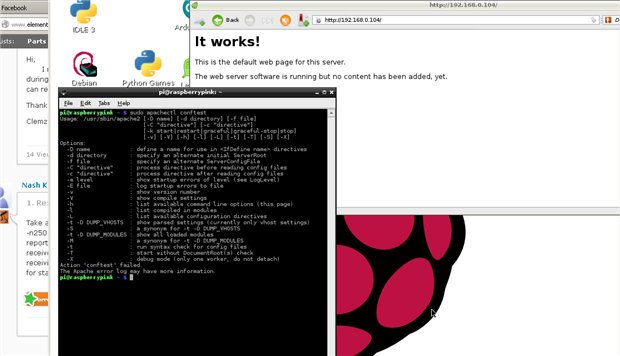
    image

    above is the result of using "sudo apachectl conftest".


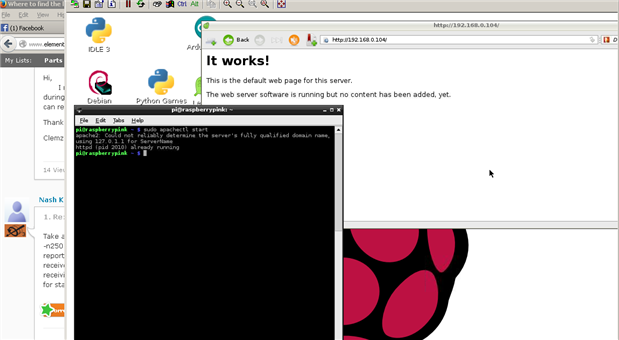
    image


    above is the result of using "sudo apachectl start"

    Nash thanks for the reply

    • Cancel
    • Vote Up 0 Vote Down
    • Sign in to reply
    • Verify Answer
    • Cancel
  • iagorubio
    0 iagorubio over 12 years ago in reply to Former Member

    Hello Clem,


    Nash had a typo in his post and it's the "configtest" and not the "conftest" option to apache_ctl you should be using.


    apachectl - Apache HTTP Server Control Interface - Apache HTTP Server


    Anyway the httpd executable have also a configuration syntax checker option, "httpd -t".


    $ httpd -t /path/to/config.file


    The "cannot determine ... " warning is not that important as it's just used in Apache for redirection urls - mostly for error messages - for the logs, and server's signature on page's footer.


    It just means there is no ServerName directive in the configuration.


    If you want to get rid of that error just use in your configuration file the directive:


    ServerName IP.OF.YOUR.PI

    • Cancel
    • Vote Up 0 Vote Down
    • Sign in to reply
    • Verify Answer
    • Reject Answer
    • Cancel
  • Former Member
    0 Former Member over 12 years ago in reply to iagorubio

    Hi Iago,

                  Thanks again, where is it exactly to place of configuration file to place the "ServerName IP.AD.RR.ESS" , is it here "/etc/apache2/sites-available/default" or here "/etc/apache2/httpd.conf"?


    Thanks again,


    Clemzky

    • Cancel
    • Vote Up 0 Vote Down
    • Sign in to reply
    • Verify Answer
    • Cancel
  • rew
    0 rew over 12 years ago in reply to Former Member

    My sense of "neat-ness" would prefer the first option (...default).


    Just try it to see if it works. Try the other if it doesn't. You now know how to test it without having to reboot your 'pi.

    • Cancel
    • Vote Up 0 Vote Down
    • Sign in to reply
    • Verify Answer
    • Cancel
  • Former Member
    0 Former Member over 12 years ago in reply to iagorubio

    Hi Iago,

                   Another information, it seems that I do not have the httpd executable file, I tried "sudo httpd" or "sudo httpd -v" but the errors says "bash: httpd command not found!


    Thanks,


    Clemzky

    • Cancel
    • Vote Up 0 Vote Down
    • Sign in to reply
    • Verify Answer
    • Cancel
  • Former Member
    0 Former Member over 12 years ago in reply to rew

    Hi Roger,

                     I've tried on both but it has no effect having the same error so probably not in these ""/etc/apache2/sites-available/default" or here "/etc/apache2/httpd.conf" two locations.  Thanks for the reply.


    Thanks,


    Clemzky

    • Cancel
    • Vote Up 0 Vote Down
    • Sign in to reply
    • Verify Answer
    • Cancel
  • gregoryfenton
    0 gregoryfenton over 12 years ago in reply to Former Member

    Replace httpd with apache2 in the above commands.

    • Cancel
    • Vote Up 0 Vote Down
    • Sign in to reply
    • Verify Answer
    • Cancel
  • Former Member
    0 Former Member over 12 years ago in reply to gregoryfenton

    Hi Greg,

                System replied using "sudo apache22" is "apache2: bad user name ${APACHE_RUN_USER}


    Thanks,


    Clemzky

    • Cancel
    • Vote Up 0 Vote Down
    • Sign in to reply
    • Verify Answer
    • Cancel
  • rew
    0 rew over 12 years ago in reply to Former Member

    One of the commands you issued earlier had the response of "cannot find servername". That is a way to check your configuration.

    I always prefer to start, stop or restart services with the init scripts.

    /etc/init.d/apache2 restart

    (or stop / start). This policy means I have never executed the httpd program from my command line in the last twenty years of administrating webservers.....

    • Cancel
    • Vote Up 0 Vote Down
    • Sign in to reply
    • Verify Answer
    • Cancel
>
element14 Community

element14 is the first online community specifically for engineers. Connect with your peers and get expert answers to your questions.

  • Members
  • Learn
  • Technologies
  • Challenges & Projects
  • Products
  • Store
  • About Us
  • Feedback & Support
  • FAQs
  • Terms of Use
  • Privacy Policy
  • Legal and Copyright Notices
  • Sitemap
  • Cookies

An Avnet Company © 2026 Premier Farnell Limited. All Rights Reserved.

Premier Farnell Ltd, registered in England and Wales (no 00876412), registered office: Farnell House, Forge Lane, Leeds LS12 2NE.

ICP 备案号 10220084.

Follow element14

  • X
  • Facebook
  • linkedin
  • YouTube