element14 Community
element14 Community
    Register Log In
  • Site
  • Search
  • Log In Register
  • Community Hub
    Community Hub
    • What's New on element14
    • Feedback and Support
    • Benefits of Membership
    • Personal Blogs
    • Members Area
    • Achievement Levels
  • Learn
    Learn
    • Ask an Expert
    • eBooks
    • element14 presents
    • Learning Center
    • Tech Spotlight
    • STEM Academy
    • Webinars, Training and Events
    • Learning Groups
  • Technologies
    Technologies
    • 3D Printing
    • FPGA
    • Industrial Automation
    • Internet of Things
    • Power & Energy
    • Sensors
    • Technology Groups
  • Challenges & Projects
    Challenges & Projects
    • Design Challenges
    • element14 presents Projects
    • Project14
    • Arduino Projects
    • Raspberry Pi Projects
    • Project Groups
  • Products
    Products
    • Arduino
    • Avnet & Tria Boards Community
    • Dev Tools
    • Manufacturers
    • Multicomp Pro
    • Product Groups
    • Raspberry Pi
    • RoadTests & Reviews
  • About Us
  • Store
    Store
    • Visit Your Store
    • Choose another store...
      • Europe
      •  Austria (German)
      •  Belgium (Dutch, French)
      •  Bulgaria (Bulgarian)
      •  Czech Republic (Czech)
      •  Denmark (Danish)
      •  Estonia (Estonian)
      •  Finland (Finnish)
      •  France (French)
      •  Germany (German)
      •  Hungary (Hungarian)
      •  Ireland
      •  Israel
      •  Italy (Italian)
      •  Latvia (Latvian)
      •  
      •  Lithuania (Lithuanian)
      •  Netherlands (Dutch)
      •  Norway (Norwegian)
      •  Poland (Polish)
      •  Portugal (Portuguese)
      •  Romania (Romanian)
      •  Russia (Russian)
      •  Slovakia (Slovak)
      •  Slovenia (Slovenian)
      •  Spain (Spanish)
      •  Sweden (Swedish)
      •  Switzerland(German, French)
      •  Turkey (Turkish)
      •  United Kingdom
      • Asia Pacific
      •  Australia
      •  China
      •  Hong Kong
      •  India
      • Japan
      •  Korea (Korean)
      •  Malaysia
      •  New Zealand
      •  Philippines
      •  Singapore
      •  Taiwan
      •  Thailand (Thai)
      • Vietnam
      • Americas
      •  Brazil (Portuguese)
      •  Canada
      •  Mexico (Spanish)
      •  United States
      Can't find the country/region you're looking for? Visit our export site or find a local distributor.
  • Translate
  • Profile
  • Settings
Raspberry Pi
  • Products
  • More
Raspberry Pi
Raspberry Pi Forum How can I connect this monitor to Raspberry Pi?
  • Blog
  • Forum
  • Documents
  • Quiz
  • Events
  • Polls
  • Files
  • Members
  • Mentions
  • Sub-Groups
  • Tags
  • More
  • Cancel
  • New
Join Raspberry Pi to participate - click to join for free!
Featured Articles
Announcing Pi
Technical Specifications
Raspberry Pi FAQs
Win a Pi
Raspberry Pi Wishlist
Actions
  • Share
  • More
  • Cancel
Forum Thread Details
  • State Suggested Answer
  • Replies 9 replies
  • Answers 2 answers
  • Subscribers 675 subscribers
  • Views 1664 views
  • Users 0 members are here
  • monitor
  • pi
  • raspberry_pi
  • crt
  • raspberri
Related

How can I connect this monitor to Raspberry Pi?

Former Member
Former Member over 11 years ago

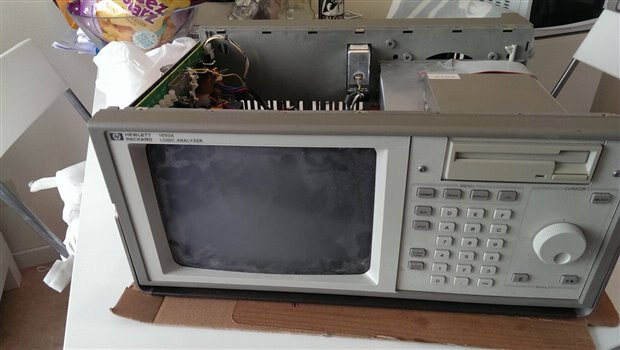
I recently found an old computer, HP Logic Analyzer 1650A, in the trash. I took it home and it was working fine, except the floppy disk from -87 with the operating system was dead.

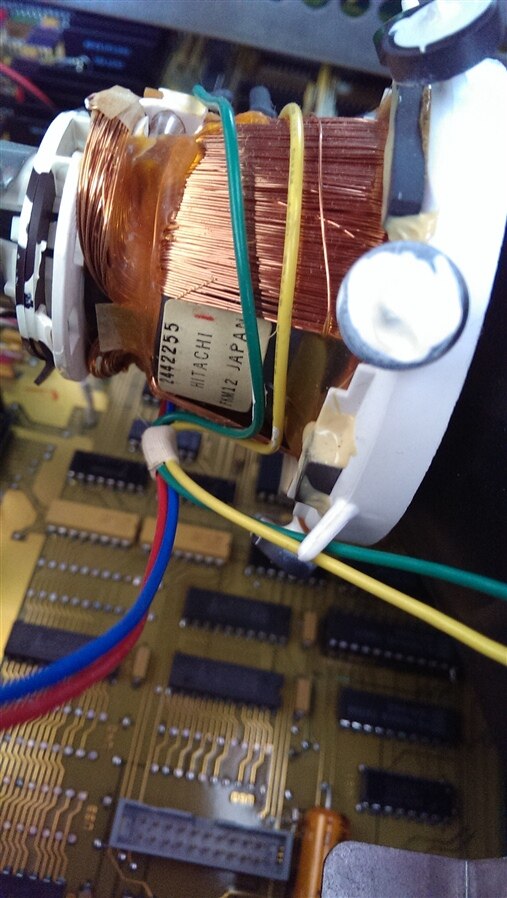
I decided to see if I could connect it's monitor to my Pi. Please look at the pictures below and help me determine what kind of interface I'm dealing with and how I can make the connection.

The monitor is black and white as far as I know, only seen the checking at boot (RAM, Disk...).

In picture 7-8 you'll see a flat ribbon cable with 20 pins. It says "input" at its connector on the monitors motherboard (the vertical one). Thats the only connection between the two motherboards and I think I have to use that cable somehow.


  1. image
  2. Fullscreen 5277.contentimage_30554.html Download
    <html><head><title>Jive SBS</title></head>
    <body><font face="arial,helvetica,sans-serif">
    <b>Error</b><br><font size="-1">
    An general error occurred while processing your request.
    </font></font></body></html>
    
  3. Fullscreen 5280.contentimage_30555.html Download
    <html><head><title>Jive SBS</title></head>
    <body><font face="arial,helvetica,sans-serif">
    <b>Error</b><br><font size="-1">
    An general error occurred while processing your request.
    </font></font></body></html>
    
  4. image
  5. Fullscreen 0003.contentimage_30557.html Download
    <html><head><title>Jive SBS</title></head>
    <body><font face="arial,helvetica,sans-serif">
    <b>Error</b><br><font size="-1">
    An general error occurred while processing your request.
    </font></font></body></html>
    
  6. image
  7. Fullscreen 5518.contentimage_30559.html Download
    <html><head><title>Jive SBS</title></head>
    <body><font face="arial,helvetica,sans-serif">
    <b>Error</b><br><font size="-1">
    An general error occurred while processing your request.
    </font></font></body></html>
    
  8. image
  9. image
  10. image
  • Sign in to reply
  • Cancel
Parents
  • Robert Peter Oakes
    0 Robert Peter Oakes over 11 years ago

    Fair enough, the first step i would suggest then is to get a copy of the maintenance manual, you may find this through some google searches. You may also find that the monitor has separate sync inputs which might complicate things. but first things first, need a maintenance manual


    regards

    • Cancel
    • Vote Up 0 Vote Down
    • Sign in to reply
    • Verify Answer
    • Reject Answer
    • Cancel
  • Former Member
    0 Former Member over 11 years ago in reply to Robert Peter Oakes

    I found the Service Manual for this very device and serial number.

    http://www.qsl.net/n9zia/test/HP1650A_Service_Manual.pdf


    This is just page 96-97, pinout for the ribbon cable. It has got 1x horizontal and 1x vertical sync from what i can see. Will this be a problem for me?

    http://www.floppytattoo.se/HP1650A_Service_Manual_CRT_Monitor_Signals_Check.pdf


    PIN 10 : HHSYNC
    PIN 11 : HVSYNC

    Fullscreen 7455.contentimage_176356.html Download
    <html><head><title>Jive SBS</title></head>
    <body><font face="arial,helvetica,sans-serif">
    <b>Error</b><br><font size="-1">
    An general error occurred while processing your request.
    </font></font></body></html>
    

    • Cancel
    • Vote Up 0 Vote Down
    • Sign in to reply
    • Verify Answer
    • Cancel
Reply
  • Former Member
    0 Former Member over 11 years ago in reply to Robert Peter Oakes

    I found the Service Manual for this very device and serial number.

    http://www.qsl.net/n9zia/test/HP1650A_Service_Manual.pdf


    This is just page 96-97, pinout for the ribbon cable. It has got 1x horizontal and 1x vertical sync from what i can see. Will this be a problem for me?

    http://www.floppytattoo.se/HP1650A_Service_Manual_CRT_Monitor_Signals_Check.pdf


    PIN 10 : HHSYNC
    PIN 11 : HVSYNC

    Fullscreen 7455.contentimage_176356.html Download
    <html><head><title>Jive SBS</title></head>
    <body><font face="arial,helvetica,sans-serif">
    <b>Error</b><br><font size="-1">
    An general error occurred while processing your request.
    </font></font></body></html>
    

    • Cancel
    • Vote Up 0 Vote Down
    • Sign in to reply
    • Verify Answer
    • Cancel
Children
  • Problemchild
    0 Problemchild over 11 years ago in reply to Former Member

    The video section of this Analyser uses digital video inputs.  Check out Table 6-3.

    Your Pi does not provide these signals directly you will need to use a sync stripper to generate the syncs and some level conversion to get the 4 level video working.

    This is probably quite a bit of work if you haven't done this sort of stuff before!


    Personally it's a bit of a shame to hack this device you may find it better to beg a copy of the disk and use it for what it was originally intended and extend your kit in your hobby.


    John

    • Cancel
    • Vote Up 0 Vote Down
    • Sign in to reply
    • Verify Answer
    • Reject Answer
    • Cancel
  • Former Member
    0 Former Member over 11 years ago in reply to Problemchild

    I see, I was afraid the signals would be of different types or standards. Sounds a bit hard to accomplish. Maybe I will let it be for a while. I ordered a USB floppy drive from ebay earlier today and found the software on another site. I will try to give the Analyzer some life.

    • Cancel
    • Vote Up 0 Vote Down
    • Sign in to reply
    • Verify Answer
    • Cancel
  • Problemchild
    0 Problemchild over 11 years ago in reply to Former Member

    Good luck, update your blog with some pictures when you get it going !!

    John

    • Cancel
    • Vote Up 0 Vote Down
    • Sign in to reply
    • Verify Answer
    • Cancel
element14 Community

element14 is the first online community specifically for engineers. Connect with your peers and get expert answers to your questions.

  • Members
  • Learn
  • Technologies
  • Challenges & Projects
  • Products
  • Store
  • About Us
  • Feedback & Support
  • FAQs
  • Terms of Use
  • Privacy Policy
  • Legal and Copyright Notices
  • Sitemap
  • Cookies

An Avnet Company © 2025 Premier Farnell Limited. All Rights Reserved.

Premier Farnell Ltd, registered in England and Wales (no 00876412), registered office: Farnell House, Forge Lane, Leeds LS12 2NE.

ICP 备案号 10220084.

Follow element14

  • X
  • Facebook
  • linkedin
  • YouTube