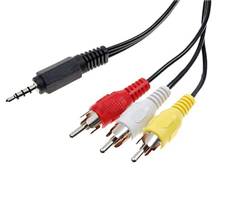
How to take out RCA equivalent video out from Raspberry pi Model B+
You can use any cable that uses the second ring for GND.
The correct order from sleeve to tip is:
Video, GND, Right audio, Left Audio.
so called "camcoder cables" have Video and Right audio swapped, but can be used by swapping the yellow and red RCA plugs.
iPod and Zune A/V cables are useable, but have left and right audio swapped (swap red and with RCA plugs to correct).
Hi All,
Thanks for your reply. I bought one camcoder cable and its working, but it is giving only monochrome output while operaing with xbmc but with NOOBS primary GUI it is giving coloured picure, can anyone suggest anything
Regards
Gopish
I tried this solution with a Panasonic camcorder cable with the combination red phono, ground, yellow phono, white phono. Swapping red for yellow did not work and no signal came to the screen. Any ideas? Here is the cable:
I also tried a cable with the GND as the second band with no succesS (tried swapping the yellow and red). Any ideas?