element14 Community
element14 Community
    Register Log In
  • Site
  • Search
  • Log In Register
  • Community Hub
    Community Hub
    • What's New on element14
    • Feedback and Support
    • Benefits of Membership
    • Personal Blogs
    • Members Area
    • Achievement Levels
  • Learn
    Learn
    • Ask an Expert
    • eBooks
    • element14 presents
    • Learning Center
    • Tech Spotlight
    • STEM Academy
    • Webinars, Training and Events
    • Learning Groups
  • Technologies
    Technologies
    • 3D Printing
    • FPGA
    • Industrial Automation
    • Internet of Things
    • Power & Energy
    • Sensors
    • Technology Groups
  • Challenges & Projects
    Challenges & Projects
    • Design Challenges
    • element14 presents Projects
    • Project14
    • Arduino Projects
    • Raspberry Pi Projects
    • Project Groups
  • Products
    Products
    • Arduino
    • Avnet & Tria Boards Community
    • Dev Tools
    • Manufacturers
    • Multicomp Pro
    • Product Groups
    • Raspberry Pi
    • RoadTests & Reviews
  • About Us
    About the element14 Community
  • Store
    Store
    • Visit Your Store
    • Choose another store...
      • Europe
      •  Austria (German)
      •  Belgium (Dutch, French)
      •  Bulgaria (Bulgarian)
      •  Czech Republic (Czech)
      •  Denmark (Danish)
      •  Estonia (Estonian)
      •  Finland (Finnish)
      •  France (French)
      •  Germany (German)
      •  Hungary (Hungarian)
      •  Ireland
      •  Israel
      •  Italy (Italian)
      •  Latvia (Latvian)
      •  
      •  Lithuania (Lithuanian)
      •  Netherlands (Dutch)
      •  Norway (Norwegian)
      •  Poland (Polish)
      •  Portugal (Portuguese)
      •  Romania (Romanian)
      •  Russia (Russian)
      •  Slovakia (Slovak)
      •  Slovenia (Slovenian)
      •  Spain (Spanish)
      •  Sweden (Swedish)
      •  Switzerland(German, French)
      •  Turkey (Turkish)
      •  United Kingdom
      • Asia Pacific
      •  Australia
      •  China
      •  Hong Kong
      •  India
      •  Japan
      •  Korea (Korean)
      •  Malaysia
      •  New Zealand
      •  Philippines
      •  Singapore
      •  Taiwan
      •  Thailand (Thai)
      •  Vietnam
      • Americas
      •  Brazil (Portuguese)
      •  Canada
      •  Mexico (Spanish)
      •  United States
      Can't find the country/region you're looking for? Visit our export site or find a local distributor.
  • Translate
  • Profile
  • Settings
Raspberry Pi
  • Products
  • More
Raspberry Pi
Raspberry Pi Forum New reworked driver for Wolfson/Cirrus Logic audio card
  • Blog
  • Forum
  • Documents
  • Quiz
  • Events
  • Polls
  • Files
  • Members
  • Mentions
  • Sub-Groups
  • Tags
  • More
  • Cancel
  • New
Join Raspberry Pi to participate - click to join for free!
Featured Articles
Announcing Pi
Technical Specifications
Raspberry Pi FAQs
Win a Pi
Raspberry Pi Wishlist
Actions
  • Share
  • More
  • Cancel
Forum Thread Details
  • Replies 390 replies
  • Subscribers 745 subscribers
  • Views 43619 views
  • Users 0 members are here
  • raspberry_pi
  • raspeberry_pi_accessories
Related

New reworked driver for Wolfson/Cirrus Logic audio card

hiassoft
hiassoft over 9 years ago

I've been working on a driver rework, mainly to get rid of the requirement to carry around a bunch of patches to upstream driver code, and also to fix some outstanding issues and introduce some new features.


Most issues have been ironed out so here's the first public release.


Edit: the driver has been included in official RPi kernels. Just run sudo rpi-update to install it.

You still have to install the mixer scripts and add the /etc/modprobe.d file. See my website for details

RPi Linux driver for Wolfson / Cirrus Logic Audio Card


Source: https://github.com/HiassofT/rpi-linux/tree/cirrus-ng-4.9.0

Precompiled kernel: http://www.horus.com/~hias/tmp/cirrus/cirrus-ng-linux-4.9.0.tgz

New mixer scripts: http://www.horus.com/~hias/tmp/cirrus/cirrus-ng-scripts.tgz


Important notes:

  • The new driver bases on the rather fresh kernel 4.9.0 which means there's some risk of (yet unknown) issues. Use it at your own risk and please run "rpi-update" to get the latest firmware before installing the new driver.
  • The soundcard name has been changed from "snd_rpi_wsp" to "RPi-Cirrus", also several ALSA controls have been removed and new ones were added. This means the old usecase scripts and any custom-made scripts will no longer work. Use the new mixer scripts instead of the old usecase/listen scripts.
  • The new driver supports setting (and receiving) of the S/PDIF channel status bits (aka AES bits). If you add an ALSA card configuration file this means applications like Kodi can do proper AC3/DTS passthrough. A sample card configuration file (plus the mixer scripts) can be found here: https://github.com/HiassofT/rpi-cirrus-config
  • I haven't fully updated the documentation on my website RPi Linux driver for Wolfson / Cirrus Logic Audio Card  yet, will do that during the next weeks/months. But except for the things noted above most stuff should still work as in previous driver versions.


Please report back if you tested the driver (either successfully or unsuccessfully), any feedback will help me!


so long,


Hias

  • Sign in to reply
  • Cancel
Parents
  • timg73
    timg73 over 9 years ago

    Hias,

    A huge thank-you for all the work you've put into supporting the Cirrus Audio card.  Until now I've been using your kernel packages, and have just got round to trying the latest official 4.9 kernel which is also working very nicely.  It's a real shame that the Cirrus card has (or appears to have) gone out of production just when the software support became so good.  The older Wolfson cards are still available, so perhaps I'll get a couple and try modifying them to fit a 40-pin header.  Anyway, thanks again for everything you've done.  I really do appreciate it.

    Tim

    • Cancel
    • Vote Up 0 Vote Down
    • Sign in to reply
    • Cancel
  • hystrix
    hystrix over 8 years ago in reply to timg73

    The Cirrus Card does seem to be out of stock everywhere - what a shame.  I just started working on an alternative ultrasound sensistive microphone, since the electret type I was using has been out of production for years and is now virtually impossible to get hold of.


    What other options are there for recording audio at 192kHz with the Raspberry Pi?


    • Cancel
    • Vote Up 0 Vote Down
    • Sign in to reply
    • Cancel
  • psyj
    psyj over 8 years ago in reply to analysis

    Nice case design  .... how will you fabricate? 3 d printer?


    Have started work on a proper pcb design.  Trouble is my Kicad skills are limited.  Anybody more gifted out there ?? Please!.  There seems no point in making the daughter board anything other than a Pi hat shape, that way it gets support from the pi itself.  Two problems


    1) The wolfson card will overhang one side of the hat card.  The pink /green jack sockets will overhang the edge of both the hat and the pi by (probably) 5.08mm. Nothing I can do to avoid that because the 40 pin headers have to be offset from one another.


    2) That will impact your case design I guess.


    At the moment, I am thinking of putting an eeprom on the board (which if memory serves me well is on the cirrus version of this audio card).  And some i2c / power holes for flying leads.


    I would suggest that the board, whilst having the overall shape of a hat, does not have the slot for the camera flex, and that display flex cutout is left to the end user to cut out, otherwise production costs will rise.

    • Cancel
    • Vote Up 0 Vote Down
    • Sign in to reply
    • Cancel
  • analysis
    analysis over 8 years ago in reply to psyj

    Hi John 


    CNC router  : )   Thanks for all your hard work it is much appreciated

    • Cancel
    • Vote Up 0 Vote Down
    • Sign in to reply
    • Cancel
  • psyj
    psyj over 8 years ago in reply to analysis

    Hi Athanasios (and others)


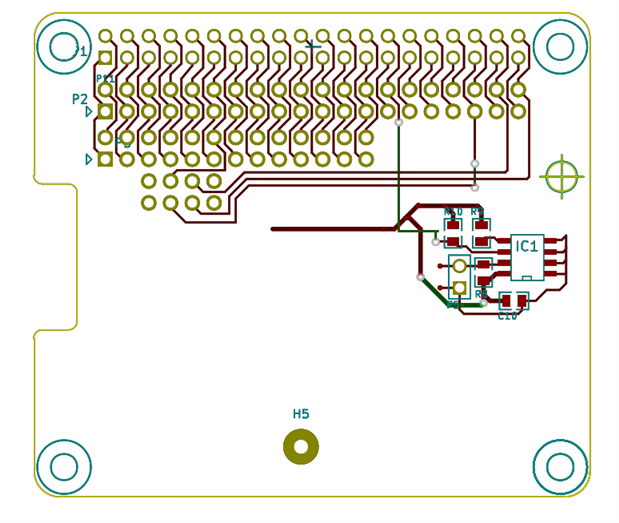
    Had some family problems here, so apologies for the delay.  The design is finally moving ahead ..... here is the alpha artwork (eg I have still to wire in the eeprom and change some pads around)  ... It gives some idea of what board space is still open


    image

    • Cancel
    • Vote Up 0 Vote Down
    • Sign in to reply
    • Cancel
  • analysis
    analysis over 8 years ago in reply to psyj

    Hi John


    I hope that everything is well now, with you and yours 

    Well done for the Great work!

    Will be in touch 


    My best

    • Cancel
    • Vote Up 0 Vote Down
    • Sign in to reply
    • Cancel
  • psyj
    psyj over 8 years ago in reply to psyj

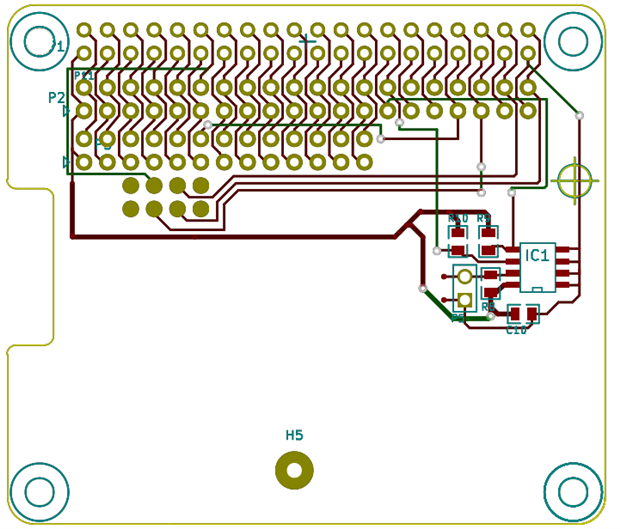
    Here is version 2 of the PCB  .... anybody see anything wrong?


    image


    The wolfson card overhangs this lower edge by 0.45 inches, this is the edge with the jack sockets.  The left hand edge of the wolfson (with the spidfs) sits directly over the left hand edge indent shown above, so the two cards are, in general, offset in this sense too. It would be nicer if the left and right edges aligned between hat card and wolfson card, but that is not possible since it would involve offsetting the 26 way connector and there is not enough space to route the tracks

    • Cancel
    • Vote Up 0 Vote Down
    • Sign in to reply
    • Cancel
  • psyj
    psyj over 8 years ago in reply to psyj

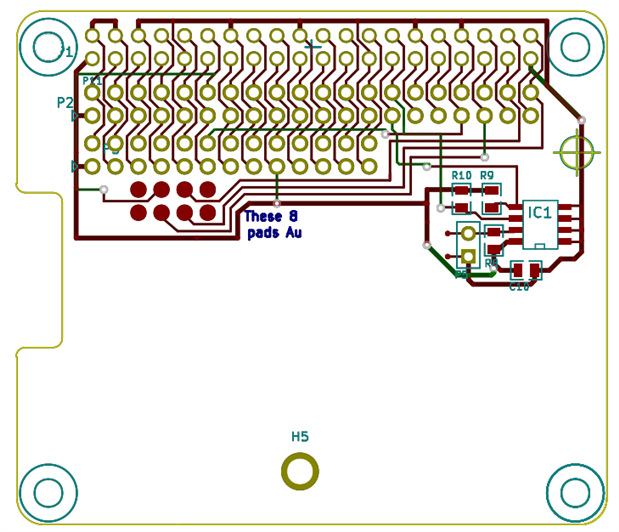
    Here is the last version, the Gerber files are generated, ready to go.  It is the first time I have sent artwork away for PCB production (rather than making the boards myself).


    image

    • Cancel
    • Vote Up 0 Vote Down
    • Sign in to reply
    • Cancel
  • soundhound
    soundhound over 8 years ago in reply to psyj

    hi John


    can you confirm the hardware mods needed to connect the wolfson to an RPi 2/3?


    I have:


    pin 40 rx to 5

    pin 38 tx to 6

    pin 35 frame to 4

    pin 12 (on wolfson) to 3


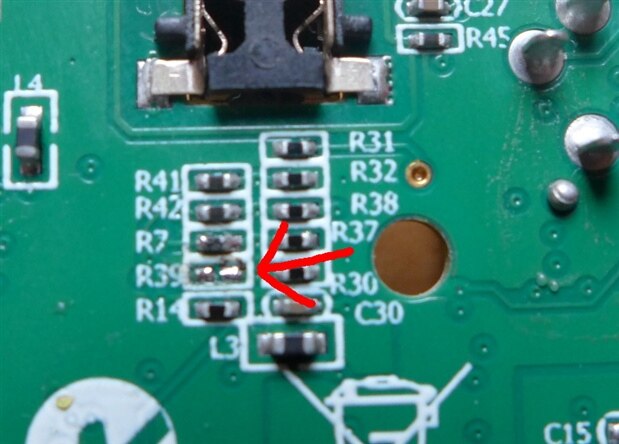
    remove resistor  r39 .... can I do this by scraping it out with a scalpel/stanley knife? has anyone posted a picture elsewhere showing its location? (my eyes aren't good)


    thanks,


    chris

    • Cancel
    • Vote Up 0 Vote Down
    • Sign in to reply
    • Cancel
  • psyj
    psyj over 8 years ago in reply to soundhound

    Chris,


    I hope those are the connections,  they are the ones on the artwork above !  (note that the 8 pogo pins are mirror numbered because of their spatial inversion)


    Pages 6 & 7 (and indeed later) of this thread give some further details on the original modification made by Hias (and me).  We differed in our approaches but the two solutions are electrically equivalent.  Like you, I didnt fancy removing the pogo pins and r39.  Instead I opted for a daughter board, which has become the pi hat shown above  ...... this requires zero modification of either the pi or the wolfson card.  However it does demand additional space  ..... and additional money!


    If you want to plug the wolfson directly onto the pi then you will need to remove the 8 pogo pins, or shield their tips from making contact with the "mother" board (both these approaches have been documented in this thread).  You will also need either to remove r39 OR cut off pin 12 on the pi 40 way header.  Of the two I would prefer to cut off pin 12 because it avoids me putting a soldering iron near the Wolfson  .... but of course if you ever re-use the pi AND you need pin 12 then you will have a problem.


    If you follow the unsolder solution, I must urge you to find a good magnifying glass and check out your board. As Hias has (I think) said, it is less difficult than it looks  ...  the heat from a normal soldering iron direct onto the component will melt both pads (and the component) and it should lift off by capillary action   .... but lift off the wrong component, or surface tension breaks down, or get a solder smear between this and adjacent pads ........ and unsoldering the pogo pins will demand lots of heat .........  Hias has nerves of steel, at least by my standards.


    But then that pi hat daughter board I am designing/building is going to cost 25 euros or there about   ...... more than Farnell currently charge for the  Wolfson card!


    Where is R39 on the Wolfson card?  Offhand I cannot say, I will need to look at the card when I get back


    A quick (and not too dirty) solution that nobody has yet tried is a 40 way idc plug and ribbon (as used on old ATA HDD) and connecting the appropriate wires to a 26 pin header plus the pogo pins.  Not all of the connections need to be made, but Hias will need to say which GPIO the driver uses .... or simply wire them all (switching pin 12 as previously noted)  ..... and remembering the mirror inversion !!!!

    • Cancel
    • Vote Up 0 Vote Down
    • Sign in to reply
    • Cancel
  • psyj
    psyj over 8 years ago in reply to analysis

    Athanasios


    Hi.  The artwork is with the pcb manufacturers and the quote for manufacture should be with you  ...... how do you want to proceed???


    Best regards


    John

    • Cancel
    • Vote Up 0 Vote Down
    • Sign in to reply
    • Cancel
  • soundhound
    soundhound over 8 years ago in reply to psyj

    thanks John.

    but things are confused: there is another thread where you originally gave the mods but including cutting a trace to pin 12 with rewiring to pin 33 ....

    and then in this thread R39 was brought up as an alternative to the pin 12 re-route but then R30 was mentioned without .... for why?


    so, to short-circuit those ambiguities, is 3 wires from P5 to the Pi 40pin header, and removing R39 enough and can it be done by scratching out the component with a scalpel/stanley knife rather than by solder iron? (I have a friend with good eyes who has found R39 but doesn´t solder!)


    thanks a lot

    chris

    • Cancel
    • Vote Up 0 Vote Down
    • Sign in to reply
    • Cancel
Reply
  • soundhound
    soundhound over 8 years ago in reply to psyj

    thanks John.

    but things are confused: there is another thread where you originally gave the mods but including cutting a trace to pin 12 with rewiring to pin 33 ....

    and then in this thread R39 was brought up as an alternative to the pin 12 re-route but then R30 was mentioned without .... for why?


    so, to short-circuit those ambiguities, is 3 wires from P5 to the Pi 40pin header, and removing R39 enough and can it be done by scratching out the component with a scalpel/stanley knife rather than by solder iron? (I have a friend with good eyes who has found R39 but doesn´t solder!)


    thanks a lot

    chris

    • Cancel
    • Vote Up 0 Vote Down
    • Sign in to reply
    • Cancel
Children
  • psyj
    psyj over 8 years ago in reply to soundhound

    Chris,


    A full reply is probably best, for others that may be reading (oh I flatter myself).  The original thread is correct,  you could cut the trace,  but equally you could remove pin 12 from the 40 pin header. Or equally remove R39. All three are electrically identical. Removal of R39 is the most elegant in my opinion, but carries risks in implementing.


    I cannot find mention of R30 anywhere but, if I have missed the reference, it is a typing error, 9 and 0 being next to one another  on the keyboard.


    Also on this question I note what I think is a typo on your part.  So just to clarify, when you say "pin 12 (on wolfson) to 3" that should of course read "pin 12 (on pi) to 3"  .... ie as per the pcb layout above.


    So to answer your question directly, your approach is one of several possible equally valid solutions.  I would not underestimate the hardness of the component, nor the risk to the PCB, but it is your call.


    For the approach that you are proposing,  the description of Hias on page 7 of this thread seems to answer your needs the best.


    John

    • Cancel
    • Vote Up 0 Vote Down
    • Sign in to reply
    • Cancel
  • soundhound
    soundhound over 8 years ago in reply to psyj

    hi John

    the R30 is in there a few times! but belonging to Matthias.

    here's the full thread:

    New reworked driver for Wolfson/Cirrus Logic audio card


    I should have said soldering point on the 40pin wolfson  connecter that mates with pin 12 on the Pi, to pin 3 of. P5!

    that's right, isn't it?


    on your circuit diagram above, it appears to me that the wolfson pin 12 goes to pi pin 33.

    how is it that p33 doesn't figure in the other two solutions, R39 and trace cut?


    thanks again.

    chris

    • Cancel
    • Vote Up 0 Vote Down
    • Sign in to reply
    • Cancel
  • psyj
    psyj over 8 years ago in reply to soundhound

    Chris


    Hi .  I am pretty sure it is R39 is the one to go,  perhaps Hais could confirm (The reason I am not 100% certain is that my solutions do not involve a board modification, so I have never done this myself). It is R39 that connects the 8804 (spdif controller) to GPIO A (ie pin 12 of the 26 way header). R30 is the pull up resistor on the same line (which, if memory serves me correctly, Hais says to leave:- which would make perfect sense)


    Yes, that is right, pin 12 of 40 way connector to pin 3 of the 8 pin header.


    Your reading of my pcb is correct. That connection is there for completeness  ...... the board is designed to make the Wolfson card resemble the Cirrus card as closely as possible  ..... but the current (and all previous versions) of the linux driver do not use this line (hence why removing R39 and leaving a weak pull up , R30, is a completely acceptable solution)

    • Cancel
    • Vote Up 0 Vote Down
    • Sign in to reply
    • Cancel
  • hiassoft
    hiassoft over 8 years ago in reply to psyj

    psyj  schrieb:


    I am pretty sure it is R39 is the one to go

    Yes, it's R39. It's on the backside of the PCB, located next to R30, near the mounting hole. Here's a picture:


    image


    so long,


    Hias

    • Cancel
    • Vote Up 0 Vote Down
    • Sign in to reply
    • Cancel
  • soundhound
    soundhound over 8 years ago in reply to hiassoft

    John, so you're saying the pin 33 connection is redundant?  thanks

    • Cancel
    • Vote Up 0 Vote Down
    • Sign in to reply
    • Cancel
  • psyj
    psyj over 8 years ago in reply to soundhound

    z z


    that is correct


    John

    • Cancel
    • Vote Up 0 Vote Down
    • Sign in to reply
    • Cancel
  • psyj
    psyj over 8 years ago in reply to hiassoft

    Hias,


    Where can I find the parameter set generated by the driver (and modified by cset commands) please? I need to populate a database of current values and parsing the plain text output given by "amixer -Dhw:0 scontents" takes a great deal of effort


    My intention is to continue "-Dhw:0 cset commands to control the device,  but tracking revisions through scontents does not seem wise


    Many thanks


    John

    • Cancel
    • Vote Up 0 Vote Down
    • Sign in to reply
    • Cancel
  • hiassoft
    hiassoft over 8 years ago in reply to psyj

    You can use alsactl store to get a complete dump of the current mixer settings. eg:

    /usr/sbin/alsactl store -f my-settings


    This'll create a simple to read and parse text file. Linux distributions also use that to get persistent mixer settings across reboots. On shutdown they call alsactl store, on boot alsactl restore.


    If you are interested in specific changes from the mixer scripts just call them with sh -x,. eg "sh -x ./Playback_to_Lineout.sh" and watch for amixer calls.


    so long,


    Hias

    • Cancel
    • Vote Up 0 Vote Down
    • Sign in to reply
    • Cancel
  • psyj
    psyj over 8 years ago in reply to hiassoft

    Hias,


    Many thanks for that alternative approach, it does seem to provide a more readable text file than "amixer -Dhw:0 scontents". My only problem is that it is still a huge file to parse (27000+ lines, 500k file)  ...... but I will see if it parses more easily/ more rapidly.  Either way many thanks,  I will let everyone know how I get on  ..... my final objective is to generate a GUI based on php/html in order to control the device in a rather more informative way than alsamixer.


    Regards


    John

    • Cancel
    • Vote Up 0 Vote Down
    • Sign in to reply
    • Cancel
element14 Community

element14 is the first online community specifically for engineers. Connect with your peers and get expert answers to your questions.

  • Members
  • Learn
  • Technologies
  • Challenges & Projects
  • Products
  • Store
  • About Us
  • Feedback & Support
  • FAQs
  • Terms of Use
  • Privacy Policy
  • Legal and Copyright Notices
  • Sitemap
  • Cookies

An Avnet Company © 2026 Premier Farnell Limited. All Rights Reserved.

Premier Farnell Ltd, registered in England and Wales (no 00876412), registered office: Farnell House, Forge Lane, Leeds LS12 2NE.

ICP 备案号 10220084.

Follow element14

  • X
  • Facebook
  • linkedin
  • YouTube