element14 Community
element14 Community
    Register Log In
  • Site
  • Search
  • Log In Register
  • Community Hub
    Community Hub
    • What's New on element14
    • Feedback and Support
    • Benefits of Membership
    • Personal Blogs
    • Members Area
    • Achievement Levels
  • Learn
    Learn
    • Ask an Expert
    • eBooks
    • element14 presents
    • Learning Center
    • Tech Spotlight
    • STEM Academy
    • Webinars, Training and Events
    • Learning Groups
  • Technologies
    Technologies
    • 3D Printing
    • FPGA
    • Industrial Automation
    • Internet of Things
    • Power & Energy
    • Sensors
    • Technology Groups
  • Challenges & Projects
    Challenges & Projects
    • Design Challenges
    • element14 presents Projects
    • Project14
    • Arduino Projects
    • Raspberry Pi Projects
    • Project Groups
  • Products
    Products
    • Arduino
    • Avnet & Tria Boards Community
    • Dev Tools
    • Manufacturers
    • Multicomp Pro
    • Product Groups
    • Raspberry Pi
    • RoadTests & Reviews
  • About Us
  • Store
    Store
    • Visit Your Store
    • Choose another store...
      • Europe
      •  Austria (German)
      •  Belgium (Dutch, French)
      •  Bulgaria (Bulgarian)
      •  Czech Republic (Czech)
      •  Denmark (Danish)
      •  Estonia (Estonian)
      •  Finland (Finnish)
      •  France (French)
      •  Germany (German)
      •  Hungary (Hungarian)
      •  Ireland
      •  Israel
      •  Italy (Italian)
      •  Latvia (Latvian)
      •  
      •  Lithuania (Lithuanian)
      •  Netherlands (Dutch)
      •  Norway (Norwegian)
      •  Poland (Polish)
      •  Portugal (Portuguese)
      •  Romania (Romanian)
      •  Russia (Russian)
      •  Slovakia (Slovak)
      •  Slovenia (Slovenian)
      •  Spain (Spanish)
      •  Sweden (Swedish)
      •  Switzerland(German, French)
      •  Turkey (Turkish)
      •  United Kingdom
      • Asia Pacific
      •  Australia
      •  China
      •  Hong Kong
      •  India
      • Japan
      •  Korea (Korean)
      •  Malaysia
      •  New Zealand
      •  Philippines
      •  Singapore
      •  Taiwan
      •  Thailand (Thai)
      • Vietnam
      • Americas
      •  Brazil (Portuguese)
      •  Canada
      •  Mexico (Spanish)
      •  United States
      Can't find the country/region you're looking for? Visit our export site or find a local distributor.
  • Translate
  • Profile
  • Settings
Raspberry Pi
  • Products
  • More
Raspberry Pi
Raspberry Pi Forum New reworked driver for Wolfson/Cirrus Logic audio card
  • Blog
  • Forum
  • Documents
  • Quiz
  • Events
  • Polls
  • Files
  • Members
  • Mentions
  • Sub-Groups
  • Tags
  • More
  • Cancel
  • New
Join Raspberry Pi to participate - click to join for free!
Featured Articles
Announcing Pi
Technical Specifications
Raspberry Pi FAQs
Win a Pi
Raspberry Pi Wishlist
Actions
  • Share
  • More
  • Cancel
Forum Thread Details
  • Replies 390 replies
  • Subscribers 743 subscribers
  • Views 42481 views
  • Users 0 members are here
  • raspberry_pi
  • raspeberry_pi_accessories
Related

New reworked driver for Wolfson/Cirrus Logic audio card

hiassoft
hiassoft over 9 years ago

I've been working on a driver rework, mainly to get rid of the requirement to carry around a bunch of patches to upstream driver code, and also to fix some outstanding issues and introduce some new features.


Most issues have been ironed out so here's the first public release.


Edit: the driver has been included in official RPi kernels. Just run sudo rpi-update to install it.

You still have to install the mixer scripts and add the /etc/modprobe.d file. See my website for details

RPi Linux driver for Wolfson / Cirrus Logic Audio Card


Source: https://github.com/HiassofT/rpi-linux/tree/cirrus-ng-4.9.0

Precompiled kernel: http://www.horus.com/~hias/tmp/cirrus/cirrus-ng-linux-4.9.0.tgz

New mixer scripts: http://www.horus.com/~hias/tmp/cirrus/cirrus-ng-scripts.tgz


Important notes:

  • The new driver bases on the rather fresh kernel 4.9.0 which means there's some risk of (yet unknown) issues. Use it at your own risk and please run "rpi-update" to get the latest firmware before installing the new driver.
  • The soundcard name has been changed from "snd_rpi_wsp" to "RPi-Cirrus", also several ALSA controls have been removed and new ones were added. This means the old usecase scripts and any custom-made scripts will no longer work. Use the new mixer scripts instead of the old usecase/listen scripts.
  • The new driver supports setting (and receiving) of the S/PDIF channel status bits (aka AES bits). If you add an ALSA card configuration file this means applications like Kodi can do proper AC3/DTS passthrough. A sample card configuration file (plus the mixer scripts) can be found here: https://github.com/HiassofT/rpi-cirrus-config
  • I haven't fully updated the documentation on my website RPi Linux driver for Wolfson / Cirrus Logic Audio Card  yet, will do that during the next weeks/months. But except for the things noted above most stuff should still work as in previous driver versions.


Please report back if you tested the driver (either successfully or unsuccessfully), any feedback will help me!


so long,


Hias

  • Sign in to reply
  • Cancel
Parents
  • timg73
    timg73 over 8 years ago

    Hias,

    A huge thank-you for all the work you've put into supporting the Cirrus Audio card.  Until now I've been using your kernel packages, and have just got round to trying the latest official 4.9 kernel which is also working very nicely.  It's a real shame that the Cirrus card has (or appears to have) gone out of production just when the software support became so good.  The older Wolfson cards are still available, so perhaps I'll get a couple and try modifying them to fit a 40-pin header.  Anyway, thanks again for everything you've done.  I really do appreciate it.

    Tim

    • Cancel
    • Vote Up 0 Vote Down
    • Sign in to reply
    • Cancel
  • hystrix
    hystrix over 8 years ago in reply to timg73

    The Cirrus Card does seem to be out of stock everywhere - what a shame.  I just started working on an alternative ultrasound sensistive microphone, since the electret type I was using has been out of production for years and is now virtually impossible to get hold of.


    What other options are there for recording audio at 192kHz with the Raspberry Pi?


    • Cancel
    • Vote Up 0 Vote Down
    • Sign in to reply
    • Cancel
  • hiassoft
    hiassoft over 8 years ago in reply to psyj

    Hi John!


    Thanks a lot for the WM5102/8804 setup files, but I did get the same error(s) as before. When using the WM8804 I also got the DLL error - which seems to be the root cause for both WM5102 and WM8804 failing. I'll leave it there, no interest in entering the windows DLL rabbit hole (after all it could be caused by using Windows XP).


    As for the filter coefficients: the wm5102 driver has been written by Wolfson/Cirrus so I'd guess they put the checks in there for a reason image


    The datasheet indicates that the allowed filter cuefficients depend on sysclk which is either ~49MHz (when using 32/48/... kHz) or ~45MHz (at 44.1/88.4/... kHz) - so the actual samplerate shouldn't have be a huge issue. Anyways, you can check the current audio device playback settings via /proc/asound/card0/pcm0p/sub0/hw_params (or pcm0c for capture/recording).


    so long,


    Hias

    • Cancel
    • Vote Up 0 Vote Down
    • Sign in to reply
    • Cancel
  • psyj
    psyj over 8 years ago in reply to hiassoft

    All,


    OK, to close off my thinking on the equalisation blocks.  Finding the parameter checking in the driver (the bit provided by Wolfson in arizona.c) has revealed a lot about the parameters you should pass to the equalisation blocks in the Wolfson.


    The checking is exactly that needed to check for stability in second order biquad filters and corresponds perfectly with the checking done by the WISCE software.


    No big suprises there.


    But what that means is that if the WISCE software will not let you have a certain set of parameters, it is for good reason and no amount of bit tinkering elsewhere will give you extra functionality from the WM5102.  Worse, you will have unstable filters.  I have for example verified that (at 44100) the first three frequency bands you can have are 110 156 and 191Hz.  Not only does this show from the WISCE software, it corresponds exactly with the quantisation of the a1, a2 parameters in a biquad filter  ...... 1+a1+a2= 1/4096,2/4096,3/4096 (read www.st.com/resource/en/application_note/cd00222512.pdf if you want.  It is the least mathematical explanation I can find, and predicts perfectly filter frequencies)


    So what does all that mean.  Basically that you cannot have accurate low frequency band pass /cut filters with the Wolfson. I would suggest that the accuracy becomes sufficiently good at 300Hz and above for 44100 data( the first 10 bands are 110, 156, 191, 221, 247, 270, 292, 312, 331, 349 HZ, shifting a bit depending on Q).  And the situation is in reality worse for higher sampling rates (the band frequencies are those I have mentioned multiplied by the ratio of the sample rates, so at 88.2 the bands are at twice the frequency) .


    So the EQ units can be used effectively as tone controls but not as an effective DRC (digital room correction) for the sized rooms I live in. The Low/High pass filters are much more useful with set points only 2-3Hz apart.


    I guess that is already more than enough, but if anybody needs further details, I am happy to provide.


    (postscript .... and the parameter for the low/high pass filters on the Wolfson follows perfectly the same maths, that is to say (quoting the above source)


    First-order filter design

    As a first step to obtain the coefficients for the 1st-order low-pass or high-pass filter the following equations can be used:

         θ C = 2 ∗ π ∗ f C / f S (= the normalized cut-off frequency)

         K = tan(θ C / 2)

         α = 1 + K.

    The denominator coefficients are identical for both low-pass and high-pass filters designed for the same cut-off frequency and are computed as follows:


    a1 = -(1 - K) / α =-(1-K)/(1+K)


    All you need to do to generate the the Wolfson parameter is multiply a1 by 4096 and make the result 16 bit signed

    • Cancel
    • Vote Up 0 Vote Down
    • Sign in to reply
    • Cancel
  • psyj
    psyj over 8 years ago in reply to psyj

    I have now managed to decipher the 5102 parameters for EQ and LHPF .  I hesitate to share here, but if somebody needs a steer

    • Cancel
    • Vote Up 0 Vote Down
    • Sign in to reply
    • Cancel
  • psyj
    psyj over 8 years ago in reply to hiassoft

    Hias,

    hiassoft


    Hi.  Having "finished" working out the parameters for the EQ and LHPF blocks (well nearly finished:- I can generate "good enough" parameters for everything and bit perfect for LHPF, the shelving filters in the EQ and A and B for the biquads)  ...... I have turned my attention to the DSP core.  I have located several firmware files that the WISCE software will happily load as legitimate files for the 5102. I note too that wm_adsp.c references several firmware files for the DSP, some of which I have.  I am guessing that this appears in your kernel as well (??).... since the wm_adsp.c work was done by those nice teccies at Wolfson shortly before the Cirrus buy-out. But what I have yet to determine is how to instruct the driver to load the firmware.


    I really do not want to waste yet more of your time:- since this question relates to calling conventions in Linux generally, could you please point me to an easy (already written!) guide.


    And then of course I will need to work out how to talk to the firmware!!  The files I have come with corresponding bin files, which I presume are plug-ins to some windows App.  But nothing for you to do there I am pleased to say.

    • Cancel
    • Vote Up 0 Vote Down
    • Sign in to reply
    • Cancel
  • psyj
    psyj over 8 years ago in reply to hiassoft

    Hias,


    Just a close-off on the WISCE software, I know you do not want to waste time with Windows (and hey!)

    I have already tried running WISCE under WINE .... with zero success!  But perhaps somebody else out on this group, who is a wizz with Wine, could give it a go    ....... a benefit that I had not thought about until this second (probably because it is too ambitious) is that WISCE running 100% under Wine on the target would have huge benefits.


    POSTSCRIPT


    I have installed WISCE under Wine (32 bit environment , Windows 2003 (for net problems) and .Net45.  It needs at least 1024 768 screen. I runs perfectly with the 8804 device file, but falls over on the 5102 file. At this moment I do not know why.  Oh and yes, I get a bad firmware message too!)

    • Cancel
    • Vote Up 0 Vote Down
    • Sign in to reply
    • Cancel
  • hiassoft
    hiassoft over 8 years ago in reply to psyj

    Hi John!

    I have now managed to decipher the 5102 parameters for EQ and LHPF . I hesitate to share here, but if somebody needs a steer

    Awesome, please post details, this sounds very interesting!


    As for the firmware files:

    wm_adsp will automatically try to load the firmware file(s) if a signal path is running through the DSP. eg configure headphone out to run through the DSP:

    amixer -q -c RPiCirrus cset name="DSP1L Input 1 AIF1RX1"
    amixer -q -c RPiCirrus cset name="DSP1R Input 1 AIF1RX2"
    amixer -q -c RPiCirrus cset name="DSP1L Input 1 Volume 32"
    amixer -q -c RPiCirrus cset name="DSP1R Input 1 Volume 32"
    amixer -q -c RPiCirrus cset name="HPOUT1L Input 1 DSP1.1"
    amixer -q -c RPiCirrus cset name="HPOUT1R Input 1 DSP1.2"
    amixer -q -c RPiCirrus cset name="HPOUT1L Input 1 Volume 32"
    amixer -q -c RPiCirrus cset name="HPOUT1R Input 1 Volume 32"
    amixer -q -c RPiCirrus cset name="HPOUT1 Digital Volume 128"
    amixer -q -c RPiCirrus cset name="HPOUT1 Digital Switch on"

    Then playback a file and watch dmesg for the "firmware not found" error message image


    You can configure the name of the firmware file with the "DSP1 Firmware" control - it lists 11 choices.


    I never tried this, not sure where to get the firmware files (there probably are some sample firmwares around). If you got one, put it in /lib/firmware, then it should get loaded.


    IIRC the DSP development software is a commercial product and rather expensive - there was some talk about it a few years ago on the other (Wolfson audio card) forum. Not sure if you are able to get it without paying bick bucks and signing NDAs or such stuff.


    Concerning WISCE: I finally got it running, had to setup a Win7 VM though. I tested shortly with wine (actually that was the first thing I tried, before using the WinXP VM) but didn't have much luck either.


    so long,


    Hias

    • Cancel
    • Vote Up 0 Vote Down
    • Sign in to reply
    • Cancel
  • psyj
    psyj over 8 years ago in reply to hiassoft

    Hi Hias,


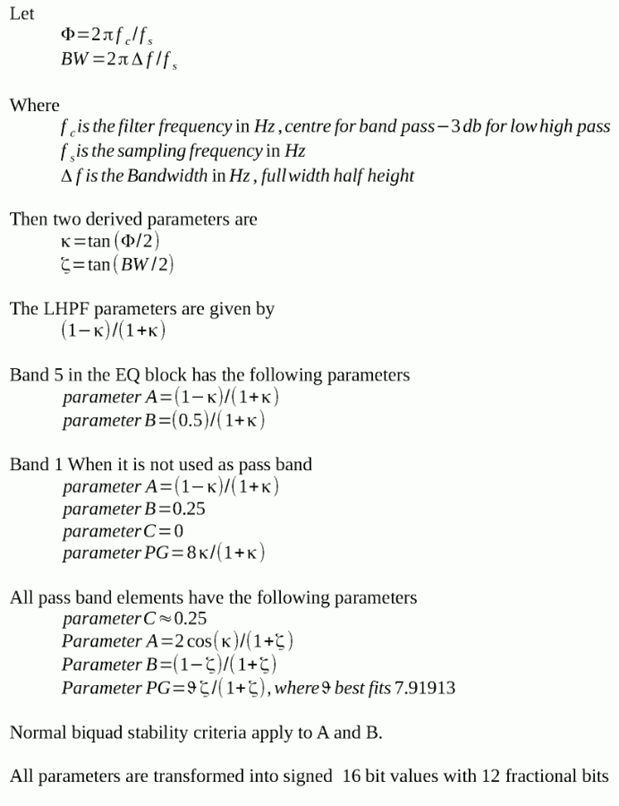
    Here is the maths I have worked through.  There are many variants of the maths to describe bi quad filters.  I tried several others, but this one is the simplest I have found for the Wolfson.


    image

    With the exception of the band pass elements, all the parameters are an exact fit to the WISCE provided parameters.


    For the pass band elements, parameters A and B are again exact matches to the WISCE provided values.  These two parameters define frequency and bandwidth.  The remaining two parameters, B and PG (=pre gain) are not exact matches to WISCE provided numbers but experimentation shows that these parameters change little and that which I have provided are close.  In particular, a little more work on PG should get an exact value .... note the similarity between the PG used for Band 1 (which is an exact match) and the empirical PG used in the biquad.


    AS to firmware files, you might want to visit


    https://github.com/lenovo-yt2-dev/proprietary_vendor_lenovo_YT2/tree/cm-12.1/proprietary/etc/firmware


    But sadly, yes, I doubt we will ever get details about the ADSP2 core, so programming to my needs is out  ...... it will have to be brutefir  ..... which is pretty good stuff, I just wanted to unbundle all the audio processing onto the wolfson.

    • Cancel
    • Vote Up +1 Vote Down
    • Sign in to reply
    • Cancel
  • marcelheijkoop
    marcelheijkoop over 8 years ago in reply to psyj

    John,

    Reading your posts I must admit my knowledge of filtering is not near your expertise.

    Stil I would like to ask you a question for possible use in the Cirrus Logic Audio Card.


    Currently I experiment/use the card to drive my speakers using the on board amplifier.

    Although rated at 1.4 to 2.8 watts in different documents I am impressed to what volume it produces with my speakers.

    It is enough for serious listening in house in my situation.


    Still as the speakers can be bi-amped , I was wondering if it would be possible to use the 2 channels to drive the low, and mid+high speaker separately and  gain a bit more efficiency by digitally filtering signals before amplifying them, and avoid losses in the speakerfilters.

    As the wolfson chips only have 1 stereo path I seen no output for a separate (sub) woofer output, not even if it is un-amplified signal for an external amp.

    But correct me if I am wrong.


    Do you see options to set separate low pass and high-pass filters to drive high and low drivers separately  ?

    And would it really output more efficient energy to the drivers to be noticeable ?

    If you could help me set filters around 400 Hz, I would like to try it .

    And as I have 2 cirrus cards I could use all 4 amp channels.


    Regards Marcel

    • Cancel
    • Vote Up 0 Vote Down
    • Sign in to reply
    • Cancel
  • psyj
    psyj over 8 years ago in reply to marcelheijkoop

    Hi Marcel,


    If I have understood your questions correctly the answer is yes to almost all of them!

    Perhaps if I explain the setup I actually use at home when listening to music it will give you a way of doing what you are seeking to do.  (Before I do I should explain that, if I remember the datasheet correctly, all 3 of the outputs from the 5102 are electrically equivalent, which is to say they can all drive 15 ohm loads)


    I have two speakers connected to a nice 1980s amplifier.  I also have an active sub-woofer.  The amplifier (and indirectly the speakers) is connected to the line out socket of the Wolfson.  The sub-woofer is connected to the headphone socket.  So one Wolfson card feeds 3 channels, it could do more.


    Now my sub-woofer has a built in low pass filter.  So all I need to do to get that to work is to connect both L and R channels from the input to the left (or right) mixer of the headphone ouput. That mixes stereo down to mono for the sub-bass output.


    For the main speakers obviously L and R are kept apart.  For each of the two channels the input goes to a LHPF block, then to a second LHPF block and finally to the line output.  This gives a very sharp cut-off and in this case the LHPFs are programmed as high-pass filters which are the complement of the (analogue) low pass filter built into the sub-woofer.  You could use just one LHPF block on each channel and have a softer roll-off.  This would be necessary if you need to put a low pass filter into the sub bass outputs. (Because the digitial core of the 5102 has just 4 LHPF modules)


    All of the connections and filter settings are programmed through Alsamixer, thanks to Hias excellent work.  Elsewhere in this thread I have described how to calculate the filter parameters, though a simpler way of doing it is to use the WISCE software to calculate the numbers.


    400Hz seems very high for a cross over frequency, is that what you need.  And do you know how rapid the roll-off needs to be?  If I understand correctly you want to low pass one pair(L/R)  of outputs and high pass the other pair.  Off-hand (though it is late) I cannot think of a simple way of passing the settings you require.


    So there are some challenges in the detail,  but I believe that all you want to do can be done, by a single 5102 board


    John

    • Cancel
    • Vote Up 0 Vote Down
    • Sign in to reply
    • Cancel
  • marcelheijkoop
    marcelheijkoop over 8 years ago in reply to psyj

    Hi John,

    I have done no calculations on my speakers, and also do not know where to get the data to do them.

    The column speakers do have quite some volume ( in liters ) but the low drivers are not as big as a separate ( active ) subwoofer would have.

    For the about 16 CM drivers I just guessed 400 Hz as a first attempt.

    And with very steep filtering handover is more pronounced and thus easy to noticed if not set correct.


    I understand your setup where you use line out and headset out to carry the same stereo signal, but filter them differently, and in combination with your external subwoofer speaker filter and mono , add combine this into 1 low signal that is amplified in that box.


    My idea was to use the 2 channels  in 1 card to both carry , f.i. the left channel.

    And then filter 1 to pass high, feed it to the on-board amplifier and feed the mid/high section of my speaker.

    And let the other to pass low , feed it to the on-board amplifier 2 and feed the low section of my speaker.

    This woud reduce my output to just the left channel, but with a separate amp for low and mid/high.

    If I remember correctly from playing with the alsa options the filters for left and right are separate, and routing of 1 signal channel in both output channels is possible.


    The experiment would be to see if one could obtain more effective output by filtering before amplification , and secondly if it would produce a noticeable result.


    .....


    Thinking of it a bit more now, using a second pi and card to drive the other channel would generate time differences in left/right channel reproduction and create distortion in the stereo image. And this is likely to be much more a disadvantage than the gain one could obtain from a bit more power.


    So if I would choose Mono output, the idea might be useful, but for stereo external amps are required to get a bit more output power.


    Regards, Marcel

    • Cancel
    • Vote Up 0 Vote Down
    • Sign in to reply
    • Cancel
Reply
  • marcelheijkoop
    marcelheijkoop over 8 years ago in reply to psyj

    Hi John,

    I have done no calculations on my speakers, and also do not know where to get the data to do them.

    The column speakers do have quite some volume ( in liters ) but the low drivers are not as big as a separate ( active ) subwoofer would have.

    For the about 16 CM drivers I just guessed 400 Hz as a first attempt.

    And with very steep filtering handover is more pronounced and thus easy to noticed if not set correct.


    I understand your setup where you use line out and headset out to carry the same stereo signal, but filter them differently, and in combination with your external subwoofer speaker filter and mono , add combine this into 1 low signal that is amplified in that box.


    My idea was to use the 2 channels  in 1 card to both carry , f.i. the left channel.

    And then filter 1 to pass high, feed it to the on-board amplifier and feed the mid/high section of my speaker.

    And let the other to pass low , feed it to the on-board amplifier 2 and feed the low section of my speaker.

    This woud reduce my output to just the left channel, but with a separate amp for low and mid/high.

    If I remember correctly from playing with the alsa options the filters for left and right are separate, and routing of 1 signal channel in both output channels is possible.


    The experiment would be to see if one could obtain more effective output by filtering before amplification , and secondly if it would produce a noticeable result.


    .....


    Thinking of it a bit more now, using a second pi and card to drive the other channel would generate time differences in left/right channel reproduction and create distortion in the stereo image. And this is likely to be much more a disadvantage than the gain one could obtain from a bit more power.


    So if I would choose Mono output, the idea might be useful, but for stereo external amps are required to get a bit more output power.


    Regards, Marcel

    • Cancel
    • Vote Up 0 Vote Down
    • Sign in to reply
    • Cancel
Children
  • psyj
    psyj over 8 years ago in reply to marcelheijkoop

    Those on  chip D class amplifiers are remarkable for what they do, but personally I would not use them.  You could arrange to use that amplifier for just the high frequency components where less power is needed (above 1kHz). That would still lead to you needing a stereo amp for the LF though.  I am fairly sure that some Lenevo tablets use the 5102 power amp to drive their speakers, so that gives an idea of where they do well.


    I am not sure whether you picked up on my observation that both the line out and headphone out are capable of driving 15 ohm loads (though I repeat I would not do it).  So conceptually you could have Left channel feeding two filters (one high pass, one low pass) and these two signals feeding the headphones out.  The Right channel could follow the same logic except it could feed the line out socket.


    However I presume you are using speaker out to drive your speaker, which is capable of driving 3 ohm loads. And there you have just two channels ...


      There are so rediculously cheap small class d amps out there eg


    PAM8403 Ultra Miniature Digital Power Amplifier Board Class D 2channels x 3W 8′′ | eBay


    at 0,30 euros.


    I would use a couple of those and protect my precious Wolfson!


    As to connecting two Wolfsons/Pi together, I wouldnt.  unifying the two I2S clocks represents a huge effort

    • Cancel
    • Vote Up 0 Vote Down
    • Sign in to reply
    • Cancel
  • marcelheijkoop
    marcelheijkoop over 8 years ago in reply to psyj

    Thanks John,


    Indeed I did not notice enough the line out  AND  headphones out both can carry the same signals with their own individual filters.

    Combined with external amps one could indeed build a setup for bi-amped speakers.

    I definitely want to experiment with that in combination with a multi channel amp I already own, it would just need 4 analogue  inputs to be active to 4 amp outputs.


    If combined with speakers out one could do a how-mid-high separation but that is fun in theory only I presume.


    On the D-amps indeed they do perform much better than people do credit them for.

    My experiments with the PAM 8403 boards are positive, but I prefer the on-board amp in the cirrus logic audio card.

    I really do recommend you test them once. Depending on the the effectiveness of your speakers it does create enough signal to enjoy your music.

    Combined with the digital silence of the card , it is ideal for a bed side audioset to wake you up in the morning , without the sound of the sea during the night.


    In need to do more reading on the amp used in the card....

    Edit :.As the 5102 you mentioned is rated at 2*20 Watt max and should not be fed with less than 8 volts.....

    Edit : confused the wolfson 5102 chip with an other popular chipmakers 5102.

    Edit :  2 watt D-amps according to chip datasheet


    Regards Marcel.

    • Cancel
    • Vote Up 0 Vote Down
    • Sign in to reply
    • Cancel
element14 Community

element14 is the first online community specifically for engineers. Connect with your peers and get expert answers to your questions.

  • Members
  • Learn
  • Technologies
  • Challenges & Projects
  • Products
  • Store
  • About Us
  • Feedback & Support
  • FAQs
  • Terms of Use
  • Privacy Policy
  • Legal and Copyright Notices
  • Sitemap
  • Cookies

An Avnet Company © 2026 Premier Farnell Limited. All Rights Reserved.

Premier Farnell Ltd, registered in England and Wales (no 00876412), registered office: Farnell House, Forge Lane, Leeds LS12 2NE.

ICP 备案号 10220084.

Follow element14

  • X
  • Facebook
  • linkedin
  • YouTube