element14 Community
element14 Community
    Register Log In
  • Site
  • Search
  • Log In Register
  • Community Hub
    Community Hub
    • What's New on element14
    • Feedback and Support
    • Benefits of Membership
    • Personal Blogs
    • Members Area
    • Achievement Levels
  • Learn
    Learn
    • Ask an Expert
    • eBooks
    • element14 presents
    • Learning Center
    • Tech Spotlight
    • STEM Academy
    • Webinars, Training and Events
    • Learning Groups
  • Technologies
    Technologies
    • 3D Printing
    • FPGA
    • Industrial Automation
    • Internet of Things
    • Power & Energy
    • Sensors
    • Technology Groups
  • Challenges & Projects
    Challenges & Projects
    • Design Challenges
    • element14 presents Projects
    • Project14
    • Arduino Projects
    • Raspberry Pi Projects
    • Project Groups
  • Products
    Products
    • Arduino
    • Avnet & Tria Boards Community
    • Dev Tools
    • Manufacturers
    • Multicomp Pro
    • Product Groups
    • Raspberry Pi
    • RoadTests & Reviews
  • About Us
  • Store
    Store
    • Visit Your Store
    • Choose another store...
      • Europe
      •  Austria (German)
      •  Belgium (Dutch, French)
      •  Bulgaria (Bulgarian)
      •  Czech Republic (Czech)
      •  Denmark (Danish)
      •  Estonia (Estonian)
      •  Finland (Finnish)
      •  France (French)
      •  Germany (German)
      •  Hungary (Hungarian)
      •  Ireland
      •  Israel
      •  Italy (Italian)
      •  Latvia (Latvian)
      •  
      •  Lithuania (Lithuanian)
      •  Netherlands (Dutch)
      •  Norway (Norwegian)
      •  Poland (Polish)
      •  Portugal (Portuguese)
      •  Romania (Romanian)
      •  Russia (Russian)
      •  Slovakia (Slovak)
      •  Slovenia (Slovenian)
      •  Spain (Spanish)
      •  Sweden (Swedish)
      •  Switzerland(German, French)
      •  Turkey (Turkish)
      •  United Kingdom
      • Asia Pacific
      •  Australia
      •  China
      •  Hong Kong
      •  India
      • Japan
      •  Korea (Korean)
      •  Malaysia
      •  New Zealand
      •  Philippines
      •  Singapore
      •  Taiwan
      •  Thailand (Thai)
      • Vietnam
      • Americas
      •  Brazil (Portuguese)
      •  Canada
      •  Mexico (Spanish)
      •  United States
      Can't find the country/region you're looking for? Visit our export site or find a local distributor.
  • Translate
  • Profile
  • Settings
Raspberry Pi
  • Products
  • More
Raspberry Pi
Raspberry Pi Forum Does this switch actually work?
  • Blog
  • Forum
  • Documents
  • Quiz
  • Events
  • Polls
  • Files
  • Members
  • Mentions
  • Sub-Groups
  • Tags
  • More
  • Cancel
  • New
Join Raspberry Pi to participate - click to join for free!
Featured Articles
Announcing Pi
Technical Specifications
Raspberry Pi FAQs
Win a Pi
Raspberry Pi Wishlist
Actions
  • Share
  • More
  • Cancel
Forum Thread Details
  • Replies 5 replies
  • Subscribers 674 subscribers
  • Views 607 views
  • Users 0 members are here
  • raspberry_pi
Related

Does this switch actually work?

Former Member
Former Member over 10 years ago

Has anyone purchased this switch and have been successful using it? Been trying to look for something like this and this seems to be one of the better built ones imo.


Here's a link to it, any help appreciated


Illuminated LED shutdown switch for Raspberry Pi – Mausberry Circuits

  • Sign in to reply
  • Cancel
Parents
  • shabaz
    shabaz over 10 years ago

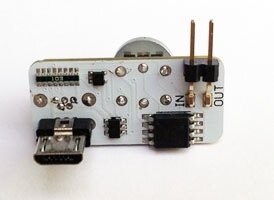
    I'm sure it probably does work for people (there seem to be some reviews for it on the Internet) but having seen photos of both sides of it, I can't see any power supply decoupling capacitor for the on-board microcontroller, if that is the case then that unfortunately tends to signify that it might not work in all scenarios. I'm not sure this is well built because a decoupling capacitor is (in my opinion) a basic requirement that engineers would design in, so that does ring alarm bells for me. Just a personal opinion.


    It is fairly easy to guess the operation if you wanted to build one for yourself - the microcontroller (if that is what it is - I cannot see the print) most likely holds a signal to an on-board MOSFET high so that the RPI boots up and then the RPI asserts a signal (this requires the RPI to have been installed with a particular script beforehand). For power-off, the microcontroller will assert a signal to the RPI, and wait for the installed script to detect that and initiate a shutdown (sudo poweroff or whatever) and when the microcontroller sees that the RPI signal has been de-asserted then it knows that it can safely switch off the MOSFET.

    image

    image

    • Cancel
    • Vote Up 0 Vote Down
    • Sign in to reply
    • Cancel
  • Former Member
    Former Member over 10 years ago in reply to shabaz

    Okay ya I agree about the decoupling capacitor. My thing right now is just trying to find a way to program the raspi2, as I only have a windows laptop that I do my stuff on, so I guess I'm not entirely sure on how to go about programming to it. I know there is probably some stuff online, I'm just not sure what or where to search for that information.


    Are those 2 that you pictured run in the same manor as the one I posted?


    Thanks

    • Cancel
    • Vote Up 0 Vote Down
    • Sign in to reply
    • Cancel
  • shabaz
    shabaz over 10 years ago in reply to Former Member

    Hi Marc,


    The photos are of the switch that you mentioned, I found them on the kickstarter page (apparently it started off as a kickstarter). It is not mandatory to have this to use the RPI by the way - most people won't have it - just need a microSD card and a good power supply, and (initially at least) a TV and a USB keyboard and/or mouse.


    You can write your programs for the RPI on either your existing laptop, or on the RPI. Once the RPI is ready for use (that involves transferring an image onto a microSD card using your laptop SD card slot [but follow the guides referenced below - there is a process to this that must be followed], and then powering up the RPI with it connected to a TV and a keyboard or mouse), then from that point on you can remove the TV and keyboard/mouse from the RPI, plug it into the network (e.g. a switch port on you home router) and from that point on you can access it over the network from your laptop. Or if you leave the TV and kb/mouse plugged in to the RPI then you can continue to use it directly.


    To get started, there are getting started videos and other resources at Element 14 and a quick start guide and other useful links at this raspberrypi.org help page and there is free magazine which may be useful but used to have a searchable index to make it practical to read but looks like it has been removed - don't know why.

    • Cancel
    • Vote Up +1 Vote Down
    • Sign in to reply
    • Cancel
  • Former Member
    Former Member over 10 years ago in reply to shabaz

    Yeah I was just looking at getting one to make it a bit simpler and quicker to turn the pi on and off, as at first I'll mainly be using it as a media Centre,  then continue tinkering with it from there.


    I was looking at cases and found the flirc case, now is this a good case? I've seen a couple reviews, but just wanted the communitys opinion as well. Was looking for something around this price range that was aluminum and not some cheapy plastic kinda thing.


    I appreciate the help, getting my first pi 2 delivered on Thursday so I'm kinda excited to get rolling.

    • Cancel
    • Vote Up +1 Vote Down
    • Sign in to reply
    • Cancel
Reply
  • Former Member
    Former Member over 10 years ago in reply to shabaz

    Yeah I was just looking at getting one to make it a bit simpler and quicker to turn the pi on and off, as at first I'll mainly be using it as a media Centre,  then continue tinkering with it from there.


    I was looking at cases and found the flirc case, now is this a good case? I've seen a couple reviews, but just wanted the communitys opinion as well. Was looking for something around this price range that was aluminum and not some cheapy plastic kinda thing.


    I appreciate the help, getting my first pi 2 delivered on Thursday so I'm kinda excited to get rolling.

    • Cancel
    • Vote Up +1 Vote Down
    • Sign in to reply
    • Cancel
Children
  • shabaz
    shabaz over 10 years ago in reply to Former Member

    Hi Marc,


    Check out the cases by navigating from this URL of Pi accessories, I run mine bare so far. One thing with the flirc case, it looks ok for media center type of uses, but in future you may want access to the 40-pin connector and that capability is easier if you have a case that allows access. No heatsinking is needed (and could make things worse if it is a bad fit) so best to avoid that if you can.


    There are some home-made alternatives too, no need to spend too much money - e.g. sandwiching boards in between two pieces of clear perspex with spacers - costs very little, still looks good, allows 40-pin connector access and is ideal if you have access to some tools.


    One more thing - probably best to avoid wireless keyboards/mice etc unless they are known to work with the RPI - the URL above only offers known working hardware. I use a wired mouse/kb currently if I need to access the RPI directly, otherwise most of the time I'll connect over the network.


    You'll probably want a Wi-Pi wireless adapter (available from that URL too) - that is my most used peripheral with the RPI, since my RPI's are not always near the home router. Not all wireless adapters work out of the box - so the Wi-Pi is ideal and works well.

    • Cancel
    • Vote Up 0 Vote Down
    • Sign in to reply
    • Cancel
element14 Community

element14 is the first online community specifically for engineers. Connect with your peers and get expert answers to your questions.

  • Members
  • Learn
  • Technologies
  • Challenges & Projects
  • Products
  • Store
  • About Us
  • Feedback & Support
  • FAQs
  • Terms of Use
  • Privacy Policy
  • Legal and Copyright Notices
  • Sitemap
  • Cookies

An Avnet Company © 2025 Premier Farnell Limited. All Rights Reserved.

Premier Farnell Ltd, registered in England and Wales (no 00876412), registered office: Farnell House, Forge Lane, Leeds LS12 2NE.

ICP 备案号 10220084.

Follow element14

  • X
  • Facebook
  • linkedin
  • YouTube