element14 Community
element14 Community
    Register Log In
  • Site
  • Search
  • Log In Register
  • Community Hub
    Community Hub
    • What's New on element14
    • Feedback and Support
    • Benefits of Membership
    • Personal Blogs
    • Members Area
    • Achievement Levels
  • Learn
    Learn
    • Ask an Expert
    • eBooks
    • element14 presents
    • Learning Center
    • Tech Spotlight
    • STEM Academy
    • Webinars, Training and Events
    • Learning Groups
  • Technologies
    Technologies
    • 3D Printing
    • FPGA
    • Industrial Automation
    • Internet of Things
    • Power & Energy
    • Sensors
    • Technology Groups
  • Challenges & Projects
    Challenges & Projects
    • Design Challenges
    • element14 presents Projects
    • Project14
    • Arduino Projects
    • Raspberry Pi Projects
    • Project Groups
  • Products
    Products
    • Arduino
    • Avnet & Tria Boards Community
    • Dev Tools
    • Manufacturers
    • Multicomp Pro
    • Product Groups
    • Raspberry Pi
    • RoadTests & Reviews
  • About Us
    About the element14 Community
  • Store
    Store
    • Visit Your Store
    • Choose another store...
      • Europe
      •  Austria (German)
      •  Belgium (Dutch, French)
      •  Bulgaria (Bulgarian)
      •  Czech Republic (Czech)
      •  Denmark (Danish)
      •  Estonia (Estonian)
      •  Finland (Finnish)
      •  France (French)
      •  Germany (German)
      •  Hungary (Hungarian)
      •  Ireland
      •  Israel
      •  Italy (Italian)
      •  Latvia (Latvian)
      •  
      •  Lithuania (Lithuanian)
      •  Netherlands (Dutch)
      •  Norway (Norwegian)
      •  Poland (Polish)
      •  Portugal (Portuguese)
      •  Romania (Romanian)
      •  Russia (Russian)
      •  Slovakia (Slovak)
      •  Slovenia (Slovenian)
      •  Spain (Spanish)
      •  Sweden (Swedish)
      •  Switzerland(German, French)
      •  Turkey (Turkish)
      •  United Kingdom
      • Asia Pacific
      •  Australia
      •  China
      •  Hong Kong
      •  India
      •  Japan
      •  Korea (Korean)
      •  Malaysia
      •  New Zealand
      •  Philippines
      •  Singapore
      •  Taiwan
      •  Thailand (Thai)
      •  Vietnam
      • Americas
      •  Brazil (Portuguese)
      •  Canada
      •  Mexico (Spanish)
      •  United States
      Can't find the country/region you're looking for? Visit our export site or find a local distributor.
  • Translate
  • Profile
  • Settings
Raspberry Pi
  • Products
  • More
Raspberry Pi
Raspberry Pi Forum Raspberry Pi 2 B screen adjust and build help
  • Blog
  • Forum
  • Documents
  • Quiz
  • Events
  • Polls
  • Files
  • Members
  • Mentions
  • Sub-Groups
  • Tags
  • More
  • Cancel
  • New
Join Raspberry Pi to participate - click to join for free!
Featured Articles
Announcing Pi
Technical Specifications
Raspberry Pi FAQs
Win a Pi
Raspberry Pi Wishlist
Actions
  • Share
  • More
  • Cancel
Forum Thread Details
  • Replies 2 replies
  • Subscribers 683 subscribers
  • Views 656 views
  • Users 0 members are here
  • raspberry pi two
  • connect
  • screen"
  • project
  • raspberry_pi
  • raspberry pi
  • inverter
  • lcd screen
  • help!
  • ras pi
Related

Raspberry Pi 2 B screen adjust and build help

hoasov
hoasov over 8 years ago

Hey all im new in this forum but i see videos from youtube about Raspberry Pi projects , I need your help with adjust my screen that i found in my home to the Raspberry Pi ,

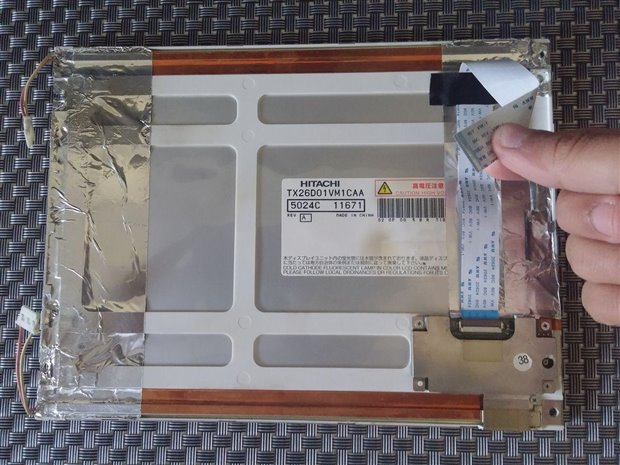
that screen was from Digiframe that i dont need anymore and i want to adjust this screen to my project.

Before you start read i apologize on my bad english image


My questions is :

1.a.) I need Driver Board for this screen that i can connect to the RPi no?

b.) if yes from where i can find the currect driver? (i need hdmi input for the RPI hdmi)

c.) if no what should i do to connect this to RPi?

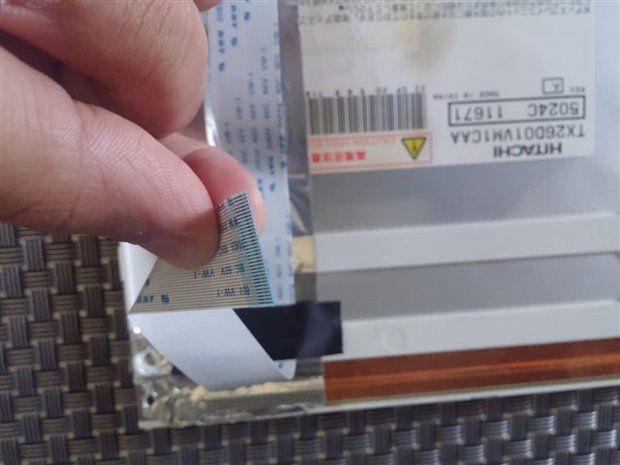
(the screen is HITACHI TX26D01VM1CAA as you can see on the pictures)


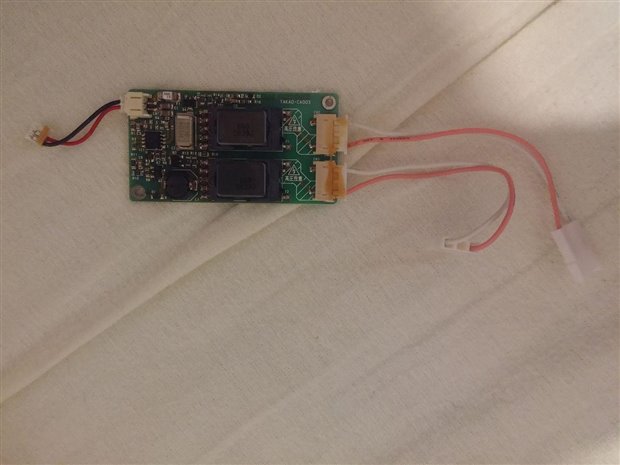
2.a.) To the screen i need to connect two lamps invertes (TAKAO-CA003 as you see on the pictures)

b.) For what is this?

c.) How much Voltage and Amper imput i need to give that?

d.) I can use gpio of RPI to connect that and save the another transformer (one transformer is for the driver of the screen)? OR i can use USB from RPI to the imput ? OR i can use the driver board to connect this ?


3.a.) After all finish with the screen issues i need to run some commands on the RPI for adjust and confirm the screen on RPI?


the pictures :
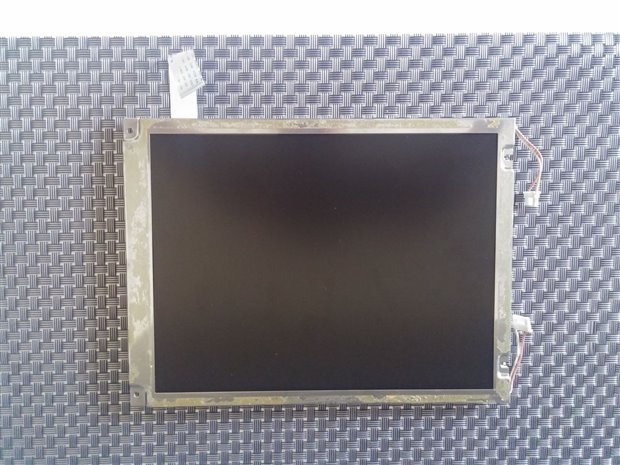
imageimageimageimage


TNX FOR ALL !!!!

  • Sign in to reply
  • Cancel
Parents
  • shabaz
    shabaz over 8 years ago

    Hi Daniel,


    The datasheet is here and it describes all connections and the voltage needed for the backlight:

    TX26D01VM1CAA Datasheet | DatasheetLib.com

    You will need a driver board, but for an off-the-shelf option all you can do is search ebay etc., to hope to find something compatible. This is a 12 year old panel, and you may have issues with connectors too, and it could cost a lot to make a PCB adaptor board to convert the connectors to any driver board you find.

    The rest of your questions hinge on the precise driver board you find. It could be an expensive journey that may end in failure if you buy a few driver boards and none of them are compatible. Better to get a known compatible display for the Pi.

    • Cancel
    • Vote Up +1 Vote Down
    • Sign in to reply
    • Cancel
Reply
  • shabaz
    shabaz over 8 years ago

    Hi Daniel,


    The datasheet is here and it describes all connections and the voltage needed for the backlight:

    TX26D01VM1CAA Datasheet | DatasheetLib.com

    You will need a driver board, but for an off-the-shelf option all you can do is search ebay etc., to hope to find something compatible. This is a 12 year old panel, and you may have issues with connectors too, and it could cost a lot to make a PCB adaptor board to convert the connectors to any driver board you find.

    The rest of your questions hinge on the precise driver board you find. It could be an expensive journey that may end in failure if you buy a few driver boards and none of them are compatible. Better to get a known compatible display for the Pi.

    • Cancel
    • Vote Up +1 Vote Down
    • Sign in to reply
    • Cancel
Children
No Data
element14 Community

element14 is the first online community specifically for engineers. Connect with your peers and get expert answers to your questions.

  • Members
  • Learn
  • Technologies
  • Challenges & Projects
  • Products
  • Store
  • About Us
  • Feedback & Support
  • FAQs
  • Terms of Use
  • Privacy Policy
  • Legal and Copyright Notices
  • Sitemap
  • Cookies

An Avnet Company © 2026 Premier Farnell Limited. All Rights Reserved.

Premier Farnell Ltd, registered in England and Wales (no 00876412), registered office: Farnell House, Forge Lane, Leeds LS12 2NE.

ICP 备案号 10220084.

Follow element14

  • X
  • Facebook
  • linkedin
  • YouTube