element14 Community
element14 Community
    Register Log In
  • Site
  • Search
  • Log In Register
  • Community Hub
    Community Hub
    • What's New on element14
    • Feedback and Support
    • Benefits of Membership
    • Personal Blogs
    • Members Area
    • Achievement Levels
  • Learn
    Learn
    • Ask an Expert
    • eBooks
    • element14 presents
    • Learning Center
    • Tech Spotlight
    • STEM Academy
    • Webinars, Training and Events
    • Learning Groups
  • Technologies
    Technologies
    • 3D Printing
    • FPGA
    • Industrial Automation
    • Internet of Things
    • Power & Energy
    • Sensors
    • Technology Groups
  • Challenges & Projects
    Challenges & Projects
    • Design Challenges
    • element14 presents Projects
    • Project14
    • Arduino Projects
    • Raspberry Pi Projects
    • Project Groups
  • Products
    Products
    • Arduino
    • Avnet & Tria Boards Community
    • Dev Tools
    • Manufacturers
    • Multicomp Pro
    • Product Groups
    • Raspberry Pi
    • RoadTests & Reviews
  • About Us
    About the element14 Community
  • Store
    Store
    • Visit Your Store
    • Choose another store...
      • Europe
      •  Austria (German)
      •  Belgium (Dutch, French)
      •  Bulgaria (Bulgarian)
      •  Czech Republic (Czech)
      •  Denmark (Danish)
      •  Estonia (Estonian)
      •  Finland (Finnish)
      •  France (French)
      •  Germany (German)
      •  Hungary (Hungarian)
      •  Ireland
      •  Israel
      •  Italy (Italian)
      •  Latvia (Latvian)
      •  
      •  Lithuania (Lithuanian)
      •  Netherlands (Dutch)
      •  Norway (Norwegian)
      •  Poland (Polish)
      •  Portugal (Portuguese)
      •  Romania (Romanian)
      •  Russia (Russian)
      •  Slovakia (Slovak)
      •  Slovenia (Slovenian)
      •  Spain (Spanish)
      •  Sweden (Swedish)
      •  Switzerland(German, French)
      •  Turkey (Turkish)
      •  United Kingdom
      • Asia Pacific
      •  Australia
      •  China
      •  Hong Kong
      •  India
      •  Japan
      •  Korea (Korean)
      •  Malaysia
      •  New Zealand
      •  Philippines
      •  Singapore
      •  Taiwan
      •  Thailand (Thai)
      •  Vietnam
      • Americas
      •  Brazil (Portuguese)
      •  Canada
      •  Mexico (Spanish)
      •  United States
      Can't find the country/region you're looking for? Visit our export site or find a local distributor.
  • Translate
  • Profile
  • Settings
Raspberry Pi Projects
  • Products
  • Raspberry Pi
  • Raspberry Pi Projects
  • More
  • Cancel
Raspberry Pi Projects
Blog Making a Custom RP2040 Project with KiCad, Part 1!
  • Blog
  • Documents
  • Events
  • Polls
  • Members
  • Mentions
  • Sub-Groups
  • Tags
  • More
  • Cancel
  • New
Join Raspberry Pi Projects to participate - click to join for free!
  • Share
  • More
  • Cancel
Group Actions
  • Group RSS
  • More
  • Cancel
Engagement
  • Author Author: shabaz
  • Date Created: 24 Jun 2026 3:25 PM Date Created
  • Views 431 views
  • Likes 8 likes
  • Comments 29 comments
  • kicad
  • pico
  • rpiexpert
  • rp2040
  • raspberry_pi_projects
  • pi pico
Related
Recommended

Making a Custom RP2040 Project with KiCad, Part 1!

shabaz
shabaz
24 Jun 2026

Partly out of curiosity, and partly to test some aspects of a workflow for other projects, I decided to create a custom RP2040 board. In most cases, there’s no need to do this; it may well be more expensive than simply using a ready-made Raspberry Pi Pico module and mounting it on a custom PCB, while saving a considerable amount of effort.

This short blog post describes how I’m approaching the project. It’s very much a work in progress.

The first thing I did was download the RP2040 hardware design guide PDF, and the minimal RP2040 design KiCad zip file from the Raspberry Pi website and extract and open the design with KiCad 10. This is what the minimal schematic looks like (click to enlarge):

image

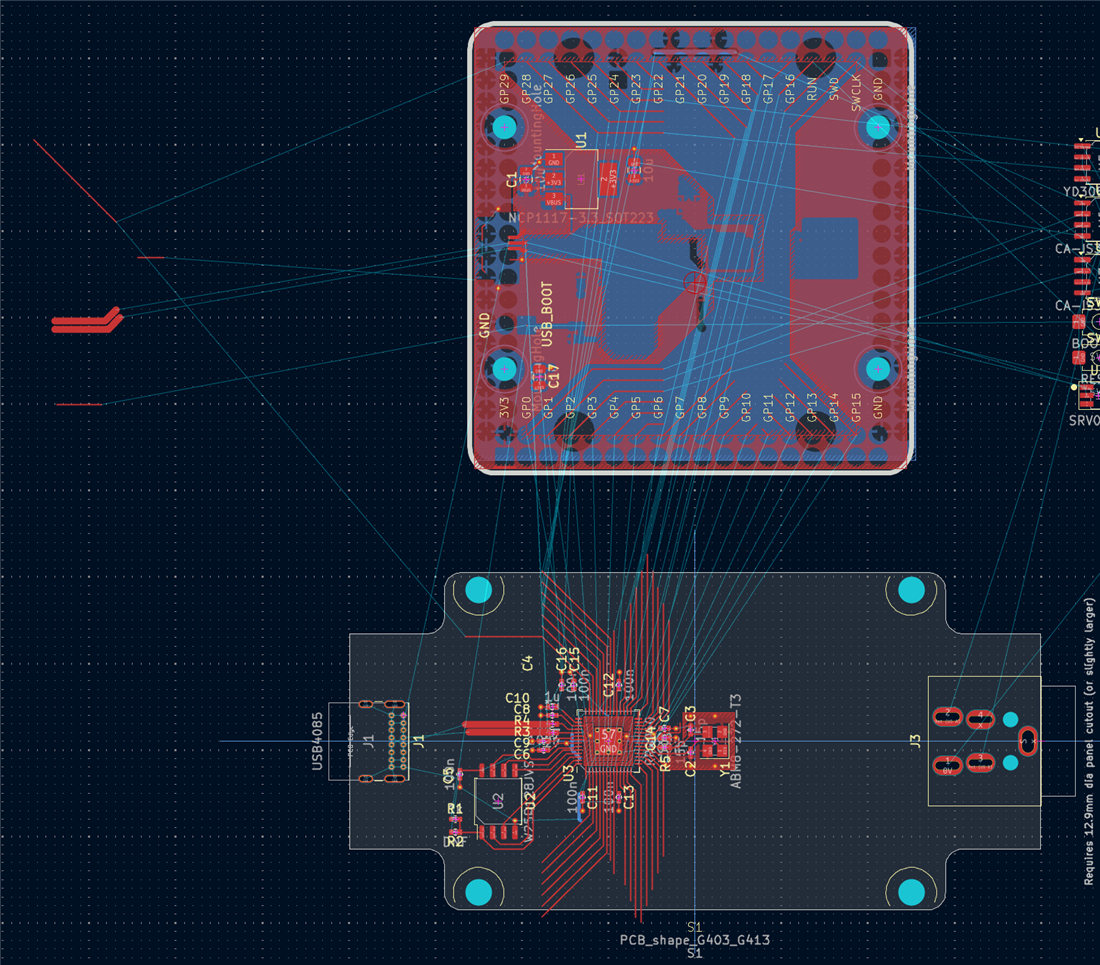
The corresponding PCB layout is shown below. My plan is to reuse parts of this design while adapting it to fit the shape and requirements of my own PCB:

image

By examining the minimal PCB layout, it was possible to see that nearly all traces were on the top layer, with just a few on the underside, leaving the majority of the bottom copper being a ground plane.

Next, I modified the schematic by removing the components I didn’t need and adding the functionality I wanted. For example, I removed the pin headers and the Micro-B USB connector, replacing the latter with a USB-C connector. I also added RS-485 circuitry to one of the UART ports, since the board is intended to function as an RS-485 adapter.

You’ll also notice a 10-pin connector that appears to be underutilised. That’s intentional. I plan to route several unused GPIO pins to that connector in case I need them later. I haven’t assigned specific GPIOs yet; I’ll wait until the connector has been placed on the PCB so that I can choose whichever pins are physically closest. Anything that makes trace routing a little easier is worth considering!

image

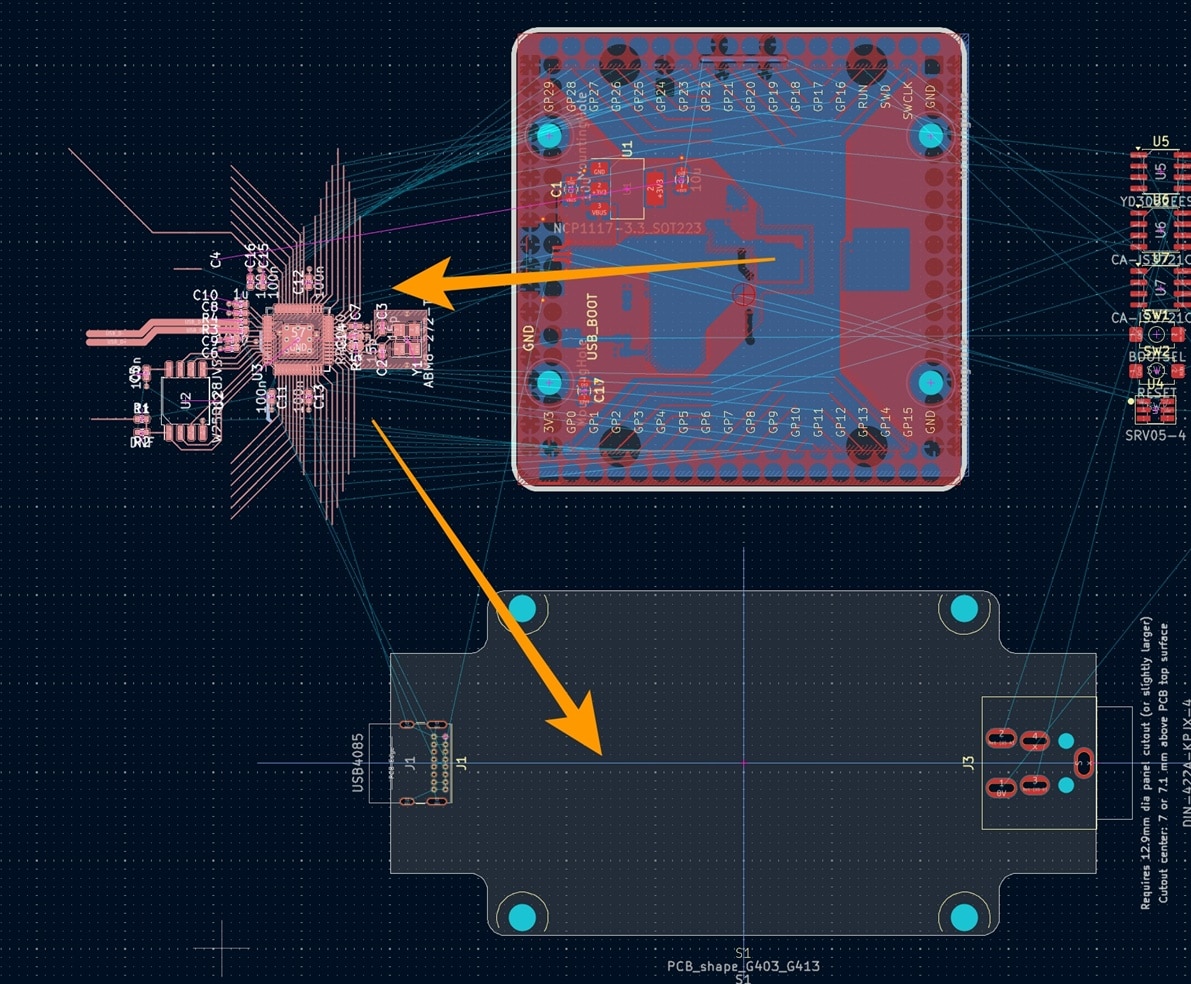
With the schematic updated, I switched to the PCB editor and took a screenshot of the original layout for reference. I then selected the main central portion of the circuitry and moved it onto my new PCB outline.
image

The result looked promising:

image

The original design includes a top-layer +3.3 V copper fill zone, and I wanted to preserve part of that arrangement. To do this, I simply created a new fill zone and roughly followed the outline of the original design, almost like connecting the dots.

image

Once that was done, I moved the new fill zone into its final position. In hindsight, it would have been easier to create the fill zone first and move it together with the rest of the circuitry, but it only took a few moments to fix. The layout was already starting to come together nicely.

image

Next, I selected the voltage regulator section from the original PCB and moved it into the desired location on the new board. Since I no longer needed any of the remaining elements from the original PCB layout, I deleted them. At this point, the project had effectively become a normal PCB design exercise, with the remaining tasks being component placement and trace routing.

image

I’ll write a Part 2 (EDIT: Here is part 2: (+) Getting Custom RP2040 Boards Produced and Assembled with KiCad, Part 2! - element14 Community ) once the layout is complete. I suspect it will be an even shorter post, since everything appears to be progressing smoothly so far.

Thanks for reading!

  • Sign in to reply

Top Comments

  • shabaz
    shabaz 10 days ago +2
    I wonder if the Raspberry Pi people every got one of these PCBs assembled.. they have traces not running through the center of pads. These are lightweight 0402 parts, they will rotate as the solder reflows…
  • arvindsa
    arvindsa 7 days ago +1
    I came here from your Part 2 of this post. Looking at the PCB Layout of the original PCB, I see a lot of polygon on top layer for the 3.3V Net. Now before I say something more, I have to say that I believe…
  • arvindsa
    arvindsa 7 days ago in reply to geralds +1
    I know that the pcb was from 3rd party. I put the question to Shabaz for his take on the originaldesign cos he would have studied the original design with more context. If RPi foundation made it for maker…
  • shabaz
    shabaz 5 days ago in reply to geralds

    Done, it's now updated at the GitHub repo. I ended up changing a few of the USB connector pads slightly to work around the connector peg holes, it was easier to get rid of DRC errors this way, than to tighten the design rule settings for the entire board. I think it should still be reliable, since it's only a fraction of a millimetre, and those pads are larger than the others anyway.

    image

    • Cancel
    • Vote Up 0 Vote Down
    • Sign in to reply
    • More
    • Cancel
  • shabaz
    shabaz 5 days ago in reply to geralds

    I swapped the pair connections:

    image

    I'm impressed; it's easier to route that SMD USB-C connector than the through-hole one! Instead of any via on the data signals, there is just one via for the 5.1k resistor. I'm really happy with that. Now just tidying up a few things and will then update the GitHub repo.

    image

    • Cancel
    • Vote Up 0 Vote Down
    • Sign in to reply
    • More
    • Cancel
  • geralds
    geralds 5 days ago in reply to shabaz

    yes, it looks good. Sunglasses

    Is U4 right placed? I must rotate it. Or have you changed the diode-pair in the schematics?

    • Cancel
    • Vote Up 0 Vote Down
    • Sign in to reply
    • More
    • Cancel
  • shabaz
    shabaz 5 days ago in reply to geralds

    Ah no problem, I made a few tweaks to the footprint because GCT had used an slightly unusual way of combining some of the pads (it was fine, but just different to how I make pads), and I believe it's looking good:

    image

    Just working on the traces to that now, and I swapped the LED to surface mount too.

    • Cancel
    • Vote Up 0 Vote Down
    • Sign in to reply
    • More
    • Cancel
  • geralds
    geralds 5 days ago in reply to shabaz

    Hi  shabaz 

    You're welcome. But sorry, a bit mistake happened including into the zip file - the step file of the USB4930 was missing. Please, here is it:

    USB405-GF-A_USB4930-00-A_GCT.zip

    Gerald

    ---

    • Cancel
    • Vote Up 0 Vote Down
    • Sign in to reply
    • More
    • Cancel
>
element14 Community

element14 is the first online community specifically for engineers. Connect with your peers and get expert answers to your questions.

  • Members
  • Learn
  • Technologies
  • Challenges & Projects
  • Products
  • Store
  • About Us
  • Feedback & Support
  • FAQs
  • Terms of Use
  • Privacy Policy
  • Legal and Copyright Notices
  • Sitemap
  • Cookies

An Avnet Company © 2026 Premier Farnell Limited. All Rights Reserved.

Premier Farnell Ltd, registered in England and Wales (no 00876412), registered office: Farnell House, Forge Lane, Leeds LS12 2NE.

Follow element14

  • X
  • Facebook
  • linkedin
  • YouTube