element14 Community
element14 Community
    Register Log In
  • Site
  • Search
  • Log In Register
  • Community Hub
    Community Hub
    • What's New on element14
    • Feedback and Support
    • Benefits of Membership
    • Personal Blogs
    • Members Area
    • Achievement Levels
  • Learn
    Learn
    • Ask an Expert
    • eBooks
    • element14 presents
    • Learning Center
    • Tech Spotlight
    • STEM Academy
    • Webinars, Training and Events
    • Learning Groups
  • Technologies
    Technologies
    • 3D Printing
    • FPGA
    • Industrial Automation
    • Internet of Things
    • Power & Energy
    • Sensors
    • Technology Groups
  • Challenges & Projects
    Challenges & Projects
    • Design Challenges
    • element14 presents Projects
    • Project14
    • Arduino Projects
    • Raspberry Pi Projects
    • Project Groups
  • Products
    Products
    • Arduino
    • Avnet & Tria Boards Community
    • Dev Tools
    • Manufacturers
    • Multicomp Pro
    • Product Groups
    • Raspberry Pi
    • RoadTests & Reviews
  • About Us
  • Store
    Store
    • Visit Your Store
    • Choose another store...
      • Europe
      •  Austria (German)
      •  Belgium (Dutch, French)
      •  Bulgaria (Bulgarian)
      •  Czech Republic (Czech)
      •  Denmark (Danish)
      •  Estonia (Estonian)
      •  Finland (Finnish)
      •  France (French)
      •  Germany (German)
      •  Hungary (Hungarian)
      •  Ireland
      •  Israel
      •  Italy (Italian)
      •  Latvia (Latvian)
      •  
      •  Lithuania (Lithuanian)
      •  Netherlands (Dutch)
      •  Norway (Norwegian)
      •  Poland (Polish)
      •  Portugal (Portuguese)
      •  Romania (Romanian)
      •  Russia (Russian)
      •  Slovakia (Slovak)
      •  Slovenia (Slovenian)
      •  Spain (Spanish)
      •  Sweden (Swedish)
      •  Switzerland(German, French)
      •  Turkey (Turkish)
      •  United Kingdom
      • Asia Pacific
      •  Australia
      •  China
      •  Hong Kong
      •  India
      • Japan
      •  Korea (Korean)
      •  Malaysia
      •  New Zealand
      •  Philippines
      •  Singapore
      •  Taiwan
      •  Thailand (Thai)
      • Vietnam
      • Americas
      •  Brazil (Portuguese)
      •  Canada
      •  Mexico (Spanish)
      •  United States
      Can't find the country/region you're looking for? Visit our export site or find a local distributor.
  • Translate
  • Profile
  • Settings
Raspberry Pi
  • Products
  • More
Raspberry Pi
Documents 10 Years of Raspberry Pi - Longest Serving Raspberry Pi Projects Competition
  • Blog
  • Forum
  • Documents
  • Quiz
  • Events
  • Polls
  • Files
  • Members
  • Mentions
  • Sub-Groups
  • Tags
  • More
  • Cancel
  • New
Join Raspberry Pi to participate - click to join for free!
Actions
  • Share
  • More
  • Cancel
Engagement
  • Author Author: e14phil
  • Date Created: 10 Mar 2022 2:46 PM Date Created
  • Last Updated Last Updated: 1 Jul 2022 8:52 AM
  • Views 8856 views
  • Likes 11 likes
  • Comments 20 comments
Related
Recommended

10 Years of Raspberry Pi - Longest Serving Raspberry Pi Projects Competition

Let us know about your longest serving  Raspberry Pi projects! image

Have you created an amazing and awe-inspiring project using a Raspberry Pi that is still going strong?

Were you one of the first to purchase a Raspberry Pi from Farnell’s website in 2012 and that same board is still in operation?

Or does your school or coding club have an example the longest serving Raspberry Pi used in education?

To celebrate a decade-long partnership between Farnell and Raspberry Pi, we are looking for the top 10 applications which showcase examples of the longest serving Raspberry Pi.

All you have to do is share your story to be in with the chance of winning some fantastic prizes.

Use the space below to tell us about your Raspberry Pi application, including as much detail as possible about your project such as what you set out to achieve, how it was a success and – most important of all – when you built it.

The 10 best examples of 10 years of Raspberry Pi use will receive a major prize including 10 Raspberry Pi Picos and a Raspberry Pi NOIR 8MP Camera, to either keep for themselves or donate as they choose. For example, a winner may want to re-gift their prize to their local school to inspire the next generation of programmers.
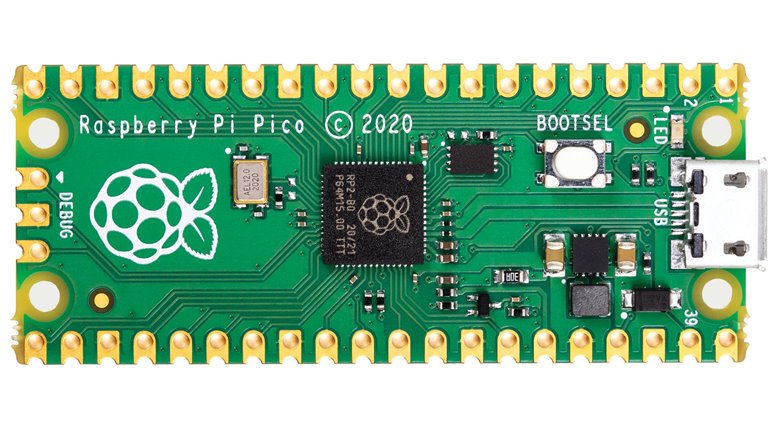
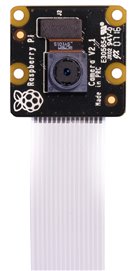
imageimage

Ten bundles of 10X Raspberry Pi Pico and Raspberry Pi NoIR Cameras are to be given away

Closing date for entries is Saturday, 30th April 2022. Terms & Conditions apply (see below) and the judges’ decision is final.


About Raspberry Pi

Raspberry Pi was launched with the aim of reversing the decline in applications to study Computer Science at Cambridge University by providing young people with a fun, robust, low-cost computer with which they could learn to program. In the decade since, Raspberry Pi has sold tens of millions of units around the world to help people to learn programming skills, build hardware projects, do home automation and even use them in industrial applications.


Ten winners will each receive 10 Raspberry Pi Picos and a Raspberry Pi NOIR 8MP Camera

Step 1: Log in or register on element14, it's easy and free.

Step 2: Post in the comments section below as much detail as possible regarding your project including what you set out to achieve, what inspired you, how it was a success and when you built it. Videos, pictures and text are all welcomed forms of submission. At least one photograph must be submitted as part of your entry to evidence your Raspberry Pi application in action.

And that’s it! Judges will review all entries submitted before the closing date of April 30, with the 10 winners announced in May. All winners must agree for their details to be used in promotional activity relating to the competition.

  • 10yearsofpi
  • Share
  • History
  • More
  • Cancel
  • Sign in to reply

Top Comments

  • Jan Cumps
    Jan Cumps over 3 years ago +2
    I've made a test instrument: an Electronics LAB switch for Test Automation . It is SCPI compatible, can be controlled with LabVIEW. https://youtu.be/d_rm3Wi2roc It's purpose is to be part of…
  • ralphjy
    ralphjy over 3 years ago +2
    I actually have a few of the original RPi Model B boards. It's been a while, so I don't remember where I purchased them. And unfortunately, they aren't still in use (although they all still should function…
  • vinayyn
    vinayyn over 3 years ago +1
    Last Year I had Made a Blood pressure sensor Interface with Raspberry-pi .This Project Is made on Demand of a Person From USA,He wanted to classify and Get The Blood Pressure Details In The Email. After…
  • beacon_dave
    beacon_dave over 3 years ago in reply to dougw

    Were you doing anything interesting for the hit detection with the audio signal from the microphone ? Sounds like there is a distinctive ring off the bat.

    • Cancel
    • Vote Up 0 Vote Down
    • Sign in to reply
    • More
    • Cancel
  • dougw
    dougw over 3 years ago

    I used a Raspberry Pi Model 1B in 2014 to make a camera that would capture video of a softball player running to first base by detecting the hit and panning a PiCam.

    You don't have permission to edit metadata of this video.
    Edit media
    x
    image
    Upload Preview
    image

    You don't have permission to edit metadata of this video.
    Edit media
    x
    image
    Upload Preview
    image

    That Raspberry Pi is still running but has been re-purposed a couple of times.

    • Cancel
    • Vote Up 0 Vote Down
    • Sign in to reply
    • More
    • Cancel
  • e14phil
    e14phil over 3 years ago in reply to ntewinkel

    Yea! they are not natively compatible, but both super useful to have in the kit bag :)

    • Cancel
    • Vote Up 0 Vote Down
    • Sign in to reply
    • More
    • Cancel
  • mauvedeity
    mauvedeity over 3 years ago

    So, about eight years ago, I made a small application running on my Pi model B that checks the traffic on the motorway and sends a notification to my phone if there's a problem that would delay me on my commute. I initially made it as part of learning Python3. It's still running, and I check it whenever I go to the office or leave there to come home. Code is available at the GitHub repository for it, and I've included some screenshots.

    Screenshots from Pushover showing traffic information sent from Rasping

    Oh, and it's also running a small program called dcled which drives the clock you can see next to the Pi here.

    RasPi in case with digital clock

    And it's running the Internet Zombie I made in 2009 because it made me laugh.

    • Cancel
    • Vote Up +1 Vote Down
    • Sign in to reply
    • More
    • Cancel
  • ntewinkel
    ntewinkel over 3 years ago

    For a moment there I thought I had missed a memo about the Pico being able to run the Pi NoIR camera! But I guess the two are not related in the prize pack Laughing

    • Cancel
    • Vote Up +1 Vote Down
    • Sign in to reply
    • More
    • Cancel
  • vinayyn
    vinayyn over 3 years ago

    Last Year I had Made a Blood pressure sensor Interface with Raspberry-pi.This Project Is made on Demand of a Person From USA,He wanted to classify and Get The Blood Pressure Details In The Email. After that, I published the Project in Open source Communities. It had helped a Few Peoples To monitor the Blood Pressure details Of Their Loved Ones. 

    /products/raspberry-pi/b/blog/posts/blood-pressure-sensor-interfacing-with-raspberry-pi

    image

    Image Of the Project

    image

               Block Diagram Of the Project

    Email Screenshot

    Email Screenshot

    Blood Pressure Details Data In the Email

    • Cancel
    • Vote Up +1 Vote Down
    • Sign in to reply
    • More
    • Cancel
  • ntewinkel
    ntewinkel over 3 years ago

    In the winter of 2016/17 I built a sprinkler controller board for my Raspberry Pi 1 B+, which was my first Raspberry Pi, provided to me by the amazing folks right here at element14 Slight smile

    It has already served 5 summers of automatic lawn and yard watering (and pond topping-upping), and is about to jump into watering season #6.
    That's with the original SD card too (I have a backup, just in case!).

    I do intend to eventually update to using a newer Pi that can also run my home sensors server (NodeRed, InfluxDB, Mosquitto) at the same time. Right now that server is running on a separate newer Pi 3, in a nice heatsink case. If I recall correctly, that original board did not work with the faster newer Raspberry Pi computers. Maybe the shift registers I used were not up to spec for it. I've tried rebuilding the control board (that PCB came in a 10-pack!), but ran into other issues. I've recently added some of those parts into a shopping-cart prize, so I can work on that this summer.

    For now though - if it aint broke... I'll likely just keep it running for as long as it wants to keep running Smile

    Raspberry Pi Sprinkler System

    That's an older picture, but nothing has changed - it's in the basement just doing its thing Slight smile
    Part of the reason for updating would be to make it prettier, but it's in the basement so no pressure.

    The software doing the work is OpenSprinkler Pi from OpenSprinkler.org. You can also just buy a (much prettier) control board from them. In my case I was just a few zones shy of the main board, plus I wanted a good puzzle - this is the first ever PCB I've created (also still the only one).
    That actually went better than I expected it to go - the PCB made everything a whole lot easier to build, and the only thing I had to add was a resistor to fix a startup glitch. That was easy to just solder across the back.

    Here is a picture of my breadboard prototype.

    Sprinkler Pi on breadboard

    I had a LOT of trouble figuring out how to use triacs to deal with the 24volt AC current that opens the sprinkler valves - it's a whole different world than the DC transistors I'm used to. With help from the element14 community here, however, I was able to get it working.
    I still have two big boards full of relays that I bought just in case Sweat smile

    Cheers,
    -Nico

    • Cancel
    • Vote Up 0 Vote Down
    • Sign in to reply
    • More
    • Cancel
  • me_Cris
    me_Cris over 3 years ago

    I was learning with a friend how to work with a Raspberry Pi, he had the platform and I had other hardware, resistor, LEDs, dc motor and so on. We practiced a few things and then embarked on some projects.
    I borrowed the platform from him and started my first serious project with the Raspberry Pi, based on facial recognition, a video camera recognizes my face and if this condition is validated, a servomotor rotates at the angle I set in the program. I did this project a year and a few months ago, as a college project; the idea was to represent a system with applications in the automotive industry, when the driver gets behind the wheel, the seat should be adjusted automatically, practically, according to the driver's preferences. At the same time, the seat can be moved back and forth, and the backrest can also be adjusted. Exterior mirrors could also be considered, which can also be adjusted. Today's technology is constantly evolving, inspiration and novelty will always be.
    To simulate these things, I used the Raspberry Pi for its computing power, the PCA9685 HAT as a driver for the SG90 sermotor, this I had at my disposal, and a webcam with usb interface. Behind these hardware components is obviously a software component, a powerful library, OpenCV, I learned how to use a facial recognition program, and I added a servomotor for mechanical operation. I need to add another servomotor and possibly a display on which I display some information, it would complete this application even more.
    We all know the Raspberry Pi platform, computing power, compact device, succulent peripherals. A circuit dedicated to controlling standard servomotors that uses this PCA9685 as the main integrated requires only two pins to communicate with Pi, namely SDA (Serial Data Line) and SCL (Serial Clock Line), thus considerably reducing the number of connections required. made between the circuit and the work platform, and by default more space remains available for the use of the other general I / O ports. Moreover, we can thus control all 16 available outputs, up to 62 such circuits can be connected in cascade with PCA9685, which means that up to 992 servomotors can be controlled simultaneously. The frequency at which the PWM is applied and the filling factor can be managed for a more precise control of the servomotor by programming the controller. For example, by setting the time duration for the "ON" state of each channel and changing the fill factor, it can be done independently by setting registers. If the register corresponding to the "ON" state is set to 409 and the register for the "OFF" state is 1228, then the percentage fill factor is: (1228-409 / 4096) x 100% = 20%.
    The servomotor control circuit can be powered in two ways: the first is via the VCC pin, which connects to the 3.3V on the Raspberry Pi board. By powering the circuit, it will always be turned on if the Raspberry Pi platform is also powered. Note that it is not recommended to connect even a single LED to this driver, as even an absorbed current of 20mA can destroy the entire device. The second case is for the situation when using actuators, then 5-6Vdc external power supply required. Several servomotors connected simultaneously consume more power by default, depending on the model. If 3-4 servomotors are connected simultaneously, the external power supply should support loads up to 2A.
    The facial recognition process is based on the use of the HOG (Histogram of Oriented Gradients) feature descriptor as a method of detecting a person's face.
    If the result is the desired one, then the servomotor will perform a rotation operation at a 90 ° angle, and a message with its name will appear on the frame around the person's face. If the person is not in the database, the program will tell you that it does not recognize that person by displaying the message "Unknown" and the actuator will perform a rotation operation at a 0 ° angle.

    imageimageimageimageimage

    • Cancel
    • Vote Up 0 Vote Down
    • Sign in to reply
    • More
    • Cancel
  • ralphjy
    ralphjy over 3 years ago

    I actually have a few of the original RPi Model B boards.  It's been a while, so I don't remember where I purchased them.  And unfortunately, they aren't still in use (although they all still should function?) as they were used for primarily learning and prototyping.  I'll see if I can dig them up.

    One project that I found is a stepper motor controller where I interfaced a stepper motor using an L293 H-bridge.

    image

    I had added a WiFi dongle and a small proto board for the H-bridge and the interface buffer (74HCT04).  The external cable is to provide the motor power and it's hard to see but there is a 4 pin header next to the H-bridge to connect the motor.

    image

    The bottom photo shows the case that I had 3D printed with a Velleman K8200 that I had just built.

    image

    And the bottom of the proto board showing the wiring.  Doubt that I could find a schematic - I may not have created one.

    Anyway, the longest continuously running RPi that I have is an RPi 3 Model B that serves as the interface for my IP camera monitor.  That has been running since 2017 and is part of this project Smart Home Security Camera System.

    • Cancel
    • Vote Up +2 Vote Down
    • Sign in to reply
    • More
    • Cancel
  • Jan Cumps
    Jan Cumps over 3 years ago

    I've made a test instrument: an Electronics LAB switch for Test Automation.

    image

    It is SCPI compatible, can be controlled with LabVIEW.

    You don't have permission to edit metadata of this video.
    Edit media
    x
    image
    Upload Preview
    image

    It's purpose is to be part of an electronics test setup, where signals or power rails have to be switched in or out during the test.
    Components:

    • a Pi
    • PiFace
    • DIN Housing
    • custom LAN SCPI driver and firmware
    • custom LabVIEW driver

    Blog on element14: SCPI on a Linux Board.

    image

    • Cancel
    • Vote Up +2 Vote Down
    • Sign in to reply
    • More
    • Cancel
<
element14 Community

element14 is the first online community specifically for engineers. Connect with your peers and get expert answers to your questions.

  • Members
  • Learn
  • Technologies
  • Challenges & Projects
  • Products
  • Store
  • About Us
  • Feedback & Support
  • FAQs
  • Terms of Use
  • Privacy Policy
  • Legal and Copyright Notices
  • Sitemap
  • Cookies

An Avnet Company © 2026 Premier Farnell Limited. All Rights Reserved.

Premier Farnell Ltd, registered in England and Wales (no 00876412), registered office: Farnell House, Forge Lane, Leeds LS12 2NE.

ICP 备案号 10220084.

Follow element14

  • X
  • Facebook
  • linkedin
  • YouTube