element14 Community
element14 Community
    Register Log In
  • Site
  • Search
  • Log In Register
  • Community Hub
    Community Hub
    • What's New on element14
    • Feedback and Support
    • Benefits of Membership
    • Personal Blogs
    • Members Area
    • Achievement Levels
  • Learn
    Learn
    • Ask an Expert
    • eBooks
    • element14 presents
    • Learning Center
    • Tech Spotlight
    • STEM Academy
    • Webinars, Training and Events
    • Learning Groups
  • Technologies
    Technologies
    • 3D Printing
    • FPGA
    • Industrial Automation
    • Internet of Things
    • Power & Energy
    • Sensors
    • Technology Groups
  • Challenges & Projects
    Challenges & Projects
    • Design Challenges
    • element14 presents Projects
    • Project14
    • Arduino Projects
    • Raspberry Pi Projects
    • Project Groups
  • Products
    Products
    • Arduino
    • Avnet & Tria Boards Community
    • Dev Tools
    • Manufacturers
    • Multicomp Pro
    • Product Groups
    • Raspberry Pi
    • RoadTests & Reviews
  • About Us
  • Store
    Store
    • Visit Your Store
    • Choose another store...
      • Europe
      •  Austria (German)
      •  Belgium (Dutch, French)
      •  Bulgaria (Bulgarian)
      •  Czech Republic (Czech)
      •  Denmark (Danish)
      •  Estonia (Estonian)
      •  Finland (Finnish)
      •  France (French)
      •  Germany (German)
      •  Hungary (Hungarian)
      •  Ireland
      •  Israel
      •  Italy (Italian)
      •  Latvia (Latvian)
      •  
      •  Lithuania (Lithuanian)
      •  Netherlands (Dutch)
      •  Norway (Norwegian)
      •  Poland (Polish)
      •  Portugal (Portuguese)
      •  Romania (Romanian)
      •  Russia (Russian)
      •  Slovakia (Slovak)
      •  Slovenia (Slovenian)
      •  Spain (Spanish)
      •  Sweden (Swedish)
      •  Switzerland(German, French)
      •  Turkey (Turkish)
      •  United Kingdom
      • Asia Pacific
      •  Australia
      •  China
      •  Hong Kong
      •  India
      • Japan
      •  Korea (Korean)
      •  Malaysia
      •  New Zealand
      •  Philippines
      •  Singapore
      •  Taiwan
      •  Thailand (Thai)
      • Vietnam
      • Americas
      •  Brazil (Portuguese)
      •  Canada
      •  Mexico (Spanish)
      •  United States
      Can't find the country/region you're looking for? Visit our export site or find a local distributor.
  • Translate
  • Profile
  • Settings
Raspberry Pi
  • Products
  • More
Raspberry Pi
Documents Raspberry Pi 3 Model A+ Unboxing
  • Blog
  • Forum
  • Documents
  • Quiz
  • Events
  • Polls
  • Files
  • Members
  • Mentions
  • Sub-Groups
  • Tags
  • More
  • Cancel
  • New
Join Raspberry Pi to participate - click to join for free!
Actions
  • Share
  • More
  • Cancel
Engagement
  • Author Author: e14phil
  • Date Created: 1 Nov 2018 11:11 AM Date Created
  • Last Updated Last Updated: 28 Jan 2019 3:26 PM
  • Views 4666 views
  • Likes 9 likes
  • Comments 17 comments
Related
Recommended

Raspberry Pi 3 Model A+ Unboxing


You don't have permission to edit metadata of this video.
Edit media
x
image
Upload Preview
image

Unboxing the Raspberry Pi 3 Model A+

Buy The Raspberry Pi 3 Model A+

Buy Raspberry Pi 3 Model A+ Buy Raspberry Pi 3 Model A+


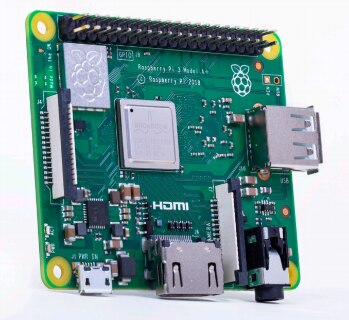
Introducing the Raspberry Pi 3 Model A+, the latest product in the Raspberry Pi 3 range.

Like the Raspberry Pi 3 Model B+, it boasts a 64-bit quad core processor running at 1.4 GHz, dual-band 2.4 GHz and 5 GHz wireless LAN, and Bluetooth 4.2/BLE.

The dual-band wireless LAN comes with modular compliance certification, allowing the board to be designed into end products with significantly reduced wireless LAN compliance testing, improving both cost and time to market.

 

imageimage


The Raspberry Pi 3 Model A+ has the same mechanical footprint as the Raspberry Pi 1 Model A+

imageimage


Raspberry Pi 3 Model A+ Specifications


Processor:

Broadcom BCM2837B0,

Cortex-A53 64-bit SoC @ 1.4 GHz


Memory:

512MB LPDDR2 SDRAM


Connectivity:

2.4 GHz and 5 GHz IEE 802.11.b/g/n/ac wireless LAN, Bluetooth 4.2/BLE


Access:

Extended 40-pin GPIO header


Video & sound:

1 × full size HDMI

MIPI DSI display port

MIPI CSI camera port

4 pole stereo output and composite video port


Multimedia:

H.264, MPEG-4 decode (1080p30);

H.264 encode (1080p30);

OpenGL ES 1.1, 2.0 graphics


SD card support:

Micro SD format for loading operating system and data storage


Input power:

5 V/2.5 A DC via micro USB connector

5 V DC via GPIO header


Environment:

Operating temperature, 0–50°C


Compliance:

For a full list of local and regional product approvals, please visit: www.raspberrypi.org/products/raspberry-pi-3-model-a+


Production lifetime:

The Raspberry Pi 3 Model A+ will remain in production until at least January 2023

  • raspberry pi 3 a plus
  • rpi3aplus
  • rpi 3 a+
  • raspberry pi
  • raspberrypi
  • rpi
  • raspberry pi 3 a+
  • rpi 3 a plus
  • raspberry pi model a plus
  • Share
  • History
  • More
  • Cancel
  • Sign in to reply

Top Comments

  • shabaz
    shabaz over 7 years ago +4
    Nice! I had not realized that the new 3 Model B+ and now the 3 Model A+ have dual-band WLAN... so I'm glad you mentioned it in the video!! Also it supports 802.11ac which is highly attractive, I saw some…
  • mp2100
    mp2100 over 7 years ago in reply to shabaz +4
    Hi @shabaz. I agree this model is a nice addition to the rPi line. The quad processor makes for good performance. But it’s still a cost vs. performance decision. In the US, Microcenter sells the Pi Zero…
  • shabaz
    shabaz over 7 years ago +3
    Here's the current consumption at power-up.. the scenario was that the Pi 3 A+ was connected via HDMI, and a Logitech Unifying receiver (used for wireless keyboard and mouse) was plugged into the single…
  • rew
    rew over 7 years ago in reply to 14rhb

    Sizing such a supercap would be very difficult: So you measure for a working day, find that it uses less than 1.5W all day and decide to use a 1.5W powersupply. So you add you supercap and set it running.


    Then... the next day you find it crashed during the night because it rotated the logfiles and compressed them. So while compressing it used over 2W for ten second.


    So, when you have that figured out, you add a bigger capacitor and set it running again. Now it runs nicely for a while until say some monthly job runs that uses the "2W" for much longer than just the compress-the-normal-logfile. So again it crashes.


    It is really difficult to find an appropriate value that will always work. But the 1.25W "normal" and just over 2.5W peak numbers are so low that a mains power supply will probably be an 2.5 or 5W USB charger. That will give you some headroom.

    • Cancel
    • Vote Up +3 Vote Down
    • Sign in to reply
    • More
    • Cancel
  • 14rhb
    14rhb over 7 years ago in reply to shabaz

    Hi Shabaz,


    That is really interesting and I'm sure you are the first to produce such a plot. Following on from some recent discussions on E14 community, perhaps a super capacitor could be utilised to enable the Pi to operate on a much lower VA power supply; supplying the extra energy during WAN activity and intensive processing. The risk would be that, without any form of closed loop energy monitoring/throttling back the ARM activity, the capacitor becomes exhausted, the light-weight PSU cannot provide the demanded current, Vout drops effectively turning the Pi off without a proper shut down (possibly damaging the OS image).


    On reflection, probably best to just use the recommended PSU image


    Rod

    • Cancel
    • Vote Up +2 Vote Down
    • Sign in to reply
    • More
    • Cancel
  • shabaz
    shabaz over 7 years ago

    Here's the current consumption at power-up.. the scenario was that the Pi 3 A+ was connected via HDMI, and a Logitech Unifying receiver (used for wireless keyboard and mouse) was plugged into the single USB - hopefully that should be representative of how the Pi may be connected for other users too.

    To do the test, power (5V) was applied to the pins on the 40-way connector instead of the USB connector.


    image

    The Logitech receiver consumes 25mA, so if it is not plugged in, then 25mA can be subtracted from the values in the chart. If I do not plug in the HDMI connector, then a further 16mA can be removed.

    Note that as soon as there is WLAN activity, or any significant processing of course, then the current will spike up as expected. The spikes can be very brief for the wireless, so the connected power supply needs to be able to support that. Here's some typical behaviour over about 10 seconds, when the system is doing nothing.. there is the occasional spike due to brief processing by the OS, network and so on.


    image

    I didn't run any load tests, but it is normal under load for the current consumption to significantly rise (perhaps 1.5A in extreme cases - just a guess based on old Pi 3 model B behaviour) depending on exactly what is running.

    • Cancel
    • Vote Up +3 Vote Down
    • Sign in to reply
    • More
    • Cancel
  • shabaz
    shabaz over 7 years ago in reply to mp2100

    Hi Allen,


    I'll take some measurements tonight hopefully, I'm guessing it could be maybe close to 3B levels (but slightly less since there is no USB hub/Ethernet chip). I need to locate a microSD card.. always forget to order those! : )

    • Cancel
    • Vote Up +2 Vote Down
    • Sign in to reply
    • More
    • Cancel
  • mp2100
    mp2100 over 7 years ago in reply to shabaz

    Hi @shabaz. I agree this model is a nice addition to the rPi line.  The quad processor makes for good performance.  But it’s still a cost vs. performance decision.  In the US, Microcenter sells the Pi Zero for as low as $5.  Great for IoT projects, with the lower power requirements, with slow processing speed.  And when you want to hide the IoT project in a small space the Pi Zero is impressive.  The microcenter.com web site says they won’t have the model 3 A+ until November 28, at a price of $25.  I didn’t hear a power usage mentioned in the video above.  The text says 2.5 amp power supply, but what's the actual amps used.  I’ll look around for that information, the model 3 B+ is power hungry.


    Decisions, decisions . . .

    • Cancel
    • Vote Up +4 Vote Down
    • Sign in to reply
    • More
    • Cancel
  • 14rhb
    14rhb over 7 years ago

    Same performance but by loosing some memory and a few USB connectors they have brought the price down considerably - what a great addition to their range.


    Rod

    • Cancel
    • Vote Up +2 Vote Down
    • Sign in to reply
    • More
    • Cancel
  • shabaz
    shabaz over 7 years ago

    Nice!

    I had not realized that the new 3 Model B+ and now the 3 Model A+ have dual-band WLAN... so I'm glad you mentioned it in the video!!

    Also it supports 802.11ac which is highly attractive, I saw some test online that shows the new models can have at least twice the throughput compared to the older 3B.

    However it could be possible to go higher (I don't know what speed the SPI interface to the Cypress/Broadcom chip gets to), a lot of the tests were not clear on what the access point was capable of.

    I think for all-round value for money, and looking at price-performance, based on the specs, this renders the Pi Zero W almost obsolete.

    • Cancel
    • Vote Up +4 Vote Down
    • Sign in to reply
    • More
    • Cancel
<
element14 Community

element14 is the first online community specifically for engineers. Connect with your peers and get expert answers to your questions.

  • Members
  • Learn
  • Technologies
  • Challenges & Projects
  • Products
  • Store
  • About Us
  • Feedback & Support
  • FAQs
  • Terms of Use
  • Privacy Policy
  • Legal and Copyright Notices
  • Sitemap
  • Cookies

An Avnet Company © 2026 Premier Farnell Limited. All Rights Reserved.

Premier Farnell Ltd, registered in England and Wales (no 00876412), registered office: Farnell House, Forge Lane, Leeds LS12 2NE.

ICP 备案号 10220084.

Follow element14

  • X
  • Facebook
  • linkedin
  • YouTube