element14 Community
element14 Community
    Register Log In
  • Site
  • Search
  • Log In Register
  • Community Hub
    Community Hub
    • What's New on element14
    • Feedback and Support
    • Benefits of Membership
    • Personal Blogs
    • Members Area
    • Achievement Levels
  • Learn
    Learn
    • Ask an Expert
    • eBooks
    • element14 presents
    • Learning Center
    • Tech Spotlight
    • STEM Academy
    • Webinars, Training and Events
    • Learning Groups
  • Technologies
    Technologies
    • 3D Printing
    • FPGA
    • Industrial Automation
    • Internet of Things
    • Power & Energy
    • Sensors
    • Technology Groups
  • Challenges & Projects
    Challenges & Projects
    • Design Challenges
    • element14 presents Projects
    • Project14
    • Arduino Projects
    • Raspberry Pi Projects
    • Project Groups
  • Products
    Products
    • Arduino
    • Avnet & Tria Boards Community
    • Dev Tools
    • Manufacturers
    • Multicomp Pro
    • Product Groups
    • Raspberry Pi
    • RoadTests & Reviews
  • About Us
  • Store
    Store
    • Visit Your Store
    • Choose another store...
      • Europe
      •  Austria (German)
      •  Belgium (Dutch, French)
      •  Bulgaria (Bulgarian)
      •  Czech Republic (Czech)
      •  Denmark (Danish)
      •  Estonia (Estonian)
      •  Finland (Finnish)
      •  France (French)
      •  Germany (German)
      •  Hungary (Hungarian)
      •  Ireland
      •  Israel
      •  Italy (Italian)
      •  Latvia (Latvian)
      •  
      •  Lithuania (Lithuanian)
      •  Netherlands (Dutch)
      •  Norway (Norwegian)
      •  Poland (Polish)
      •  Portugal (Portuguese)
      •  Romania (Romanian)
      •  Russia (Russian)
      •  Slovakia (Slovak)
      •  Slovenia (Slovenian)
      •  Spain (Spanish)
      •  Sweden (Swedish)
      •  Switzerland(German, French)
      •  Turkey (Turkish)
      •  United Kingdom
      • Asia Pacific
      •  Australia
      •  China
      •  Hong Kong
      •  India
      • Japan
      •  Korea (Korean)
      •  Malaysia
      •  New Zealand
      •  Philippines
      •  Singapore
      •  Taiwan
      •  Thailand (Thai)
      • Vietnam
      • Americas
      •  Brazil (Portuguese)
      •  Canada
      •  Mexico (Spanish)
      •  United States
      Can't find the country/region you're looking for? Visit our export site or find a local distributor.
  • Translate
  • Profile
  • Settings
Raspberry Pi
  • Products
  • More
Raspberry Pi
Documents Raspberry Pi High Quality Camera
  • Blog
  • Forum
  • Documents
  • Quiz
  • Events
  • Polls
  • Files
  • Members
  • Mentions
  • Sub-Groups
  • Tags
  • More
  • Cancel
  • New
Join Raspberry Pi to participate - click to join for free!
Actions
  • Share
  • More
  • Cancel
Engagement
  • Author Author: e14phil
  • Date Created: 30 Apr 2020 7:18 AM Date Created
  • Last Updated Last Updated: 30 Apr 2020 8:47 AM
  • Views 6506 views
  • Likes 13 likes
  • Comments 20 comments
Related
Recommended

Raspberry Pi High Quality Camera

Raspberry Pi High Quality Camera Specs


Wildlife photographers, Home CCTV installers, Computer vision pioneers and Astronomy hackers, REJOICE your prayers have been answered.

Today we are excited to introduce to you the new Raspberry Pi High Quality Camera, a High Quality, 12 Megapixel Sony IMX477 Sensor with interchangeable lenses.

image

Raspberry Pi HQ CameraRaspberry Pi HQ Camera


The Raspberry Pi High Quality Camera is the latest camera accessory from Raspberry Pi.

It offers higher resolution (12 megapixels, compared to 8 megapixels), and sensitivity (approximately 50% greater area per pixel for improved low-light performance) than the existing Camera Module v2, and is designed to work with interchangeable lenses in both C- and CS-mount form factors. Other lens form factors can be accommodated using third-party lens adapters.


The package comprises a circuit board carrying a Sony IMX477 sensor, an FPC cable for connection to a Raspberry Pi computer, a milled aluminium lens mount with integrated tripod mount and focus adjustment ring, and a C- to CS-mount adapter.


You don't have permission to edit metadata of this video.
Edit media
x
image
Upload Preview
image


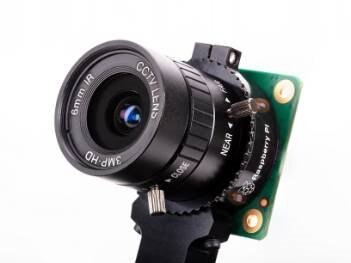
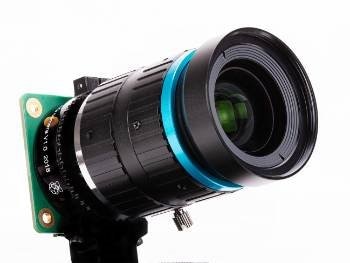
In addition the the Raspberry Pi HQ Camera, two official Lenses have been releases, The 6mm Wide Angle Lens and the 16mm Telephoto Lens, with compatibility for other 3rd Party Lenses through the integrated C and CS Mount.


Raspberry Pi HQ Camera Interchangeable Lenses.
imageimage

Raspberry Pi HQ Camera with 16MM Telephoto Lens

Raspberry Pi HQ CameraRaspberry Pi HQ Camera

RPi 16MM Telephoto LensRPi 16MM Telephoto Lens

Raspberry Pi HQ Camera with 6MM Wide Angle Lens

Raspberry Pi HQ CameraRaspberry Pi HQ Camera

RPi 6MM Wide Angle LensRPi 6MM Wide Angle Lens


Raspberry Pi HQ Camera FAQ


Will this camera work with my Raspberry Pi?

It is compatible with all models of Raspberry Pi computer from Raspberry Pi 1 Model B onwards, using the latest software release from

www.raspberrypi.org.


Do I need to buy a lens?

Yes, the same as a DSLR Camera, you need to pair the Raspberry Pi HQ Camera with a lens. You can Buy one of the two listed above or pair it with any 3rd Party C-Mount or CS-Mount Lens.


What are the Raspberry Pi HQ Camera Specifications


Sensor

Sony IMX477R stacked, back-illuminated sensor

12.3 megapixels

7.9 mm sensor diagonal

1.55 μm × 1.55 μm pixel size

OutputRAW12/10/8, COMP8
Back FocusAdjustable  (12.5mm to 22.4mm)
Lens Mounts

C-Mount

CS-Mount (C-CD Adapter Included)

IR Cut FilterIntegrated
Ribbon Cable Length200mm
Tripod Mound1/4" -20
Compliance

FCC 47 CFR Part 15, Subpart B, Class B Digital Device


Electromagnetic Compatibility Directive (EMC)

2014/30/EU

Restriction of Hazardous Substances (RoHS)

Directive 2011/65/EU

Production Lifetime

The Raspberry Pi High Quality Camera will remain

in production until at least January 2026


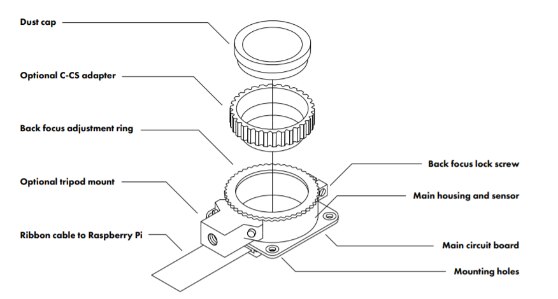
What Camera Mount Does the Rapsberry Pi HQ Camera come with?

The Raspberry Pi HQ Camera has a milled aluminium lens mount with integrated tripod mount and focus adjustment ring, and comes with a C- to

CS-mount adapter.
 

image


How Does the Raspberry Pi HQ Camera connect to my Raspberry Pi?

With an FPC cable, the same as the Raspberry Pi Camera V2. You will need to use the most up to date software for your Raspberry Pi.


Raspberry Pi HQ Camera Dimensions

image


Can you remove the Raspberry Pi HQ Camera's Infrared IR Filter?

Technically Yes... BUT..  but doing so will void the warranty on the product, and is likely to prove irreversible.

Read more info here.


Taking Photos with the Raspberry Pi HQ Camera


First, Make sure your raspberry Pi is up to date by connecting your Raspberry Pi to the internetand running:

sudo apt update  and  sudo apt full-upgrade


Then enable the camera in Raspbian: in the Raspbian menu, select Preferences, then Raspberry Pi Configuration. Click the Interfaces tab, find the Camera entry in the list, and select Enabled. Click OK, and reboot your Raspberry Pi when prompted.


raspistill is a command line tool for capturing camera images.


To check your camera is correctly installed, open a terminal window (Raspbian menu > Accessories > Terminal) and take a test photograph by entering the command:

raspistill -o test.jpg


When you hit ENTER a live preview image will appear, and after a default period of five seconds, the camera will capture a single still image. This will be saved in your home folder and named test.jpg.


To use the camera just as a viewfinder, without saving a photo, use this command:

raspistill -t 0


For more detailed information about installing and operating camera software, refer to

https://www.raspberrypi.org/documentation/configuration/camera.md


For more advanced information about controlling the camera, see

https://www.raspberrypi.org/documentation/raspbian/applications/camera.md


Now the biggest question.... What will you build with a Raspberry Pi HQ Camera?

Attachments:
image20200430 Raspberry Pi High Quality Camera Getting Started.pdf
  • raspberry pi hq camera
  • raspberry pi camera computer vision
  • rpi cctv
  • raspberry pi 4
  • raspberry pi
  • raspberry pi camera for cctv
  • computer vision camera
  • Share
  • History
  • More
  • Cancel
  • Sign in to reply

Top Comments

  • Workshopshed
    Workshopshed over 5 years ago +5
    Would definitely be interested to see how this captures video and if you need to fit out your Pi with additional storage.
  • Problemchild
    Problemchild over 5 years ago in reply to shabaz +5
    Yes Shabaz handy but a tad expensive for what it is then again everyone else charges more for that sensor so maybe they think it can support that price. One thing it does need is some dust protection as…
  • beacon_dave
    beacon_dave over 5 years ago in reply to beacon_dave +5
    8 MegaPixel Sony IMX219 imager with CS mount lens on the left and M12 mount lens on the right.
  • shabaz
    shabaz over 5 years ago in reply to balearicdynamics

    Wow. Microscope image tools are an awesome idea : )

    I hope these modules come back in stock soon.

    • Cancel
    • Vote Up +4 Vote Down
    • Sign in to reply
    • More
    • Cancel
  • Problemchild
    Problemchild over 5 years ago in reply to shabaz

    Yes Shabaz handy but a tad expensive for what it is then again everyone else charges more for that sensor so maybe they think it can support that price.

    One thing it does need is some dust protection as you said ...maybe it's just considered cheap and cheerful  and the glass an additional extra.#

    Will be good on my Inspection Microscope though Shabbaz !

    • Cancel
    • Vote Up +5 Vote Down
    • Sign in to reply
    • More
    • Cancel
  • balearicdynamics
    balearicdynamics over 5 years ago in reply to shabaz

    You are true, I was orienting on the Arducam option(s) before this new entry.


    Enrico

    • Cancel
    • Vote Up +3 Vote Down
    • Sign in to reply
    • More
    • Cancel
  • balearicdynamics
    balearicdynamics over 5 years ago

    An enthusiastic welcome. e14phil, do you remember the 2018 conference at Electronica? The second was AMIR, my advanced microscope image recognition? Well, I am productizing the windows10 version and meanwhile, I was exploring the creation of a Raspberry Pi 4B based device for microscope acquisition, and this is just the news that can change the game.


    The other project I am working on related to the camera acquisition is something I have already done some progress with action cameras but not fully controlled by the robotic programmable moving system. Now, this becomes possible.


    Enrico

    • Cancel
    • Vote Up +2 Vote Down
    • Sign in to reply
    • More
    • Cancel
  • beacon_dave
    beacon_dave over 5 years ago in reply to shabaz

    ArduCam have been producing cameras with C/CS Mount and 12mm mount lens fittings for a number of years now

    https://www.arducam.com/product-category/cameras-for-raspberrypi/

    They have options for movable IR shutters as well if you need them.

    • Cancel
    • Vote Up +4 Vote Down
    • Sign in to reply
    • More
    • Cancel
  • shabaz
    shabaz over 5 years ago

    Nice to see : )

    It will help loads with industrial applications. It's difficult using the older sensor and trying to retrofit a lens to it.

    I tried using an old Pi camera for document scanning (for a work-related activity) and took a lot of tweaks to get the existing lens to produce a semi-acceptable image.

    I wish though the metal lens mount extended over the PCB and had mounting threads for screws on the back, so that it provides dust/environment protection.

    The 'C-mount' is a popular thread used on security cams, so that's another good source for them (although perhaps some older lenses might not be good enough for such a high-res sensor in a photography mode, they would be adequate for a video mode).

    • Cancel
    • Vote Up +2 Vote Down
    • Sign in to reply
    • More
    • Cancel
  • gpolder
    gpolder over 5 years ago

    this is great, gives a lot of flexibility for machine vision applications.

    By the way, be aware that although 12 Megapixels sounds great, the optical resolution of your lens needs to fit.

    The 6mm (not MM) clearly doesn't, while the picture says it is 3MP.


    Gerrit.

    • Cancel
    • Vote Up +2 Vote Down
    • Sign in to reply
    • More
    • Cancel
  • Problemchild
    Problemchild over 5 years ago in reply to Workshopshed

    It'll all depend on the additional optics, it should be quite good I'd of thought. Since say 32GB or larger cards are so cheap expanding the RPI to be good enough shouldnt be too expensive or inconvenient.

    • Cancel
    • Vote Up +4 Vote Down
    • Sign in to reply
    • More
    • Cancel
  • Problemchild
    Problemchild over 5 years ago

    I would say any improvements in the Low light is due to the process/design improvements as the sensor is 50% bigger but has 50% more pixels thus the pixel area and thus light gathering capacity of a given pixel is approximately the same as say the 8mpixel one

    • Cancel
    • Vote Up +4 Vote Down
    • Sign in to reply
    • More
    • Cancel
  • Workshopshed
    Workshopshed over 5 years ago

    Would definitely be interested to see how this captures video and if you need to fit out your Pi with additional storage.

    • Cancel
    • Vote Up +5 Vote Down
    • Sign in to reply
    • More
    • Cancel
<
element14 Community

element14 is the first online community specifically for engineers. Connect with your peers and get expert answers to your questions.

  • Members
  • Learn
  • Technologies
  • Challenges & Projects
  • Products
  • Store
  • About Us
  • Feedback & Support
  • FAQs
  • Terms of Use
  • Privacy Policy
  • Legal and Copyright Notices
  • Sitemap
  • Cookies

An Avnet Company © 2026 Premier Farnell Limited. All Rights Reserved.

Premier Farnell Ltd, registered in England and Wales (no 00876412), registered office: Farnell House, Forge Lane, Leeds LS12 2NE.

ICP 备案号 10220084.

Follow element14

  • X
  • Facebook
  • linkedin
  • YouTube