

Also read a more current version of this information that includes all models through Raspberry Pi 3 Model B - How To Identify Which Model Of The Raspberry Pi You Have.
"Thanks for the below archive article too Lui!" [element14]
Users looking to further their journey into the Raspberry Pi world increasingly need to be aware of the different models of Raspberry Pi that are floating around. Despite the "uniform" Raspberry Pi branding, several models and iterations of Raspberry Pi have been released, each with differences that will affect the accessories you can use with the board, the performance and features of the board itself, and the operating systems which you can run on the board. It is important to be acquainted with the Raspberry Pi you have (or one you are going to buy) to ensure it's the one that best suits your project's needs.
Basic Differences
The Raspberry Pi family can be broken down into the "original" Raspberry Pi, the Raspberry Pi "plus", and the Raspberry Pi 2. Each of these designations also come in two flavours - Model A and Model B (with the exception of the Raspberry Pi 2 at present). The following table summarizes some of the differences between the different Raspberry Pi boards. I have not included the Raspberry Pi Compute Module in this comparison, as it's designed for embedded integration. If you have one, you probably already know all about it, as it looks entirely different from a regular Raspberry Pi, and is in the shape of an SODIMM stick, and is not very hobbyist friendly.
| Feature | Raspberry Pi | Raspberry Pi 2 | |||
| Model A | Model B | Model A+ | Model B+ | Model B | |
| CPU | Single-core 700Mhz BCM2835 | Quad-core 900Mhz BCM2836 | |||
| RAM | 256 | 512* | 256 | 512 | 1024 |
| LAN | No | Yes | No | Yes | Yes |
| GPIO Port | 26 | 40 | |||
| USB Ports | 1 | 2 | 1 | 4 | 4 |
| USB Hot-Plug | No | Yes | |||
| Storage | SD | microSD | |||
| CVBS Video | RCA Connector | 4-pole 3.5mm Jack | |||
| 3.3v Power | Linear Regulator | Switching Converter | |||
The "original" Raspberry Pi boards are built around s single-core 700Mhz BCM2835 ARMv6 CPU. Two models were available, with the Model B being most popular, featuring two USB ports, and a LAN port, whereas the Model A has only one USB port and no LAN port. Initial shipments of the Raspberry Pi Model B had several USB power problems due to polyfuse current limiters, only 256Mb RAM and a v1.0 PCB with slightly different GPIO connector pin-out and no P5 and P6 connector (which made it incompatible with the Wolfson Audio Card). Some changes were made, initially addressing the USB problems by removing the polyfuses. It was later announced that Raspberry Pi Model B would be upgraded to 512Mb at the same price, and that Model A boards would ship with 256Mb RAM instead of the 128Mb it was originally planned for. As a result, the majority of Model B's will be 512Mb versions with version 2.0 PCB. However, the "original" Raspberry Pi had a 26-pin GPIO connector, which some users thought was insufficient, used linear regulators for the 3.3v power causing higher temperatures and inefficient power usage, had a full size friction-fit SD slot which caused contact issues and suffered from rebooting if USB peripherals were plugged in while the board was active.
The Raspberry Pi "plus" series of boards addresses these issues, by changing the design of the "original" Raspberry Pi. Recognizing the GPIO problem, the header was expanded to 40-pins, with the first 26 pins arranged electrically identically as the "original" Raspberry Pi for compatibility reasons. Four USB ports were provided on the B+ board, instead of just two (which makes it possible to use keyboard, mouse, wireless and another peripheral without a hub) and USB power distribution was improved by using a soft-start circuit to prevent rebooting when peripherals were hot-plugged. The power consumption and heat generation were reduced, by changing the linear regulator with a switching regulator, and the power supply circuitry also featured a power rail supervisor IC, allowing the red power LED to turn off when the 5v rail fell below ~4.83v, removing the need for TP1 and TP2 "voltage checks" with a multimeter.
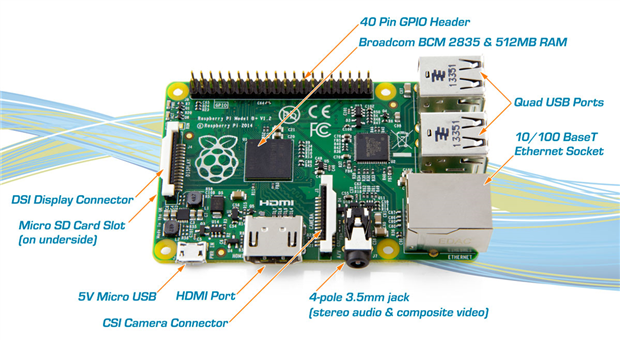
The friction fit SD card slot was replaced with a quality "push-click" microSD slot, meaning full-size cards used in the "original" model needed to be copied over to microSD cards for use in the "plus". The ports were rearranged so as to reduce their protrusion from the board, and proper mounting holes and rounded corners were provided. The audio circuitry has a dedicated power regulator. It does keep the same CPU and are hence generally software compatible between each other, however, due to the change in the USB power distribution with soft-start control, builds with non-updated GPIO drivers migrated to the "plus" models would have problems with USB devices not receiving power. One casualty of the changes was the removal of the dedicated RCA connector for CVBS (composite) video, instead, migrating to a four pole jack with the audio.
Despite the hardware-backwards-compatible GPIO pin allocation, many expansion boards designed for the "original" Raspberry Pi will not directly fit over the header due to mechanical interference from the USB ports which have moved inwards (e.g. the original PiFace Control and Display and PiFace Digital). New versions of these expansion boards are generally preferred, although a stacking-header or extension cable could allow for connections to be made. As the board design had also changed, cases made for the "plus" are incompatible with the "original" and vice versa.
The Raspberry Pi "plus" series was the first time that a Model A-board had appeared sporting a different form factor. The Model A+ is physically shorter and more compact, with the PCB extending to the mounting hole on the USB side of the 40-pin GPIO connector.
The Raspberry Pi 2 carries on the new layout, GPIO, USB design and power distribution introduced with the "plus" models and upgrades the main SoC to a more beefy quad-core 900Mhz ARMv7 BCM2836. This increases the consumption over the Model B+, to a level similar to the original B, but in return, offers performance about six times faster. The Raspberry Pi 2 is software compatible with older builds of software (e.g. Raspbian) only if the kernel is upgraded to a version released after February 2015. The Raspberry Pi 2 seems to be "camera shy", as an exposed power regulator on the board is disrupted by xenon camera flashes. As it carries the same layout as the "plus", generally peripherals which work with the "plus" will work with the Raspberry Pi 2 at a hardware level, although the software may need updating.
If you are interested in the latest operating systems, such as Windows 10 for IoT or Ubuntu Mate, these require the Raspberry Pi 2 as they are compiled with the ARMv7 instruction set available on the BCM2836. This makes it the preferred model for most hobbyists today.
The availability of the Model B+ and "original" Model B is very restricted. Accessories for the older "original" Raspberry Pi are starting to become less common, as new inventory comes in. Soon, you might not have to worry too much about compatibility if you have a "plus" or "Raspberry Pi 2" model, as they share footprints and connectors and manufacturers are shifting their focus to the newer boards.
List of Expansion Boards by Compatibility
Following is a list of element14 stocked expansion boards and compatibility with Raspberry Pi boards compiled with best efforts, judging from specifications and personal experience. I will not be held responsible in case of errors, please do your own confirmatory research before purchasing.
Original Raspberry Pi
- Embest Embedded Pi
- Piface Control and Display
- Chipkit Pi
- Gertduino
- Gertboard
- Wolfson Audio Card (only for Rev 2.0 PCB)
- Freescale Xtrinsic Sense
- PiFace Shim RTC
- Microstack Base Board
- Adafruit LCD Keypad Kit
- NXP Explore NFC
Raspberry Pi "plus" and Raspberry Pi 2
- Embest Embedded Pi (*maybe* as it uses a ribbon cable)
- Freescale Xtrinsic Sense (fits over first 26 pins, but has sufficient clearance)
- PiFace Shim RTC
- PiFace Digital 2
- PiFace Motor Control Extra
- PiFace Relay+
- PiFace Relay Extra
- Microstack Base Board
- Cirrus Logic Audio Card
- NXP Explore NFC (fits over first 26 pins, due to pass-through header, has sufficient clearance)
Quick Visual Identification
While there is a few variety of Raspberry Pi boards available, most users are likely to own a Model B of some description, as these are the recommended boards for beginners as they are most featureful without being too expensive. If you have the box, then that can definitely give you a hint as to which model you have. If you have the plain white box to the left, then you've got an "original" Raspberry Pi Model B. If you have the one in the middle, you have a Raspberry Pi Model B+. If you have the one on the right with a big "2" on it, then you have the latest Raspberry Pi 2 Model B.


Looking at the PCB itself, here is an image that shows the three different Model B's at the time of writing.
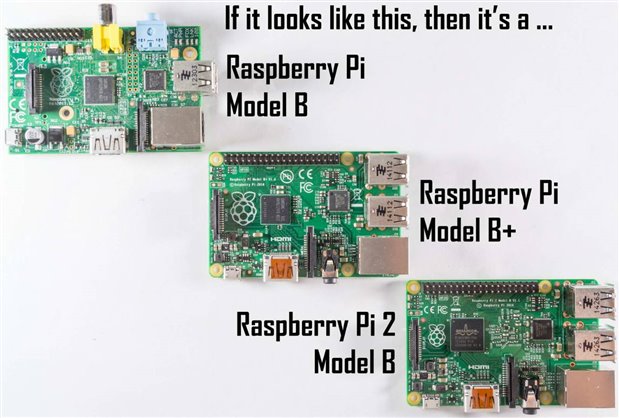
The "original" Raspberry Pi Model B has square edges on the PCB. If you have a Raspberry Pi with square edges, and two USB ports, it's an "original" Model B. If it has square edges and only one USB port, it's an "original" Model A.
The Raspberry Pi Model B+ and the Raspberry Pi 2 Model B both look visually similar, leading to many users to be confused. However, telling them apart is quite easy, as the model is silkscreened in white text underneath the GPIO connector, like this:


Another way to tell, is that the Raspberry is smaller on the Raspberry Pi 2 Model B, and the chip has the Broadcom marking on it, as they have stopped using package-on-package technology (and thus, the RAM is mounted on the other side of the board).
If you have a Raspberry Pi with rounded corners, is smaller than the above boards, and has a single USB port, then it is a Raspberry Pi Model A+. At this time, no Raspberry Pi 2 Model A exists.
Identifying Your Board Once Booted
Maybe you've got a Raspberry Pi in service, and you just can't remember what model it was and you really don't want to have to pull it out to look at its PCB. If you already have your Raspberry Pi running, you can find out the model of your Raspberry Pi by going to the terminal and issuing cat /proc/cpuinfo and looking up the last four digits in the table here. This will tell you which board, board revision, RAM and manufacturer all in one fell swoop. A summary of the table, grouped by model, is as follows:
- Raspberry Pi Model A: 0007, 0008, 0009
- Raspberry Pi Model B (Rev 1.0, 256Mb): 0002, 0003
- Raspberry Pi Model B (Rev 2.0, 256Mb): 0004, 0005, 0006
- Raspberry Pi Model B (Rev 2.0, 512Mb): 000d, 000e, 000f
- Raspberry Pi Model A+: 0012
- Raspberry Pi Model B+: 0010, 0013
- Raspberry Pi 2 Model B: 1041
Conclusion
Working out what Raspberry Pi board you have doesn't have to be hard work - all it takes is a quick glance at the board itself and the markings and shape of the board, or issuing a command, and you can better understand what expansion options are suitable and what operating systems you can run.
Top Comments