element14 Community
element14 Community
    Register Log In
  • Site
  • Search
  • Log In Register
  • Community Hub
    Community Hub
    • What's New on element14
    • Feedback and Support
    • Benefits of Membership
    • Personal Blogs
    • Members Area
    • Achievement Levels
  • Learn
    Learn
    • Ask an Expert
    • eBooks
    • element14 presents
    • Learning Center
    • Tech Spotlight
    • STEM Academy
    • Webinars, Training and Events
    • Learning Groups
  • Technologies
    Technologies
    • 3D Printing
    • FPGA
    • Industrial Automation
    • Internet of Things
    • Power & Energy
    • Sensors
    • Technology Groups
  • Challenges & Projects
    Challenges & Projects
    • Design Challenges
    • element14 presents Projects
    • Project14
    • Arduino Projects
    • Raspberry Pi Projects
    • Project Groups
  • Products
    Products
    • Arduino
    • Avnet & Tria Boards Community
    • Dev Tools
    • Manufacturers
    • Multicomp Pro
    • Product Groups
    • Raspberry Pi
    • RoadTests & Reviews
  • About Us
  • Store
    Store
    • Visit Your Store
    • Choose another store...
      • Europe
      •  Austria (German)
      •  Belgium (Dutch, French)
      •  Bulgaria (Bulgarian)
      •  Czech Republic (Czech)
      •  Denmark (Danish)
      •  Estonia (Estonian)
      •  Finland (Finnish)
      •  France (French)
      •  Germany (German)
      •  Hungary (Hungarian)
      •  Ireland
      •  Israel
      •  Italy (Italian)
      •  Latvia (Latvian)
      •  
      •  Lithuania (Lithuanian)
      •  Netherlands (Dutch)
      •  Norway (Norwegian)
      •  Poland (Polish)
      •  Portugal (Portuguese)
      •  Romania (Romanian)
      •  Russia (Russian)
      •  Slovakia (Slovak)
      •  Slovenia (Slovenian)
      •  Spain (Spanish)
      •  Sweden (Swedish)
      •  Switzerland(German, French)
      •  Turkey (Turkish)
      •  United Kingdom
      • Asia Pacific
      •  Australia
      •  China
      •  Hong Kong
      •  India
      • Japan
      •  Korea (Korean)
      •  Malaysia
      •  New Zealand
      •  Philippines
      •  Singapore
      •  Taiwan
      •  Thailand (Thai)
      • Vietnam
      • Americas
      •  Brazil (Portuguese)
      •  Canada
      •  Mexico (Spanish)
      •  United States
      Can't find the country/region you're looking for? Visit our export site or find a local distributor.
  • Translate
  • Profile
  • Settings
RoadTests & Reviews
  • Products
  • More
RoadTests & Reviews
Review Blogs Arm Education: Internet of Things Course - mbed Platform and CMSIS Library
  • Blogs
  • RoadTest Forum
  • Documents
  • RoadTests
  • Reviews
  • Polls
  • Files
  • Members
  • Sub-Groups
  • More
  • Cancel
  • New
Join RoadTests & Reviews to participate - click to join for free!
  • Share
  • More
  • Cancel
  • Author Author: ralphjy
  • Date Created: 27 May 2019 8:06 PM Date Created
  • Views 987 views
  • Likes 3 likes
  • Comments 3 comments
Related
Recommended
  • RoadTest
  • arm education iot course

Arm Education: Internet of Things Course - mbed Platform and CMSIS Library

ralphjy
ralphjy
27 May 2019

The sixth course module examines using software libraries and application programming interfaces (APIs) to increase program development efficiency.  Libraries also allow modular programming and improve hardware portability.  This module looks specifically at the mbed Platform and CMSIS Library for use with the Cortex-M processors.

image


The mbed platform provides both open software libraries and open hardware designs to aid prototyping and development of applications and systems based on Arm Cortex-M microcontrollers.  The mbed SDK provides a standards based C/C++ SDK along with an online IDE and compiler.  The mbed SDK is built on the low-level ARM CMSIS APIs which allow precise program control of the hardware.


image


Lab4 Exercise - Programming Using mbed API

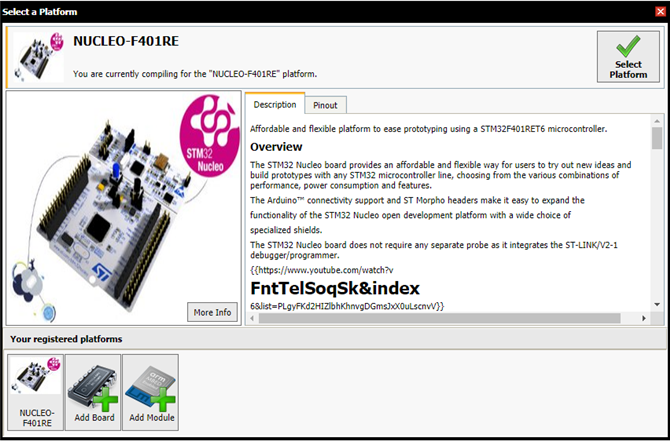
This exercise requires that you have an account with mbed.org so that you can use their online tools.  Once you create an account and login, you then have access to the mbed IDE.  You need to register the specific device that you are using.
image


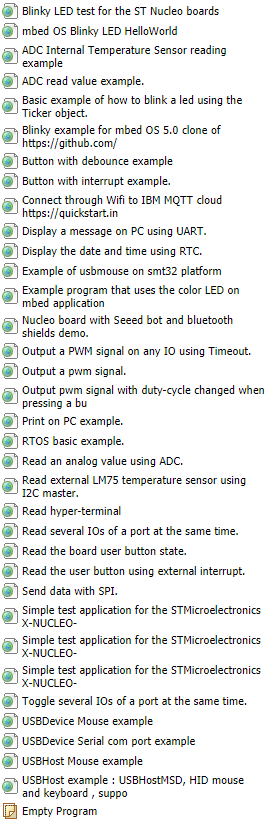
Then you have access to a number of sample programs.  We are using the Blinky LED template for this lab.
image


Here is the finished code in the IDE showing the higher level constructs versus the register level code that we used previously in the Keil MDK.  If the compile is successful a binary file is downloaded to your computer and you can then just drag and drop it to the F401RE mass storage device and the flashing occurs automatically.

image


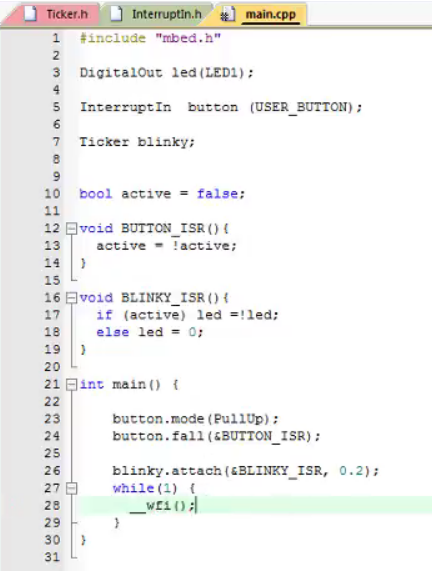
The second part of the lab has you export the code to a Keil MDK project.  This allows you to use the mbed libraries with the Keil IDE.  The lab exercise is to create an Interrupt version of the Blinky program.  Again, the code shows the higher level constructs relative to the previous register level version.
image


I did have a couple of issues with the project exported from the mbed IDE.  The Scatter File for the linker had an incorrect path and the Flash memory size was not set, but once I fixed those issues I successfully compiled and executed the program.  I must admit that using the libraries saves a lot of time not having to search through the Reference Manual.

  • Sign in to reply
  • noorpuri
    noorpuri over 6 years ago

    A good tutorial for beginners

    • Cancel
    • Vote Up 0 Vote Down
    • Sign in to reply
    • More
    • Cancel
  • ralphjy
    ralphjy over 6 years ago in reply to gordonmx

    Hi Gordon,


    Hopefully you've solved this by now.  I'm on a trip until mid next week so I don't have access to the computer where I have Keil configured so I'll try to do this from memory.


    You need to go into the Options for Target and fix the Scatter File path and the Flash Programming algorithm.  When I exported the project the path was incorrect and there was no algorithm set.  You can copy the settings in the project from the previous lab that was created in the MDK (not exported from mBed).  The Scatter File path is set on the Linker tab and the Flash algorithm is set on the Utilities tab.


    I find that for configuration errors like this, Google is my best friend.


    Ralph

    • Cancel
    • Vote Up 0 Vote Down
    • Sign in to reply
    • More
    • Cancel
  • gordonmx
    gordonmx over 6 years ago

    Ralph,


    How did you solve the issues with the scatter file path and flash memory size?


    Gordon

    • Cancel
    • Vote Up 0 Vote Down
    • Sign in to reply
    • More
    • Cancel
element14 Community

element14 is the first online community specifically for engineers. Connect with your peers and get expert answers to your questions.

  • Members
  • Learn
  • Technologies
  • Challenges & Projects
  • Products
  • Store
  • About Us
  • Feedback & Support
  • FAQs
  • Terms of Use
  • Privacy Policy
  • Legal and Copyright Notices
  • Sitemap
  • Cookies

An Avnet Company © 2025 Premier Farnell Limited. All Rights Reserved.

Premier Farnell Ltd, registered in England and Wales (no 00876412), registered office: Farnell House, Forge Lane, Leeds LS12 2NE.

ICP 备案号 10220084.

Follow element14

  • X
  • Facebook
  • linkedin
  • YouTube