


Having read Mark's early experience I thought installing the BenchVue code would be a doddle - the heavy lifting having been done already by someone else.
Not quite !!
I decided to put it on a computer outside mainstream use because I've experienced issues with this kind of software before. I tried on an Intel i3 running Windows 7 wit 8G of RAM.
The initial install went OK with the usual request to agree to a chunk of legal stuff that means nothing to ordinary humans. It then chundered away for quite a while, showing the odd flash screen but very little useful information. It doesn't tell you haw much drive space it plans to use or ask where you would like it to go.
After a while it asked if I wanted to use English (yes), share information with Keysight (no) and install some thing with a name like Waveform Builder (no).
Then the install stuff on screen all closed but the PC went on being busy - (I started Task Manager and could see that a BenchVue thing was still running as an application. I waited a while and it went on, sometimes using as much as half the RAM and three of the 4 processor cores.)
After a while I got bored and clicked the icon it had added to the desktop and got this:
I would have put a full screenshot here but E14 tells me that .jpg are a forbidden file type.
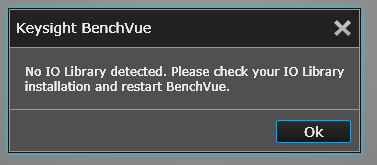
So I've cut and pasted the cute little system modal dialogue box that appears in the middle.
All you can do is click on OK and it then kills off BenchVue.
The box isn't quite system modal because you can run other things but it stays on top of most other windows on your system.
So, there is no manual, the Keysight install instruction on the web say to run the install file, which I did, and this is what I get.
I've had a look at the on line help thing on the Web but it has nothing about installation and is way out of date.
The Keysight forum has a question about this but the answer given is weird -
The problem is Keysight VISA needs to be your primary VISA.
In Windows, just go to Control Panel > Programs > Programs and Features, then select Keysight IO Libraries, then click Change, then check the box next to "Keysight VISA as primary VISA" and continue. This will overwrite & disable your current primary VISA, but solve the problem
Then another guy says:
Actually, it's a little more complicated than that. NI VISA and Keysight VISA can coexist in a "side-by-side" installation where Keysight VISA is Secondary. Here are the rules:
1. If you install NI VISA first, then Keysight VISA, we detect the NI version and install ourselves as "Secondary" automatically. Thus "visa32.dll" remains NI's and "agvisa32.dll" is ours.
2. If you install Keysight VISA first, then NI VISA, NI detects our version and renames ours, then puts their visa32.dll in its place.
Well I was never asked to install anyone's VISA or IO Libraries so I haven't - if anyone (Mark ?) knows that I should please let me know.
MK 
