element14 Community
element14 Community
    Register Log In
  • Site
  • Search
  • Log In Register
  • Community Hub
    Community Hub
    • What's New on element14
    • Feedback and Support
    • Benefits of Membership
    • Personal Blogs
    • Members Area
    • Achievement Levels
  • Learn
    Learn
    • Ask an Expert
    • eBooks
    • element14 presents
    • Learning Center
    • Tech Spotlight
    • STEM Academy
    • Webinars, Training and Events
    • Learning Groups
  • Technologies
    Technologies
    • 3D Printing
    • FPGA
    • Industrial Automation
    • Internet of Things
    • Power & Energy
    • Sensors
    • Technology Groups
  • Challenges & Projects
    Challenges & Projects
    • Design Challenges
    • element14 presents Projects
    • Project14
    • Arduino Projects
    • Raspberry Pi Projects
    • Project Groups
  • Products & Partners
    Products & Partners
    • Arduino
    • Avnet & Tria Boards Community
    • Dev Tools
    • Manufacturers
    • Multicomp Pro
    • Product Groups
    • Raspberry Pi
    • RoadTests & Reviews
  • About Us
    About the element14 Community
  • Store
    Store
    • Visit Your Store
    • Choose another store...
      • Europe
      •  Austria (German)
      •  Belgium (Dutch, French)
      •  Bulgaria (Bulgarian)
      •  Czech Republic (Czech)
      •  Denmark (Danish)
      •  Estonia (Estonian)
      •  Finland (Finnish)
      •  France (French)
      •  Germany (German)
      •  Hungary (Hungarian)
      •  Ireland
      •  Israel
      •  Italy (Italian)
      •  Latvia (Latvian)
      •  
      •  Lithuania (Lithuanian)
      •  Netherlands (Dutch)
      •  Norway (Norwegian)
      •  Poland (Polish)
      •  Portugal (Portuguese)
      •  Romania (Romanian)
      •  Russia (Russian)
      •  Slovakia (Slovak)
      •  Slovenia (Slovenian)
      •  Spain (Spanish)
      •  Sweden (Swedish)
      •  Switzerland(German, French)
      •  Turkey (Turkish)
      •  United Kingdom
      • Asia Pacific
      •  Australia
      •  China
      •  Hong Kong
      •  India
      •  Japan
      •  Korea (Korean)
      •  Malaysia
      •  New Zealand
      •  Philippines
      •  Singapore
      •  Taiwan
      •  Thailand (Thai)
      •  Vietnam
      • Americas
      •  Brazil (Portuguese)
      •  Canada
      •  Mexico (Spanish)
      •  United States
      Can't find the country/region you're looking for? Visit our export site or find a local distributor.
  • Translate
  • Profile
  • Settings
RoadTests & Reviews
  • Products & Partners
  • More
RoadTests & Reviews
RoadTest Forum Arduino Ventuno Q - my first experience with the Ventuno Q
  • Blogs
  • Forum
  • Documents
  • RoadTests
  • Reviews
  • Polls
  • Files
  • Members
  • Sub-Groups
  • More
  • Cancel
  • New
Join RoadTests & Reviews to participate - click to join for free!
Actions
  • Share
  • More
  • Cancel
Forum Thread Details
  • Replies 1 reply
  • Subscribers 2748 subscribers
  • Views 62 views
  • Users 0 members are here
  • RoadTest
  • Ventuno-Q
  • robotics
  • ai
  • Orbbec
  • arduino
Related

Arduino Ventuno Q - my first experience with the Ventuno Q

geralds
geralds 18 hours ago

Here's my first experience using the Ventuno-Q:

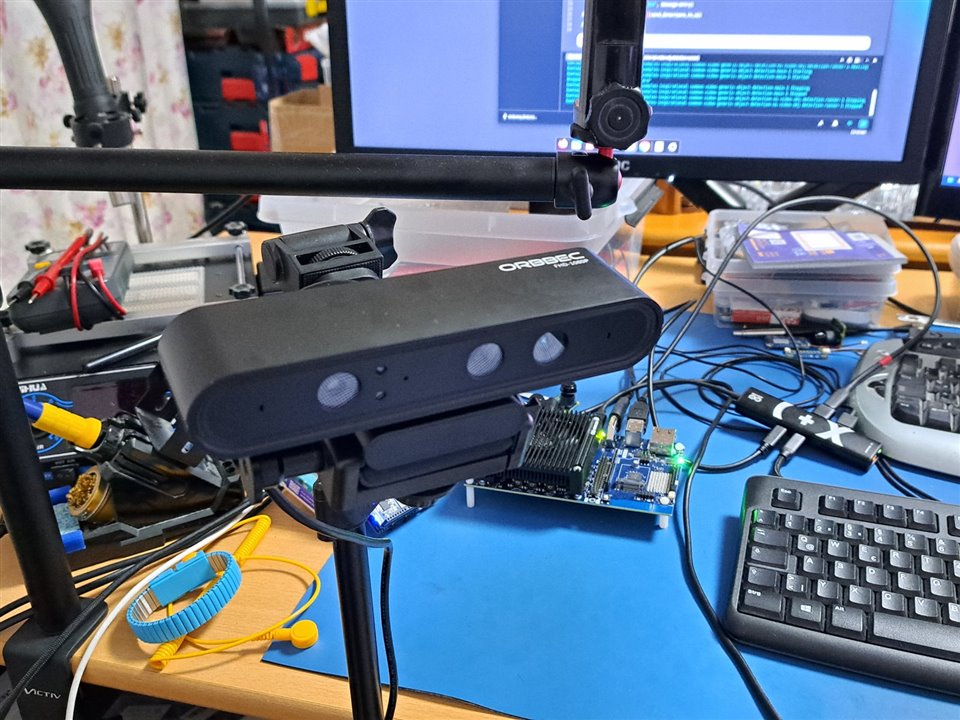
Today I received a 3D depth camera: Orbbec Astra Pro Plus.
This camera has a USB connector (USB-A, 3.0) and can therefore be easily connected to the Ventuno-Q
image

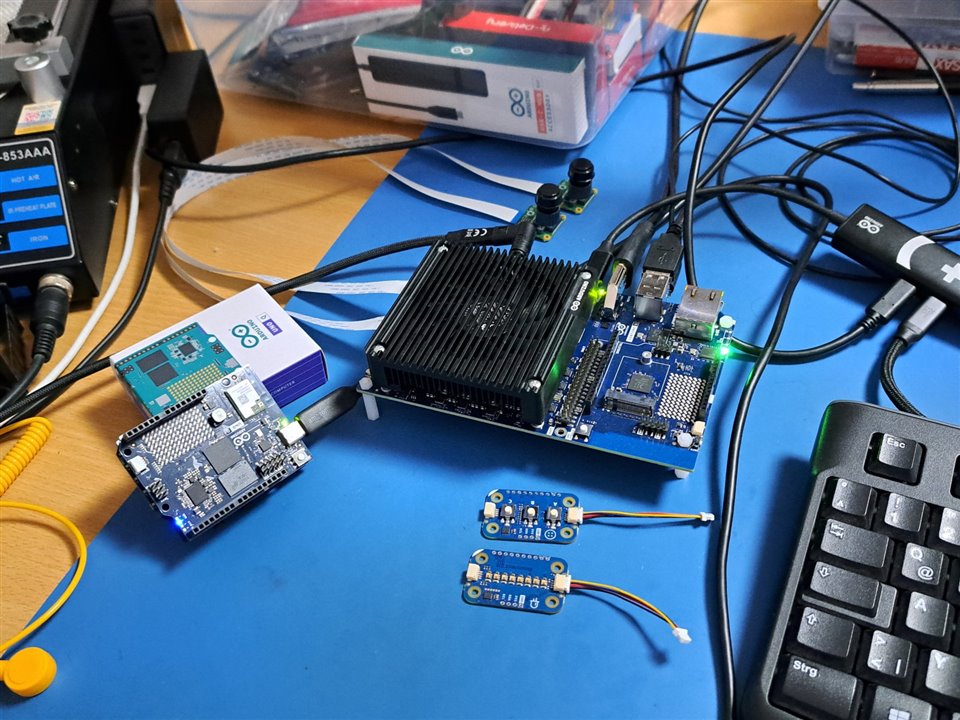
This is my working place:

image

left: my solder station, front: Uno-Q, Ventuno-Q, modulinos, behind: two MIPI/CSI cameras, USB docking stick, right: keyboard

Here in a 5-minute video I demonstrate how to open an example project using the App Lab:
The application is an example AI program that uses a 3D depth camera to display objects.
You can adjust the sensitivity settings to filter objects based on their size.

You don't have permission to edit metadata of this video.
Edit media
x
image
Upload Preview
image

This example uses a pre-trained model to detect objects on a live video feed from a camera.
The workflow involves continuously getting the frames from a camera, processing it through an AI model using the video object detection Brick,
and displaying the bounding boxes around detections. The App is managed from an interactive web interface.

This example is based on the Arduino UNO Q, but also works on Arduino VENTUNO Q.

The projects and examples featured in the App Lab are typically write-protected; therefore, you must create a copy before you can make any modifications.

If you like more information's about App Lab, please follow Arduino's Git:

https://github.com/arduino/arduino-app-lab

Best regards
Gerald

  • Sign in to reply
  • Cancel
  • cstanton
    cstanton 3 hours ago

    Thanks for the git link - how's the camera? I've only messed with realsense and kinects myself.

    • Cancel
    • Vote Up 0 Vote Down
    • Sign in to reply
    • Cancel
element14 Community

element14 is the first online community specifically for engineers. Connect with your peers and get expert answers to your questions.

  • Members
  • Learn
  • Technologies
  • Challenges & Projects
  • Products
  • Store
  • About Us
  • Feedback & Support
  • FAQs
  • Terms of Use
  • Privacy Policy
  • Legal and Copyright Notices
  • Sitemap
  • Cookies

An Avnet Company © 2026 Premier Farnell Limited. All Rights Reserved.

Premier Farnell Ltd, registered in England and Wales (no 00876412), registered office: Farnell House, Forge Lane, Leeds LS12 2NE.

Follow element14

  • X
  • Facebook
  • linkedin
  • YouTube