RoadTest: Seeking an Engineer to Review a Trinamic Motor Drive kit from Analog Devices
Author: manojroy123
Creation date:
Evaluation Type: Development Boards & Tools
Did you receive all parts the manufacturer stated would be included in the package?: True
What other parts do you consider comparable to this product?: I am new to this product of FOC control of motor. I haven't found any compatible product yet
What were the biggest problems encountered?: Software installation and configuring the Development kit
Detailed Review:
What I received in the kit
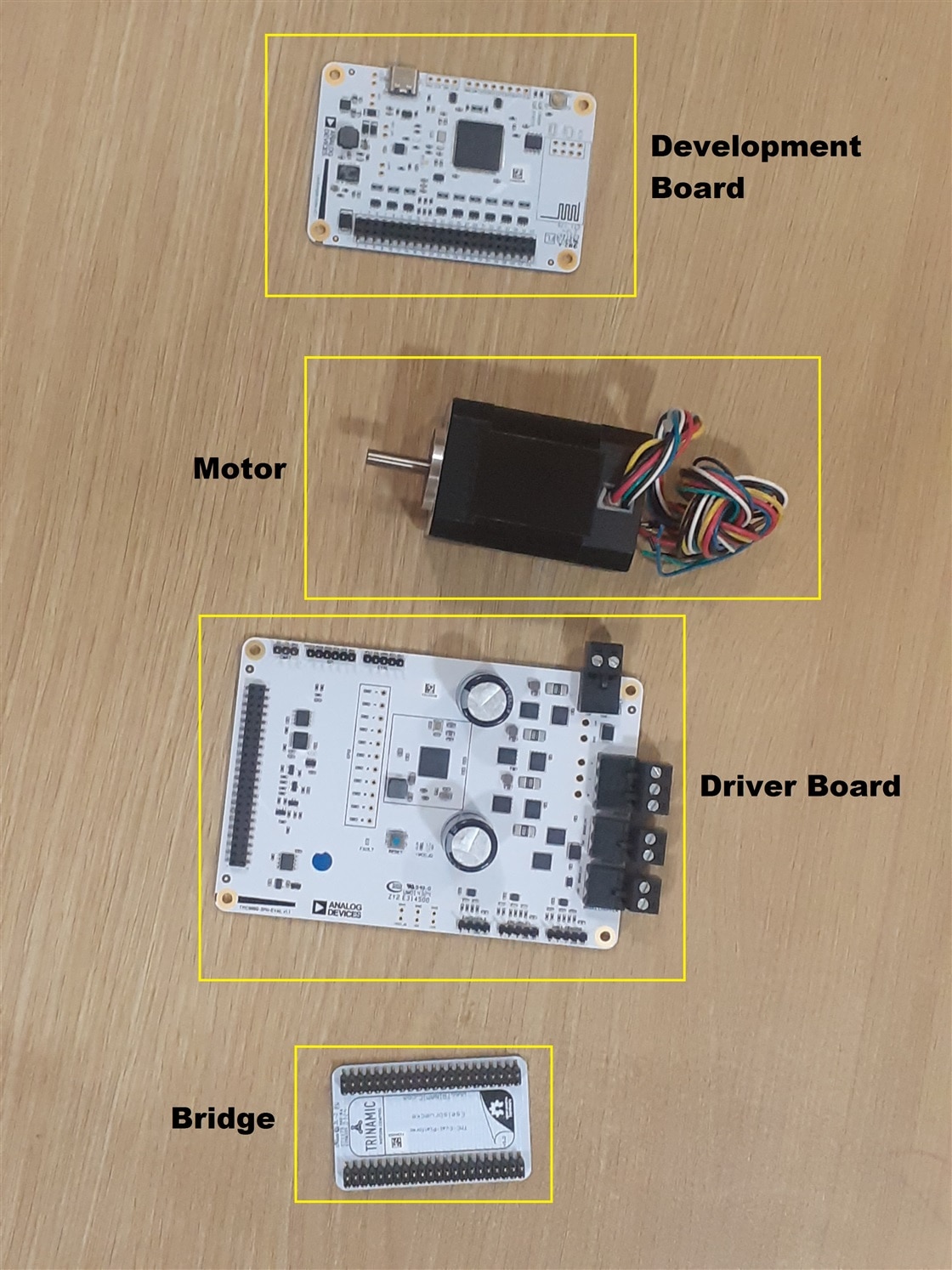
Some information about the technology used
Some information about DC motor.
QBL4280 is a NEMA 17 BLDC motor 6Ncm, 8 poles, 4000RPM. It is a brushless DC electric motor that adheres to the NEMA 17 frame standard, meaning it has a square mounting face with 1.7 by 1.7 inches (approximately 43 by 43 mm) dimensions. It uses electronic commutation with an integrated inverter to convert DC power into an AC signal for efficient operation, offering features like high torque-to-size ratio, precise control, low noise, and long life compared to brushed motors. These motors often include Hall sensors for precise speed and position control, and are commonly used in robotics, CNC machines, and other automation applications where space is limited but power is essential.
Key Characteristics
NEMA 17 Standard:
This specifies the motor's mounting dimensions, ensuring it fits within the standard NEMA frame size for easy integration.
Brushless Design:
Instead of traditional brushes, it uses electronic commutation via an inverter and sensors to switch current in the motor windings, which leads to longer life and less maintenance.
BLDC Motor Type:
Brushless DC motors offer efficient operation, high torque, and precise control, making them suitable for demanding applications.
Hall Sensors:
The inclusion of Hall sensors enables accurate speed and position control by providing feedback to the electronic controller.
Integrated Driver:
Many NEMA 17 BLDC motors are sold as kits with an integrated driver, which is essential for controlling the motor's power and signals.
Advantages
High Torque-to-Size Ratio:
Provides a good amount of power for its compact size.
Precise Control:
Offers excellent speed stability and precise control for various applications.
Low Maintenance & Long Life:
The absence of brushes eliminates wear and tear, leading to a longer operational life.
Quiet Operation:
Generally operates with lower noise and vibration compared to brushed DC motors.
Common Applications
Robotics:
Ideal for robotic arms and other robotic systems due to their high power density and precise control.
3D Printers and CNC machines:
Used for precise motion control in 3D printing and various CNC machine tools.
Industrial Automation:
Finds use in various industrial robots, belt-driven systems, and other automated processes.
Medical Devices:
Its reliability and precise performance make it suitable for certain medical equipment.
Difference between NEMA 17 Stepper Motor Vs NEMA 17 BLDC motor
| Feature | NEMA 17 Stepper Motor | NEMA 17 BLDC Motor |
| Motor Type | Stepper (synchronous) | Brushless DC (BLDC) |
| Control Type | Open-loop (often) | Closed-loop (typically) |
| Motion | Discrete steps (e.g., 1.8°/step) | Continuous rotation |
| Position Control | Direct (steps) | Requires encoder for precise control |
| Speed | Low to medium (0–1000 RPM typical) | High (1000–20,000+ RPM) |
| Torque at Low Speed | High | Lower than stepper (unless geared) |
| Torque at High Speed | Drops off significantly | Maintains torque at high speed |
| Efficiency | Lower | Higher |
| Noise & Vibration | More (due to stepping) | Smoother and quieter |
| Driver Complexity | Simple (pulse/dir) | More complex (requires commutation) |
| Applications | 3D printers, CNC, robotics | Drones, fans, e-bikes, industrial automation |
Control and driving difference
| Feature | Stepper | BLDC |
| Controller | Stepper driver (e.g., A4988, DRV8825) | BLDC driver with commutation (e.g., ESC, VESC, or smart controller) |
| Feedback | Usually open-loop | Requires hall sensors or encoder |
| Control Signal | Step/Dir pulses | PWM, analog, or serial commands |
Working of nema 17 bldc motor
Here’s a clear breakdown of how a NEMA 17 BLDC motor works
Basic Concept of a BLDC Motor
A BLDC (Brushless DC) motor converts electrical energy into mechanical rotation using:
A rotor with permanent magnets
A stator with wire windings
Electronic commutation (instead of brushes)
The stator windings are energized in a specific sequence to create a rotating magnetic field, which pulls the rotor around.
Construction of a NEMA 17 BLDC Motor
| Component | Description |
| Rotor | Contains permanent magnets (2 or more pole pairs) |
| Stator | Contains 3-phase windings (A, B, C) arranged around the rotor |
| Hall sensors (optional) | Detect rotor position for commutation |
| Shaft | Outputs mechanical rotation |
| Frame (NEMA 17) | Standardized size: 43.2 mm x 43.2 mm front face |
Working Principle
Rotor spins, driving the shaft.
The controller uses Hall effect sensors or back-EMF detection to determine rotor position and adjust the commutation timing.
Electronic Commutation
Unlike brushed DC motors that use mechanical brushes and commutators, a BLDC uses a microcontroller or ESC to:
There are two main types of control:
Uses Hall sensors to detect rotor position
Uses back-EMF to estimate position (simpler, cheaper, but worse at low speed)
Speed and Direction Control
Speed is controlled by adjusting the input voltage or PWM duty cycle.
Direction is reversed by changing the phase sequence (e.g., A→B→C to A→C→B).
Advanced controllers (like VESC) allow very precise control over speed, acceleration, and braking.
Example Use Cases for NEMA 17 BLDC Motors
How to Run a NEMA 17 BLDC Motor
You'll Need:
| Component | Description |
| BLDC Motor | NEMA 17 brushless motor |
| BLDC Controller/ESC | To handle 3-phase commutation |
| Power Supply | Matching the motor voltage (e.g., 24V or 48V DC) |
| (Optional) Hall Sensors | For sensored control |
| Microcontroller (optional) | For PWM speed control or direction logic |
Typical Wiring:
Controller → controlled by PWM signal or serial/UART
Construction of a BLDC NEMA 17 motor
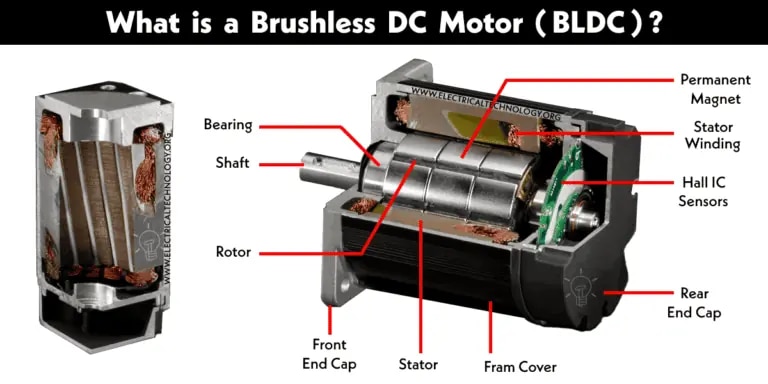
A brushless DC motor (known as BLDC) is a permanent magnet synchronous electric motor which is driven by direct current (DC) electricity and it accomplishes electronically controlled commutation system (commutation is the process of producing rotational torque in the motor by changing phase currents through it at appropriate times) instead of a mechanically commutation system. BLDC motors are also referred as trapezoidal permanent magnet motors.
Unlike conventional brushed type DC motor, wherein the brushes make the mechanical contact with commutator on the rotor so as to form an electric path between a DC electric source and rotor armature windings, BLDC motor employs electrical commutation with permanent magnet rotor and a stator with a sequence of coils. In this motor, permanent magnet (or field poles) rotates and current carrying conductors are fixed.
The armature coils are switched electronically by transistors or silicon controlled rectifiers at the correct rotor position in such a way that armature field is in space quadrature with the rotor field poles. Hence the force acting on the rotor causes it to rotate. Hall sensors or rotary encoders are most commonly used to sense the position of the rotor and are positioned around the stator. The rotor position feedback from the sensor helps to determine when to switch the armature current.
This electronic commutation arrangement eliminates the commutator arrangement and brushes in a DC motor and hence more reliable and less noisy operation is achieved. Due to the absence of brushes BLDC motors are capable to run at high speeds. The efficiency of BLDC motors is typically 85 to 90 percent, whereas as brushed type DC motors are 75 to 80 percent efficient. There are wide varieties of BLDC motors available ranging from small power range to fractional horsepower, integral horsepower and large power ranges.
Construction of BLDC Motor
BLDC motors can be constructed in different physical configurations. Depending on the stator windings, these can be configured as single-phase, two-phase, or three-phase motors. However, three-phase BLDC motors with permanent magnet rotor are most commonly used. The construction of this motor has many similarities of three phase induction motor as well as conventional DC motor. This motor has stator and rotor parts as like all other motors.
Stator of a BLDC motor made up of stacked steel laminations to carry the windings. These windings are placed in slots which are axially cut along the inner periphery of the stator. These windings can be arranged in either star or delta. However, most BLDC motors have three phase star connected stator.
Each winding is constructed with numerous interconnected coils, where one or more coils are placed in each slot. In order to form an even number of poles, each of these windings is distributed over the stator periphery.
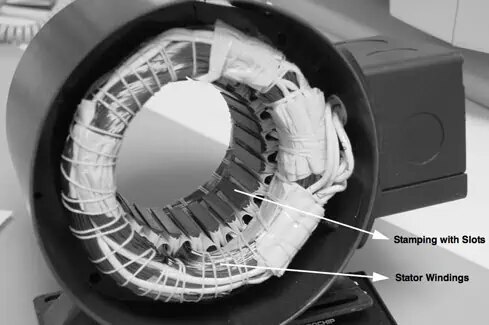
The stator must be chosen with the correct rating of the voltage depending on the power supply capability. For robotics, automotive and small actuating applications, 48 V or less voltage BLDC motors are preferred. For industrial applications and automation systems, 100 V or higher rating motors are used.
BLDC motor incorporates a permanent magnet in the rotor. The number of poles in the rotor can vary from 2 to 8 pole pairs with alternate south and north poles depending on the application requirement. In order to achieve maximum torque in the motor, the flux density of the material should be high. A proper magnetic material for the rotor is needed to produce required magnetic field density.
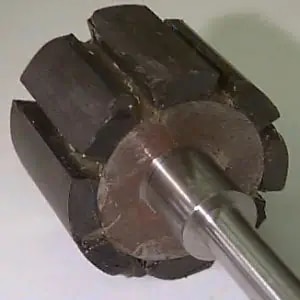
Ferrite magnets are inexpensive, however they have a low flux density for a given volume. Rare earth alloy magnets are commonly used for new designs. Some of these alloys are Samarium Cobalt (SmCo), Neodymium (Nd), and Ferrite and Boron (NdFeB). The rotor can be constructed with different core configurations such as the circular core with permanent magnet on the periphery, circular core with rectangular magnets, etc.
Hall sensor provides the information to synchronize stator armature excitation with rotor position. Since the commutation of BLDC motor is controlled electronically, the stator windings should be energized in sequence in order to rotate the motor. Before energizing a particular stator winding, acknowledgment of rotor position is necessary. So the Hall Effect sensor embedded in stator senses the rotor position.
Most BLDC motors incorporate three Hall sensors which are embedded into the stator. Each sensor generates Low and High signals whenever the rotor poles pass near to it. The exact commutation sequence to the stator winding can be determined based on the combination of these three sensor’s response.
Specification of QBL4208-61-04-013 BLDC MOTOR, 3-PH, 24VDC, 4000RPM, 52W
Working of a BLDC NEMA 17 motor
BLDC motor works on the principle similar to that of a conventional DC motor, i.e., the Lorentz force law which states that whenever a current carrying conductor placed in a magnetic field it experiences a force. As a consequence of reaction force, the magnet will experience an equal and opposite force. In case BLDC motor, the current carrying conductor is stationary while the permanent magnet moves.
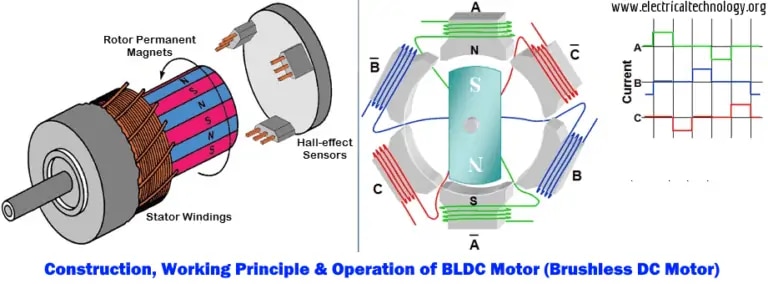
When the stator coils are electrically switched by a supply source, it becomes electromagnet and starts producing the uniform field in the air gap. Though the source of supply is DC, switching makes to generate an AC voltage waveform with trapezoidal shape. Due to the force of interaction between electromagnet stator and permanent magnet rotor, the rotor continues to rotate.
Consider the figure below in which motor stator is excited based on different switching states. With the switching of windings as High and Low signals, corresponding winding energized as North and South poles. The permanent magnet rotor with North and South poles align with stator poles causing motor to rotate.
Observe that motor produces torque because of the development of attraction forces (when North-South or South-North alignment) and repulsion forces (when North-North or South-South alignment). By this way motor moves in a clockwise direction.
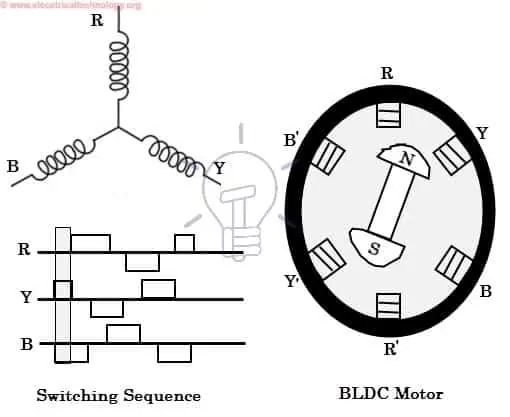
Here, one might get a question that how we know which stator coil should be energized and when to do. This is because; the motor continuous rotation depends on the switching sequence around the coils. As discussed above that Hall sensors give shaft position feedback to the electronic controller unit.
Based on this signal from sensor, the controller decides particular coils to energize. Hall-effect sensors generate Low and High level signals whenever rotor poles pass near to it. These signals determine the position of the shaft.
Some information about the driver board.
TMC9660-3PH-EVAL is a driver board for NEMA 17 BLDC motor is an advanced and programable ESC designed for BLDC and PMSM motor with field oriented control (FOC)
What makes it different from normal ESC
| Feature | Basic ESC | TMC9660-3PH-EVKIT |
| Commutation | Trapezoidal or sinusoidal | FOC (Field-Oriented Control) |
| Motor Support | BLDC (sensorless or sensored) | BLDC + PMSM (3-phase) |
| Control Interface | PWM/RC or analog | SPI / UART |
| Programmable | Usually no | Yes (fully configurable) |
| Feedback | Often sensorless | Supports Hall, encoder, etc. |
| Protection | Limited | Advanced (thermal, overcurrent, braking, etc.) |
| Integration | Simple plug-and-play | Evaluation/development platform |
What makes it special ?
The TMC9660 chip is a smart motor controller ic designed for:
What can you do with it ?
Working of the Driver board
Field Oriented Control on BLDC motor
Field-oriented control of BLDC Motor is an advanced control method that regulates the motor’s magnetic field and current to achieve smooth, precise and efficient operation. Unlike traditional control methods, the field-oriented control (FOC) method aligns the stator current with the rotor’s magnetic field to optimise the speed and torque control for superior performance. It also enables accurate control over BLDC motors resulting in smoother efficiency and better operation at a wide range of speeds.
Field-Oriented Control (FOC) in BLDC motors is an advanced control technique used to achieve smooth and efficient motor operation. Here's how each key component of FOC helps in improving BLDC motor operation:
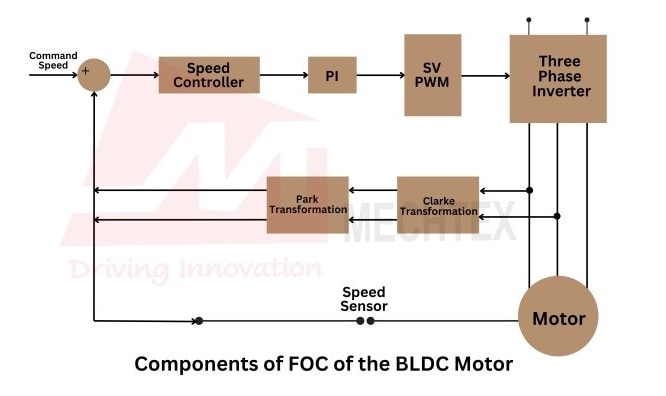
Clarke and Park Transformations
Clarke transformation converts the three-phase stator current (a,b,c) into two orthogonal components (α, β) in a stationary reference frame. On the other hand, peak transformation further converts these components into rotating reference frames (d, q), aligning them with the rotor’s magnetic field. It simplifies the control by turning AC signals into DC quantities.
Proportional-Integral (PI) Controllers
Proportional-integral (PI) Controllers regulate the d and q-axis currents by comparing the reference values with the actual motor current. The PI controllers adjust the pulse width modulation (PWM) to maintain the desired current levels.
Space Vector Modulation (SVM)
SVM is used to generate the optimal switching sequence of the inverter, converting signals into appropriate voltages for motor windings. It enhances the performance of the BLDC motor by reducing the noise and vibrations.
Inverter
The inverter switches the DC supply to the motor phases based on control signals generated by FOC algorithms. The inverter is responsible for controlling the direction and magnitude of the current flow in each phase of the motor.
Rotor Position Sensor
Field-Oriented Control (FOC) of BLDC motors requires precise rotor position information obtained from sensors like encoders and other techniques. The rotor position is crucial to synchronise the stator currents with the rotor's magnetic field.
Working of FOC in BLDC Motors
The working of Field-Oriented Control (FOC) of BLDC motors starts by measuring the three-phase current of BLDC motors. These currents are essential for understanding the motor’s current operating state. The three-phase current is transformed into d-axis and q-axis components which simplifies the control process by separating the torque and flux producing currents.
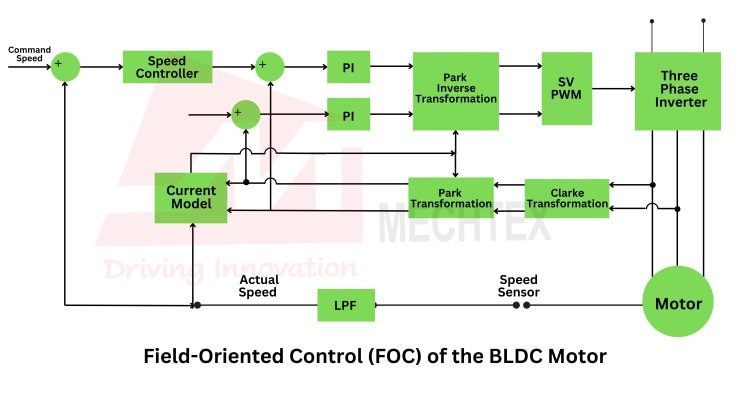
The q-axis current (torque-producing) and d-axis current (flux-producing) are regulated using a Proportional-Integral (PI) Controller. This controller adjusts the BLDC motor’s voltage to maintain the desired operating conditions. The regulated d-axis and q-axis currents are converted back into three-phase currents using inverse Clarke and Park transformations.
The output signals are passed through pulse width modulation (PWM) system, which generates the signals for the motor’s inverter. Finally, the inverter converts the control signals from PWM into three-phase voltage signals that drive the motor and complete the FOC loop.
Advantages of FOC in BLDC Motors
FOC offers several benefits that enhance motor performance and control, especially in precision-driven applications. Here are some advantages of FOC in BLDC motor:
Improved Efficiency
FOC optimises the BLDC motor’s magnetic field reducing losses and improving overall efficiency.
High Precision
By directly controlling the torque and flux-producing currents, FOC enables highly precise control over the motor’s performance making it ideal for applications like CNC machines and robotic arms.
Better Response
FOC adapts quickly to changes in load and speed, providing fast and accurate control which is crucial for dynamic applications.
Wide Speed Ranges
FOC allows BLDC motors to operate efficiently across a broad range of speeds from low RPM to high-speed applications.
Features and Benefits TMC9660-3PH-EVKIT driver board
How does TMC9660 provides overcurrent protection to bldc motor ?
The TMC9660 provides overcurrent protection for a BLDC motor using a combination of internal current sensing, configurable limits, and fault handling logic. This is a key feature for preventing motor and driver damage due to stalled motors, wiring issues, or unexpected loads.
Let’s break down how overcurrent protection works in the TMC9660:
Current Sensing
The TMC9660 has integrated Current Sense Amplifiers (CSAs) that measure the current flowing through each of the three motor phases:
These measurements are taken via external shunt resistors connected to low-side (or sometimes inline) paths of the motor driver.
The chip uses an internal ADC to sample these current values continuously.
This allows real-time monitoring of phase currents — essential for both motor control (like FOC) and protection.
Overcurrent Detection
The TMC9660 uses two main strategies to detect overcurrent:
a) Cycle-by-Cycle Overcurrent Limiting (Fast Response)
When current in a phase exceeds a configured threshold (based on sensed voltage across the shunt resistor), the driver **immediately disables** the corresponding MOSFETs.
This is a hardware-level shutdown, typically within microseconds.
It's like a built-in "current fuse" to avoid damage to the driver or motor windings.
b) Software Configurable Limits
The driver allows you to set current limits via SPI or UART.
When the current exceeds these set limits (average or peak), the driver can:
Limit the current via PWM modulation (current regulation)
Trigger an overcurrent fault and stop the motor
Log the fault in status registers
These thresholds are set based on:
Shunt resistor value (e.g., 10 mΩ, 5 mΩ)
Amplifier gain (internal to the TMC9660)
Target current limit (e.g., 10 A)
Driver Response to Overcurrent
When an overcurrent condition is detected, the TMC9660 can:
| Response Type | Description |
| Immediate shutdown | Disables the MOSFETs to stop current flow instantly |
| Flag fault | Sets a flag in the status register for the host MCU to read |
| Brake the motor | Optionally uses unused half-bridge to apply braking |
| Thermal throttling or shutdown | If overcurrent causes heating, temperature protection may kick in too |
These behaviors are configurable using registers in the TMC9660’s firmware interface.
Example: How You’d Set Overcurrent Limit
Assume:
Shunt resistor = 10 mΩ
You want to limit phase current to 15 A
Then:
V = I × R = 15 A × 0.01 Ω = 150 mV
Set the internal comparator threshold slightly above 150 mV (e.g., 160 mV) to allow margin
This is done via register settings over SPI or UART using the TMCL-IDE or your own microcontroller code.
Interaction with FOC or Speed Control
In FOC (Field-Oriented Control) mode:
The TMC9660 dynamically adjusts PWM duty cycles to maintain current within limits
It can reduce torque demand (Iq component) if current limit is approached
This ensures smooth limiting rather than sudden motor cutoff
How to Test It (On the EVKIT)
You can trigger and test overcurrent protection by:
* Gradually increasing motor load
* Artificially increasing current in one phase
* Intentionally stalling the motor (briefly and carefully)
* Observing current readings and fault flags in the TMCL-IDE
You’ll see:
* Immediate response in case of hard overcurrent
* Or **limiting behavior (e.g., torque reduced) in soft overcurrent
Summary: Overcurrent Protection in TMC9660
| Mechanism | Description |
| Current Sensing | Via shunt resistors and internal amplifiers |
| Fast Hardware Cutoff | If current exceeds critical threshold |
| Configurable Software Limits | Programmable via SPI/UART |
| Fault Signaling | Registers show overcurrent condition |
| Motor Shutdown or Braking | Optional safety response |
| FOC Integration | Dynamically limits torque/current during operation |
What is braking ?
Braking in the context of electric motors — including BLDC motors controlled by drivers like the TMC9660 — refers to techniques used to slow down or stop the motor quickly by converting its rotational energy into heat or electrical energy.
Why Braking Is Important ?
Without braking, a motor will coast to a stop slowly due to inertia.
Braking allows for:
* Faster stops (e.g. emergency stop or controlled deceleration)
* Holding torque (in position control systems)
* Safety in high-speed tools (like a table saw)
Types of Braking in BLDC Motors
Here are the common types of braking supported by smart motor drivers like the TMC9660:
1) Dynamic Braking (Resistive Braking)
* The motor's energy is dissipated as **heat** through a **braking resistor**.
*Works by connecting the motor windings to a resistor when braking is triggered.
* The **back-EMF** (voltage generated by the spinning motor) drives current into the resistor, converting kinetic energy to heat.
How It Works:
* The driver activates unused half-bridge FETs or an external braking circuit.
* You must ensure a resistor is properly sized to handle power dissipation.
2) Regenerative Braking
* The motor acts as a generator and sends energy back into the power supply or battery.
* Useful in battery-powered systems (like e-bikes or EVs).
* The controller must be capable of handling power flow in reverse, and the power supply must accept energy.
3) Electrical Braking (Shorted Windings)
* The controller temporarily shorts the motor windings (or applies low-side FETs), causing eddy currents to oppose motion.
* Converts kinetic energy to heat in the motor windings themselves.
* Very simple and effective for quick stops, especially at low speed.
Braking in TMC9660
The TMC9660 includes:
An unused half-bridge output that can be used for a brake resistor or electromechanical brake.
Braking control logic that activates under:
*Overcurrent
*Stop commands
*Custom user control via UART/SPI
You can configure it to apply braking when faults occur, or trigger it manually via software.
Example: Table Saw Motor Braking
If you’re using the TMC9660 for a DIY table saw, braking would:
Stop the blade quickly when you turn it off or press an emergency stop
Prevent dangerous coasting
You could:
* Use the braking output to connect a resistor
* Or configure the TMC9660 to short the phases to electrically brake the motor
Summary: What Is Braking?
| Type of Braking | Description | Energy Goes To |
| Dynamic | Energy dumped into resistor | Heat in resistor |
| Regenerative | Energy returned to supply | Battery/capacitor |
| Electrical (shorted) | Phases shorted to resist motion | Heat in windings |
| Mechanical (optional) | Physical brake applied | Not part of TMC9660 |
What is thermal protection ?
What is Thermal Protection in Motor Drivers?
Thermal protection is a safety feature in motor drivers (like the TMC9660) that monitors temperature and prevents overheating by:
* Limiting performance
* Shutting down the motor
* Signaling a fault to the controller
It protects the driver IC, MOSFETs, and motor from heat damage due to:
* High current
* Poor cooling
* Ambient temperature rise
* Stall or overload conditions
How the **TMC9660** Performs Thermal Protection ?
The TMC9660 includes built-in thermal monitoring and protection logic. Here's how it works step-by-step
1.Internal Temperature Monitoring
* The TMC9660 monitors its die (junction) temperature using an on-chip thermal sensor.
* This is not external — it’s the temperature of the IC itself, near the power MOSFETs.
It can detect overheating before components are damaged.
2. Thermal Warning Threshold
* If the internal temperature reaches a warning level (typically around 125–150 °C, depending on configuration), the chip can:
* Flag a "pre-warning" fault in a status register
* Allow the system (e.g. your microcontroller) to react — e.g., reduce current, pause operation, turn on fan, etc.
3. Thermal Shutdown Threshold
* If the temperature exceeds a critical limit (e.g. 160–175 °C), the driver will:
* Immediately shut down all MOSFETs
* Stop motor operation
* Prevent further heating
This is a fail-safe mechanism to avoid permanent damage.
4. Status Registers for Thermal Faults
The TMC9660 provides status flags over SPI/UART, such as:
| Register / Flag | Description |
| TSD | Thermal Shutdown Detected |
| TW | Thermal Warning (pre-threshold) |
| DRV_STATUS | General status register including thermal flags |
| FAULT_MASK | Used to enable or mask specific thermal faults |
You can read these with your MCU or via TMCL-IDE (in the EVKIT) to take action.
5. Automatic Recovery
After a thermal shutdown:
* The chip can be configured to automatically resume operation once it cools below a safe level.
* Or you can require a manual reset via software.
Additional Thermal Protections (User Responsibilities)
* The internal protection handles the chip’s own temperature, but you should still:
* Add heatsinks or cooling fans if driving high current
* Monitor motor temperature separately (the driver doesn’t monitor motor temp)
* Design proper PCB layout for thermal dissipation
* Keep motor loads within spec to avoid overload
Summary: TMC9660 Thermal Protection
| Feature | Description |
| Internal sensor | Monitors die temperature |
| Warning level | Sets status flag (no shutdown yet) |
| Shutdown level | Immediately disables outputs |
| Status flags | Read via SPI/UART (e.g. `TSD`, `TW`) |
| Recovery | Automatic or software-controlled |
| No external sensor input | You must monitor motor temperature separately |
Test Thermal Protection on EVKIT
You can test this by:
* Running a motor under load
* Watching temperature readings in **TMCL-IDE**
* Logging when the `TW` or `TSD` flags appear
* Verifying that the chip shuts down gracefully
What is motor speed ?
Controlling the speed of a BLDC motor (like with the TMC9660) involves adjusting how much power is delivered to the motor phases — usually by modifying the motor current or voltage, depending on your control mode. The TMC9660 supports closed-loop speed control using Field-Oriented Control (FOC).
Methods to Control Speed with TMC9660
There are three main ways to control the speed of a BLDC motor using the TMC9660:
| Method | Description | Use Case |
| 1. Velocity Control Mode | You send a target speed (RPM) to the driver, and it adjusts phase currents to match. | Best for precise speed regulation. |
| 2. Torque (Current) Control Mode | You send a target torque, and speed increases until external load balances the torque. | Good for variable-speed tools. |
| 3. Open-loop PWM control (not preferred) | You send a fixed PWM duty cycle, and the motor spins faster with higher duty. | Only useful in simple or non-critical systems. |
For TMC9660, the best practice is to use Velocity Control Mode with feedback (Hall sensors or encoder).
How Speed Control Works (Internally)
* Hall sensors
* ABN encoders
* Or sensorless estimation (more complex)
* Calculates the difference between target and actual speed.
* Adjusts the motor current (Iq) accordingly using a PID controller.
* Updates the PWM outputs to change motor power → changes speed.
How to Control Speed Practically (Using EVKIT)
Step 1: Connect Hardware
* Power supply
* BLDC motor (3-phase)
* Hall sensors or encoder (if available)
* Connect via USB to PC
Step 2: Open TMCL-IDE
* TMCL-IDE is the GUI tool from Trinamic to configure the TMC9660.
* Connect to the board via USB.
Step 3: Set Control Mode
In TMCL-IDE:
* Select Velocity Mode.
* Choose feedback method (Hall/encoder).
* Set PID gains (optional tuning).
* Set a **target speed** in RPM (or steps/s).
Step 4: Set Speed
* In the “Parameters” tab, enter the desired speed (e.g., 3000 RPM).
* The motor will ramp to that speed and maintain it.
* You can monitor current, voltage, and temperature live.
How to Control Speed with a Microcontroller (DIY)
If you’re not using the GUI, you can use an MCU (e.g., STM32, Arduino, ESP32) via UART or SPI to send speed commands.
### Example: Set Speed via UART
* Connect your MCU UART to the TMC9660 EVKIT UART header.
* Use the Trinamic Motion Control Protocol (TMCL) to send commands like:
```tmcl
SEND: 05 04 00 00 0B B8 00 00 00 C2
^ ^ ^ ^ ^
| | | | └── 3000 RPM (in hex)
| | | └── Motor ID
| | └── Command: Rotate Right
| └── Type: move command
└── Device address
* Or, use SPI with register writes to set `TARGET_VELOCITY` register.
Optional: Calculate Speed from Electrical Frequency
You can also calculate speed from the electrical frequency:
$$
\text{Speed (RPM)} = \frac{60 \times f_{\text{electrical}}}{\text{Pole Pairs}}
$$
Where:
* `f_electrical` = frequency of the motor's phase commutation
* Pole Pairs = half the number of magnetic poles in your motor
Important Notes
* To control speed accurately, you need a position/speed feedback sensor (Hall, encoder, or sensorless estimator).
* Tune your PID loop (especially the velocity loop) for smoother control.
* Use current limiting to avoid stalling or damaging your motor.
Summary: How to Control Speed (TMC9660)
| Step | What to Do |
| 1. Setup hardware | Motor, driver, Hall/encoder |
| 2. Select control mode | Velocity mode preferred |
| 3. Send speed commands | Via GUI (TMCL-IDE) or UART/SPI |
| 4. Monitor & tune | Use feedback, adjust PID for stability |
| 5. Add safety | Current & thermal limits to protect motor |
How to control position of the motor ?
But since you're using the TMC9660, which is designed for 3-phase BLDC or PMSM motors, the concept of "steps" is a bit different.
| Term | Applies To | Meaning |
| Steps | Stepper motors (like NEMA 17 stepper) | Discrete position changes (e.g., 200 steps per revolution) |
| Position (angle) | BLDC/PMSM motors (like NEMA 17 BLDC) | Continuous or incremental rotation tracked by encoder or Hall sensors |
In a BLDC motor, you don’t control "steps", you control:
* Position (in degrees or encoder counts)
* Speed (in RPM)
* Torque / Current (in Amps)
If you want to move a specific angle or rotation, that's called position control, not step control.
How to Control "Steps" (Position) with TMC9660
If your goal is to rotate the motor by a specific amount (e.g. 90°, 1 full turn, 3 revolutions), here's how you do it:
1. Use Position Control Mode
The TMC9660 supports Field-Oriented Control (FOC) with position control if:
* You have a position feedback sensor
*Encoder (ABN or SPI-based)
* Or Hall sensors (limited resolution)
2.Define Position Units
You define how position is measured, such as:
* Encoder counts per revolution (e.g. 4096 CPR)
* Microsteps (if using virtual step interface)
* Or physical degrees
:Example: If 1 rev = 4096 counts, then 90° = 1024 counts.
3.Send Target Position (Like Steps)
You send a position command like:
* Move to position = 2048 (half a turn)
* Or move +500 counts from current position
* Or rotate forward 3 full turns = 3 × 4096 = 12,288 counts
You can do this:
* Via TMCL-IDE GUI
* Or via SPI/UART from your microcontroller
* Or using the motion engine (in firmware) to generate ramps
4.Use Position Feedback
The TMC9660 uses:
* Incremental encoders
* Hall sensors (low-res)
to track the rotor position.
If you're trying to move precisely, you must use an encoder — Hall sensors alone aren't accurate enough.
Example: Move by "Steps" with Encoder
Assume:
* 1 rev = 4096 encoder counts
* You want to move 3 full rotations = 12,288 counts
Then:
Optional:
* Set `MAX_VELOCITY` and `ACCELERATION` to control how fast and smoothly it moves.
If You're Using a Stepper Motor Instead
If you're actually using a NEMA 17 stepper, and not a BLDC motor, you want a stepper driver like:
* TMC2209
* TMC5160
* TMC2130
Those accept step and direction signals, and you can directly control the number of steps by counting step pulses.
Summary
| If You're Using a: | Control "Steps" By |
| BLDC motor (TMC9660) | Use position mode with encoder; set target position in counts |
| Stepper motor (TMC2209, etc.) | Send step pulses; 1 pulse = 1 step |
Working of the microcontroler board
The TMC9660-3PH-EVKIT is a 3-phase BLDC/PMSM motor driver evaluation kit designed by Trinamic (a part of ADI – Analog Devices) to showcase and test the features of the TMC9660 motor driver IC.
Overview: What Is It?
| Feature | Description |
| Board Name | TMC9660-3PH-EVKIT |
| Core Chip | TMC9660 – a 3-phase Field-Oriented Control (FOC) driver |
| Motor Type | 3-phase BLDC or PMSM motors |
| Control Modes | Torque, Velocity, and Position (with encoder) |
| Feedback Options | Hall sensors or incremental encoder (ABN) |
| Interfaces | UART, SPI, Step/Direction |
| Power Supply | 12 V to 48 V (typical), supports high current motors |
| Target Use | Evaluation, development, prototyping of BLDC control systems |
What It Includes
The EVKIT is a full-featured motor driver development platform. It typically includes:
1) TMC9660 Driver Chip
* Controls 3-phase BLDC or PMSM motors
* Built-in FOC (Field-Oriented Control) engine
* Integrated MOSFET gate drivers
* Current sense amplifiers
2) 3-Phase Output Stage
* For directly driving motor windings
* Requires external FETs or comes with onboard FETs (depending on version)
3) Feedback Inputs
* Hall sensor inputs (digital)
* ABN Encoder inputs (quadrature encoder support)
4) Communication Ports
* UART
* SPI
* Sometimes USB (via onboard interface chip)
5) Brake Output
* Control an external brake resistor or electromagnetic brake
6) Development Features
* Access to **TMCL-IDE** (Trinamic's PC configuration GUI)
* Firmware/parameter tweaking
* Real-time monitoring of speed, current, voltage, temperature
Control Methods
You can control the TMC9660-EVKIT via:
| Interface | Use |
| TMCL-IDE (via UART) | Easiest way to test and tune (Windows PC app) |
| Microcontroller via UART/SPI | Integrate into your own embedded system |
| Step/Dir interface | Optional — emulate stepper-like motion control |
Typical Applications
High-precision motion control
Robotics
CNC machines
Lab automation
Electric tools (like table saws, if BLDC-based)
Industrial BLDC motor evaluation and prototyping
Summary: TMC9660-3PH-EVKIT
| Feature | Details |
| Purpose | Evaluate and develop with the TMC9660 BLDC driver |
| Motor support | 3-phase BLDC/PMSM |
| Feedback | Encoder or Hall sensors |
| Control modes | Torque, speed, position (FOC) |
| Interfaces | UART, SPI, Step/Dir |
| Software | TMCL-IDE for easy tuning and control |
| Voltage/Current | Up to \~48V, high current (depends on FETs) |
What is TMCL-IDE ?
TMCL-IDE (Trinamic Motion Control Language – Integrated Development Environment)
TMCL-IDE is a Windows-based graphical user interface (GUI) provided by Trinamic / Analog Devices for configuring, controlling, and monitoring Trinamic motor driver ICs and evaluation boards — including the TMC9660-3PH-EVKIT.
What It's Used For
| Purpose | Description |
| Configure Driver Parameters | Easily set current limits, velocity, acceleration, etc. |
| Control Motor Operation | Start/stop motor, set speed, move to position, switch modes |
| Monitor Live Data | See real-time current, voltage, speed, temperature, and status flags |
| Tune Control Loops | Adjust PID gains for torque, speed, or position control |
| Firmware & Registers Access | Read/write internal driver registers over UART or SPI |
| Run TMCL Scripts | Automate motion sequences using Trinamic’s scripting language |
Key Features
| Feature | Details |
| Motion Control Modes | Torque, Velocity, and Position |
| Interface Support | UART, USB, SPI (via Trinamic eval boards) |
| Real-Time Graphing | Plot speed, current, position, temperature live |
| Script Editor | Write and run TMCL (Trinamic Motion Control Language) scripts |
| Status Flags View | Thermal warnings, overcurrent, stall, undervoltage, etc. |
| EEPROM/Flash Access | Save and load parameter configurations |
Why Use TMCL-IDE with TMC9660-3PH-EVKIT?
Because:
It allows quick testing of motors without writing any code.
You can change control modes (e.g., velocity to position) instantly.
You can monitor motor health (overcurrent, temperature, fault flags).
You can fine-tune parameters like max current, braking, PID loops, etc.
It gives you real-time feedback, which is essential for tuning FOC.
What You Need to Use It
| Requirement | Details |
| OS | Windows 10/11 (only Windows supported) |
| Download | From Analog Devices / Trinamic](https://www.analog.com/en/design-center/evaluation-hardware-and-software/eval-kits/tmcl-ide.html) |
| Connection | USB cable from PC to evaluation board |
| Drivers | USB-to-UART drivers (FTDI or equivalent) included or pre-installed |
Getting Started (Quick Guide)
Download & Install TMCL-IDE from Analog Devices website
Connect TMC9660-3PH-EVKIT to your PC via USB
TMCL-IDE should auto-detect the board
Select a control mode (e.g., velocity)
Enter parameters: current, speed, acceleration
Press Start to run the motor
View live feedback (current, temp, faults)
Example: Move Motor to 3 Rotations (Position Mode)
Switch to Position Control Mode
Enter:
* Target position: `12288` (3 × 4096 encoder counts)
* Max velocity: `1000`
* Acceleration: `500`
Hit Start – motor will move exactly 3 revolutions
Testing the TMC9660-3PH-EVKIT
The kit consists of a microcontroller board, a bridge board, an Advance ESC driver board and motor along with it’s TMCL-IDE software. As shown bellow
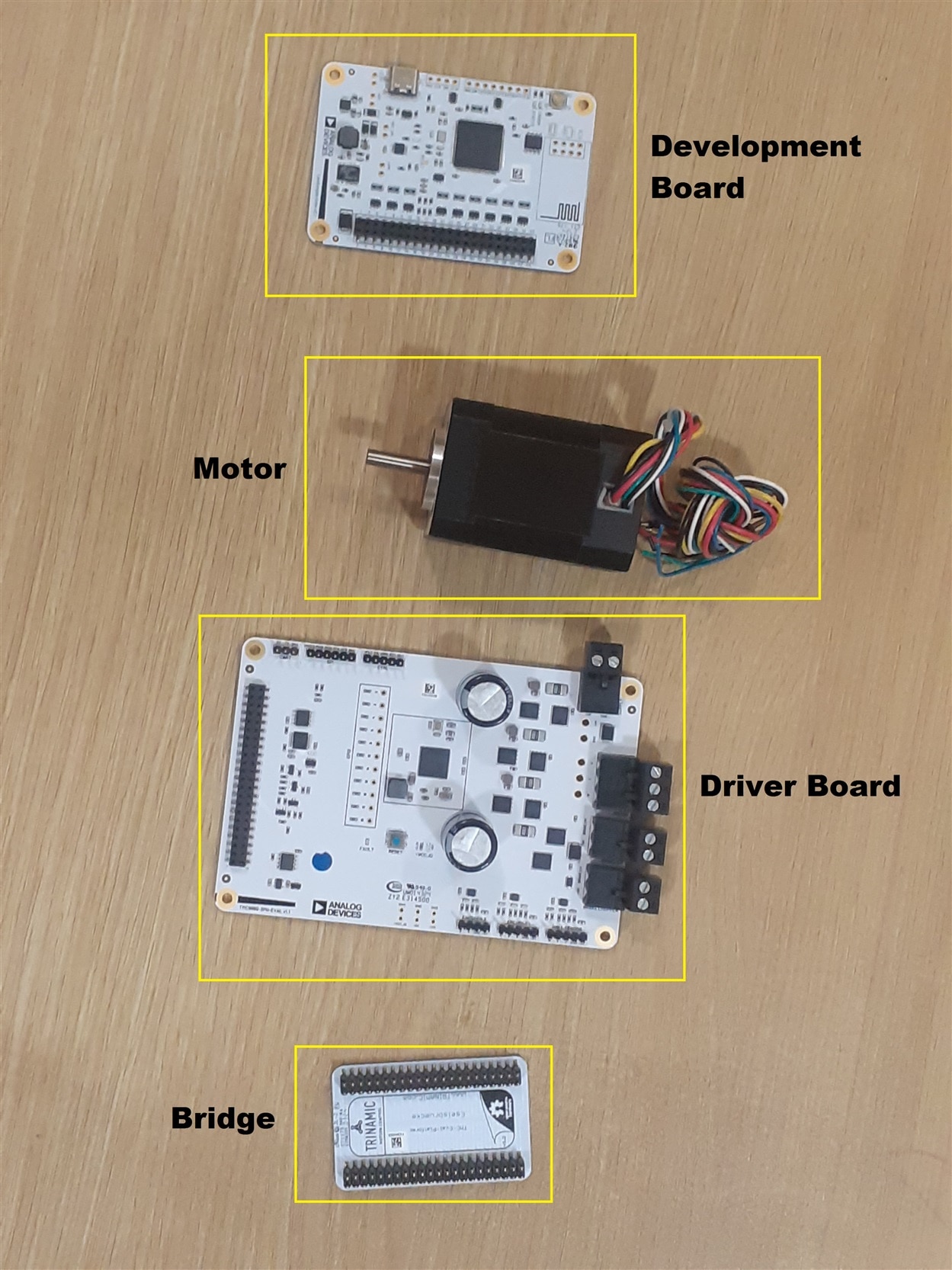
Know we will connect all the parts together. The final setup looks given as bellow.
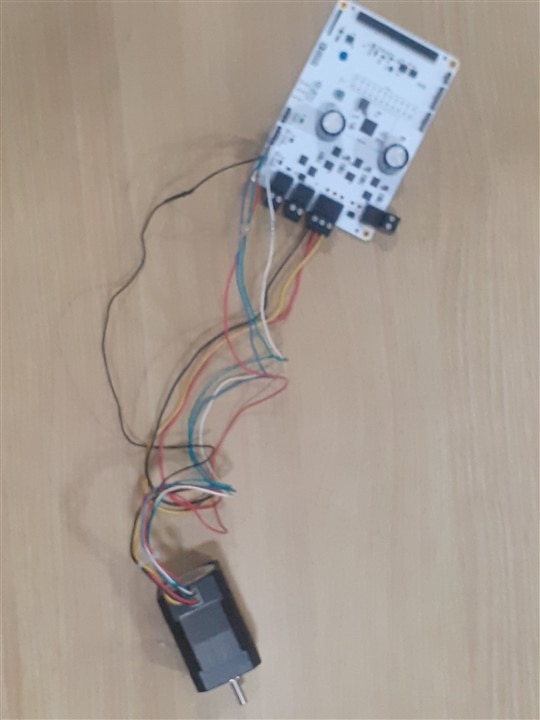
Connecting driver board to the motor
First we connect the Phase wire as give in table bellow.
| Wire Color | Function |
| Yellow | Phase U |
| Red | Phase V |
| Black | Phase W |
Then we connect the sensor wire of the motor as given bellow
| Wire for Hall Sensor | Function |
| Red | Vcc Hall Sensor |
| Black | Sensor Ground |
| Blue | Hall U |
| Green | Hall V |
| White | Hall W |
Image of Driver board getting connected to the BLDC motor.
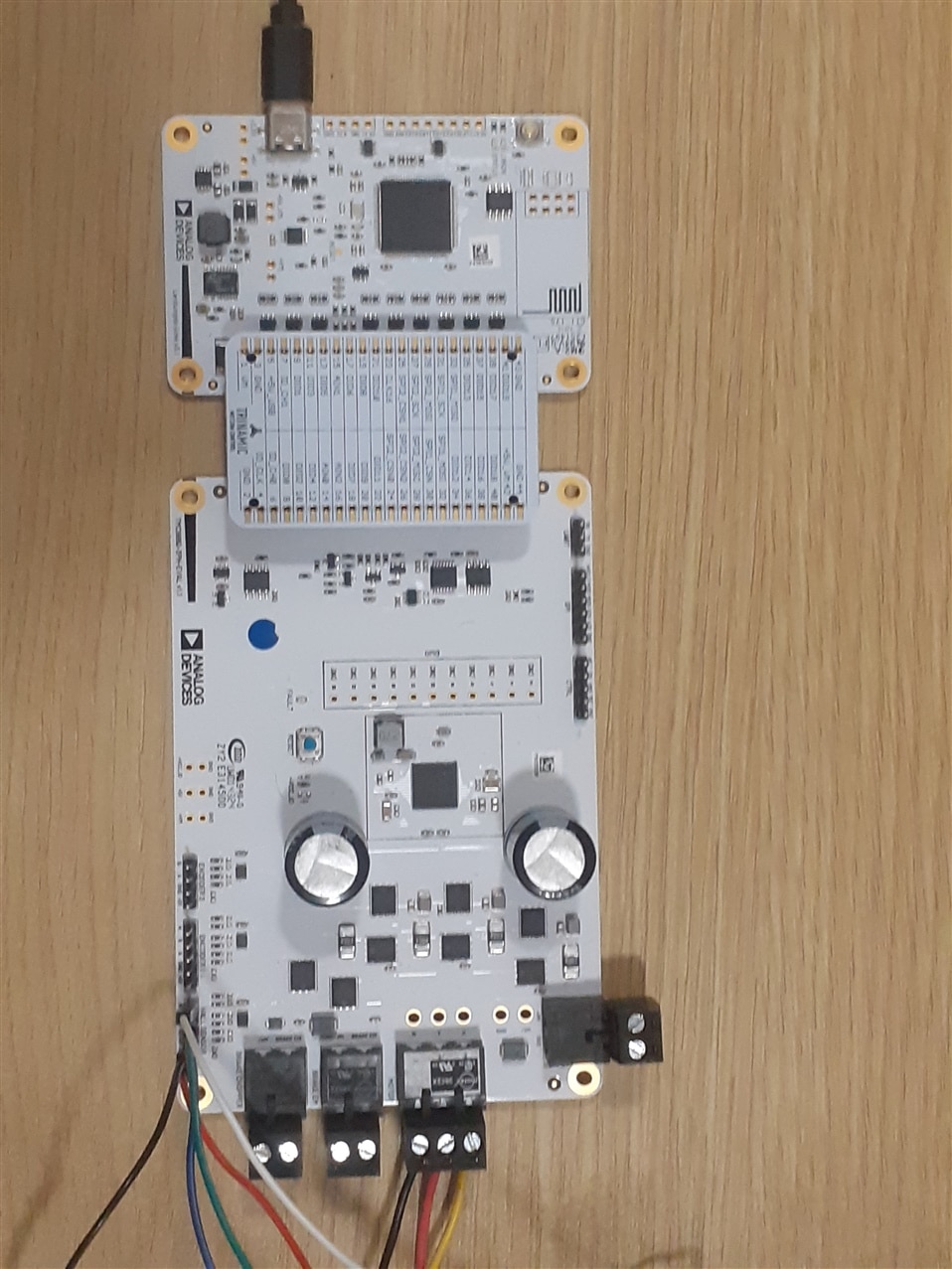
Connecting driver board to the microcontroller board
To connect driver board to microcontroller. We first connect the driver board to the Eselsbruecke bridge connection board and than the Eselsbruecke bridge connection board gets connected to the MCU board Landungsbruecke (PC interface board) as shown bellow.
Setting up software for the microcontroller board
To let you PC communicate with the microcontroller board you need to download TMCL-IDE from the following link given bellow.
I have a windows 8.1 pro operating system. TMCL-IDE 4.x is not supported on this OS. So I am using ubuntu 22.04 to install and test the IDE.
To install it in ubuntu 22.04. First download tmcl-ide-linux-x64-4.7.2.bin from the give link in your download folder.
After downloading open terminal window. In it type the following command
Cd Downloads
Chmod +x tmcl-ide-linux-x64-4.7.2.bin
./ tmcl-ide-linux-x64-4.7.2.bin
Setup will start. Install the Trinamic TMCL-IDE 4.x software for the OS.
After installation type the following command on terminal
sudo gedit /etc/udev/rules.d/99-ttyacms.rules
add the lines ATTRS{idVendor}=="16d0" , ENV{ID_MM_DEVICE_IGNORE}="1" ATTRS{idVendor}=="2a3c" , ENV{ID_MM_DEVICE_IGNORE}="1"
Reload the settings
sudo udevadm control --reload-rules
Alternatively, you can purge the modemmanager with
sudo apt-get purge modemmanager
Note:- dialout group
The dialout group in Linux is a system group that control access to serial port(like /dev/ttyS0 , /dev/ttyUSB0 , /dev/ttyACM0 , etc)
To access serial port you need to add user to dialout group. To do so first check the user by writing the following command in the terminal
Echo $USER
You will see the username
After getting the username add it to the dialout group by writing the following command.
sudo adduser <Your_Username> dialout
After that logout of the system and than login. For changes to be applied in the system.
Know your time to start the program to do so go to the following folder
~/ADI-Trinamic-Tools/TMCL-IDE/V4.7.2
In it type the following command.
./TMCL-IDE.sh
The application will start.
After starting the application you need to update the firmware of the board to 3.11.3 from the bellow link.
https://github.com/analogdevicesinc/TMC-EvalSystem/releases/tag/3.11.3
Once the firmware is updated the TMCL-IDE 4.7.2 will support communication with the microcontroller board.
Set the voltage of the driver board to 19 volt you will see the fault led in the driver board gets switched off and the TMCL-IDE software shows a red light at the top left corner of the software.
My Experience with the product and plan with the product.
I applied to Roadtest this product because I wanted to upgrade my table saw PCB cutter with better power motor with more features. Like testing of overheating, speed control of motor, torque control of motor etc. I cut many materials with that cutter like acrylic, FR4 material etc. But I also wanted to cut aluminium, steel, copper with it. Every different material needs different torque, motor speed etc. In case the material get stuck with the blade I want the motor to stop immidietly. These features are the things that is available with TMC9660-3PH-EVKIT system for which I have appled for.
Experience with the TMC9660 system
I have a core i3, 8 gb ram system with win 8.1 pro Operating system. I tried to install TMCL-IDE 4.7.x in it, But the os was showing a lot of *.dll error in it. I tried to ask community member to sove of thoes error and fixed most of them by downloading thoes *.dll but still there was some *.dll that are only available and compatible with win 11 OS. Since my computer is not compatible with windows 11 os so I decided to go for Ubuntu liinux os. I have installed the ubuntu 22.04 os in my system and installed the TMCL-IDE 4.7.x in it. It got installed and I was able to open the IDE without any error. The IDE showed that the TMC9660-3PH-EVKIT need a firmware upgrade so I have installed the latest firmware in it version 3.11.3. After installation the TMCL-IDE was able to communicate with the TMC9660-3PH-EVKIT firmware using serial port and was able to talk to the EVKIT in boot mode. The kit contains two mode in it. One is boot and another on is param mode. When set to param mode the EVKIT showed error. I raised this problem in the community for it's solution. They told me to set the commutation mode of the EVKIT which can be done via UBL tool. I tried to do so but failed in it. I installed the UBL tool in win 8.1 pro os and then tried to set parameter of kit for commutation mode but failed to do so. After so much of problem. I just got stuck and I am not able to get out of it. I ask community to get me help from Analog Device who is the maker of the kit. Still no solution.


