element14 Community
element14 Community
    Register Log In
  • Site
  • Search
  • Log In Register
  • Community Hub
    Community Hub
    • What's New on element14
    • Feedback and Support
    • Benefits of Membership
    • Personal Blogs
    • Members Area
    • Achievement Levels
  • Learn
    Learn
    • Ask an Expert
    • eBooks
    • element14 presents
    • Learning Center
    • Tech Spotlight
    • STEM Academy
    • Webinars, Training and Events
    • Learning Groups
  • Technologies
    Technologies
    • 3D Printing
    • FPGA
    • Industrial Automation
    • Internet of Things
    • Power & Energy
    • Sensors
    • Technology Groups
  • Challenges & Projects
    Challenges & Projects
    • Design Challenges
    • element14 presents Projects
    • Project14
    • Arduino Projects
    • Raspberry Pi Projects
    • Project Groups
  • Products
    Products
    • Arduino
    • Avnet & Tria Boards Community
    • Dev Tools
    • Manufacturers
    • Multicomp Pro
    • Product Groups
    • Raspberry Pi
    • RoadTests & Reviews
  • About Us
  • Store
    Store
    • Visit Your Store
    • Choose another store...
      • Europe
      •  Austria (German)
      •  Belgium (Dutch, French)
      •  Bulgaria (Bulgarian)
      •  Czech Republic (Czech)
      •  Denmark (Danish)
      •  Estonia (Estonian)
      •  Finland (Finnish)
      •  France (French)
      •  Germany (German)
      •  Hungary (Hungarian)
      •  Ireland
      •  Israel
      •  Italy (Italian)
      •  Latvia (Latvian)
      •  
      •  Lithuania (Lithuanian)
      •  Netherlands (Dutch)
      •  Norway (Norwegian)
      •  Poland (Polish)
      •  Portugal (Portuguese)
      •  Romania (Romanian)
      •  Russia (Russian)
      •  Slovakia (Slovak)
      •  Slovenia (Slovenian)
      •  Spain (Spanish)
      •  Sweden (Swedish)
      •  Switzerland(German, French)
      •  Turkey (Turkish)
      •  United Kingdom
      • Asia Pacific
      •  Australia
      •  China
      •  Hong Kong
      •  India
      • Japan
      •  Korea (Korean)
      •  Malaysia
      •  New Zealand
      •  Philippines
      •  Singapore
      •  Taiwan
      •  Thailand (Thai)
      • Vietnam
      • Americas
      •  Brazil (Portuguese)
      •  Canada
      •  Mexico (Spanish)
      •  United States
      Can't find the country/region you're looking for? Visit our export site or find a local distributor.
  • Translate
  • Profile
  • Settings
Code Exchange
  • Technologies
  • More
Code Exchange
Blog Conditional breakpoint in VSCode
  • Blog
  • Forum
  • Documents
  • Events
  • Polls
  • Files
  • Members
  • Mentions
  • Sub-Groups
  • Tags
  • More
  • Cancel
  • New
Join Code Exchange to participate - click to join for free!
  • Share
  • More
  • Cancel
Group Actions
  • Group RSS
  • More
  • Cancel
Engagement
  • Author Author: Jan Cumps
  • Date Created: 15 Dec 2025 8:00 PM Date Created
  • Views 60 views
  • Likes 4 likes
  • Comments 0 comments
  • vscode
Related
Recommended

Conditional breakpoint in VSCode

Jan Cumps
Jan Cumps
15 Dec 2025

Sometimes, you want to have a breakpoint that only halts execution (breaks Slight smile) if a certain condition is true.

My user story:

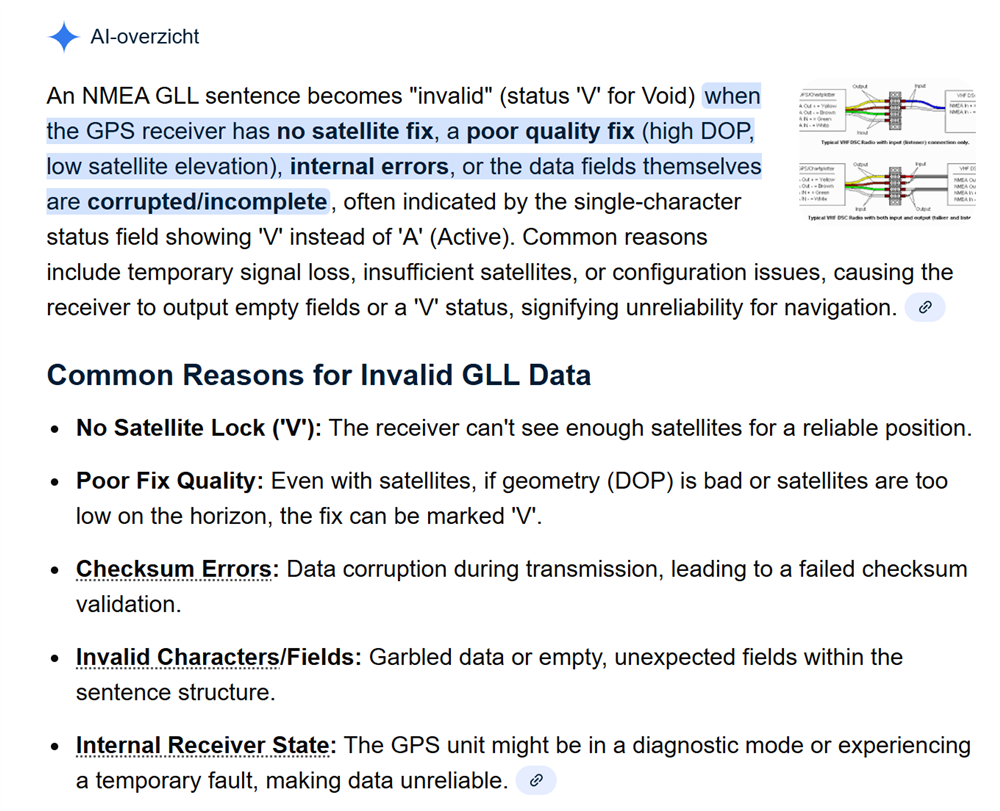
I have a GPS design that receives data from satellites. Sometimes, that radio receives "not guaranteed" data. The data isn't corrupt, but there are conditions (view blocked, ...) that render the data as unreliable.

image
this image is a capture of AI generated content

I wrote a data parser for GPS data, that gets 30 messages per minute. In a debug session, I want the debugger to break when the GPS reports the issue. This info comes as one of many attributes of a payload string. So there is no interrupt, or unique code path, that indicates this situation.

To let the debugger only break on this condition, I want to set a breakpoint in the part of the code that retrieves this data. And let it apply only when the payload indicates that data is not reliable (the break condition).

My GPS data parser extracts all the fields of the payload it receives from a GPS module. That's its only job: cut payload into fields. It doesn't take decisions on the value of the fields.
But I want to make the debugger break when one of those fields (the field valid) has the value that flags that the payload is not reliable.

To achieve that, I put a breakpoint just after the code that parses the field:

image

Then, I put a condition: only break if the parsed value has that indicator that the payload can't be trusted.

There are several ways to edit a breakpoint in VSCode. The one I used, is to right-click on the breakpoint icon (the red dot), select Edit breakpoint.
Then I added the condition: ! gll.result.valid

When I debug the design, it 'll happily run the code, until there is an occurrence of this situation. Then the debugger stops, and I have access to all state and data of when this happened.

Contrary to common hardware breakpoints, conditional breakpoints make your program run slower. Use them only when needed.

There are other options, like checking this value in code, or raising a GPIO pin when this happens. Valid debug techniques, but they require code changes.
The conditional breakpoint is another tools in that toolkit.

  • Sign in to reply
element14 Community

element14 is the first online community specifically for engineers. Connect with your peers and get expert answers to your questions.

  • Members
  • Learn
  • Technologies
  • Challenges & Projects
  • Products
  • Store
  • About Us
  • Feedback & Support
  • FAQs
  • Terms of Use
  • Privacy Policy
  • Legal and Copyright Notices
  • Sitemap
  • Cookies

An Avnet Company © 2025 Premier Farnell Limited. All Rights Reserved.

Premier Farnell Ltd, registered in England and Wales (no 00876412), registered office: Farnell House, Forge Lane, Leeds LS12 2NE.

ICP 备案号 10220084.

Follow element14

  • X
  • Facebook
  • linkedin
  • YouTube