element14 Community
element14 Community
    Register Log In
  • Site
  • Search
  • Log In Register
  • Community Hub
    Community Hub
    • What's New on element14
    • Feedback and Support
    • Benefits of Membership
    • Personal Blogs
    • Members Area
    • Achievement Levels
  • Learn
    Learn
    • Ask an Expert
    • eBooks
    • element14 presents
    • Learning Center
    • Tech Spotlight
    • STEM Academy
    • Webinars, Training and Events
    • Learning Groups
  • Technologies
    Technologies
    • 3D Printing
    • FPGA
    • Industrial Automation
    • Internet of Things
    • Power & Energy
    • Sensors
    • Technology Groups
  • Challenges & Projects
    Challenges & Projects
    • Design Challenges
    • element14 presents Projects
    • Project14
    • Arduino Projects
    • Raspberry Pi Projects
    • Project Groups
  • Products
    Products
    • Arduino
    • Avnet & Tria Boards Community
    • Dev Tools
    • Manufacturers
    • Multicomp Pro
    • Product Groups
    • Raspberry Pi
    • RoadTests & Reviews
  • About Us
    About the element14 Community
  • Store
    Store
    • Visit Your Store
    • Choose another store...
      • Europe
      •  Austria (German)
      •  Belgium (Dutch, French)
      •  Bulgaria (Bulgarian)
      •  Czech Republic (Czech)
      •  Denmark (Danish)
      •  Estonia (Estonian)
      •  Finland (Finnish)
      •  France (French)
      •  Germany (German)
      •  Hungary (Hungarian)
      •  Ireland
      •  Israel
      •  Italy (Italian)
      •  Latvia (Latvian)
      •  
      •  Lithuania (Lithuanian)
      •  Netherlands (Dutch)
      •  Norway (Norwegian)
      •  Poland (Polish)
      •  Portugal (Portuguese)
      •  Romania (Romanian)
      •  Russia (Russian)
      •  Slovakia (Slovak)
      •  Slovenia (Slovenian)
      •  Spain (Spanish)
      •  Sweden (Swedish)
      •  Switzerland(German, French)
      •  Turkey (Turkish)
      •  United Kingdom
      • Asia Pacific
      •  Australia
      •  China
      •  Hong Kong
      •  India
      •  Japan
      •  Korea (Korean)
      •  Malaysia
      •  New Zealand
      •  Philippines
      •  Singapore
      •  Taiwan
      •  Thailand (Thai)
      •  Vietnam
      • Americas
      •  Brazil (Portuguese)
      •  Canada
      •  Mexico (Spanish)
      •  United States
      Can't find the country/region you're looking for? Visit our export site or find a local distributor.
  • Translate
  • Profile
  • Settings
Embedded and Microcontrollers
  • Technologies
  • More
Embedded and Microcontrollers
Embedded Forum programming AD75019 with FPGA
  • Blog
  • Forum
  • Documents
  • Quiz
  • Polls
  • Files
  • Members
  • Mentions
  • Sub-Groups
  • Tags
  • More
  • Cancel
  • New
Join Embedded and Microcontrollers to participate - click to join for free!
Actions
  • Share
  • More
  • Cancel
Forum Thread Details
  • Replies 37 replies
  • Subscribers 480 subscribers
  • Views 4131 views
  • Users 0 members are here
Related

programming AD75019 with FPGA

Former Member
Former Member over 13 years ago
Report Post       Today, 06:56 AM

Hello,
please , i want to program AD75019 , an analogue Cross point Switch from analogue devices 16x16, with FPGA, ad75019 have a serial interface, i'have to shift 256 bit into 256 bit shift register , once the register is full i apply a PCLK pulse to to transfer the register to latch (like it's mentionned in the datasheet) my problem is, that i can'T close or open any switch image
please , anyone could help, thanks in Advance


this my configuration:


VDD:11V
VCC:5V
VSS: 0V


SCLK: 1MHZ


this how i did the spi interface : a shift register of 256 bit with a state machine for controlling PCLK signal:


-- spi_SM.vhd


library ieee;
use ieee.std_logic_1164.all;
use ieee.std_logic_arith.all;
use ieee.std_logic_signed.all;
use ieee.std_logic_arith.all;


entity spi_SM is


generic(N:integer :=256; C:integer :=9; D:integer :=4 );
-- generic(C:integer :=9);
port(
clk :in std_logic;
rst_n:in std_logic;


data: in std_logic_vector (N-1 downto 0);
SCLK: inout std_logic; --inout pour qu'il peut etre lu en process
SIN imageut std_logic;
PCLK: out std_logic


);
end spi_SM;


architecture rtl of spi_SM is


type States is (ACTIF, UPDATE, IDLE);
signal state : States := ACTIF;
signal EndSend : std_logic_vector(8 downto 0);
signal t_rst_cnt_n : std_logic ;


--Diviseur (pour generer la frequence d'horloge du port SPI(20Khz-5Mhz))
component diviseur
generic ( N : integer := 4 );
port(
clk : in std_logic ;
rst_n : in std_logic ;
clk_out : out std_logic
);
end component;


--Compteurnbit
component Compteurnbit
generic ( N : integer := 16 );
port(
clk : in std_logic ;
rst_cnt_n : in std_logic ;
OutCount : inout std_logic_vector(N-1 downto 0)
);
end component;


--Sregister
component Sregister
generic ( N : integer := 256 );
port(
clk : in std_logic;
rst_n : in std_logic;
S :in std_logic_vector (N-1 downto 0);-- durée de train d'impulsion
Q : out std_logic
);
end component;


begin


U0_diviseur : diviseur generic map(D) port map(clk, rst_n, SCLK); ---definir frequence de SPI (clk de base=20 Mhz)
U0_Sregister : Sregister generic map(N) port map(SCLK,rst_n,data,SIN);
U0_Compteurnbit : Compteurnbit generic map(C) port map(SCLK,t_rst_cnt_n,EndSend);-- counting 256 pulse to set EndSend


send : process (SCLK,EndSend)
begin


if (rst_n='0') then
t_rst_cnt_n<='0';
else
case state is
when
actif=>
if (unsigned(EndSend) = 256) then -- opertation arithmetique donc convertit std_logic_vector en unsigned
PCLK<='0';--0
t_rst_cnt_n<='0';
state<= UPDATE;
else
t_rst_cnt_n<='1';
PCLK<='1';
state<= ACTIF;
end if;
when UPDATE=>
PCLK<='1';--0
-- state<= actif ;
state<= IDLE;
when IDLE=>
PCLK<='1';
state<= IDLE;


end case;


end if;
end process;


end;


  • Sign in to reply
  • Cancel
Parents
  • Former Member
    Former Member over 13 years ago

    Hello Michael,


    i improve my code to respect exactly the delay as it's mentioned on the time diagram , here tow screenshot for the simulation, i did a state machine to control SCLK and PCLK , the master clock of the FSM is clk2=2.5 MHZ, so i have SCLK with F=625 KHZ

    unfortunately, still i can't control switch image, what do you think ?


    imageimage

    • Cancel
    • Vote Up 0 Vote Down
    • Sign in to reply
    • Cancel
  • Former Member
    Former Member over 13 years ago in reply to Former Member

    Hello Hachani


    I am working on a project with the AD75019 and have been facing some problems. I read your post and discussion and figured that you might be able to help me out a little bit.


    I am trying to program the AD75019 using at PIC32 microcontroller. I am currently testing the chip for a single input single output configuration. Before I get into the programming part I'd like to know if my connections are right. Must the PCLCK pin be from a clock pin of the microcontroller or can it be any digital output from the microcontroller. I have currently connected it to a digital output pin from the microcontroller and after entering data into the serial buffer register of the microcontroller I output a logic low on the o/p pin and a logic high to represent an active low pulse. I am not sure if that is the right way to go about it.


    Also, the power supply connections. I have connected the Vdd to +10V; Vss = Grnd, Vcc = +5V. and as for the DGND pin, should it be grounded or left open or bypassed with a capacitor?


    Sorry to bombard you with so many questions but then I have been trying to program this chip for a while now and there isn't a lot of resources or support for this device. Looking forward to your assistance.


    Thank you

    • Cancel
    • Vote Up 0 Vote Down
    • Sign in to reply
    • Cancel
  • michaelkellett
    michaelkellett over 13 years ago in reply to Former Member

    @ Rudhram,


    Can you post a diagram showing all your connections.

    Normally I would expect you to connect  a 5V supply between DGND and VCC, a 12V supply between VSS and VDD and connect VSS to DGND.

    Watch out for the sequencing note in the data sheet (turn on the 12V supply first). Make sure you have some kind of current limiting in your power supplies while you are experimenting or you may fry a chip or two.

    Your connnection for PCLK sounds correct.


    MK

    • Cancel
    • Vote Up 0 Vote Down
    • Sign in to reply
    • Cancel
  • Former Member
    Former Member over 13 years ago in reply to michaelkellett

    Hello Michael


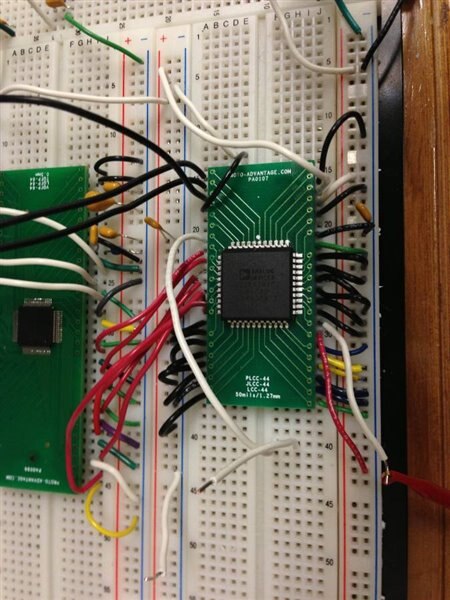
    Thanks for your response, I got distracted away from the AD75019 for a while and had to get used to programming the dsPIC33E and ads1298. However, I am now back to using the ad75019, and the problem still persists. only now, i am not sure if it is the hardware/connections or the code. I have attached an image of the switch, the top four pins on the left are PCLK, SCLK, SIN and Vss respectively and on the right side top, the second, third and fourth pins are the Vdd and Vcc and DGND respectively. I am using one input (X15) and one output (Y15), everything else has been grounded to prevent crosstalk.


    I have a feeling that the problem is associated with the power supply sequencing because after running the program, if I remove both the power supply connections (Vdd and Vcc) I get a distorted version of the input signal on the output.


    Looking forward to hearing from you.


    Thank you

    Cheers

    image

    • Cancel
    • Vote Up 0 Vote Down
    • Sign in to reply
    • Cancel
  • michaelkellett
    michaelkellett over 13 years ago in reply to Former Member

    Hello Rudhram,


    You will need to post a schematic diagram for me to understand your connections.

    Have you got simulation results from your FPGA design.

    Finally have you any logic analyser/scope traces of the control signals.


    MK

    • Cancel
    • Vote Up 0 Vote Down
    • Sign in to reply
    • Cancel
  • Former Member
    Former Member over 13 years ago in reply to Former Member

    Hello Rudhram, Michael;

    I'm sorry rudhram for the delay of my answer, in my case I'm using an FPGA,

      Must the PCLCK pin be from a clock pin of the microcontroller or can it be any digital output from the microcontroller.


    Yes your PCLK could be any digital output, you have to generate a rectangular signal, with a frequency between 20Khz --5 MHZ as it's required in the datasheet, then you have realy to be careful about the rising edge of the clock , be sure that you upload 256 bit into AD75019 no more no less, and the rising edge of your clock is  directly after the rising edge of each 256 bit, I mean your rising edge of clock shouldn't be in the same time of the rising edge of the bit, to avoid metastable state

      Also, the power supply connections. I have connected the Vdd to +10V; Vss = Grnd, Vcc = +5V. and as for the DGND pin, should it be grounded or left open or bypassed with a capacitor?

    your configuration is ok for VDD,VCC,VSS your DGND should be grounded, not bypassed with a capacitor , one more thing I don't think that it's a good idea to make the other Input/Output into the ground, since it's a grid of switch, you can short cut your connection by mistake.

    Maybe be a fast way to know where your signal is going, to which output i.e from X15 did not go to Y15 maybe it' went to other output so, make some LED in each INPUT/OUTPUT, and make sure you give enough current, and then when you send your signal, you know if you have close some switch or no image


    well hope that this will help you, tell me if there's any progress


    Thanks

    • Cancel
    • Vote Up 0 Vote Down
    • Sign in to reply
    • Cancel
Reply
  • Former Member
    Former Member over 13 years ago in reply to Former Member

    Hello Rudhram, Michael;

    I'm sorry rudhram for the delay of my answer, in my case I'm using an FPGA,

      Must the PCLCK pin be from a clock pin of the microcontroller or can it be any digital output from the microcontroller.


    Yes your PCLK could be any digital output, you have to generate a rectangular signal, with a frequency between 20Khz --5 MHZ as it's required in the datasheet, then you have realy to be careful about the rising edge of the clock , be sure that you upload 256 bit into AD75019 no more no less, and the rising edge of your clock is  directly after the rising edge of each 256 bit, I mean your rising edge of clock shouldn't be in the same time of the rising edge of the bit, to avoid metastable state

      Also, the power supply connections. I have connected the Vdd to +10V; Vss = Grnd, Vcc = +5V. and as for the DGND pin, should it be grounded or left open or bypassed with a capacitor?

    your configuration is ok for VDD,VCC,VSS your DGND should be grounded, not bypassed with a capacitor , one more thing I don't think that it's a good idea to make the other Input/Output into the ground, since it's a grid of switch, you can short cut your connection by mistake.

    Maybe be a fast way to know where your signal is going, to which output i.e from X15 did not go to Y15 maybe it' went to other output so, make some LED in each INPUT/OUTPUT, and make sure you give enough current, and then when you send your signal, you know if you have close some switch or no image


    well hope that this will help you, tell me if there's any progress


    Thanks

    • Cancel
    • Vote Up 0 Vote Down
    • Sign in to reply
    • Cancel
Children
  • Former Member
    Former Member over 13 years ago in reply to Former Member

    Hello Michael and Hachani


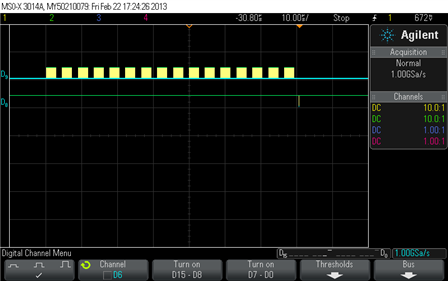
    I have moved forwar with the AD75019 and I just managed to obtain control of the switch. I was operating the switch at less than minimum power supply and my SPI communication was incorrect. I did not even notice that my code was incorrect and was sending 128bits instead of 256. This has fixed the problem and the switch works fine. It however, does not switch fast enough. The data sheet says the total time to be 52micro seconds, but anything short of 70 microseconds affects the output.


    image


    That is the timing diagram for the switch communication (70microseconds). Anything shorter than this results in erroneous communication.


    That being said, I have a question regarding the settling time of the switch. Nowhere in the data sheet is there any mention of the Signal Settling time. Would you happen to know about the settling time.


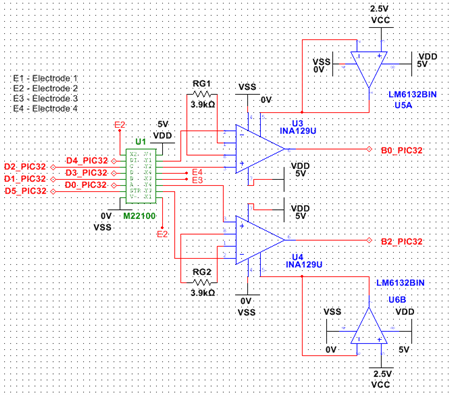
    Michael, please find below my schematic of the circuit. Only correction is the Vdd for the switch (M22100) is +6.8V and Vss is -6.8V. Vcc is 5V.

    The switch works fine but just the timing that is not right, I wonder if it has anything to do with the power supply.


    . image


    Thanks

    Cheers

    • Cancel
    • Vote Up 0 Vote Down
    • Sign in to reply
    • Cancel
  • michaelkellett
    michaelkellett over 13 years ago in reply to Former Member

    Hello Rudhram,


    First the easy bit:

    AD get the 52uS from a 5MHz sclock and 256 bits to send. Actually this works out to 51.2uS. From your scope trace it looks as if you are sending the data in 16 bursts with quite long inter-burst gaps. (I can't be quite sure because you don't say if the top scope trace is clock or data.) If you do have gap every 16 clocks this would expalin why you need 70uS to get the data into the switch.


    AD quote the PCLOCK to switch on/off time as 70nS, they don't describe exactly what they mean by on/off but since your INA129U needs 2.5uS to settle within scope trace width and 5mS to 0.1% (from the data sheet) I don't think the switch settling time is going to be an issue.


    MK

    • Cancel
    • Vote Up 0 Vote Down
    • Sign in to reply
    • Cancel
  • Former Member
    Former Member over 12 years ago in reply to michaelkellett

    Hello Michael and Rudhram;


    Recently I got  problem with AD75019, when I upload my data, I should put the power off and then put it on to configure the AD75019 with the new data, otherwise, I still has the pervious configuration with the pervious data, does this make sense ??!!

    • Cancel
    • Vote Up 0 Vote Down
    • Sign in to reply
    • Cancel
element14 Community

element14 is the first online community specifically for engineers. Connect with your peers and get expert answers to your questions.

  • Members
  • Learn
  • Technologies
  • Challenges & Projects
  • Products
  • Store
  • About Us
  • Feedback & Support
  • FAQs
  • Terms of Use
  • Privacy Policy
  • Legal and Copyright Notices
  • Sitemap
  • Cookies

An Avnet Company © 2026 Premier Farnell Limited. All Rights Reserved.

Premier Farnell Ltd, registered in England and Wales (no 00876412), registered office: Farnell House, Forge Lane, Leeds LS12 2NE.

ICP 备案号 10220084.

Follow element14

  • X
  • Facebook
  • linkedin
  • YouTube