element14 Community
element14 Community
    Register Log In
  • Site
  • Search
  • Log In Register
  • Community Hub
    Community Hub
    • What's New on element14
    • Feedback and Support
    • Benefits of Membership
    • Personal Blogs
    • Members Area
    • Achievement Levels
  • Learn
    Learn
    • Ask an Expert
    • eBooks
    • element14 presents
    • Learning Center
    • Tech Spotlight
    • STEM Academy
    • Webinars, Training and Events
    • Learning Groups
  • Technologies
    Technologies
    • 3D Printing
    • FPGA
    • Industrial Automation
    • Internet of Things
    • Power & Energy
    • Sensors
    • Technology Groups
  • Challenges & Projects
    Challenges & Projects
    • Design Challenges
    • element14 presents Projects
    • Project14
    • Arduino Projects
    • Raspberry Pi Projects
    • Project Groups
  • Products
    Products
    • Arduino
    • Avnet & Tria Boards Community
    • Dev Tools
    • Manufacturers
    • Multicomp Pro
    • Product Groups
    • Raspberry Pi
    • RoadTests & Reviews
  • About Us
  • Store
    Store
    • Visit Your Store
    • Choose another store...
      • Europe
      •  Austria (German)
      •  Belgium (Dutch, French)
      •  Bulgaria (Bulgarian)
      •  Czech Republic (Czech)
      •  Denmark (Danish)
      •  Estonia (Estonian)
      •  Finland (Finnish)
      •  France (French)
      •  Germany (German)
      •  Hungary (Hungarian)
      •  Ireland
      •  Israel
      •  Italy (Italian)
      •  Latvia (Latvian)
      •  
      •  Lithuania (Lithuanian)
      •  Netherlands (Dutch)
      •  Norway (Norwegian)
      •  Poland (Polish)
      •  Portugal (Portuguese)
      •  Romania (Romanian)
      •  Russia (Russian)
      •  Slovakia (Slovak)
      •  Slovenia (Slovenian)
      •  Spain (Spanish)
      •  Sweden (Swedish)
      •  Switzerland(German, French)
      •  Turkey (Turkish)
      •  United Kingdom
      • Asia Pacific
      •  Australia
      •  China
      •  Hong Kong
      •  India
      • Japan
      •  Korea (Korean)
      •  Malaysia
      •  New Zealand
      •  Philippines
      •  Singapore
      •  Taiwan
      •  Thailand (Thai)
      • Vietnam
      • Americas
      •  Brazil (Portuguese)
      •  Canada
      •  Mexico (Spanish)
      •  United States
      Can't find the country/region you're looking for? Visit our export site or find a local distributor.
  • Translate
  • Profile
  • Settings
Experts, Learning and Guidance
  • Technologies
  • More
Experts, Learning and Guidance
Ask an Expert Forum XTAL clock and 2A03
  • Blog
  • Forum
  • Documents
  • Leaderboard
  • Files
  • Members
  • Mentions
  • Sub-Groups
  • Tags
  • More
  • Cancel
  • New
Join Experts, Learning and Guidance to participate - click to join for free!
Actions
  • Share
  • More
  • Cancel
Forum Thread Details
  • Replies 17 replies
  • Subscribers 303 subscribers
  • Views 4521 views
  • Users 0 members are here
  • nintendo entertainment system
  • adruino
  • retro gaming console
Related
See a helpful answer?

Be sure to click 'more' and select 'suggest as answer'!

If you're the thread creator, be sure to click 'more' then 'Verify as Answer'!

XTAL clock and 2A03

splatkillwill
splatkillwill over 5 years ago

I'm not sure where to ask this but I'm a newbie and I'm looking for someone to look over a schematic before I try it so I don't break anything (specifically a 2A03 (6502 based NES CPU) I only have one). The idea is to hook enough of it up to get it running and interact with it with a Adruino Uno. The Adruino only has enough pins to look at the lower 8 bits of the address bus but I figure when I get to the Adruino script I can just respond to the $fc and $fd of the $fffc and $fffd reset vector and not send any JMP instructions to anything lower that $ff00 to get started poking around.
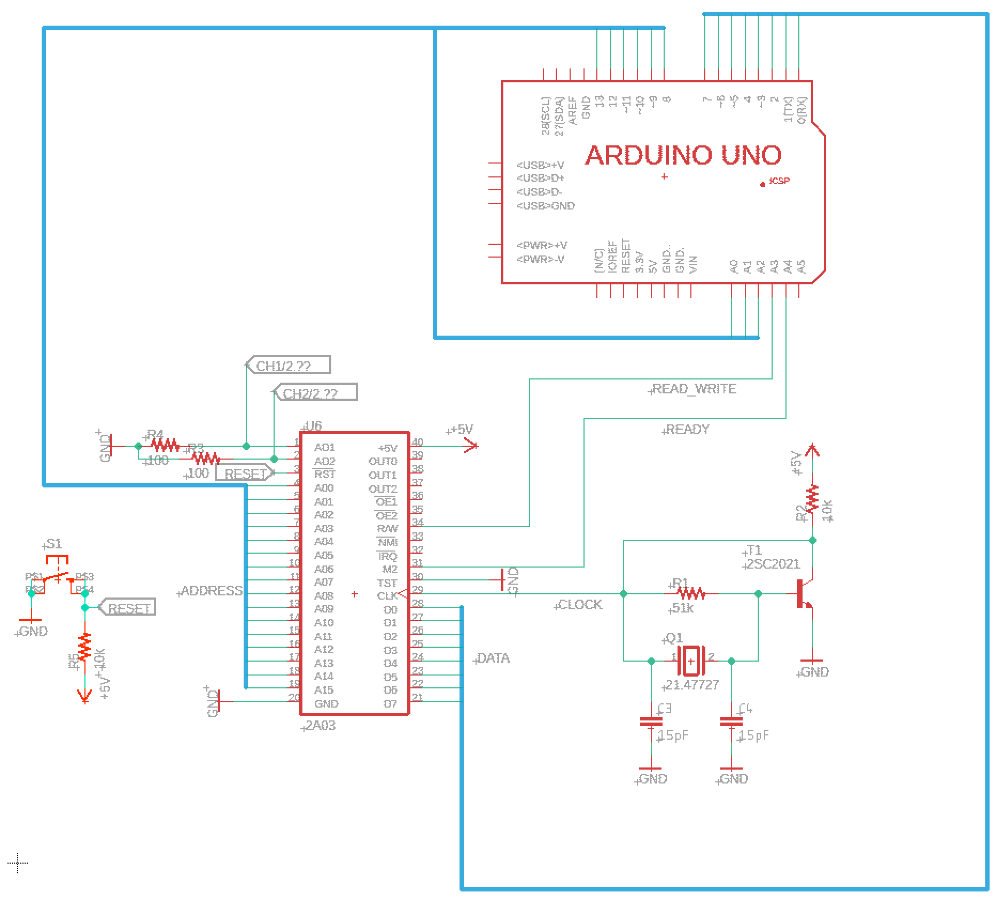
image

I'm specifically worried about the XTAL clock. Its based on StandaloneNesPlayer (soniktech.com) but I don't have a 74HCT04N so I figured I'd use a transistor for the not gate but my R2 value of 10k is arbitrary.
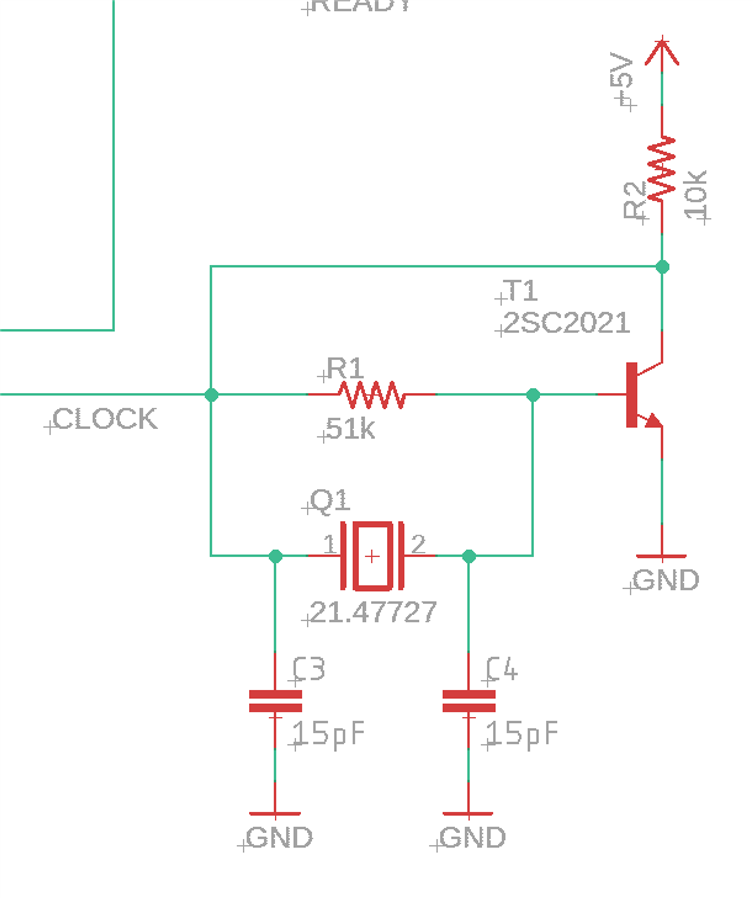
image

I attached the Eagle project (I'm new at that too)

Attachments:
my_NES.zip
  • Sign in to reply
  • Cancel

Top Replies

  • michaelkellett
    michaelkellett over 5 years ago +3
    I don't think this oscillator will work. Use the recommended chip (or a ready made oscillator). BUT..... you seem to connecting the Arduino to the NES chip as if the Arduino were a memory device - what…
  • Jan Cumps
    Jan Cumps over 5 years ago in reply to splatkillwill +3
    The oscillator in the original article is a Pierce oscillator.
  • jc2048
    jc2048 over 5 years ago +3
    As Michael says, you'll find this tricky to get right without some way of looking at the waveform coming out. This worked with an ordinary 16MHz AT-cut processor crystal and a 2N3904 transistor. I've biased…
Parents
  • jc2048
    jc2048 over 5 years ago

    As Michael says, you'll find this tricky to get right without some way of looking at the waveform coming

    out.


    This worked with an ordinary 16MHz AT-cut processor crystal and a 2N3904 transistor. I've biased it to

    swing around 1.5V, which would suit a TTL level input. If it's a pure CMOS input, you'd want to move that

    up to 2.5V (by changing the base bias resistor).


    image


    image


    image


    The collector resistor is a compromise. Increasing it increases the gain, but it doesn't then drive so

    well. In my case, 3.3k was better than 1k or 4k7 [I didn't experiment any further].


    For what you're doing with the 6502 clone, couldn't you just generate the clock from the Arduino and run

    everything at whatever speed it can manage to generate the signals at. Does it matter if you see it

    running at only a tenth of the normal speed, or whatever you get? The original 6502 parts were static and

    there was no minimum clock speed, so I don't imagine this device would be too fussy either. You could get

    the Arduino to control the reset too.


    Edit


    Not only do you need a way of looking at the waveform, you also need to know how to use it properly. I had the 20MHz bandwidth limit on. This is what it looks like without


    image


    so my circuit isn't producing a very nice waveform.

    • Cancel
    • Vote Up +3 Vote Down
    • Sign in to reply
    • Cancel
Reply
  • jc2048
    jc2048 over 5 years ago

    As Michael says, you'll find this tricky to get right without some way of looking at the waveform coming

    out.


    This worked with an ordinary 16MHz AT-cut processor crystal and a 2N3904 transistor. I've biased it to

    swing around 1.5V, which would suit a TTL level input. If it's a pure CMOS input, you'd want to move that

    up to 2.5V (by changing the base bias resistor).


    image


    image


    image


    The collector resistor is a compromise. Increasing it increases the gain, but it doesn't then drive so

    well. In my case, 3.3k was better than 1k or 4k7 [I didn't experiment any further].


    For what you're doing with the 6502 clone, couldn't you just generate the clock from the Arduino and run

    everything at whatever speed it can manage to generate the signals at. Does it matter if you see it

    running at only a tenth of the normal speed, or whatever you get? The original 6502 parts were static and

    there was no minimum clock speed, so I don't imagine this device would be too fussy either. You could get

    the Arduino to control the reset too.


    Edit


    Not only do you need a way of looking at the waveform, you also need to know how to use it properly. I had the 20MHz bandwidth limit on. This is what it looks like without


    image


    so my circuit isn't producing a very nice waveform.

    • Cancel
    • Vote Up +3 Vote Down
    • Sign in to reply
    • Cancel
Children
  • splatkillwill
    splatkillwill over 5 years ago in reply to jc2048

    I ended up putting the xtal back on the original board and getting the clock off of that but I'll have to look at this in more detail when I have time.

    Generating the clock from the Arduino was my first thought but I heard older chips might not persist the state of the registers if you run them too slow, also the 2A03 is a sound chip as well. My end goal is to use the sound chip part and I assumed the sound generation part would need the right clock to sound right.

    • Cancel
    • Vote Up +1 Vote Down
    • Sign in to reply
    • Cancel
element14 Community

element14 is the first online community specifically for engineers. Connect with your peers and get expert answers to your questions.

  • Members
  • Learn
  • Technologies
  • Challenges & Projects
  • Products
  • Store
  • About Us
  • Feedback & Support
  • FAQs
  • Terms of Use
  • Privacy Policy
  • Legal and Copyright Notices
  • Sitemap
  • Cookies

An Avnet Company © 2025 Premier Farnell Limited. All Rights Reserved.

Premier Farnell Ltd, registered in England and Wales (no 00876412), registered office: Farnell House, Forge Lane, Leeds LS12 2NE.

ICP 备案号 10220084.

Follow element14

  • X
  • Facebook
  • linkedin
  • YouTube