element14 Community
element14 Community
    Register Log In
  • Site
  • Search
  • Log In Register
  • Community Hub
    Community Hub
    • What's New on element14
    • Feedback and Support
    • Benefits of Membership
    • Personal Blogs
    • Members Area
    • Achievement Levels
  • Learn
    Learn
    • Ask an Expert
    • eBooks
    • element14 presents
    • Learning Center
    • Tech Spotlight
    • STEM Academy
    • Webinars, Training and Events
    • Learning Groups
  • Technologies
    Technologies
    • 3D Printing
    • FPGA
    • Industrial Automation
    • Internet of Things
    • Power & Energy
    • Sensors
    • Technology Groups
  • Challenges & Projects
    Challenges & Projects
    • Design Challenges
    • element14 presents Projects
    • Project14
    • Arduino Projects
    • Raspberry Pi Projects
    • Project Groups
  • Products
    Products
    • Arduino
    • Avnet & Tria Boards Community
    • Dev Tools
    • Manufacturers
    • Multicomp Pro
    • Product Groups
    • Raspberry Pi
    • RoadTests & Reviews
  • About Us
  • Store
    Store
    • Visit Your Store
    • Choose another store...
      • Europe
      •  Austria (German)
      •  Belgium (Dutch, French)
      •  Bulgaria (Bulgarian)
      •  Czech Republic (Czech)
      •  Denmark (Danish)
      •  Estonia (Estonian)
      •  Finland (Finnish)
      •  France (French)
      •  Germany (German)
      •  Hungary (Hungarian)
      •  Ireland
      •  Israel
      •  Italy (Italian)
      •  Latvia (Latvian)
      •  
      •  Lithuania (Lithuanian)
      •  Netherlands (Dutch)
      •  Norway (Norwegian)
      •  Poland (Polish)
      •  Portugal (Portuguese)
      •  Romania (Romanian)
      •  Russia (Russian)
      •  Slovakia (Slovak)
      •  Slovenia (Slovenian)
      •  Spain (Spanish)
      •  Sweden (Swedish)
      •  Switzerland(German, French)
      •  Turkey (Turkish)
      •  United Kingdom
      • Asia Pacific
      •  Australia
      •  China
      •  Hong Kong
      •  India
      • Japan
      •  Korea (Korean)
      •  Malaysia
      •  New Zealand
      •  Philippines
      •  Singapore
      •  Taiwan
      •  Thailand (Thai)
      • Vietnam
      • Americas
      •  Brazil (Portuguese)
      •  Canada
      •  Mexico (Spanish)
      •  United States
      Can't find the country/region you're looking for? Visit our export site or find a local distributor.
  • Translate
  • Profile
  • Settings
Experts, Learning and Guidance
  • Technologies
  • More
Experts, Learning and Guidance
Ask an Expert Forum Cannot access Beaglebone Black v 3 from laptop
  • Blog
  • Forum
  • Documents
  • Leaderboard
  • Files
  • Members
  • Mentions
  • Sub-Groups
  • Tags
  • More
  • Cancel
  • New
Join Experts, Learning and Guidance to participate - click to join for free!
Actions
  • Share
  • More
  • Cancel
Forum Thread Details
  • Replies 7 replies
  • Subscribers 303 subscribers
  • Views 1061 views
  • Users 0 members are here
  • cannot access beaglebone black v 3 from laptop
Related
See a helpful answer?

Be sure to click 'more' and select 'suggest as answer'!

If you're the thread creator, be sure to click 'more' then 'Verify as Answer'!

Cannot access Beaglebone Black v 3 from laptop

Former Member
Former Member over 9 years ago

Hello Element 14,


Thanks for this service.  First post.


I have been trying to copy the contents of one BBB to another.  In the process I made one of the BBBs invisible to my laptop.  (I probably deleted  essential files from the BBB that vanished.)  Could the files be restored to the BBB from a microSDHC card?  If so, where might I find the necessary BBB startup files ?


Thank you,

canis

  • Sign in to reply
  • Cancel

Top Replies

  • clem57
    clem57 over 9 years ago in reply to Former Member +1
    That does not work! You need to download to desktop and use win32iskimager(windows) or dd command(linux) to create uSDHC. The img is like a zip that has to be broken up. Clem PS Besides using dd command…
  • clem57
    clem57 over 9 years ago

    Were you working on flash or micro sd? You can have either. To restore flash https://learn.adafruit.com/downloads/pdf/beaglebone-black-installing-operating-systems.pdf

    Clem

    • Cancel
    • Vote Up 0 Vote Down
    • Sign in to reply
    • Cancel
  • clem57
    clem57 over 9 years ago in reply to clem57

    Here are pre built images to download BeagleBoard.org - latest-images

    Clem

    • Cancel
    • Vote Up 0 Vote Down
    • Sign in to reply
    • Cancel
  • Former Member
    Former Member over 9 years ago in reply to clem57

    Thanks Clem.


    I did find those images on the Beaglebone website.  I have two BBBs that I can no longer access via the USB cable provided. Here's roughly what I did in an effort to regain access- not sure if steps were correct.

    1) connect USB

        > Blue PWR LED lights up

        > All 4 USER LEDs (0 through 3) light up

        > LED 1 & LED 3 turn off

        > LED 0 (heart beat) and LED 2 continue to blink (intensity of LED 2 flash starts bright but becomes faint).

    2) BBB icon does not appear under "Computer" (PC laptop).  BBB icon does not appear under "Devices" (MacBook Pro)


    I then:

    1) Downloaded the an image from the Beagleboard.org site to a uSDHC. 

    2) uSDHC loaded into the uSD slot of the BBB

    3) Repeated the above, but still no BBB icons.  Not sure how to proceed.


    Regards,

    Doug

    • Cancel
    • Vote Up 0 Vote Down
    • Sign in to reply
    • Cancel
  • clem57
    clem57 over 9 years ago in reply to Former Member

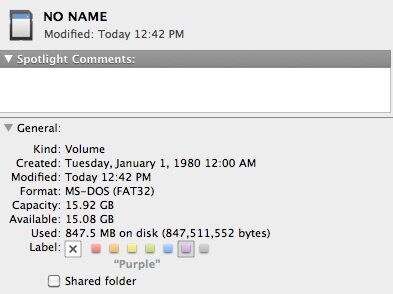
    Check the sdhc is FAT32 and not anything else.

    Clem

    • Cancel
    • Vote Up 0 Vote Down
    • Sign in to reply
    • Cancel
  • Former Member
    Former Member over 9 years ago in reply to clem57

    I think it FAT 32


    image

    • Cancel
    • Vote Up 0 Vote Down
    • Sign in to reply
    • Cancel
  • clem57
    clem57 over 9 years ago in reply to Former Member

    That does not work! You need to download to desktop and use win32iskimager(windows) or dd command(linux) to create uSDHC. The img is like a zip that has to be broken up.

    Clem


    PS

    Besides using dd command, you can also try other image writer applications such as usb-imagerwriter for deb based distributions, and imagewriter for rpm based distributions. These tools will make the image writing process more user-friendly than dd command.

    --- How to write Raspberry Pi image to SD card - Xmodulo

    • Cancel
    • Vote Up +1 Vote Down
    • Sign in to reply
    • Cancel
  • Former Member
    Former Member over 9 years ago in reply to clem57

    Hi Clem,


    I regretfully haven't used win32diskimager & don't know what the dd command is.   Thanks for the Rasberry Pi, etc. links- I'll get back as soon as I check out the tutorials.


    Regards,

    Doug

    • Cancel
    • Vote Up 0 Vote Down
    • Sign in to reply
    • Cancel
element14 Community

element14 is the first online community specifically for engineers. Connect with your peers and get expert answers to your questions.

  • Members
  • Learn
  • Technologies
  • Challenges & Projects
  • Products
  • Store
  • About Us
  • Feedback & Support
  • FAQs
  • Terms of Use
  • Privacy Policy
  • Legal and Copyright Notices
  • Sitemap
  • Cookies

An Avnet Company © 2025 Premier Farnell Limited. All Rights Reserved.

Premier Farnell Ltd, registered in England and Wales (no 00876412), registered office: Farnell House, Forge Lane, Leeds LS12 2NE.

ICP 备案号 10220084.

Follow element14

  • X
  • Facebook
  • linkedin
  • YouTube