element14 Community
element14 Community
    Register Log In
  • Site
  • Search
  • Log In Register
  • Community Hub
    Community Hub
    • What's New on element14
    • Feedback and Support
    • Benefits of Membership
    • Personal Blogs
    • Members Area
    • Achievement Levels
  • Learn
    Learn
    • Ask an Expert
    • eBooks
    • element14 presents
    • Learning Center
    • Tech Spotlight
    • STEM Academy
    • Webinars, Training and Events
    • Learning Groups
  • Technologies
    Technologies
    • 3D Printing
    • FPGA
    • Industrial Automation
    • Internet of Things
    • Power & Energy
    • Sensors
    • Technology Groups
  • Challenges & Projects
    Challenges & Projects
    • Design Challenges
    • element14 presents Projects
    • Project14
    • Arduino Projects
    • Raspberry Pi Projects
    • Project Groups
  • Products
    Products
    • Arduino
    • Avnet & Tria Boards Community
    • Dev Tools
    • Manufacturers
    • Multicomp Pro
    • Product Groups
    • Raspberry Pi
    • RoadTests & Reviews
  • About Us
  • Store
    Store
    • Visit Your Store
    • Choose another store...
      • Europe
      •  Austria (German)
      •  Belgium (Dutch, French)
      •  Bulgaria (Bulgarian)
      •  Czech Republic (Czech)
      •  Denmark (Danish)
      •  Estonia (Estonian)
      •  Finland (Finnish)
      •  France (French)
      •  Germany (German)
      •  Hungary (Hungarian)
      •  Ireland
      •  Israel
      •  Italy (Italian)
      •  Latvia (Latvian)
      •  
      •  Lithuania (Lithuanian)
      •  Netherlands (Dutch)
      •  Norway (Norwegian)
      •  Poland (Polish)
      •  Portugal (Portuguese)
      •  Romania (Romanian)
      •  Russia (Russian)
      •  Slovakia (Slovak)
      •  Slovenia (Slovenian)
      •  Spain (Spanish)
      •  Sweden (Swedish)
      •  Switzerland(German, French)
      •  Turkey (Turkish)
      •  United Kingdom
      • Asia Pacific
      •  Australia
      •  China
      •  Hong Kong
      •  India
      • Japan
      •  Korea (Korean)
      •  Malaysia
      •  New Zealand
      •  Philippines
      •  Singapore
      •  Taiwan
      •  Thailand (Thai)
      • Vietnam
      • Americas
      •  Brazil (Portuguese)
      •  Canada
      •  Mexico (Spanish)
      •  United States
      Can't find the country/region you're looking for? Visit our export site or find a local distributor.
  • Translate
  • Profile
  • Settings
Experts, Learning and Guidance
  • Technologies
  • More
Experts, Learning and Guidance
Ask an Expert Forum Measuring low resistances with Arduino
  • Blog
  • Forum
  • Documents
  • Leaderboard
  • Files
  • Members
  • Mentions
  • Sub-Groups
  • Tags
  • More
  • Cancel
  • New
Join Experts, Learning and Guidance to participate - click to join for free!
Actions
  • Share
  • More
  • Cancel
Forum Thread Details
  • State Verified Answer
  • Replies 12 replies
  • Answers 2 answers
  • Subscribers 304 subscribers
  • Views 3093 views
  • Users 0 members are here
  • resistance
  • ohms
  • resistor
  • arduino
Related
See a helpful answer?

Be sure to click 'more' and select 'suggest as answer'!

If you're the thread creator, be sure to click 'more' then 'Verify as Answer'!

Measuring low resistances with Arduino

Former Member
Former Member over 10 years ago

Hi,


I want to measure a resistance of about 0.4-1.6 ohms with an Arduino. I'm guessing this can't be done by a simple voltage divider because of the low resistances.


How could I achieve this? The measurement doesn't have to be very accurate. The question is pretty much about "is it less than or more than 1 ohm?".


Thanks

  • Sign in to reply
  • Cancel

Top Replies

  • Former Member
    Former Member over 10 years ago in reply to gadget.iom +1
    Haven't tried anything in circuit yet. The only thing that came to mind was a voltage divider circuit, but with a bit of googling I came to the conclusion that the Arduino doesn't have enough resolution…
Parents
  • gadget.iom
    0 gadget.iom over 10 years ago

    What have you looked at so far?

    • Cancel
    • Vote Up 0 Vote Down
    • Sign in to reply
    • Verify Answer
    • Cancel
  • Former Member
    0 Former Member over 10 years ago in reply to gadget.iom

    Haven't tried anything in circuit yet. The only thing that came to mind was a voltage divider circuit, but with a bit of googling I came to the conclusion that the Arduino doesn't have enough resolution to measure such low resistances with a voltage divider. Maybe some kind of amplification would be possible, but I don't have the knowledge to do such a thing.


    Any help would be appreciated, thanks.

    • Cancel
    • Vote Up +1 Vote Down
    • Sign in to reply
    • Verify Answer
    • Cancel
  • Former Member
    0 Former Member over 10 years ago in reply to Former Member

    Hi!


    Bipolar transistors BJT's are current controlled devices, Changing the amount of current flowing through base to emitter alters the amount of a separate current flowing through collector-emitter, great for amplifying!  http://www.allaboutcircuits.com/textbook/semiconductors/chpt-4/bipolar-junction-transistors-bjt/


    The change in resistance of a small current would manifest as a change in current from a different more abundant source and therefore easier to measure. Sometimes it's necessary to chain multiple transistors in what's known as a Darlington configuration to further boost that through more transistors.

    • Cancel
    • Vote Up 0 Vote Down
    • Sign in to reply
    • Verify Answer
    • Cancel
  • Former Member
    0 Former Member over 10 years ago in reply to Former Member

    Thanks for the info. I'll look into that.


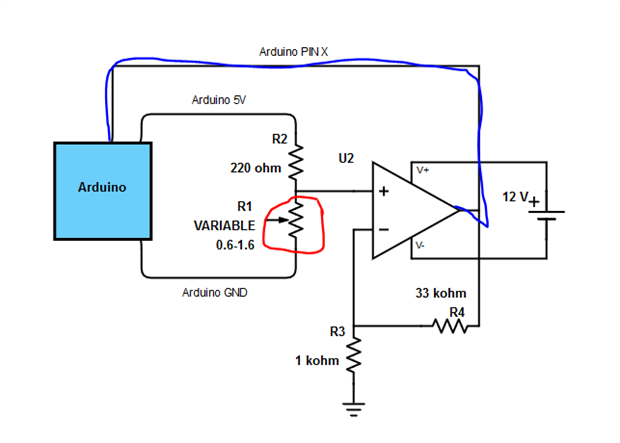
    I also considered the possibile usage of an opamp (a component I have never used before). I watched a couple of Youtube videos about them and this is what I came up with. The component circled in red is the resistor which I'm trying to measure. The wire marked with blue is what I would use to read the signal to the Arduino. The assumption is that this would give me a signal voltage of 0.74 - 2.95 V  to the Arduino depending on the resistance (0.6 - 1.6 ohm)


    Am I even close with this one? Would the opamp be able to convert a voltage of 0.022 - 0.087 V to 0.74 -  2.95 V smooth(ish)ly?

    image

    • Cancel
    • Vote Up 0 Vote Down
    • Sign in to reply
    • Verify Answer
    • Cancel
  • Former Member
    0 Former Member over 10 years ago in reply to Former Member

    Hi,


    I did consider this approach too, boosting the voltage with an op-amp is also a potential.. There are often many ways to skin a cat!!

    Have you tried changing the 220 ohm resistor for a lower value? That would initially increase the range of the voltage maybe even bring it into range to be measured by an analog to digital converter built into your microcontroller (a higher sample range on the adc would be beneficial. If you can choose a 10bit option over an 8bit this would be better as would 12bit. Im not certain what range the Arduino has?).


    Changing the 220ohm resistor for a lower value seems a good idea to start with, this will increase the "baseline" voltage, choosing right the baseline can be increased from 0.022v to 0.74v(or within reasonable parameters.) This leaves the differential range the same so there would still only be a very slight change when the variable resistors value changes.


    What is the nature of the variable resistance? is it an actual variable resistor or something else? maybe there's a bit of trickery we can do without needing op-amps or transistors..

    • Cancel
    • Vote Up 0 Vote Down
    • Sign in to reply
    • Verify Answer
    • Reject Answer
    • Cancel
  • Robert Peter Oakes
    0 Robert Peter Oakes over 10 years ago in reply to Former Member

    The arduino UNO already has an analogue comparator that can be used for this, use one end connected to a set point (Perhaps from a PWM output with an RC to emulate an 8bit DAC or simply a resistor divider, then the comparator will trip once the threshold is reached, knowing the value of the DAC will indicate if the resistor is above or below the threshold to a roughly 1% accuracy. selecting the right resistors to produce say 0 - 1V output and then the 1R + some other value to limit the current can be used for the other input


    No external op amp needed in this case


    alternate and probably easier is to use a resistor divider with the target resistor in question as part of this. Set the VREF to the ADC to be the 1.1V reference, not the 5V reference (Default). this will give you far better resolution at the low voltage end.


    the arduino has a 10bit ADC so 0 - 1023 value which equates to roughly 1mV per count (Assuming the 1.1V VREF)


    so a 100R in series with 1R and 5V across the two will result in 5v/101R = 50mA, this across the1R gives 50mV

    a 0.5R will give about 25mV

    1.5R will give 75mV


    the mV equate to the rough count given from the ADC


    Yes your working in the low end of the ADC but given your not interested in accurate measurement of the resistor, just a rough go/no go test, this should be more than enough


    if you want a better resolution then you could drop the resistor to say 50ohms which will give roughly 100mA through the divider and so 1R = 100mV (Roughly), 150mV = 1R5, 50mV = 0R5


    Not bad for just the addition of a single resistor

    • Cancel
    • Vote Up 0 Vote Down
    • Sign in to reply
    • Reject Answer
    • Cancel
Reply
  • Robert Peter Oakes
    0 Robert Peter Oakes over 10 years ago in reply to Former Member

    The arduino UNO already has an analogue comparator that can be used for this, use one end connected to a set point (Perhaps from a PWM output with an RC to emulate an 8bit DAC or simply a resistor divider, then the comparator will trip once the threshold is reached, knowing the value of the DAC will indicate if the resistor is above or below the threshold to a roughly 1% accuracy. selecting the right resistors to produce say 0 - 1V output and then the 1R + some other value to limit the current can be used for the other input


    No external op amp needed in this case


    alternate and probably easier is to use a resistor divider with the target resistor in question as part of this. Set the VREF to the ADC to be the 1.1V reference, not the 5V reference (Default). this will give you far better resolution at the low voltage end.


    the arduino has a 10bit ADC so 0 - 1023 value which equates to roughly 1mV per count (Assuming the 1.1V VREF)


    so a 100R in series with 1R and 5V across the two will result in 5v/101R = 50mA, this across the1R gives 50mV

    a 0.5R will give about 25mV

    1.5R will give 75mV


    the mV equate to the rough count given from the ADC


    Yes your working in the low end of the ADC but given your not interested in accurate measurement of the resistor, just a rough go/no go test, this should be more than enough


    if you want a better resolution then you could drop the resistor to say 50ohms which will give roughly 100mA through the divider and so 1R = 100mV (Roughly), 150mV = 1R5, 50mV = 0R5


    Not bad for just the addition of a single resistor

    • Cancel
    • Vote Up 0 Vote Down
    • Sign in to reply
    • Reject Answer
    • Cancel
Children
  • Former Member
    0 Former Member over 10 years ago in reply to Robert Peter Oakes

    Thanks, Peter!


    I totally forgot about the 1.1V VREF of the Arduino. I have a much better feeling of this working now.

    • Cancel
    • Vote Up 0 Vote Down
    • Sign in to reply
    • Verify Answer
    • Cancel
  • Former Member
    0 Former Member over 10 years ago in reply to Robert Peter Oakes

    Hi!


    Just tried it with a 100 ohm resistor and set the Arduino's analog reference to 1.1V, and it worked fine! I used a 12 volt source, though. I just read the analog pin and for my purposes, when the analogRead value is larger than 53, the resistor is at the correct value.


    Thank you so much, guys!

    • Cancel
    • Vote Up 0 Vote Down
    • Sign in to reply
    • Verify Answer
    • Cancel
  • Robert Peter Oakes
    0 Robert Peter Oakes over 10 years ago in reply to Former Member

    With a 12V source, you risk feeding 12V into the analogue pin of the Aarduino when the resistor under test is not connected, this is not good


    A 5.1V zener across the input and ground should protect it though, you probably are having the internal protection diodes ctivating at the moment but they may not last with 70mA passing through it


    Either way though, good news that you solved it


    Peter

    • Cancel
    • Vote Up 0 Vote Down
    • Sign in to reply
    • Verify Answer
    • Cancel
  • Former Member
    0 Former Member over 10 years ago in reply to Robert Peter Oakes

    Thanks, I'm going to look into zener diodes.


    I'm going to have a relay or a mosfet so that I'm not reading the voltage divider at the same time as I am powering the heating element. The resistance of the element will be under 2 ohms at all times, so I shouldn't get anywhere near 5 volts out of the voltage divider provided that my Arduino code doesn't fail image

    • Cancel
    • Vote Up 0 Vote Down
    • Sign in to reply
    • Verify Answer
    • Cancel
element14 Community

element14 is the first online community specifically for engineers. Connect with your peers and get expert answers to your questions.

  • Members
  • Learn
  • Technologies
  • Challenges & Projects
  • Products
  • Store
  • About Us
  • Feedback & Support
  • FAQs
  • Terms of Use
  • Privacy Policy
  • Legal and Copyright Notices
  • Sitemap
  • Cookies

An Avnet Company © 2025 Premier Farnell Limited. All Rights Reserved.

Premier Farnell Ltd, registered in England and Wales (no 00876412), registered office: Farnell House, Forge Lane, Leeds LS12 2NE.

ICP 备案号 10220084.

Follow element14

  • X
  • Facebook
  • linkedin
  • YouTube