element14 Community
element14 Community
    Register Log In
  • Site
  • Search
  • Log In Register
  • Community Hub
    Community Hub
    • What's New on element14
    • Feedback and Support
    • Benefits of Membership
    • Personal Blogs
    • Members Area
    • Achievement Levels
  • Learn
    Learn
    • Ask an Expert
    • eBooks
    • element14 presents
    • Learning Center
    • Tech Spotlight
    • STEM Academy
    • Webinars, Training and Events
    • Learning Groups
  • Technologies
    Technologies
    • 3D Printing
    • FPGA
    • Industrial Automation
    • Internet of Things
    • Power & Energy
    • Sensors
    • Technology Groups
  • Challenges & Projects
    Challenges & Projects
    • Design Challenges
    • element14 presents Projects
    • Project14
    • Arduino Projects
    • Raspberry Pi Projects
    • Project Groups
  • Products
    Products
    • Arduino
    • Avnet & Tria Boards Community
    • Dev Tools
    • Manufacturers
    • Multicomp Pro
    • Product Groups
    • Raspberry Pi
    • RoadTests & Reviews
  • About Us
  • Store
    Store
    • Visit Your Store
    • Choose another store...
      • Europe
      •  Austria (German)
      •  Belgium (Dutch, French)
      •  Bulgaria (Bulgarian)
      •  Czech Republic (Czech)
      •  Denmark (Danish)
      •  Estonia (Estonian)
      •  Finland (Finnish)
      •  France (French)
      •  Germany (German)
      •  Hungary (Hungarian)
      •  Ireland
      •  Israel
      •  Italy (Italian)
      •  Latvia (Latvian)
      •  
      •  Lithuania (Lithuanian)
      •  Netherlands (Dutch)
      •  Norway (Norwegian)
      •  Poland (Polish)
      •  Portugal (Portuguese)
      •  Romania (Romanian)
      •  Russia (Russian)
      •  Slovakia (Slovak)
      •  Slovenia (Slovenian)
      •  Spain (Spanish)
      •  Sweden (Swedish)
      •  Switzerland(German, French)
      •  Turkey (Turkish)
      •  United Kingdom
      • Asia Pacific
      •  Australia
      •  China
      •  Hong Kong
      •  India
      • Japan
      •  Korea (Korean)
      •  Malaysia
      •  New Zealand
      •  Philippines
      •  Singapore
      •  Taiwan
      •  Thailand (Thai)
      • Vietnam
      • Americas
      •  Brazil (Portuguese)
      •  Canada
      •  Mexico (Spanish)
      •  United States
      Can't find the country/region you're looking for? Visit our export site or find a local distributor.
  • Translate
  • Profile
  • Settings
Experts, Learning and Guidance
  • Technologies
  • More
Experts, Learning and Guidance
Ask an Expert Forum Trying to understand serial to parallel circuit
  • Blog
  • Forum
  • Documents
  • Leaderboard
  • Files
  • Members
  • Mentions
  • Sub-Groups
  • Tags
  • More
  • Cancel
  • New
Join Experts, Learning and Guidance to participate - click to join for free!
Actions
  • Share
  • More
  • Cancel
Forum Thread Details
  • State Not Answered
  • Replies 32 replies
  • Subscribers 301 subscribers
  • Views 9257 views
  • Users 0 members are here
Related
See a helpful answer?

Be sure to click 'more' and select 'suggest as answer'!

If you're the thread creator, be sure to click 'more' then 'Verify as Answer'!

Trying to understand serial to parallel circuit

opalko
opalko over 3 years ago

Hi again folks (after some time away!),
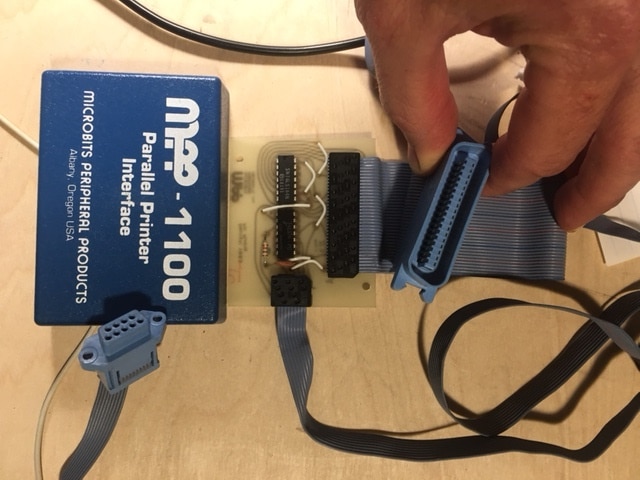
When I was a teen, I had an Atari 800 computer/ The Atari did not have a parallel port interface.  All they had were the joystick ports, which were serial.  A clever company came up with a serial->parallel port interface.  Me, not knowing much about electronics, could not figure out how they did this.  (PS -I still don't know much about electronics!!!).

Flash forward 40 years and this past week I decided to take apart the serial->parallel interface and reverse engineer this thing! I took apart and there are 2 chips - a 74LS14, and a 74LS164, a resistor and a capacitor. Next step was to draw the schematic, which I did with pencil and paper. This became messy, so I resorted to learning to use KiCad, and came up with the attached drawing. (see attachments)

I get what makes this work is the 74LS164 8 bit parallel-out serial shift register. I still don't really understand how it works though.  As I understand it, the data on this register may be read out in parallel (from all flip-flops) at once.
So some questions!

0) Can someone explain how this whole interface works!?

1) How is the data being read on the printer side?  Is the printer polling every data pin on the parallel port at once regardless of how many are actually being used?

2) Since there are really only 2 address data pins (3 & 5) being used here, it doesn't seem a vast improvement over serial?  But I guess because the Atari only has pins 1-4 for I/O and 1 of those sends the data to the 74LS164?

Thanks for any help understanding this.
Robert Opalko

PS There doesn't seem to be nearly as many members on this forum as there was in the past... Where did everyone go?

image
image
  • Sign in to reply
  • Cancel

Top Replies

  • phoenixcomm
    phoenixcomm over 3 years ago in reply to opalko +4
    try this link: computer.howstuffworks.com/parallel-port1.htm this says that IBM did it but in fact, It was Wang labs. and en.wikipedia.org/.../Centronics
  • phoenixcomm
    phoenixcomm over 3 years ago +4
  • dougw
    dougw over 3 years ago +3
    I don't get it either. A Centronics printer needs 8 data bits and some handshaking to work - this doesn't even have enough pins connected. On a Centronics connector all pins from 19-30 and 33 are ground…
Parents
  • beacon_dave
    0 beacon_dave over 3 years ago

    makerkaren did a nice introduction to shift registers over on the Learning Circuit which may be of interest.
    /challenges-projects/element14-presents/thelearningcircuit/w/documents/4946/the-learning-circuit-75-how-shift-registers-work

    • Cancel
    • Vote Up +1 Vote Down
    • Sign in to reply
    • Verify Answer
    • Cancel
Reply
  • beacon_dave
    0 beacon_dave over 3 years ago

    makerkaren did a nice introduction to shift registers over on the Learning Circuit which may be of interest.
    /challenges-projects/element14-presents/thelearningcircuit/w/documents/4946/the-learning-circuit-75-how-shift-registers-work

    • Cancel
    • Vote Up +1 Vote Down
    • Sign in to reply
    • Verify Answer
    • Cancel
Children
  • opalko
    0 opalko over 3 years ago in reply to beacon_dave

    Do you know of a similar intro or guide to how parallel ports work?

    • Cancel
    • Vote Up 0 Vote Down
    • Sign in to reply
    • Verify Answer
    • Cancel
  • phoenixcomm
    0 phoenixcomm over 3 years ago in reply to opalko

    try this link:  computer.howstuffworks.com/parallel-port1.htm this says that IBM did it but in fact, It was Wang labs. 

    and en.wikipedia.org/.../Centronics

    • Cancel
    • Vote Up +4 Vote Down
    • Sign in to reply
    • Verify Answer
    • Cancel
  • phoenixcomm
    0 phoenixcomm over 3 years ago in reply to opalko

    Re: you have a uni-direction printer cable. When the printer is busy it sets 'BUSY' active and the computer stops sending data. conversely, when the BUSY is NOT ACTIVE the computer will send data. The same is true for the ON-LINE Signal the must be active for anything to work.  

    • Cancel
    • Vote Up +3 Vote Down
    • Sign in to reply
    • Verify Answer
    • Cancel
  • opalko
    0 opalko over 3 years ago in reply to beacon_dave

    This was great - thanks!

    • Cancel
    • Vote Up 0 Vote Down
    • Sign in to reply
    • Verify Answer
    • Cancel
  • beacon_dave
    0 beacon_dave over 3 years ago in reply to opalko

    Also perhaps take a look at makerkaren 's follow-up hands-on video:

    How to Make a 4-bit Shift Register Circuit
    /challenges-projects/element14-presents/thelearningcircuit/w/documents/4970/the-learning-circuit-76-how-to-make-a-4-bit-shift-register-circuit

    to help reinforce your understanding.

    You could also perhaps simulate your design on the likes of Tinkercad to help reinforce your understanding of it:

    Tinkercad
    https://www.tinkercad.com/learn/circuits

    and finally go on to build a simulation for real using the likes of an Arduino to send serial data into your MPP-1100 interface and then capture the output of it and display the result on the serial terminal.

    Then post a blog about it here on the Element14 community.

    • Cancel
    • Vote Up +2 Vote Down
    • Sign in to reply
    • Verify Answer
    • Cancel
  • opalko
    0 opalko over 3 years ago in reply to beacon_dave

    Going over to watch that video now! I like those other ideas as well. What got me started on this was buying an old Science Fair Microcomputer Trainer that has a 4 bit CPU and a 4x5 matrix "keyboard" to enter assembly language programs into it. Entering programs is a drag and I thought I could use this parallel circuit to enter programs from the Atari into it.  Not sure this would work now and I think I would need 2 shift registers to read the keyboard matrix input.....

    Going to check out tinkercad also!

    • Cancel
    • Vote Up +1 Vote Down
    • Sign in to reply
    • Verify Answer
    • Cancel
  • beacon_dave
    0 beacon_dave over 3 years ago in reply to opalko

    A sort of 'print your code' into the trainer type approach ?

    Sounds doable but it could turn into a bit of  'a long way around for a shortcut' type scenario. Depends on the motivation and if there is any specific 'emotional attachment' to the Science Fair trainer.

    FYI it looks like someone on Instructables created an emulator which may be of interest if you just want to be able to run the programs from the trainer kit manual:

    Radio Shack Microcomputer Trainer Emulator in Scratch
    https://www.instructables.com/Radio-Shack-Microcomputer-Trainer-Emulator-in-Scra/

    If you still want to use the Atari printer utility then remember that you will likely get ASCII character values out of the Centronics end if you are printing from a text editor. For example if you print the character '1' then that is going to be treated as a value of 31hex and appear as 00110001 on the Centronics data bus. You will likely need to use the strobe signal to simulate the actual key press and you will also need to take care of the select/busy inputs to keep the Atari happy, and if necessary to slow down the data rate into the trainer, which is expecting slow human keypresses.

    You may find that the likes of an Arduino is an easier route as you have more control over the GPIO pins for simulating the keyboard matrix input.

    • Cancel
    • Vote Up +1 Vote Down
    • Sign in to reply
    • Verify Answer
    • Cancel
  • opalko
    0 opalko over 3 years ago in reply to beacon_dave
    beacon_dave said:
    Sounds doable but it could turn into a bit of  'a long way around for a shortcut' type scenario. Depends on the motivation and if there is any specific 'emotional attachment' to the Science Fair trainer.

    Yeah, now that I have written it out, it sounds like a goofy idea..

    beacon_dave said:

    FYI it looks like someone on Instructables created an emulator which may be of interest if you just want to be able to run the programs from the trainer kit manual:

    Radio Shack Microcomputer Trainer Emulator in Scratch

    Cool

    beacon_dave said:
    f you still want to use the Atari printer utility then remember that you will likely get ASCII character values out of the Centronics end if you are printing from a text editor. For example if you print the character '1' then that is going to be treated as a value of 31hex and appear as 00110001 on the Centronics data bus. You will likely need to use the strobe signal to simulate the actual key press

    If I can get a program to just read my keypress and sending it out the Centronics side I will be thrilled...lol. Thanks for the extra info

    • Cancel
    • Vote Up 0 Vote Down
    • Sign in to reply
    • Verify Answer
    • Cancel
  • beacon_dave
    0 beacon_dave over 3 years ago in reply to opalko

    From what I saw, the MPP-1100 appeared to be able to make use of the ROM update to support the Atari 850 interface module.

    Atari 850 Interface Module
    http://www.computinghistory.org.uk/det/52934/Atari-850-Interface-Module/

    So software designed to use the parallel port output port of the 850 module, appears to also work with the MPP-1100 interface.

    However, programming the Atari Serial IO System port directly, would likely give you more flexibility.

    One for  airbornesurfer  perhaps ?

    • Cancel
    • Vote Up +3 Vote Down
    • Sign in to reply
    • Verify Answer
    • Cancel
  • airbornesurfer
    0 airbornesurfer over 3 years ago in reply to beacon_dave

    Ha! I'll throw it on the list ;)

    I still gotta finish that record player, first....

    • Cancel
    • Vote Up 0 Vote Down
    • Sign in to reply
    • Verify Answer
    • Cancel
element14 Community

element14 is the first online community specifically for engineers. Connect with your peers and get expert answers to your questions.

  • Members
  • Learn
  • Technologies
  • Challenges & Projects
  • Products
  • Store
  • About Us
  • Feedback & Support
  • FAQs
  • Terms of Use
  • Privacy Policy
  • Legal and Copyright Notices
  • Sitemap
  • Cookies

An Avnet Company © 2025 Premier Farnell Limited. All Rights Reserved.

Premier Farnell Ltd, registered in England and Wales (no 00876412), registered office: Farnell House, Forge Lane, Leeds LS12 2NE.

ICP 备案号 10220084.

Follow element14

  • X
  • Facebook
  • linkedin
  • YouTube