element14 Community
element14 Community
    Register Log In
  • Site
  • Search
  • Log In Register
  • Community Hub
    Community Hub
    • What's New on element14
    • Feedback and Support
    • Benefits of Membership
    • Personal Blogs
    • Members Area
    • Achievement Levels
  • Learn
    Learn
    • Ask an Expert
    • eBooks
    • element14 presents
    • Learning Center
    • Tech Spotlight
    • STEM Academy
    • Webinars, Training and Events
    • Learning Groups
  • Technologies
    Technologies
    • 3D Printing
    • FPGA
    • Industrial Automation
    • Internet of Things
    • Power & Energy
    • Sensors
    • Technology Groups
  • Challenges & Projects
    Challenges & Projects
    • Design Challenges
    • element14 presents Projects
    • Project14
    • Arduino Projects
    • Raspberry Pi Projects
    • Project Groups
  • Products
    Products
    • Arduino
    • Avnet & Tria Boards Community
    • Dev Tools
    • Manufacturers
    • Multicomp Pro
    • Product Groups
    • Raspberry Pi
    • RoadTests & Reviews
  • About Us
  • Store
    Store
    • Visit Your Store
    • Choose another store...
      • Europe
      •  Austria (German)
      •  Belgium (Dutch, French)
      •  Bulgaria (Bulgarian)
      •  Czech Republic (Czech)
      •  Denmark (Danish)
      •  Estonia (Estonian)
      •  Finland (Finnish)
      •  France (French)
      •  Germany (German)
      •  Hungary (Hungarian)
      •  Ireland
      •  Israel
      •  Italy (Italian)
      •  Latvia (Latvian)
      •  
      •  Lithuania (Lithuanian)
      •  Netherlands (Dutch)
      •  Norway (Norwegian)
      •  Poland (Polish)
      •  Portugal (Portuguese)
      •  Romania (Romanian)
      •  Russia (Russian)
      •  Slovakia (Slovak)
      •  Slovenia (Slovenian)
      •  Spain (Spanish)
      •  Sweden (Swedish)
      •  Switzerland(German, French)
      •  Turkey (Turkish)
      •  United Kingdom
      • Asia Pacific
      •  Australia
      •  China
      •  Hong Kong
      •  India
      • Japan
      •  Korea (Korean)
      •  Malaysia
      •  New Zealand
      •  Philippines
      •  Singapore
      •  Taiwan
      •  Thailand (Thai)
      • Vietnam
      • Americas
      •  Brazil (Portuguese)
      •  Canada
      •  Mexico (Spanish)
      •  United States
      Can't find the country/region you're looking for? Visit our export site or find a local distributor.
  • Translate
  • Profile
  • Settings
Experts, Learning and Guidance
  • Technologies
  • More
Experts, Learning and Guidance
Ask an Expert Forum Fundamentals with Multicomp Multimeter + Accessories Road Test MP730624 Bluetooth questions
  • Blog
  • Forum
  • Documents
  • Leaderboard
  • Files
  • Members
  • Mentions
  • Sub-Groups
  • Tags
  • More
  • Cancel
  • New
Join Experts, Learning and Guidance to participate - click to join for free!
Actions
  • Share
  • More
  • Cancel
Forum Thread Details
  • State Suggested Answer
  • Replies 11 replies
  • Answers 1 answer
  • Subscribers 302 subscribers
  • Views 3942 views
  • Users 0 members are here
  • bluetooth
  • ble
  • ask_an_expert
  • multicomppro
  • multicomp
Related
See a helpful answer?

Be sure to click 'more' and select 'suggest as answer'!

If you're the thread creator, be sure to click 'more' then 'Verify as Answer'!

Fundamentals with Multicomp Multimeter + Accessories Road Test MP730624 Bluetooth questions

robogary
robogary over 3 years ago

Page 4.1 - The instruction manual says to install the application software on your Android phone. Nothing else. Fantastic,I go the Galaxy store and try searching for Multimeter, MultiComp, MulticompPro, -- no matches found. What software package name goes for this DMM MP730624 ? Where do I find it ? 

Page4.5 - The instruction book says in the software app to turn on Bluetooth & scan. Well............my phone has bluetooth enabled all the time. It connects to my car, bluetooth speakers, etc all the time. I went into settings, had all other Bluetooth devices either off and out of range, and the DMM was not detected by my phone when I executed a scan. Yes, I did have the DMM BLE turned on by holding down the Hz/Duty/BLE button. Is the instruction saying the APP has to be running in order to connect bluetooth by phone ? very strange, is the app really needed to recognize multicomp bluetooth ?

Page 13 - manual states use only the bluetooth USB device (optional) supplied with with the product. OK, I can order a bluetooth adapter for my PC, but which one ? Does this DMM use bluetooth 4 , or BLE ? The instruction manual uses both terms  interchangably.

Page 13.1 - The manual says Install multimeterBLE software. Where ? I googled every plausible name I could think of, but never found it. I did not find a Download page on the Newark site 

Please advise, thanks for any help

  • Sign in to reply
  • Cancel

Top Replies

  • robogary
    robogary over 3 years ago in reply to Prasanth Arockiaraj +1
    Hi Prasanth Arockiaraj - Weird , my PC got a big Windows update today, and the OWON PC tool started working. Thank you for your help and listening
  • robogary
    0 robogary over 3 years ago

    Answered per community.element14.com/.../196462

    • Cancel
    • Vote Up 0 Vote Down
    • Sign in to reply
    • Verify Answer
    • Reject Answer
    • Cancel
  • Prasanth Arockiaraj
    0 Prasanth Arockiaraj over 3 years ago

    Hi 

    Operating instruction for MP730624: https://www.farnell.com/datasheets/3100719.pdf

    To connect with Mobile Device please see page number 7 to get App link.  Please scan QR Code Bluetooth 4.0 Android APP or go to

    http://www.owon.com.hk/bluetooth4

    • Cancel
    • Vote Up 0 Vote Down
    • Sign in to reply
    • Verify Answer
    • Cancel
  • robogary
    0 robogary over 3 years ago in reply to Prasanth Arockiaraj

    Thank you. Please what location has the PC version of the software ?  The zip file only contains .apk 

    • Cancel
    • Vote Up 0 Vote Down
    • Sign in to reply
    • Verify Answer
    • Cancel
  • Prasanth Arockiaraj
    0 Prasanth Arockiaraj over 3 years ago in reply to robogary

    PC Software link: http://files.owon.com.cn/software/pc/owon_multimeter_pc_software_en.zip

    If this link does not works, please check https://www.owon.com.hk/support_PC_Software_list4

    PC software for OWON B&OW Series digital multimeter (Bluetooth 4.0 version)  

    You need a USB adaptor as well like https://eleshop.eu/owon-usb-bluetooth-dongle.html

    Refer to page no 34 in the operating instructions.

    • Cancel
    • Vote Up -1 Vote Down
    • Sign in to reply
    • Verify Answer
    • Cancel
  • robogary
    0 robogary over 3 years ago in reply to Prasanth Arockiaraj

    Thank you. PC software link worked OK, seems to install properly.  I ordered a USB BLE 4.0 https://www.amazon.com/Techkey-Bluetooth-Adapter-Computer-Keyboard/dp/B07QL7C6WG/ref=sr_1_1?keywords=Techkey+USB+Bluetooth+4.0+Adapter+Dongle+for+PC+Laptop+Computer&qid=1646360189&sr=8-1

    Hoping this dongle works with the driver. 

    • Cancel
    • Vote Up 0 Vote Down
    • Sign in to reply
    • Verify Answer
    • Cancel
  • robogary
    0 robogary over 3 years ago in reply to Prasanth Arockiaraj

    Just an update for you Prasanth, 

    The USB bluetooth dongle I ordered would not work with the DMM software. The instant the USB dongle was plugged in, it established itself as a Bluetooth module, not available a COM PORT for the SW driver. 

    I was shocked Newark sells the DMM MP730624, but not all the accessories.

    The OWON dongle was only available in the USA from one supplier, Jameco, https://www.jameco.com/z/OWON-USBMD-Owon-Technology-Lilliput-Electronics-Bluetooth-Dongle-Addon-for-OWON-Handheld-Multimeters_2328031.html

    Cost + shipping just for the dongle, is almost half the cost of the DMM itself.  I hope this dongle gets things moving with the DMM software tools portion of the Road Test. Thank you for your help

    • Cancel
    • Vote Up 0 Vote Down
    • Sign in to reply
    • Verify Answer
    • Cancel
  • Prasanth Arockiaraj
    0 Prasanth Arockiaraj over 3 years ago in reply to robogary

    Let me do some research and will find the solution asap. 

    • Cancel
    • Vote Up 0 Vote Down
    • Sign in to reply
    • Verify Answer
    • Cancel
  • robogary
    0 robogary over 3 years ago in reply to Prasanth Arockiaraj

    No problem, I ordered the OWON dongle last night, hoping to arrive by the end of the week. 

    • Cancel
    • Vote Up 0 Vote Down
    • Sign in to reply
    • Verify Answer
    • Cancel
  • robogary
    0 robogary over 3 years ago in reply to Prasanth Arockiaraj

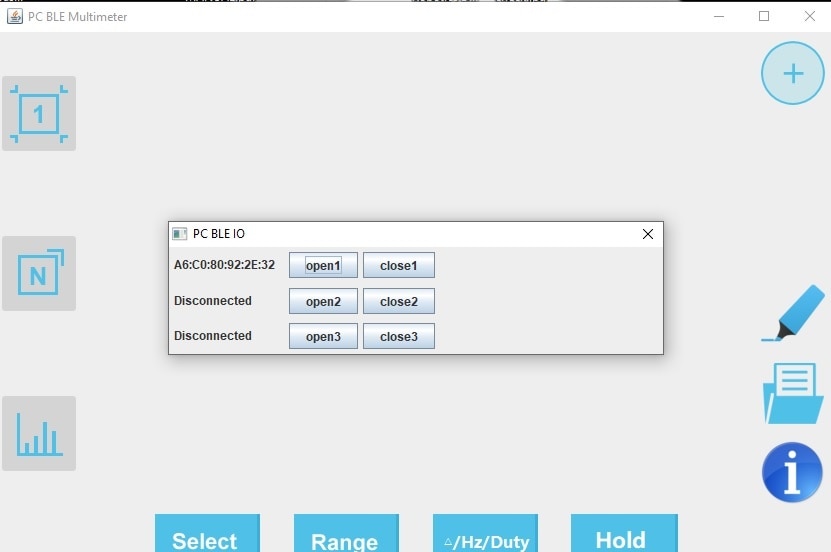
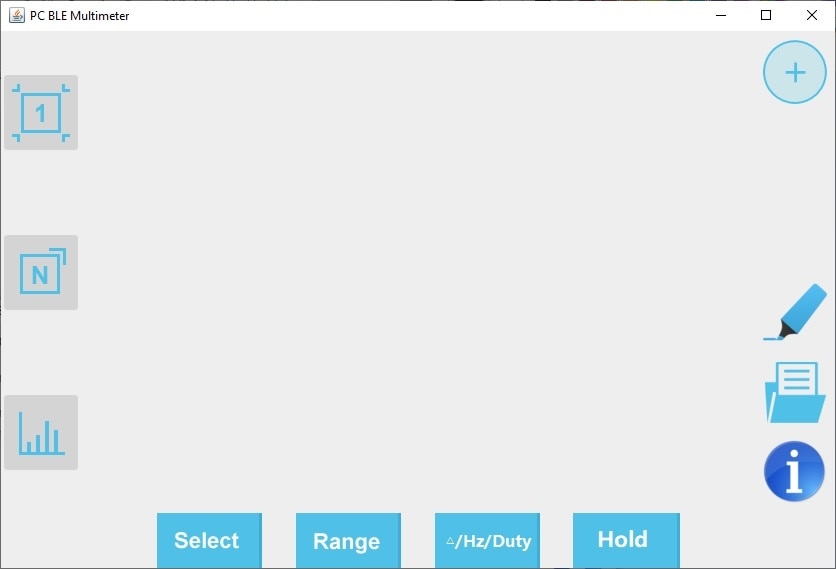
    My previous message I couldnt identify the DMM by BLE address,  after multiple tries of shutting the DMM off and ON, finally the address is identified. but still the DMM tool screen is empty, as if not properly connected. Please advise any suggestions.

    Thank you

    imageimage

    • Cancel
    • Vote Up 0 Vote Down
    • Sign in to reply
    • Verify Answer
    • Cancel
  • robogary
    0 robogary over 3 years ago in reply to Prasanth Arockiaraj

    Hi  Prasanth Arockiaraj - Weird , my PC got a big Windows update today, and the OWON PC tool started working. Thank you for your help and listening 

    • Cancel
    • Vote Up +1 Vote Down
    • Sign in to reply
    • Verify Answer
    • Cancel
>
element14 Community

element14 is the first online community specifically for engineers. Connect with your peers and get expert answers to your questions.

  • Members
  • Learn
  • Technologies
  • Challenges & Projects
  • Products
  • Store
  • About Us
  • Feedback & Support
  • FAQs
  • Terms of Use
  • Privacy Policy
  • Legal and Copyright Notices
  • Sitemap
  • Cookies

An Avnet Company © 2025 Premier Farnell Limited. All Rights Reserved.

Premier Farnell Ltd, registered in England and Wales (no 00876412), registered office: Farnell House, Forge Lane, Leeds LS12 2NE.

ICP 备案号 10220084.

Follow element14

  • X
  • Facebook
  • linkedin
  • YouTube