element14 Community
element14 Community
    Register Log In
  • Site
  • Search
  • Log In Register
  • Community Hub
    Community Hub
    • What's New on element14
    • Feedback and Support
    • Benefits of Membership
    • Personal Blogs
    • Members Area
    • Achievement Levels
  • Learn
    Learn
    • Ask an Expert
    • eBooks
    • element14 presents
    • Learning Center
    • Tech Spotlight
    • STEM Academy
    • Webinars, Training and Events
    • Learning Groups
  • Technologies
    Technologies
    • 3D Printing
    • FPGA
    • Industrial Automation
    • Internet of Things
    • Power & Energy
    • Sensors
    • Technology Groups
  • Challenges & Projects
    Challenges & Projects
    • Design Challenges
    • element14 presents Projects
    • Project14
    • Arduino Projects
    • Raspberry Pi Projects
    • Project Groups
  • Products
    Products
    • Arduino
    • Avnet & Tria Boards Community
    • Dev Tools
    • Manufacturers
    • Multicomp Pro
    • Product Groups
    • Raspberry Pi
    • RoadTests & Reviews
  • About Us
  • Store
    Store
    • Visit Your Store
    • Choose another store...
      • Europe
      •  Austria (German)
      •  Belgium (Dutch, French)
      •  Bulgaria (Bulgarian)
      •  Czech Republic (Czech)
      •  Denmark (Danish)
      •  Estonia (Estonian)
      •  Finland (Finnish)
      •  France (French)
      •  Germany (German)
      •  Hungary (Hungarian)
      •  Ireland
      •  Israel
      •  Italy (Italian)
      •  Latvia (Latvian)
      •  
      •  Lithuania (Lithuanian)
      •  Netherlands (Dutch)
      •  Norway (Norwegian)
      •  Poland (Polish)
      •  Portugal (Portuguese)
      •  Romania (Romanian)
      •  Russia (Russian)
      •  Slovakia (Slovak)
      •  Slovenia (Slovenian)
      •  Spain (Spanish)
      •  Sweden (Swedish)
      •  Switzerland(German, French)
      •  Turkey (Turkish)
      •  United Kingdom
      • Asia Pacific
      •  Australia
      •  China
      •  Hong Kong
      •  India
      • Japan
      •  Korea (Korean)
      •  Malaysia
      •  New Zealand
      •  Philippines
      •  Singapore
      •  Taiwan
      •  Thailand (Thai)
      • Vietnam
      • Americas
      •  Brazil (Portuguese)
      •  Canada
      •  Mexico (Spanish)
      •  United States
      Can't find the country/region you're looking for? Visit our export site or find a local distributor.
  • Translate
  • Profile
  • Settings
Experts, Learning and Guidance
  • Technologies
  • More
Experts, Learning and Guidance
Ask an Expert Forum What SoC should i use for this project?
  • Blog
  • Forum
  • Documents
  • Leaderboard
  • Files
  • Members
  • Mentions
  • Sub-Groups
  • Tags
  • More
  • Cancel
  • New
Join Experts, Learning and Guidance to participate - click to join for free!
Actions
  • Share
  • More
  • Cancel
Forum Thread Details
  • State Not Answered
  • Replies 22 replies
  • Subscribers 299 subscribers
  • Views 3711 views
  • Users 0 members are here
Related
See a helpful answer?

Be sure to click 'more' and select 'suggest as answer'!

If you're the thread creator, be sure to click 'more' then 'Verify as Answer'!

What SoC should i use for this project?

flows
flows over 2 years ago

Okay this is my first time using a forum to ask something so apologies for my english and questions asking.

Whats is my project: I want to make my own controller to control LED strips for ambient lights behinde my tv. The LED's sync to what’s happening on the screen.

My plan: I want to take a hdmi input from a source (like chrome cast or gaming console), process the image and then pas the hdmi input, out to the tv, via hdmi out. To split the hdmi input to the SoC and the tv, i will use a seperate hdmi splitter, if it takes to much bandwith or prossecing power to pass trough via the SoC.

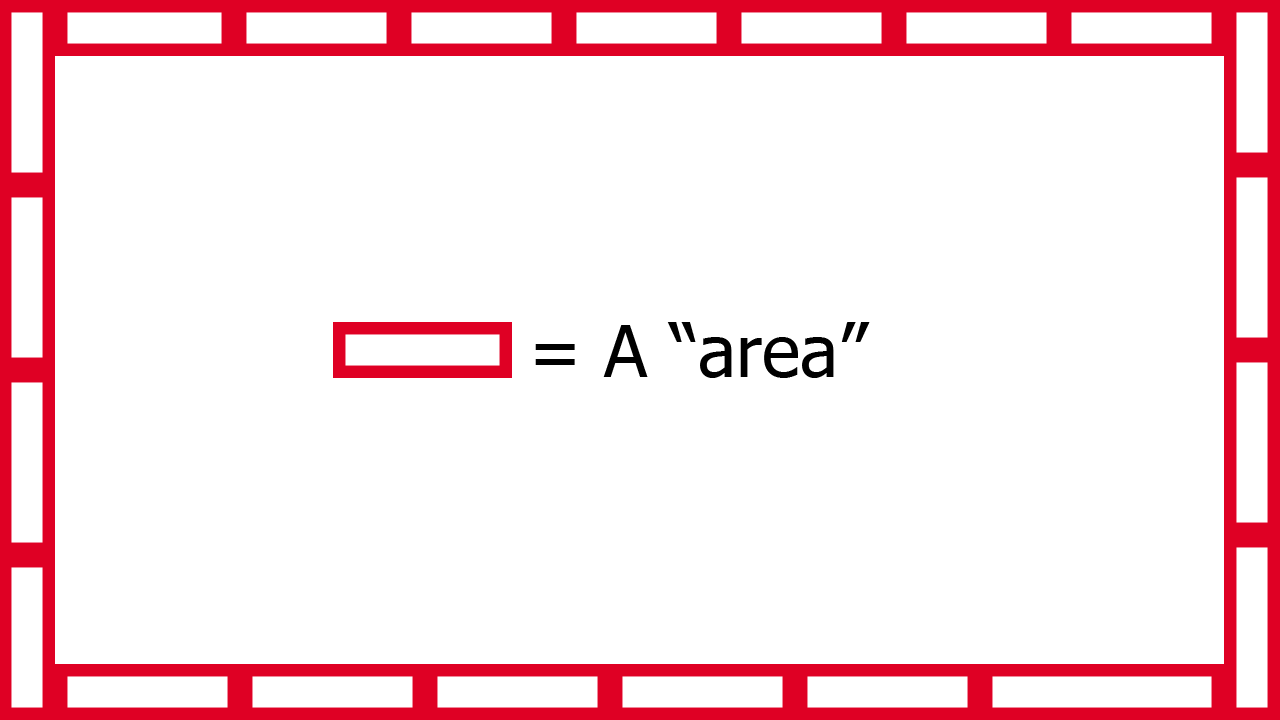
What does the image prossecing look like?: I want to take a avarage of the colors of a area. This area will be allong the sides of the screen. I also added a really ruf sketch of what i mean by area. The number of areas depend on the number of LED's around the screen. I am not sure if this is the final way i am going to do this, but this gives you a idea of what i mean by image prossecing.
image

To cut on procesing cost/time i think i will maybe down scale the image it needs to proccess. For example when you have a 4k image input, it needs to collect a lot of pixel color values, and take a average of them. While we maybe dont need that much detail. I dont know how far i will down scale the image, but i will know this after testing.

The qeustion: So now you know my plan, my qeustion is: What SoC should i use for this project? The main reason i ask this qeustion is because i dont know how much computing power it wil take to prosses a image this way. I know i can probably use a raspberry pi, but i also dont want to use a overpowerd SoC for this project. Also because i maybe want to produce more of these i need to think about cost.

Requirments:

   - It needs to have I/O pins (ofcourse)
   - There needs to be a way that i can have hdmi in (in to the SoC ofc) (it doenst have to be include on the SoC)
   - It needs to output data to the LED strip with a rate that it looks smooth to what happens on the screen (i dont know how many FPS that is, i think around 15-30 FPS)
   - (This isn't a must but it would make the project more intresseting) There needs to be a way it can have wifi (preferably onboard wifi)

More info:

   - I will be writing a "library" my self to controll the LED strip
   - The program wil be written in C++
   - For the image prossecing i think i will use the openCV library
   - I will use the WS2812B LED's

If you have any qeustions ask me!

I haven't tryed any SoC yet, i do have the raspberry pi 4 B at home.

  • Sign in to reply
  • Cancel

Top Replies

  • saadtiwana_int
    saadtiwana_int over 2 years ago +6
    I have considerable experience with video processing up to around 1080p60 (not 4k). I can suggest you two ways to do this if 1080p60 is enough for you: 1. You can use a HDMI-to-USB3 frame grabber (~10…
  • saadtiwana_int
    saadtiwana_int over 2 years ago in reply to beacon_dave +3
    beacon_dave Regarding the EDID data in FPGA designs, I remember the Digilent IPs (free, open source) handle the EDID data for some of the popular formats,...you need to select the option when instantiating…
  • balajivan1995
    balajivan1995 over 2 years ago +2
    Seems like someone already did this with Raspberry PI and Neopixels. https://www.raspberrypi.com/tutorials/raspberry-pi-tv-ambient-lighting/
Parents
  • saadtiwana_int
    0 saadtiwana_int over 2 years ago

    I have considerable experience with video processing up to around 1080p60 (not 4k). I can suggest you two ways to do this if 1080p60 is enough for you:

    1. You can use a HDMI-to-USB3 frame grabber (~10-15$ supporting ~1080p60), connected to something like a RPi or any other SBC which supports USB3. Then you can write the image processing code inside the RPi. I would say this would be the easier approach.

    2. You can use Zybo Z7-20 board, which has a HDMI input (as well as an output), and you can build your system inside the Zybo's Zynq FPGA to extract the info you need from each frame. You can also drive the LEDs by building some logic inside the FPGA fabric. 

    In both cases you will need a HDMI splitter on your original source so that one output goes to the TV and the other comes to your system of choice (above). The first way will be easier but the performance might be limited (but probably still acceptable for what you need for). The second system will be blazing fast but I wouldn't recommend it if you you haven't worked with FPGAs before (or not willing to put in quite a bit of effort Slight smile )

    Hope that helps!

    p.s When you do complete it, please do share your project here on element14! ;)

    • Cancel
    • Vote Up +6 Vote Down
    • Sign in to reply
    • Verify Answer
    • Cancel
Reply
  • saadtiwana_int
    0 saadtiwana_int over 2 years ago

    I have considerable experience with video processing up to around 1080p60 (not 4k). I can suggest you two ways to do this if 1080p60 is enough for you:

    1. You can use a HDMI-to-USB3 frame grabber (~10-15$ supporting ~1080p60), connected to something like a RPi or any other SBC which supports USB3. Then you can write the image processing code inside the RPi. I would say this would be the easier approach.

    2. You can use Zybo Z7-20 board, which has a HDMI input (as well as an output), and you can build your system inside the Zybo's Zynq FPGA to extract the info you need from each frame. You can also drive the LEDs by building some logic inside the FPGA fabric. 

    In both cases you will need a HDMI splitter on your original source so that one output goes to the TV and the other comes to your system of choice (above). The first way will be easier but the performance might be limited (but probably still acceptable for what you need for). The second system will be blazing fast but I wouldn't recommend it if you you haven't worked with FPGAs before (or not willing to put in quite a bit of effort Slight smile )

    Hope that helps!

    p.s When you do complete it, please do share your project here on element14! ;)

    • Cancel
    • Vote Up +6 Vote Down
    • Sign in to reply
    • Verify Answer
    • Cancel
Children
  • flows
    0 flows over 2 years ago in reply to saadtiwana_int

    Thanks everyone for the responses i have learned so much more. I have a qeustion, is there a real difference between a frame grabber and a capture card? Or is it just the name? And i will defenitly share my project one's its done!

    • Cancel
    • Vote Up +1 Vote Down
    • Sign in to reply
    • Verify Answer
    • Cancel
  • beacon_dave
    0 beacon_dave over 2 years ago in reply to flows

    Historically a frame grabber used to be a large external standalone box that could capture one or more frames into its own memory. It also often had various electronics such as GPIO for triggering options. A computer connected to it could then be used to access any part of the stored data.

    Over time, the technology started to become smaller and available as plug-in cards for computers, often requiring the host to support its operation.

    Some manufactures tend to use the names interchangeably when referring to the same device.

    • Cancel
    • Vote Up +1 Vote Down
    • Sign in to reply
    • Verify Answer
    • Cancel
  • beacon_dave
    0 beacon_dave over 2 years ago in reply to saadtiwana_int

    I recall Adam Taylor doing some Zybo Z7 projects in that area

    https://www.hackster.io/adam-taylor/creating-a-zynq-or-fpga-based-image-processing-platform-e79394

    https://www.hackster.io/adam-taylor/using-hls-on-an-fpga-based-image-processing-platform-8f029f

    Doesn't it struggle with handling 1080p video though ?

    • Cancel
    • Vote Up +1 Vote Down
    • Sign in to reply
    • Verify Answer
    • Cancel
  • shabaz
    0 shabaz over 2 years ago in reply to beacon_dave

    I'd not heard of the Zybo board but just saw the price.. one may as well buy the cheaper Philips Hue box (which supports multiple 4K HDMI inputs). 

    • Cancel
    • Vote Up +1 Vote Down
    • Sign in to reply
    • Verify Answer
    • Cancel
  • beacon_dave
    0 beacon_dave over 2 years ago in reply to shabaz

    Looks like the Philips Hue Sync box it is limited to 10 lamps though ?

    https://www.philips-hue.com/en-hk/p/hue-play-hdmi-sync-box-/8718699707248

    You can get a lot more than 10x WS2812B pixel LEDs around a typical large screen display. 

    • Cancel
    • Vote Up +1 Vote Down
    • Sign in to reply
    • Verify Answer
    • Cancel
  • beacon_dave
    0 beacon_dave over 2 years ago in reply to shabaz

    Do you think it would be feasible trying to do it 'old school' by building a custom frame grabber ?

    Decode the TMDS data channels, write the video frame data into RAM, then then just access the actual pixel data needed to drive the pixel LEDs rather than trying to chew on all the data ?

    'Old old school' and you would probably just pick the required data out of the video signal and skip the rest.

    I'm guessing there will already be some video-centric ICs available off-the-shelf to do some of the heavy lifting.

    • Cancel
    • Vote Up +2 Vote Down
    • Sign in to reply
    • Verify Answer
    • Cancel
  • saadtiwana_int
    0 saadtiwana_int over 2 years ago in reply to beacon_dave

    You raise a very good point. So if it's 1080p30 then it's very well within the "supported" fabric frequencies. However, if you move to 1080p60  (60fps) then it moves into the gray area where the frequencies encountered are not supported but actually they do work. I did try receiving 1080p60 video on a zybo z7-20 board earlier this year and was surprised myself too that it worked. But it seemed solid at least in my testing, granted I didn't test this at different temperatures (timing can change). 

    • Cancel
    • Vote Up +1 Vote Down
    • Sign in to reply
    • Verify Answer
    • Cancel
  • saadtiwana_int
    0 saadtiwana_int over 2 years ago in reply to shabaz

    Hi shabaz  you're right about the price comparison. This was not clear (to me at least) from the question, but I assumed that the person wanted to try something himself instead of buying something. 

    • Cancel
    • Vote Up +2 Vote Down
    • Sign in to reply
    • Verify Answer
    • Cancel
  • shabaz
    0 shabaz over 2 years ago in reply to saadtiwana_int

    I too thought he wanted to DIY, but DIY doesn't have to mean to design a capture card from scratch. He does mention cost.

    I was merely pointing out that a Hue system is much cheaper (and can still involve DIY, just not on the capture portion).

    I'm not recommending it if (say) the person wanting to try something wishes to learn how to use an FPGA of course; in which case a Zynq board would be excellent!

    • Cancel
    • Vote Up +2 Vote Down
    • Sign in to reply
    • Verify Answer
    • Cancel
  • shabaz
    0 shabaz over 2 years ago in reply to beacon_dave

    People tend to recommend the tools they are familiar with, and I'm no different. If it were me, (and I'm glad it's not, I don't wish to design the solution) I'd consider a framebuffer approach before considering anything else. Turn it into a Linux task by reading a framebuffer. There is still the issue of 4k and HDCP, I know nothing about how that can be resolved, at least not at a DIY level.

    But, beyond that, it would not be longer than a 24-hour task to get the majority of a audio/video pipeline (google Gstreamer) working from any off-the-shelf capture card (e.g. there are HDMI-to-CSI cards for the Pi, that seem pretty low-cost, but not 4k from a brief Google search), with a framebuffer being a sink for it (after say splitting the pipeline). Then, it's a matter of spending the time on the end application, i.e. reading the framebuffer in C (for instance), that's a fun and simple exercise. The OP would get to spend the time on the end algorithm/application, and the LED-interfacing hardware, since the rest is already supported stuff.

    The above would then also be adaptable for any streamed video too, i.e. 4k is a possibility as well as other sources of information (like the Microsoft solution you mention). HDMI isn't ideal anyway - HDMI is a compromise (even Philips's Hue advert for their HDMI solution shows that the result doesn't look too attractive always). 

    By relying on standard interfaces, upgrading to a different capture card would be a possibility as well, e.g. if the new Pi 5 has decent throughput on USB. And the output could be streamed to a TV (or use the HDMI output from a Pi). Plus, it's easy to add a delay if needed (e.g. if the code controlling the lights takes a bit of time), since these are all features supported on day 1 simply by inserting a buffer. In terms of performance, I believe a Pi could be more than capable of supporting all this, it might actually excel at it (I've not tried this on a Pi).

    • Cancel
    • Vote Up +2 Vote Down
    • Sign in to reply
    • Verify Answer
    • Cancel
element14 Community

element14 is the first online community specifically for engineers. Connect with your peers and get expert answers to your questions.

  • Members
  • Learn
  • Technologies
  • Challenges & Projects
  • Products
  • Store
  • About Us
  • Feedback & Support
  • FAQs
  • Terms of Use
  • Privacy Policy
  • Legal and Copyright Notices
  • Sitemap
  • Cookies

An Avnet Company © 2025 Premier Farnell Limited. All Rights Reserved.

Premier Farnell Ltd, registered in England and Wales (no 00876412), registered office: Farnell House, Forge Lane, Leeds LS12 2NE.

ICP 备案号 10220084.

Follow element14

  • X
  • Facebook
  • linkedin
  • YouTube