element14 Community
element14 Community
    Register Log In
  • Site
  • Search
  • Log In Register
  • Community Hub
    Community Hub
    • What's New on element14
    • Feedback and Support
    • Benefits of Membership
    • Personal Blogs
    • Members Area
    • Achievement Levels
  • Learn
    Learn
    • Ask an Expert
    • eBooks
    • element14 presents
    • Learning Center
    • Tech Spotlight
    • STEM Academy
    • Webinars, Training and Events
    • Learning Groups
  • Technologies
    Technologies
    • 3D Printing
    • FPGA
    • Industrial Automation
    • Internet of Things
    • Power & Energy
    • Sensors
    • Technology Groups
  • Challenges & Projects
    Challenges & Projects
    • Design Challenges
    • element14 presents Projects
    • Project14
    • Arduino Projects
    • Raspberry Pi Projects
    • Project Groups
  • Products
    Products
    • Arduino
    • Avnet & Tria Boards Community
    • Dev Tools
    • Manufacturers
    • Multicomp Pro
    • Product Groups
    • Raspberry Pi
    • RoadTests & Reviews
  • About Us
  • Store
    Store
    • Visit Your Store
    • Choose another store...
      • Europe
      •  Austria (German)
      •  Belgium (Dutch, French)
      •  Bulgaria (Bulgarian)
      •  Czech Republic (Czech)
      •  Denmark (Danish)
      •  Estonia (Estonian)
      •  Finland (Finnish)
      •  France (French)
      •  Germany (German)
      •  Hungary (Hungarian)
      •  Ireland
      •  Israel
      •  Italy (Italian)
      •  Latvia (Latvian)
      •  
      •  Lithuania (Lithuanian)
      •  Netherlands (Dutch)
      •  Norway (Norwegian)
      •  Poland (Polish)
      •  Portugal (Portuguese)
      •  Romania (Romanian)
      •  Russia (Russian)
      •  Slovakia (Slovak)
      •  Slovenia (Slovenian)
      •  Spain (Spanish)
      •  Sweden (Swedish)
      •  Switzerland(German, French)
      •  Turkey (Turkish)
      •  United Kingdom
      • Asia Pacific
      •  Australia
      •  China
      •  Hong Kong
      •  India
      • Japan
      •  Korea (Korean)
      •  Malaysia
      •  New Zealand
      •  Philippines
      •  Singapore
      •  Taiwan
      •  Thailand (Thai)
      • Vietnam
      • Americas
      •  Brazil (Portuguese)
      •  Canada
      •  Mexico (Spanish)
      •  United States
      Can't find the country/region you're looking for? Visit our export site or find a local distributor.
  • Translate
  • Profile
  • Settings
Experts, Learning and Guidance
  • Technologies
  • More
Experts, Learning and Guidance
Ask an Expert Forum What SoC should i use for this project?
  • Blog
  • Forum
  • Documents
  • Leaderboard
  • Files
  • Members
  • Mentions
  • Sub-Groups
  • Tags
  • More
  • Cancel
  • New
Join Experts, Learning and Guidance to participate - click to join for free!
Actions
  • Share
  • More
  • Cancel
Forum Thread Details
  • State Not Answered
  • Replies 22 replies
  • Subscribers 299 subscribers
  • Views 3706 views
  • Users 0 members are here
Related
See a helpful answer?

Be sure to click 'more' and select 'suggest as answer'!

If you're the thread creator, be sure to click 'more' then 'Verify as Answer'!

What SoC should i use for this project?

flows
flows over 2 years ago

Okay this is my first time using a forum to ask something so apologies for my english and questions asking.

Whats is my project: I want to make my own controller to control LED strips for ambient lights behinde my tv. The LED's sync to what’s happening on the screen.

My plan: I want to take a hdmi input from a source (like chrome cast or gaming console), process the image and then pas the hdmi input, out to the tv, via hdmi out. To split the hdmi input to the SoC and the tv, i will use a seperate hdmi splitter, if it takes to much bandwith or prossecing power to pass trough via the SoC.

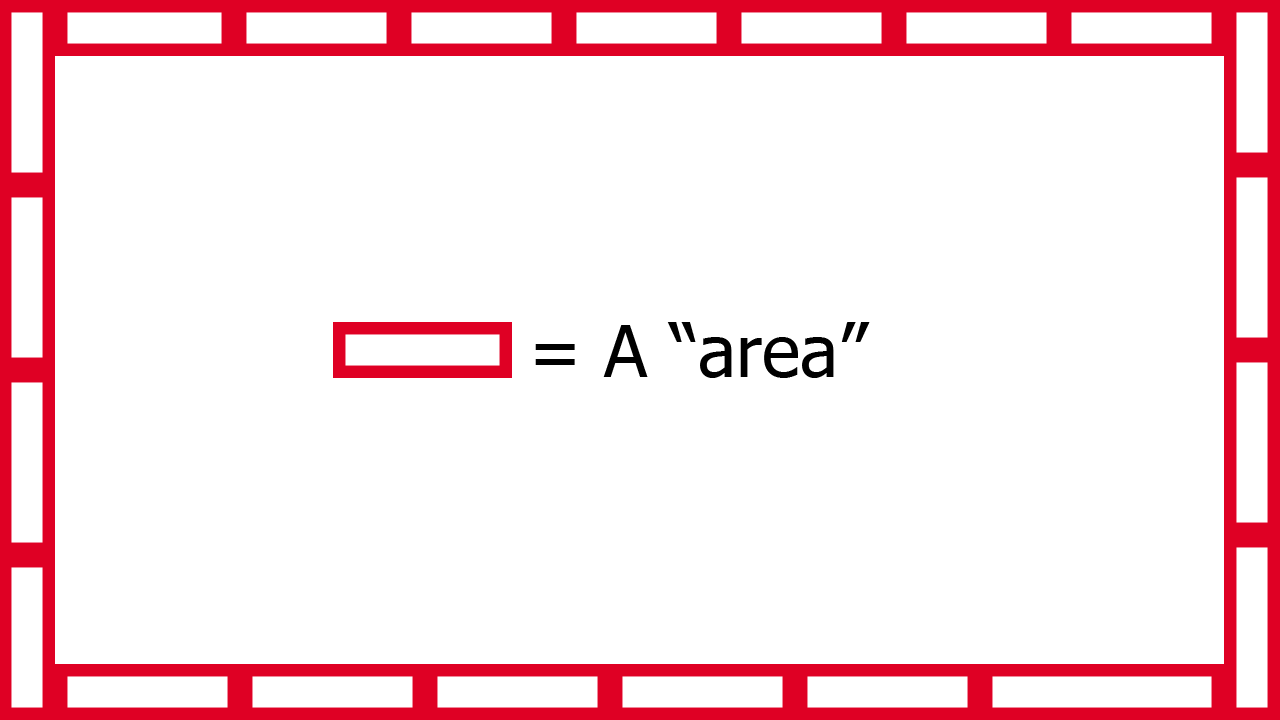
What does the image prossecing look like?: I want to take a avarage of the colors of a area. This area will be allong the sides of the screen. I also added a really ruf sketch of what i mean by area. The number of areas depend on the number of LED's around the screen. I am not sure if this is the final way i am going to do this, but this gives you a idea of what i mean by image prossecing.
image

To cut on procesing cost/time i think i will maybe down scale the image it needs to proccess. For example when you have a 4k image input, it needs to collect a lot of pixel color values, and take a average of them. While we maybe dont need that much detail. I dont know how far i will down scale the image, but i will know this after testing.

The qeustion: So now you know my plan, my qeustion is: What SoC should i use for this project? The main reason i ask this qeustion is because i dont know how much computing power it wil take to prosses a image this way. I know i can probably use a raspberry pi, but i also dont want to use a overpowerd SoC for this project. Also because i maybe want to produce more of these i need to think about cost.

Requirments:

   - It needs to have I/O pins (ofcourse)
   - There needs to be a way that i can have hdmi in (in to the SoC ofc) (it doenst have to be include on the SoC)
   - It needs to output data to the LED strip with a rate that it looks smooth to what happens on the screen (i dont know how many FPS that is, i think around 15-30 FPS)
   - (This isn't a must but it would make the project more intresseting) There needs to be a way it can have wifi (preferably onboard wifi)

More info:

   - I will be writing a "library" my self to controll the LED strip
   - The program wil be written in C++
   - For the image prossecing i think i will use the openCV library
   - I will use the WS2812B LED's

If you have any qeustions ask me!

I haven't tryed any SoC yet, i do have the raspberry pi 4 B at home.

  • Sign in to reply
  • Cancel

Top Replies

  • saadtiwana_int
    saadtiwana_int over 2 years ago +6
    I have considerable experience with video processing up to around 1080p60 (not 4k). I can suggest you two ways to do this if 1080p60 is enough for you: 1. You can use a HDMI-to-USB3 frame grabber (~10…
  • saadtiwana_int
    saadtiwana_int over 2 years ago in reply to beacon_dave +3
    beacon_dave Regarding the EDID data in FPGA designs, I remember the Digilent IPs (free, open source) handle the EDID data for some of the popular formats,...you need to select the option when instantiating…
  • balajivan1995
    balajivan1995 over 2 years ago +2
    Seems like someone already did this with Raspberry PI and Neopixels. https://www.raspberrypi.com/tutorials/raspberry-pi-tv-ambient-lighting/
  • misaz
    0 misaz over 2 years ago

    This is usualy done using FPGA and fully hardware accelerated implementation. Bitrate of display depends on resolution and refresh rate, but usually is too high for any soft processing. Even high performance computers with i9 and Ryzens can't do this without help of hardware acceleration in GPU.

    • Cancel
    • Vote Up +1 Vote Down
    • Sign in to reply
    • Verify Answer
    • Cancel
  • balajivan1995
    0 balajivan1995 over 2 years ago

    Seems like someone already did this with Raspberry PI and Neopixels.
    https://www.raspberrypi.com/tutorials/raspberry-pi-tv-ambient-lighting/

    • Cancel
    • Vote Up +2 Vote Down
    • Sign in to reply
    • Verify Answer
    • Cancel
  • beacon_dave
    0 beacon_dave over 2 years ago

    If you use an external frame grabber then you should be able to reduce the video resolution substantially during the capture in order to reduce the processing required later on.

    If you use one which is UVC class compliant then you should be able to use it with a wide range of devices without having to worry about device driver support. (For a proof of concept you could perhaps start out with a USB webcam pointed at the screen).

    • Cancel
    • Vote Up +1 Vote Down
    • Sign in to reply
    • Verify Answer
    • Cancel
  • shabaz
    0 shabaz over 2 years ago in reply to beacon_dave

    If they wanted to, the streaming firms could make these systems redundant overnight (ie. eliminate the need for image processors/grabbers etc), I don't know why they don't do it, since it would work better if there was prior information (e.g. metadata). No ideas if movies have that though! 

    I tried a simple experiment using DIY metadata controlling lights over BLE (since wiring would be messy too), and learned quite a bit; the BLE transmission time was more that repeatable enough for real-time effects. What was interesting was that while movies might have things that are supposed to occur immediately, that's not the case, (presumably because someone needs to sit on the set controlling the lighting manually!). For instance in this film, I think the lighting took a frame or two to disappear from the movie, compared to when the flame goes out on the match etc. I didn't reach a conclusion about if the metadata should be timed with the match flame (which is where eyes would be on) or the background lighting in the movie. Also the effect wasn't great with LCD screens that are still lit when dark; OLED would have been better!

    You don't have permission to edit metadata of this video.
    Edit media
    x
    image
    Upload Preview
    image

    • Cancel
    • Vote Up +2 Vote Down
    • Sign in to reply
    • Verify Answer
    • Cancel
  • beacon_dave
    0 beacon_dave over 2 years ago in reply to shabaz

    Nice.

    It's not quite 'IllumiRoom' but getting there Slight smile

    https://www.youtube.com/watch?v=aA5dNoangbo

    https://www.youtube.com/watch?v=re1EatGRV0w

    What was the actual viewing experience like ?

    The match in that movie gave a pretty consistent light output in the room despite it being waved around when being extinguished. Slight smile

    • Cancel
    • Vote Up +2 Vote Down
    • Sign in to reply
    • Verify Answer
    • Cancel
  • shabaz
    0 shabaz over 2 years ago in reply to beacon_dave

    I just had a very quick read of that paper, clever system! Neat how they derive their input from different sources. Such a system would be very much feasible nowadays at a reasonable cost, since low-res projectors are cheap (high-res in unnecessary since it will be only used by peripheral vision).

    My prototype was using network messages too essentially, but for communication via BLE. And pre-programmed table of events at movie timestamps, which is not as universal, but probably a lot more feasible nowadays due to the amount of streamed content allowing such a thing to occur via app, without needing to adhere to standards like DVD, blu-ray etc.

    The effect was spooky (probably more so if it was an unfamiliar film, but I've seen that one plenty of times), since it's very unexpected for lighting to switch off entirely during a movie's dark scenes. Normally I have some dim lighting when watching a film, so it's quite disconcerting when all the room light is completely under autopilot, i.e. under control by the movie.

    I didn't apply dimming or colour changes, but that would have been near-zero additional effort, since it's all in the metadata quality. Worth doing for one or two cool movies I reckon! 

    • Cancel
    • Vote Up +1 Vote Down
    • Sign in to reply
    • Verify Answer
    • Cancel
  • saadtiwana_int
    0 saadtiwana_int over 2 years ago

    I have considerable experience with video processing up to around 1080p60 (not 4k). I can suggest you two ways to do this if 1080p60 is enough for you:

    1. You can use a HDMI-to-USB3 frame grabber (~10-15$ supporting ~1080p60), connected to something like a RPi or any other SBC which supports USB3. Then you can write the image processing code inside the RPi. I would say this would be the easier approach.

    2. You can use Zybo Z7-20 board, which has a HDMI input (as well as an output), and you can build your system inside the Zybo's Zynq FPGA to extract the info you need from each frame. You can also drive the LEDs by building some logic inside the FPGA fabric. 

    In both cases you will need a HDMI splitter on your original source so that one output goes to the TV and the other comes to your system of choice (above). The first way will be easier but the performance might be limited (but probably still acceptable for what you need for). The second system will be blazing fast but I wouldn't recommend it if you you haven't worked with FPGAs before (or not willing to put in quite a bit of effort Slight smile )

    Hope that helps!

    p.s When you do complete it, please do share your project here on element14! ;)

    • Cancel
    • Vote Up +6 Vote Down
    • Sign in to reply
    • Verify Answer
    • Cancel
  • flows
    0 flows over 2 years ago in reply to saadtiwana_int

    Thanks everyone for the responses i have learned so much more. I have a qeustion, is there a real difference between a frame grabber and a capture card? Or is it just the name? And i will defenitly share my project one's its done!

    • Cancel
    • Vote Up +1 Vote Down
    • Sign in to reply
    • Verify Answer
    • Cancel
  • beacon_dave
    0 beacon_dave over 2 years ago in reply to flows

    Historically a frame grabber used to be a large external standalone box that could capture one or more frames into its own memory. It also often had various electronics such as GPIO for triggering options. A computer connected to it could then be used to access any part of the stored data.

    Over time, the technology started to become smaller and available as plug-in cards for computers, often requiring the host to support its operation.

    Some manufactures tend to use the names interchangeably when referring to the same device.

    • Cancel
    • Vote Up +1 Vote Down
    • Sign in to reply
    • Verify Answer
    • Cancel
  • beacon_dave
    0 beacon_dave over 2 years ago in reply to shabaz

    Ten years ago the required hardware would still have been quite expensive. However MS Research appeared to turn away from enhanced displays towards fully immersive rooms with the likes of 'RoomAlive'

    https://www.youtube.com/watch?v=ILb5ExBzHqw

    but that would have been even more expensive due to the number of projectors and cameras to cover a room.

    Around the same time others like Lightform were using the projector + depth camera technology for automated projection mapping solutions with some interesting results

    https://www.youtube.com/watch?v=WtSlfSYBroA

    however need the tools and content for the average person to make the most of it.

    I guess films with the likes of sunrises and lightning strikes could work quite well with your metadata setup. Also you could perhaps play around with shadows by intentionally removing ambient light in the peripheral vision area for a  spooky effect. Also where the colourist has played around with tints to emphasise changes in mood or season, this could be applied behind the screen.

    • Cancel
    • Vote Up 0 Vote Down
    • Sign in to reply
    • Verify Answer
    • Cancel
>
element14 Community

element14 is the first online community specifically for engineers. Connect with your peers and get expert answers to your questions.

  • Members
  • Learn
  • Technologies
  • Challenges & Projects
  • Products
  • Store
  • About Us
  • Feedback & Support
  • FAQs
  • Terms of Use
  • Privacy Policy
  • Legal and Copyright Notices
  • Sitemap
  • Cookies

An Avnet Company © 2025 Premier Farnell Limited. All Rights Reserved.

Premier Farnell Ltd, registered in England and Wales (no 00876412), registered office: Farnell House, Forge Lane, Leeds LS12 2NE.

ICP 备案号 10220084.

Follow element14

  • X
  • Facebook
  • linkedin
  • YouTube