element14 Community
element14 Community
    Register Log In
  • Site
  • Search
  • Log In Register
  • Community Hub
    Community Hub
    • What's New on element14
    • Feedback and Support
    • Benefits of Membership
    • Personal Blogs
    • Members Area
    • Achievement Levels
  • Learn
    Learn
    • Ask an Expert
    • eBooks
    • element14 presents
    • Learning Center
    • Tech Spotlight
    • STEM Academy
    • Webinars, Training and Events
    • Learning Groups
  • Technologies
    Technologies
    • 3D Printing
    • FPGA
    • Industrial Automation
    • Internet of Things
    • Power & Energy
    • Sensors
    • Technology Groups
  • Challenges & Projects
    Challenges & Projects
    • Design Challenges
    • element14 presents Projects
    • Project14
    • Arduino Projects
    • Raspberry Pi Projects
    • Project Groups
  • Products
    Products
    • Arduino
    • Avnet & Tria Boards Community
    • Dev Tools
    • Manufacturers
    • Multicomp Pro
    • Product Groups
    • Raspberry Pi
    • RoadTests & Reviews
  • About Us
  • Store
    Store
    • Visit Your Store
    • Choose another store...
      • Europe
      •  Austria (German)
      •  Belgium (Dutch, French)
      •  Bulgaria (Bulgarian)
      •  Czech Republic (Czech)
      •  Denmark (Danish)
      •  Estonia (Estonian)
      •  Finland (Finnish)
      •  France (French)
      •  Germany (German)
      •  Hungary (Hungarian)
      •  Ireland
      •  Israel
      •  Italy (Italian)
      •  Latvia (Latvian)
      •  
      •  Lithuania (Lithuanian)
      •  Netherlands (Dutch)
      •  Norway (Norwegian)
      •  Poland (Polish)
      •  Portugal (Portuguese)
      •  Romania (Romanian)
      •  Russia (Russian)
      •  Slovakia (Slovak)
      •  Slovenia (Slovenian)
      •  Spain (Spanish)
      •  Sweden (Swedish)
      •  Switzerland(German, French)
      •  Turkey (Turkish)
      •  United Kingdom
      • Asia Pacific
      •  Australia
      •  China
      •  Hong Kong
      •  India
      • Japan
      •  Korea (Korean)
      •  Malaysia
      •  New Zealand
      •  Philippines
      •  Singapore
      •  Taiwan
      •  Thailand (Thai)
      • Vietnam
      • Americas
      •  Brazil (Portuguese)
      •  Canada
      •  Mexico (Spanish)
      •  United States
      Can't find the country/region you're looking for? Visit our export site or find a local distributor.
  • Translate
  • Profile
  • Settings
Experts, Learning and Guidance
  • Technologies
  • More
Experts, Learning and Guidance
Ask an Expert Forum Timeout Error when Reading Measurements from Impedance Analyzer Solartron 1260 via NI MAX using IEEE 488/GPIB
  • Blog
  • Forum
  • Documents
  • Leaderboard
  • Files
  • Members
  • Mentions
  • Sub-Groups
  • Tags
  • More
  • Cancel
  • New
Join Experts, Learning and Guidance to participate - click to join for free!
Actions
  • Share
  • More
  • Cancel
Forum Thread Details
  • State Not Answered
  • Replies 29 replies
  • Subscribers 297 subscribers
  • Views 4248 views
  • Users 0 members are here
  • PCIB
  • NIMax
  • impedance analyzer
  • read error
Related
See a helpful answer?

Be sure to click 'more' and select 'suggest as answer'!

If you're the thread creator, be sure to click 'more' then 'Verify as Answer'!

Timeout Error when Reading Measurements from Impedance Analyzer Solartron 1260 via NI MAX using IEEE 488/GPIB

Abdul
Abdul over 1 year ago

Hi, 

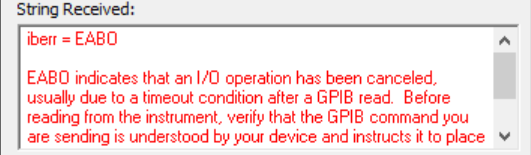
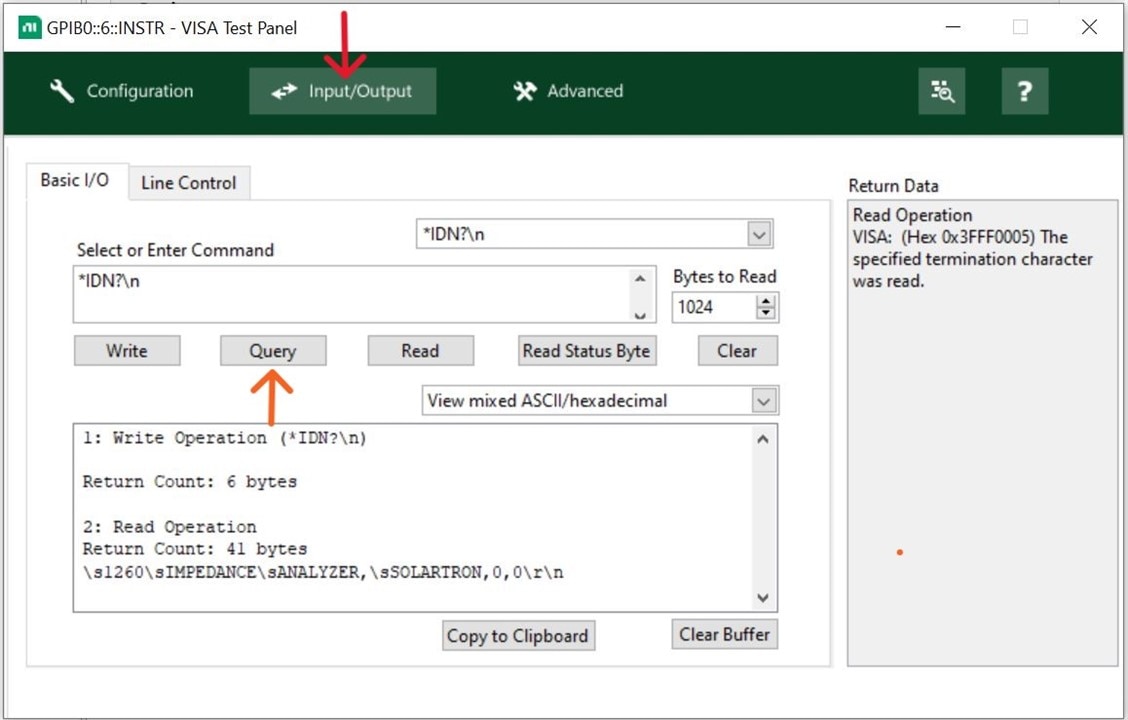
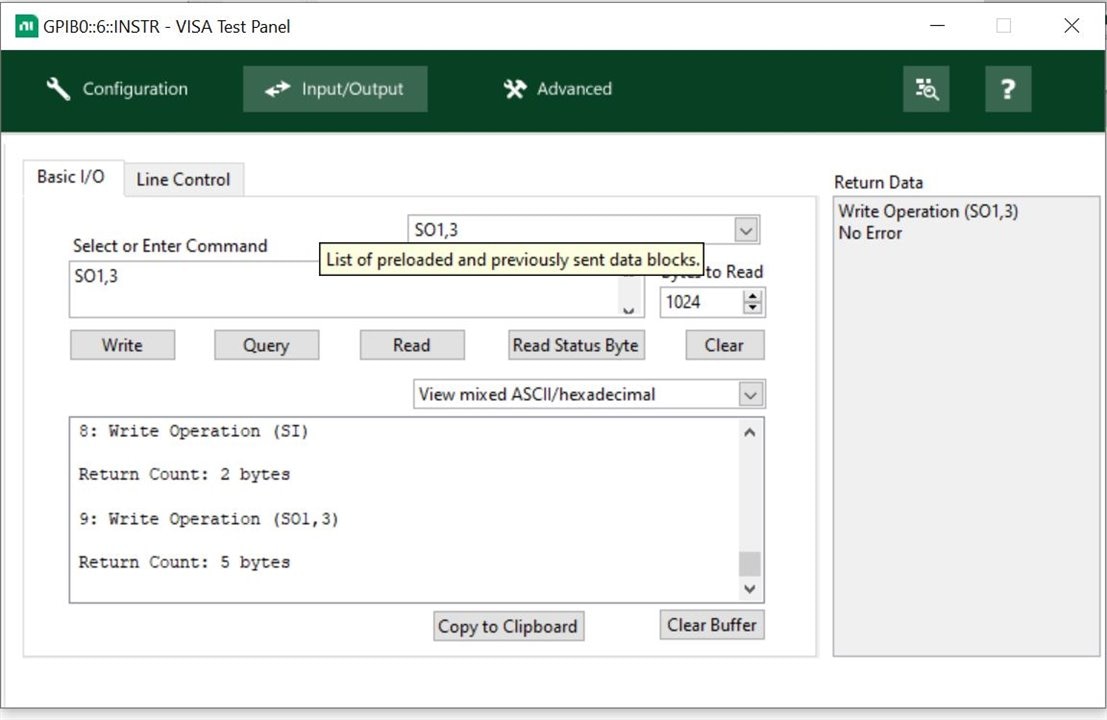
 I'm working with a Solartron A1260 Impedance/Gain-Phase Analyzer and attempting to read measurements on the NI MAX interface connected through a PCI bus. The analyzer itself is functioning correctly and can receive "Write" commands, as you can see the measurements on blue screen, but when I try to "Read" these measurements using NI MAX, I encounter a timeout error, as illustrated in the attached screenshot.The only command I can read is `*IDN? `. but my goal is to "Read" that simple measurement data of impedance analyzer on NI MAX interface.

I have tried adjusting the timeout/Bytes settings and reviewing the connection, but the issue persists. It seems like the main challenge is that I'm not sure about the correct commands to read the measurement data. Here are the details of my setup:


- Device Model: Solartron 1260 Impedance/Gain-Phase Analyzer
- Connection: Interface through PCIB
- Software: NI MAX
- Issue: Timeout error EABO during GPIB read operation

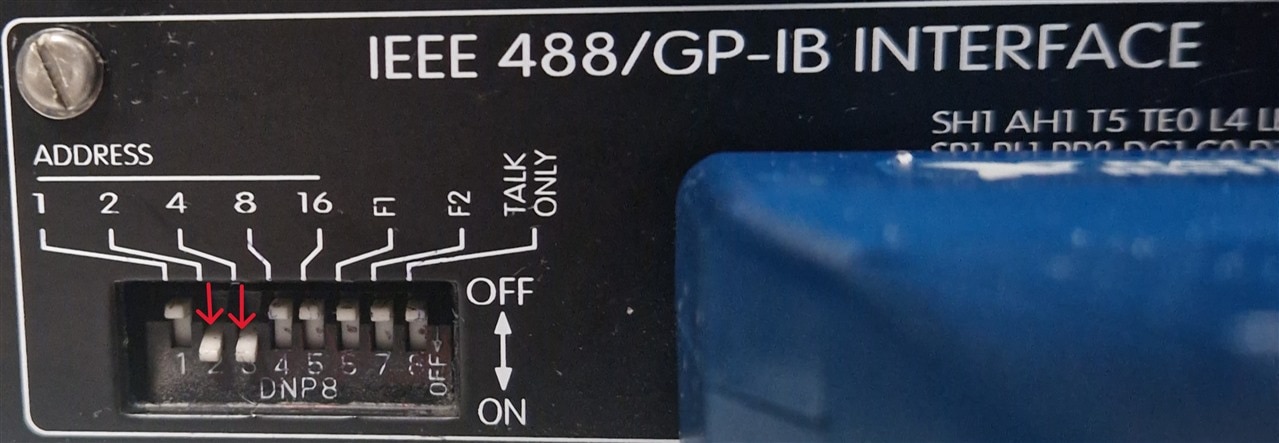
- Troubleshooting Steps: Adjusted timeout settings, adjusted bytes, changed addresses, checked GPIB command syntax, changed GPIB

 I would greatly appreciate any advice on the proper GPIB commands for reading measurements from a Solartron 1260 or any troubleshooting steps that might resolve this timeout error.

Thank you in advance for your help!

image

image

image

  • Sign in to reply
  • Cancel

Top Replies

  • Abdul
    Abdul over 1 year ago +4
    Subject: Successful Update: Command Reading on NI MAX Interface Achieved! Dear Element14 Community, I have successfully configured the NI MAX interface to read commands from the impedance analyzer…
  • Jan Cumps
    Jan Cumps over 1 year ago in reply to shabaz +3
    I read the paper. Very useful to learn / understand a working conversation for this brand. Warning to Abdul , at the end of the paper, the writer explains how one of his scripts damaged the instrument…
  • shabaz
    shabaz over 1 year ago +2
    You could also check for code for other Solartron products of that era, in case you can spot any difference. For instance, a student used a 1260A here: https://www.slideshare.net/JosephHaystead/enel301…
Parents
  • Abdul
    0 Abdul over 1 year ago

    Subject: Successful Update: Command Reading on NI MAX Interface Achieved!

    Dear Element14 Community,

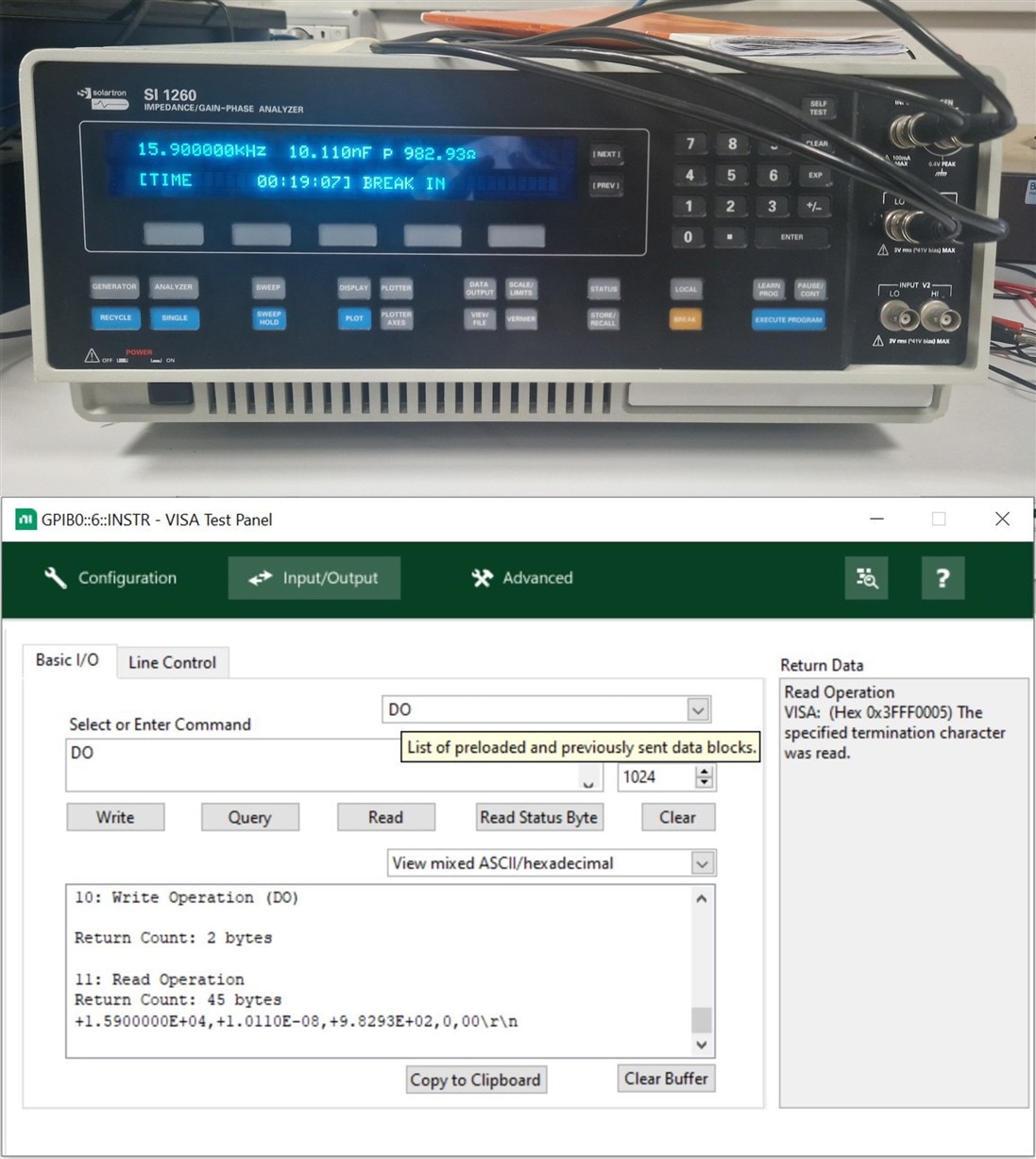
    I have successfully configured the NI MAX interface to read commands from the impedance analyzer. My apologies for the delayed update,

    Here's a brief overview of the approach that led to this breakthrough:

    1. Firstly on the impedance analyzer 1260, press the “DATA OUTPUT” hard key.
    2. Select the GPIB option and choose the [dump all] setting. This configuration allows the PC to control the impedance analyzer, facilitating efficient data management and analysis.
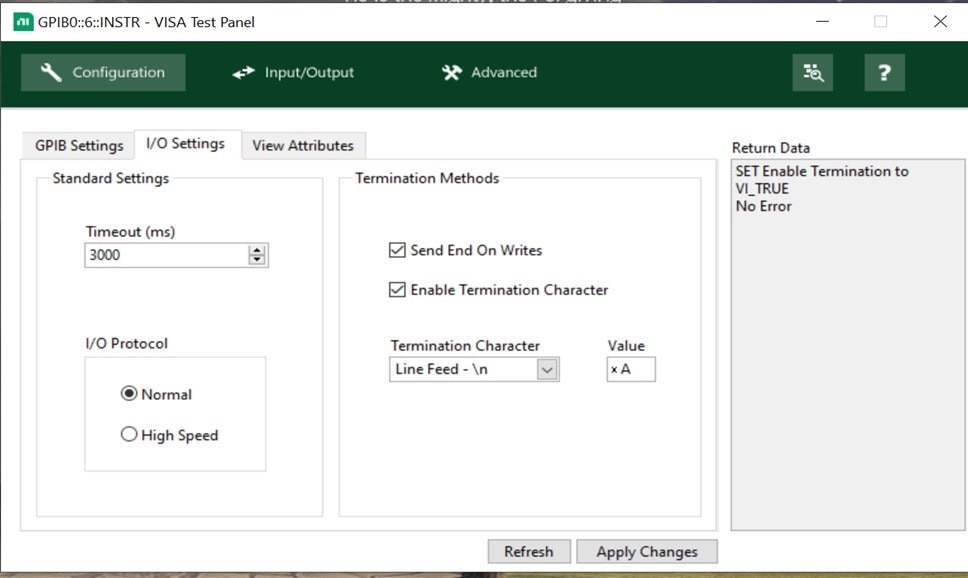
    3. In the VISA test panel of NI MAX, enable the termination character to ensure smooth communication. All remaining settings are configured to their default values even the time out settings too

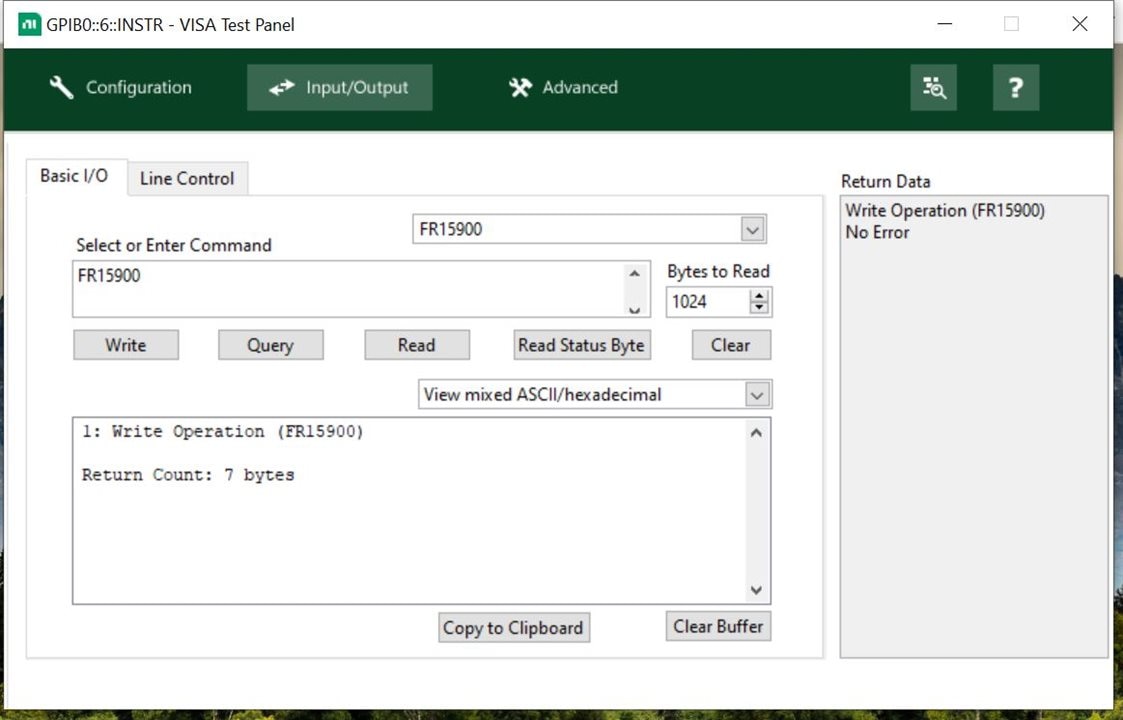
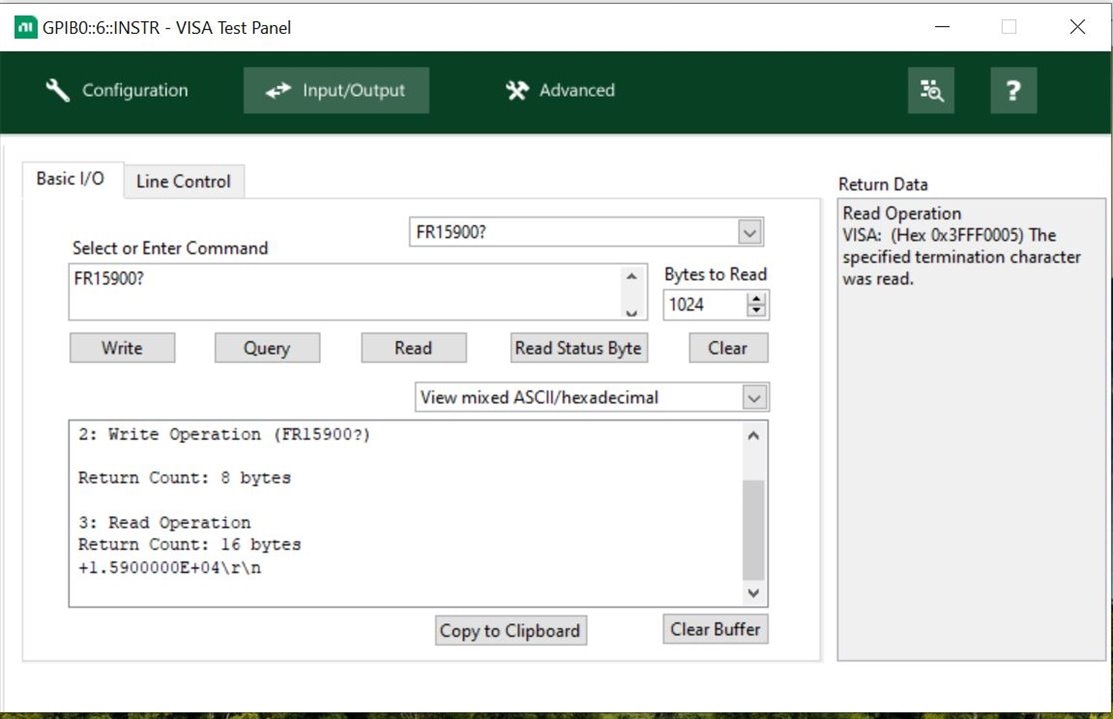
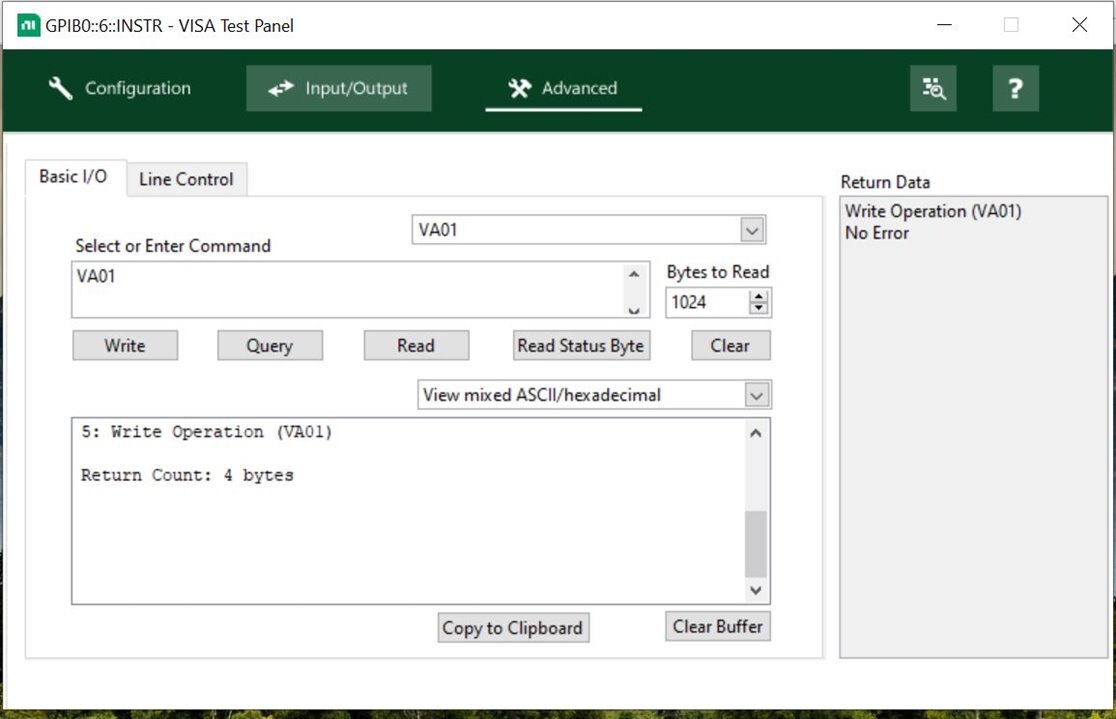
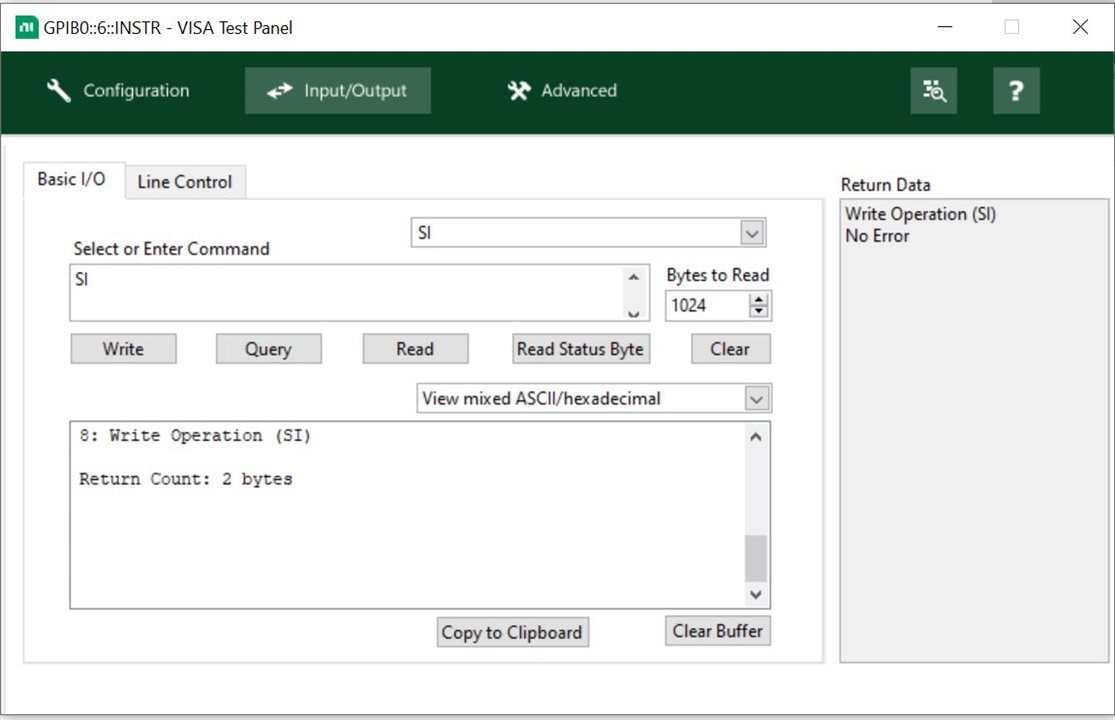
    For detailed command usage, Referring to Chapter 8 (Remote Commands) of the impedance analyzer's operating manual Model 1260. I've also attached screenshots to illustrate the setup and provide clearer guidance.

    I must extend my heartfelt thanks to the Element14 community, particularly shabaz, Jan Cumps , Andrew J , and michaelkellett for their invaluable guidance and expertise throughout this process. Thank you.

    Warm regards,

    Abdul 

    image

    image

    imageimageimageimageimageimageimage

    • Cancel
    • Vote Up +4 Vote Down
    • Sign in to reply
    • Verify Answer
    • Cancel
Reply
  • Abdul
    0 Abdul over 1 year ago

    Subject: Successful Update: Command Reading on NI MAX Interface Achieved!

    Dear Element14 Community,

    I have successfully configured the NI MAX interface to read commands from the impedance analyzer. My apologies for the delayed update,

    Here's a brief overview of the approach that led to this breakthrough:

    1. Firstly on the impedance analyzer 1260, press the “DATA OUTPUT” hard key.
    2. Select the GPIB option and choose the [dump all] setting. This configuration allows the PC to control the impedance analyzer, facilitating efficient data management and analysis.
    3. In the VISA test panel of NI MAX, enable the termination character to ensure smooth communication. All remaining settings are configured to their default values even the time out settings too

    For detailed command usage, Referring to Chapter 8 (Remote Commands) of the impedance analyzer's operating manual Model 1260. I've also attached screenshots to illustrate the setup and provide clearer guidance.

    I must extend my heartfelt thanks to the Element14 community, particularly shabaz, Jan Cumps , Andrew J , and michaelkellett for their invaluable guidance and expertise throughout this process. Thank you.

    Warm regards,

    Abdul 

    image

    image

    imageimageimageimageimageimageimage

    • Cancel
    • Vote Up +4 Vote Down
    • Sign in to reply
    • Verify Answer
    • Cancel
Children
  • md_steve
    0 md_steve over 1 year ago in reply to Abdul

    Congratulations! I couldn't help you but I'm glad others here were able to jump in and help. What a resource we have here, eh?  

    • Cancel
    • Vote Up 0 Vote Down
    • Sign in to reply
    • Verify Answer
    • Cancel
  • michaelkellett
    0 michaelkellett over 1 year ago in reply to Abdul

    Hello, really happy you got it going.

    Older instruments can be quite a pain to hook up on GPIB.

    MK

    • Cancel
    • Vote Up 0 Vote Down
    • Sign in to reply
    • Verify Answer
    • Cancel
element14 Community

element14 is the first online community specifically for engineers. Connect with your peers and get expert answers to your questions.

  • Members
  • Learn
  • Technologies
  • Challenges & Projects
  • Products
  • Store
  • About Us
  • Feedback & Support
  • FAQs
  • Terms of Use
  • Privacy Policy
  • Legal and Copyright Notices
  • Sitemap
  • Cookies

An Avnet Company © 2025 Premier Farnell Limited. All Rights Reserved.

Premier Farnell Ltd, registered in England and Wales (no 00876412), registered office: Farnell House, Forge Lane, Leeds LS12 2NE.

ICP 备案号 10220084.

Follow element14

  • X
  • Facebook
  • linkedin
  • YouTube