element14 Community
element14 Community
    Register Log In
  • Site
  • Search
  • Log In Register
  • Community Hub
    Community Hub
    • What's New on element14
    • Feedback and Support
    • Benefits of Membership
    • Personal Blogs
    • Members Area
    • Achievement Levels
  • Learn
    Learn
    • Ask an Expert
    • eBooks
    • element14 presents
    • Learning Center
    • Tech Spotlight
    • STEM Academy
    • Webinars, Training and Events
    • Learning Groups
  • Technologies
    Technologies
    • 3D Printing
    • FPGA
    • Industrial Automation
    • Internet of Things
    • Power & Energy
    • Sensors
    • Technology Groups
  • Challenges & Projects
    Challenges & Projects
    • Design Challenges
    • element14 presents Projects
    • Project14
    • Arduino Projects
    • Raspberry Pi Projects
    • Project Groups
  • Products
    Products
    • Arduino
    • Avnet & Tria Boards Community
    • Dev Tools
    • Manufacturers
    • Multicomp Pro
    • Product Groups
    • Raspberry Pi
    • RoadTests & Reviews
  • About Us
  • Store
    Store
    • Visit Your Store
    • Choose another store...
      • Europe
      •  Austria (German)
      •  Belgium (Dutch, French)
      •  Bulgaria (Bulgarian)
      •  Czech Republic (Czech)
      •  Denmark (Danish)
      •  Estonia (Estonian)
      •  Finland (Finnish)
      •  France (French)
      •  Germany (German)
      •  Hungary (Hungarian)
      •  Ireland
      •  Israel
      •  Italy (Italian)
      •  Latvia (Latvian)
      •  
      •  Lithuania (Lithuanian)
      •  Netherlands (Dutch)
      •  Norway (Norwegian)
      •  Poland (Polish)
      •  Portugal (Portuguese)
      •  Romania (Romanian)
      •  Russia (Russian)
      •  Slovakia (Slovak)
      •  Slovenia (Slovenian)
      •  Spain (Spanish)
      •  Sweden (Swedish)
      •  Switzerland(German, French)
      •  Turkey (Turkish)
      •  United Kingdom
      • Asia Pacific
      •  Australia
      •  China
      •  Hong Kong
      •  India
      • Japan
      •  Korea (Korean)
      •  Malaysia
      •  New Zealand
      •  Philippines
      •  Singapore
      •  Taiwan
      •  Thailand (Thai)
      • Vietnam
      • Americas
      •  Brazil (Portuguese)
      •  Canada
      •  Mexico (Spanish)
      •  United States
      Can't find the country/region you're looking for? Visit our export site or find a local distributor.
  • Translate
  • Profile
  • Settings
Experts, Learning and Guidance
  • Technologies
  • More
Experts, Learning and Guidance
Ask an Expert Forum trying to connect MP730424 DMM with rs232 but get Timeout error
  • Blog
  • Forum
  • Documents
  • Leaderboard
  • Files
  • Members
  • Mentions
  • Sub-Groups
  • Tags
  • More
  • Cancel
  • New
Join Experts, Learning and Guidance to participate - click to join for free!
Actions
  • Share
  • More
  • Cancel
Forum Thread Details
  • State Not Answered
  • Replies 11 replies
  • Subscribers 297 subscribers
  • Views 1843 views
  • Users 0 members are here
  • help
  • connector
  • ask_an_expert
  • cable
Related
See a helpful answer?

Be sure to click 'more' and select 'suggest as answer'!

If you're the thread creator, be sure to click 'more' then 'Verify as Answer'!

trying to connect MP730424 DMM with rs232 but get Timeout error

JeremieWerner
JeremieWerner over 1 year ago

I am trying to remote control a DMM MP730424 from a computer with Windows 11. *IDN? gives a VI_ERROR_TMO: Timeout expired before operation completed.

the instrument port information show: baud 115200, parity None, stop bits 1, data bits 8. 

What is the expected EOL and termination character?

has anyone manage to control this device via RS232?

  • Sign in to reply
  • Cancel

Top Replies

  • michaelkellett
    michaelkellett over 1 year ago +3
    It looks like an Owon XDM2041. The same (poor) documentation is on the web if you hunt for it. This discussion on eevblog (several message in) suggests that it will talk easily via the serial port.. The…
  • shabaz
    shabaz over 1 year ago +2
    I don't have this instrument, but here are some things to try. Perhaps the transmit and receive pins need swapping. Sometimes instruments require a cable (e.g. null modem cable) to attach to the usb…
  • Gough Lui
    Gough Lui over 1 year ago +2
    Most devices will need '\n' for the EOL/termination character. If not, try '\r'. - Gough
  • shabaz
    0 shabaz over 1 year ago

    I don't have this instrument, but here are some things to try.

    Perhaps the transmit and receive pins need swapping. Sometimes instruments require a cable (e.g. null modem cable) to attach to the usb-to-RS232 adapter.  Worth trying both straight and swapped.

    Also, presume the USB-to-RS232 adapter is functioning? You can check by unplugging from the instrument and shorting the transmit and receive pins and testing with serial terminal software (such as PuTTY).

    Also, might be worth checking the instrument config menu, in case the default isn't 115200 (user manuals can be incorrect).

    You should try all combinations of CR/LF and see which one responds to your *IDN? But make sure to power-cycle the instrument before each attempt, because an incorrect line termination leaves instrument software in a messed up state often.

    Also, you could try different PC software (to eliminate potential PC software issues), for instance pyvisa is good. Or just test with serial console software.

    • Cancel
    • Vote Up +2 Vote Down
    • Sign in to reply
    • Verify Answer
    • Cancel
  • michaelkellett
    0 michaelkellett over 1 year ago

    It looks like an Owon XDM2041. The same (poor) documentation is on the web if you hunt for it. This discussion on eevblog (several message in) suggests that it will talk easily via the serial port.. The poster makes no mention of special cables so I think that you may have a basic comms issue.

    Try connecting to it with Hyperterminal or your favourite terminal programme and send messages by hand. 

    https://www.eevblog.com/forum/testgear/owon-xdm1041-the-unknown-multimeter/25/

    MK

    • Cancel
    • Vote Up +3 Vote Down
    • Sign in to reply
    • Verify Answer
    • Cancel
  • Gough Lui
    0 Gough Lui over 1 year ago

    Most devices will need '\n' for the EOL/termination character. If not, try '\r'.

    - Gough

    • Cancel
    • Vote Up +2 Vote Down
    • Sign in to reply
    • Verify Answer
    • Cancel
  • JeremieWerner
    0 JeremieWerner over 1 year ago in reply to shabaz

    Hi Shabaz, thanks a lot for the suggestions. 

    - null modem: I now tried this but didn't help

    - usb-to-rs232: I tried shorting the read and write pins and it works. tested with NI Max. 

    - instrument configs: I checked and they are 115200, None, stop bits 1, data bits 8. I have checked that the cables and the serial software are all using the same. 

    - I tried *IDN?\r, *IDN?\r\n, *IDN?\n, *IDN?. all gives a timeout error.

    - PC software: tried with NI Max and with pyvisa. 

    could the instrument be defective? how to test? 

    • Cancel
    • Vote Up 0 Vote Down
    • Sign in to reply
    • Verify Answer
    • Cancel
  • JWx
    0 JWx over 1 year ago

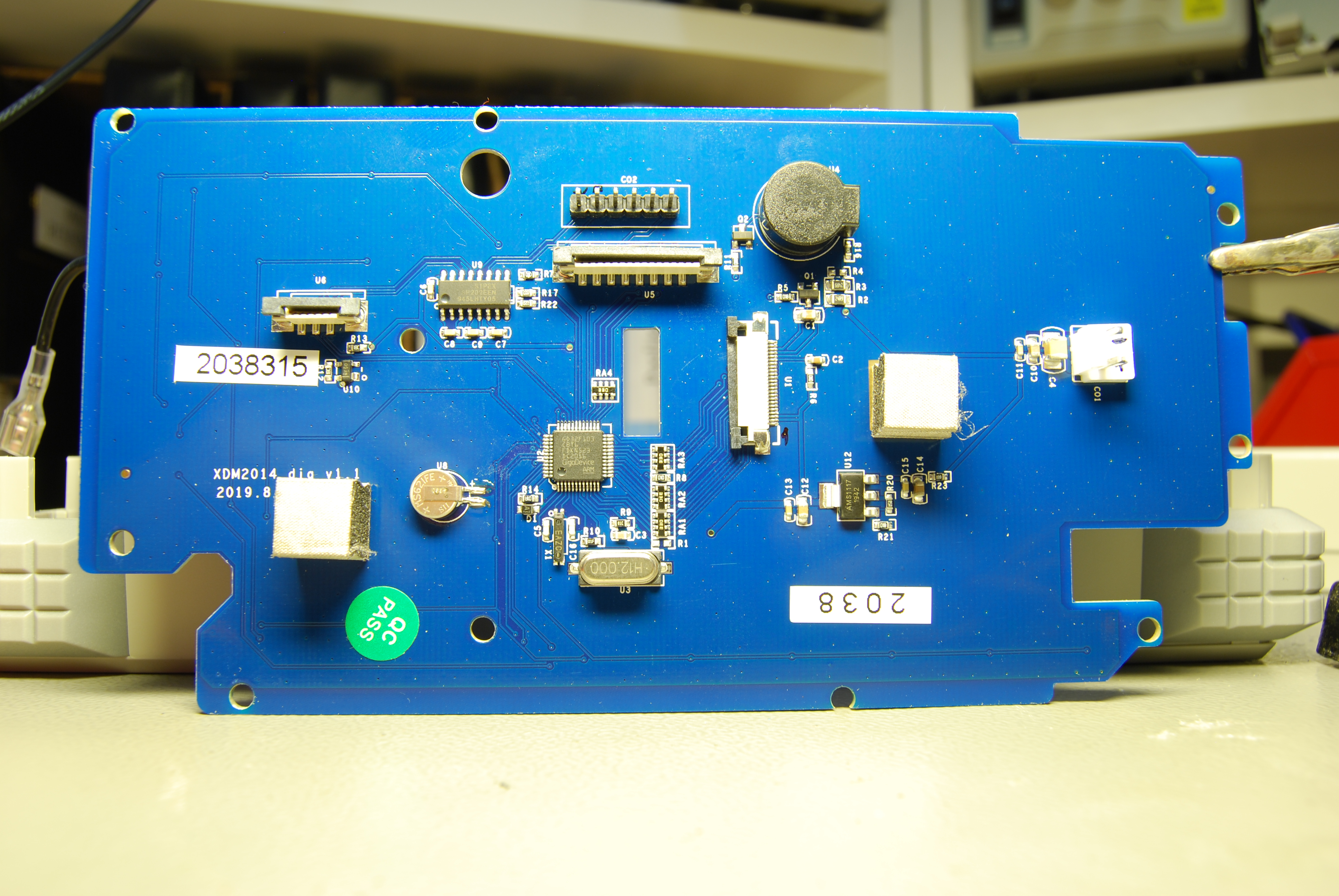
    maybe hardware flow control on RS232 is required? As usb-uart adapters are often only tx/rx/gnd, so maybe a computer with hardware uart and a proper cable would be necessary for a test... (EDIT - if this is logic level RS232 [despite the fact that photo suggests that it contains Sipex SP202 level converter], connecting to the standard RS232 can damage it)  from the photo below (if it is the same PCB as in MP730424) there is only one TX and one RX on SP202 used, so no hardware flow control
    MCU board photo

    or cable pinout? in the times of old, (serial) cable pinouts for various equipment were really important - cable for one manufacturer was usually incompatible with equipment of different brand...

    BTW. below there is a discussion about this DMM, but nothing about RS232

    community.element14.com/.../software-options-or-interface-specs-for-the-multicomp-pro-bench-dmm

    • Cancel
    • Vote Up 0 Vote Down
    • Sign in to reply
    • Verify Answer
    • Cancel
  • michaelkellett
    0 michaelkellett over 1 year ago

    Which USB to RS232 adapter are you using - if the DMM uses true RS232 it may very well not work with a logic level adapter.

    Do you have a scope (ideally with RS232 decoding) - if so then connect it to monitor the RS232 RX and TX pins.

    Found some more info here:

    https://github.com/PetteriAimonen/owon-xdm2041-info/tree/main/mcu_board

    This would suggest that the DMM is  a logic level RS232 so it won't work (reliably) with a a true RS232 adapter on the PC.

    You can check this - disconnect the lead from the DMM and use another meter to measure the voltage on pins 2 and 3 relative to pin 5.

    If all the voltages you see are between 0 and +5V it is a logic level interface.

    If at least one of the voltages is more than 3V  -ve  it is a true RS232  interface,

    If both voltages are less than +/-0.5V is not a functional interface.

    There are some more tests that can be done with a meter to check that you have RX and TX  correctly connected to their complements on the pC lead but we'll leave that until we know if we have the right voltage levels.

    MK

    • Cancel
    • Vote Up 0 Vote Down
    • Sign in to reply
    • Verify Answer
    • Cancel
  • beacon_dave
    0 beacon_dave over 1 year ago in reply to michaelkellett
    michaelkellett said:
    This would suggest that the DMM is  a logic level RS232 so it won't work (reliably) with a a true RS232 adapter on the PC.

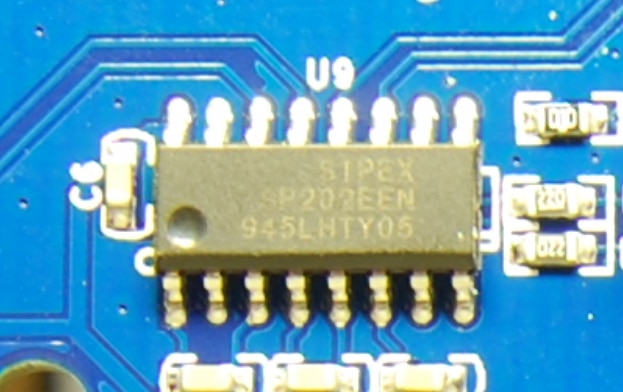
    Looks like there is a Sipex SP232 RS232 line driver/receiver on the circuit board.


    image

    • Cancel
    • Vote Up +1 Vote Down
    • Sign in to reply
    • Verify Answer
    • Cancel
  • michaelkellett
    0 michaelkellett over 1 year ago in reply to beacon_dave

    Where did you get the picture ?

    MK

    • Cancel
    • Vote Up 0 Vote Down
    • Sign in to reply
    • Verify Answer
    • Cancel
  • JWx
    0 JWx over 1 year ago in reply to michaelkellett

    int the repo you have found there are also photos of PCB....
    https://raw.githubusercontent.com/PetteriAimonen/owon-xdm2041-info/main/mcu_board/mcu_board_top.jpg

    • Cancel
    • Vote Up +1 Vote Down
    • Sign in to reply
    • Verify Answer
    • Cancel
  • beacon_dave
    0 beacon_dave over 1 year ago in reply to michaelkellett

    From the link you provided above.

    • Cancel
    • Vote Up 0 Vote Down
    • Sign in to reply
    • Verify Answer
    • Cancel
>
element14 Community

element14 is the first online community specifically for engineers. Connect with your peers and get expert answers to your questions.

  • Members
  • Learn
  • Technologies
  • Challenges & Projects
  • Products
  • Store
  • About Us
  • Feedback & Support
  • FAQs
  • Terms of Use
  • Privacy Policy
  • Legal and Copyright Notices
  • Sitemap
  • Cookies

An Avnet Company © 2025 Premier Farnell Limited. All Rights Reserved.

Premier Farnell Ltd, registered in England and Wales (no 00876412), registered office: Farnell House, Forge Lane, Leeds LS12 2NE.

ICP 备案号 10220084.

Follow element14

  • X
  • Facebook
  • linkedin
  • YouTube