element14 Community
element14 Community
    Register Log In
  • Site
  • Search
  • Log In Register
  • Community Hub
    Community Hub
    • What's New on element14
    • Feedback and Support
    • Benefits of Membership
    • Personal Blogs
    • Members Area
    • Achievement Levels
  • Learn
    Learn
    • Ask an Expert
    • eBooks
    • element14 presents
    • Learning Center
    • Tech Spotlight
    • STEM Academy
    • Webinars, Training and Events
    • Learning Groups
  • Technologies
    Technologies
    • 3D Printing
    • FPGA
    • Industrial Automation
    • Internet of Things
    • Power & Energy
    • Sensors
    • Technology Groups
  • Challenges & Projects
    Challenges & Projects
    • Design Challenges
    • element14 presents Projects
    • Project14
    • Arduino Projects
    • Raspberry Pi Projects
    • Project Groups
  • Products
    Products
    • Arduino
    • Avnet & Tria Boards Community
    • Dev Tools
    • Manufacturers
    • Multicomp Pro
    • Product Groups
    • Raspberry Pi
    • RoadTests & Reviews
  • About Us
    About the element14 Community
  • Store
    Store
    • Visit Your Store
    • Choose another store...
      • Europe
      •  Austria (German)
      •  Belgium (Dutch, French)
      •  Bulgaria (Bulgarian)
      •  Czech Republic (Czech)
      •  Denmark (Danish)
      •  Estonia (Estonian)
      •  Finland (Finnish)
      •  France (French)
      •  Germany (German)
      •  Hungary (Hungarian)
      •  Ireland
      •  Israel
      •  Italy (Italian)
      •  Latvia (Latvian)
      •  
      •  Lithuania (Lithuanian)
      •  Netherlands (Dutch)
      •  Norway (Norwegian)
      •  Poland (Polish)
      •  Portugal (Portuguese)
      •  Romania (Romanian)
      •  Russia (Russian)
      •  Slovakia (Slovak)
      •  Slovenia (Slovenian)
      •  Spain (Spanish)
      •  Sweden (Swedish)
      •  Switzerland(German, French)
      •  Turkey (Turkish)
      •  United Kingdom
      • Asia Pacific
      •  Australia
      •  China
      •  Hong Kong
      •  India
      •  Japan
      •  Korea (Korean)
      •  Malaysia
      •  New Zealand
      •  Philippines
      •  Singapore
      •  Taiwan
      •  Thailand (Thai)
      •  Vietnam
      • Americas
      •  Brazil (Portuguese)
      •  Canada
      •  Mexico (Spanish)
      •  United States
      Can't find the country/region you're looking for? Visit our export site or find a local distributor.
  • Translate
  • Profile
  • Settings
Industrial Automation
  • Technologies
  • More
Industrial Automation
Forum E14 Community recommendation for ModBus TCP client
  • Blog
  • Forum
  • Documents
  • Quiz
  • Events
  • Polls
  • Files
  • Members
  • Mentions
  • Sub-Groups
  • Tags
  • More
  • Cancel
  • New
Join Industrial Automation to participate - click to join for free!
Actions
  • Share
  • More
  • Cancel
Forum Thread Details
  • Replies 29 replies
  • Subscribers 288 subscribers
  • Views 810 views
  • Users 0 members are here
  • modbus testing
  • modbus
  • client application
Related

E14 Community recommendation for ModBus TCP client

colporteur
colporteur 2 months ago

I am looking for an application to query a ModBus TCP interface on a scale head?
image

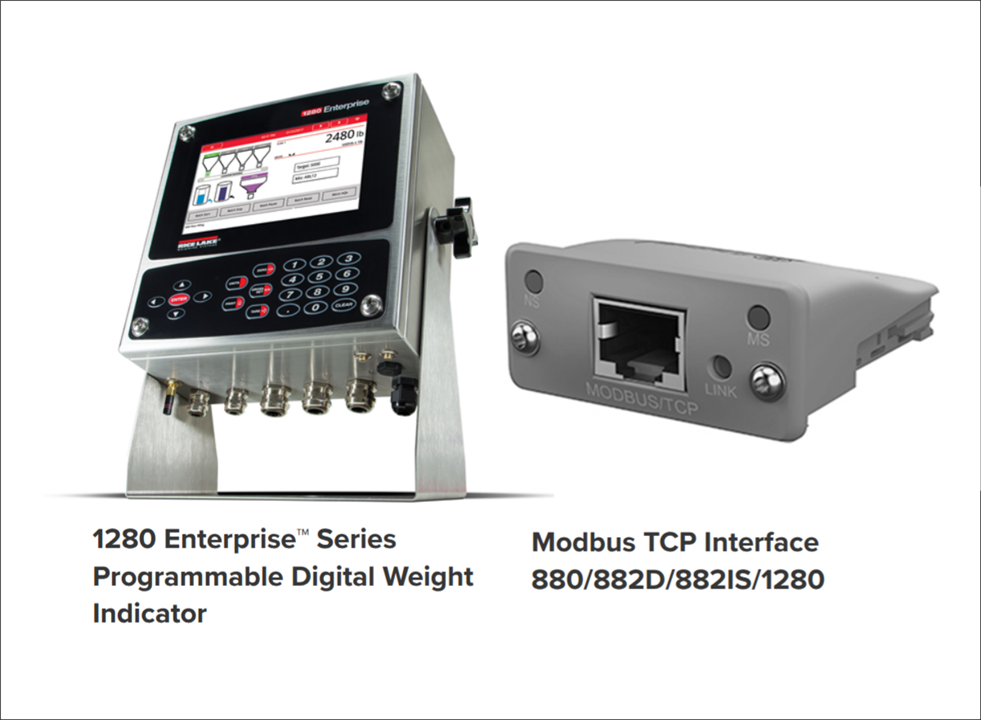
The company I am working for has recently installed a RiceLake 1280 scale indicator with a Modbus TCP interface. The scale indicator is IP capable and resides in a network DMZ. The goal is to have a cloud vendor pull scale data over the network from the Modbus interface. I'm looking for an application that can query the Modbus interface to confirm communication with the interface. 

The scale vendor recommended an application in order to set the Modbus TCP interface IP address. I managed to get that working, proving the interface IP answers an IP ping. DMZ rules have been set in place to isolate the indicator. I want to test that the cloud vendor can get to the Modbus interface and pull the data. I'm thinking maybe there is a software tool like minicom is for serial communication, except the tool is for Modbus.

E14 has some great Modbus resources but nothing to match my search. A Modbus client query tool. I'm hoping there is a community member that has experience with Modbus TCP and that they could recommend application software to perform the task.

  • Sign in to reply
  • Cancel
Parents
  • shabaz
    shabaz 2 months ago

    Hi Sean,

    While it's not the best protocol for this (it's a bit "naked"! and the cloud app vendor ought to have come up with better proposals to be honest), but anyway, I was interested, because by coincidence I'm just getting going with Modbus RTU currently (RS-485 instead of TCP, some differences in the protocol). I got curious enough to try to find the user manual for the 1280 Modbus TCP card. I gave that to AI, and it generated the Python code attached below. It complained that the user manual was vague in places, which it is, so I told it to try to make a simulator that accepted a few different function codes, and then try to simulate the cloud side too). 

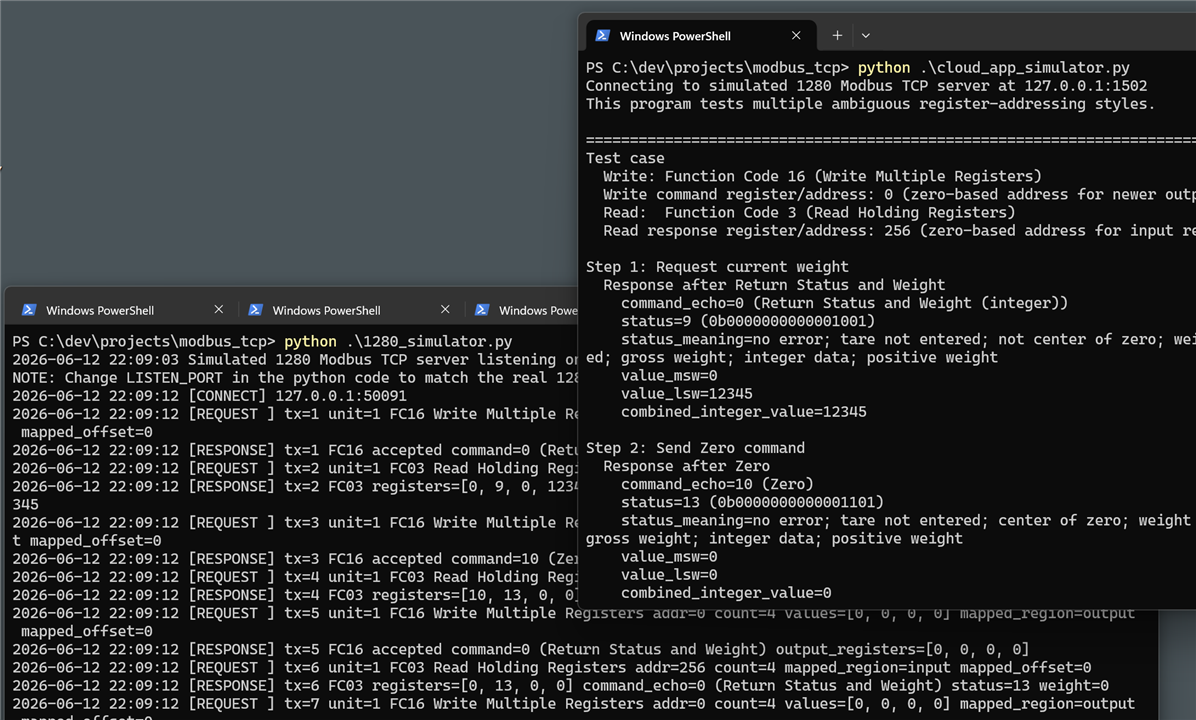
    The screenshot shows the 1280_simulator.py file running at the left side, it just sits and waits for a connection.

    On the right window, you can see the cloud_app_simulator.py file running, it makes a TCP connection to the 1280 simulator, and then tries a few function codes.

    Currently the code transmits to port 127.0.0.1 and port 1502, you'd need to modify both of those to suit your needs.

    Please don't ask me for modifications or tweaks, I don't know Modbus TCP nor what the AI did! : ) It might be ok but it might not. It might completely fail.

    I suppose one other thing worth doing is perhaps running WireShark, and examining if it successfully decodes whatever is sent by these two simulators. I didn't try that (I've not got WireShark installed currently). I only tried running the Python code on Windows, it should work with Linux but I can't be sure.

    image

    modbus_tcp_python.zip

    • Cancel
    • Vote Up +1 Vote Down
    • Sign in to reply
    • Cancel
  • colporteur
    colporteur 2 months ago in reply to shabaz

    I've used your client side program. It appears to connect but generates errors.client_output.zip

    • Cancel
    • Vote Up 0 Vote Down
    • Sign in to reply
    • Cancel
Reply
  • colporteur
    colporteur 2 months ago in reply to shabaz

    I've used your client side program. It appears to connect but generates errors.client_output.zip

    • Cancel
    • Vote Up 0 Vote Down
    • Sign in to reply
    • Cancel
Children
  • shabaz
    shabaz 1 month ago in reply to colporteur

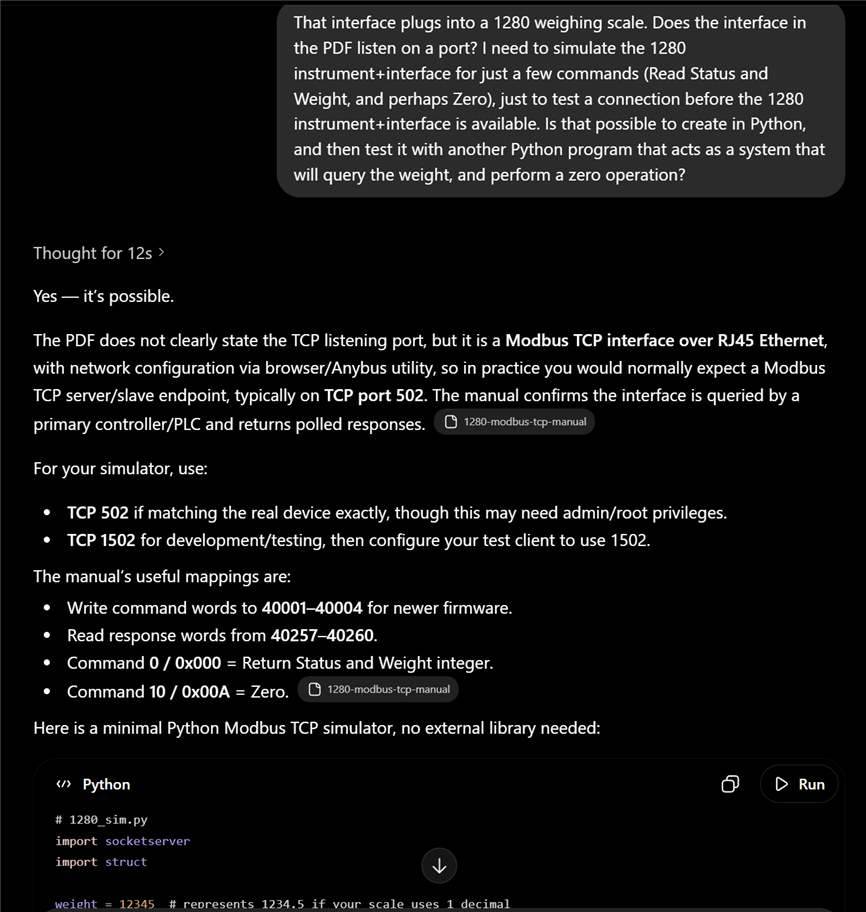
    I cannot take the credit, AI wrote that code, I merely pointed it at the 1280 user manual, and it spit out Python code, I merely ran it and told it of any errors, so it could correct it. The screenshot below shows what I asked it originally. It's not perfect as you noticed, since it could have provided more helpful output or automatically abort a test rather than hang.

    Regarding the TCP connection etc., I'm very familiar with that part only because I ended up developing some products that heavily relied on network features/functions, I believe I would struggle with a lot of it if I had to learn it on my own.

    image

    • Cancel
    • Vote Up 0 Vote Down
    • Sign in to reply
    • Cancel
  • colporteur
    colporteur 1 month ago in reply to shabaz

    I'm humbled by your knowledge and thankful that you are willing to share.

    Many eons ago, when my skins had less wrinkles, I recall training with a senior aviation electronics technician in a course. He took the the time to share his experience. The stuff I learned in that short interaction I have never forgot. 

    I can't comprehend how you extracted the information from the manual that enabled you to write code and decode the output for the modbus tcp interface. I'm envious.

    I recall listening to a lecturer speaking Russian. I figured if I listened hard enough I would understand Russian. Never understood a word! I have combed the manual and reviewed your code thinking if I try hard enough I will gain the knowledge. It is not working.

    If I was forty years younger, I would invest the time. I accomplished the goal. Just have the test the firewall rules set and be done. Thanks again.

    I tried you trick of connecting to an IP that didn't support modbus tcp and noted the error. I suspected your code was working. Great work on a first attempt.

    • Cancel
    • Vote Up +1 Vote Down
    • Sign in to reply
    • Cancel
  • shabaz
    shabaz 2 months ago in reply to colporteur

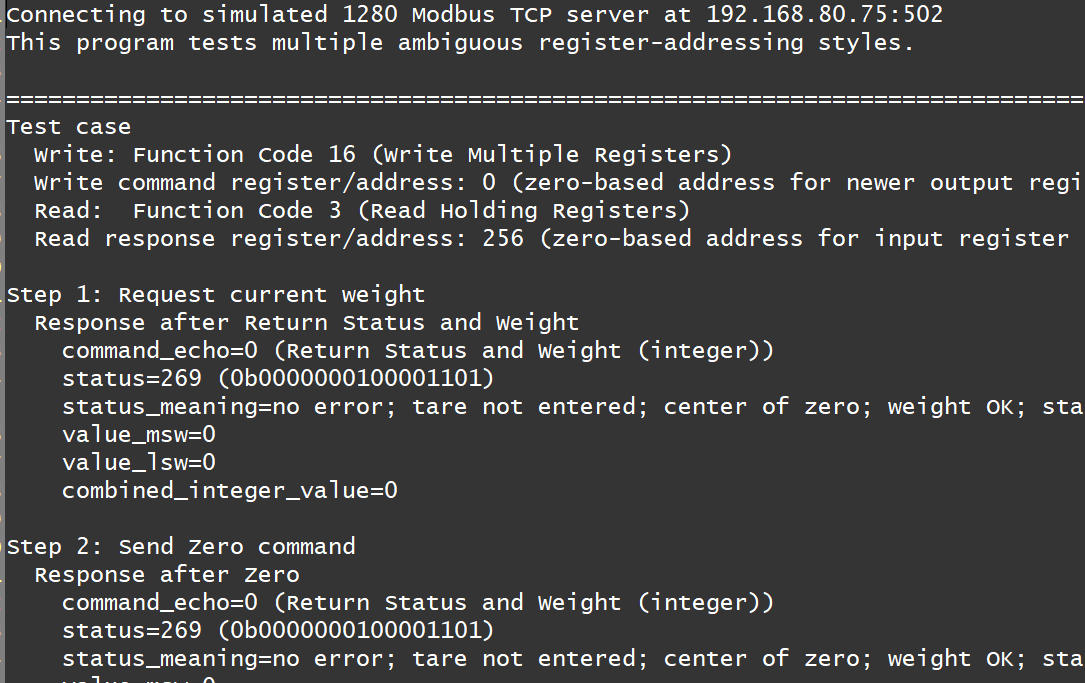
    Here is how the 1280 did in fact respond during the first test case:

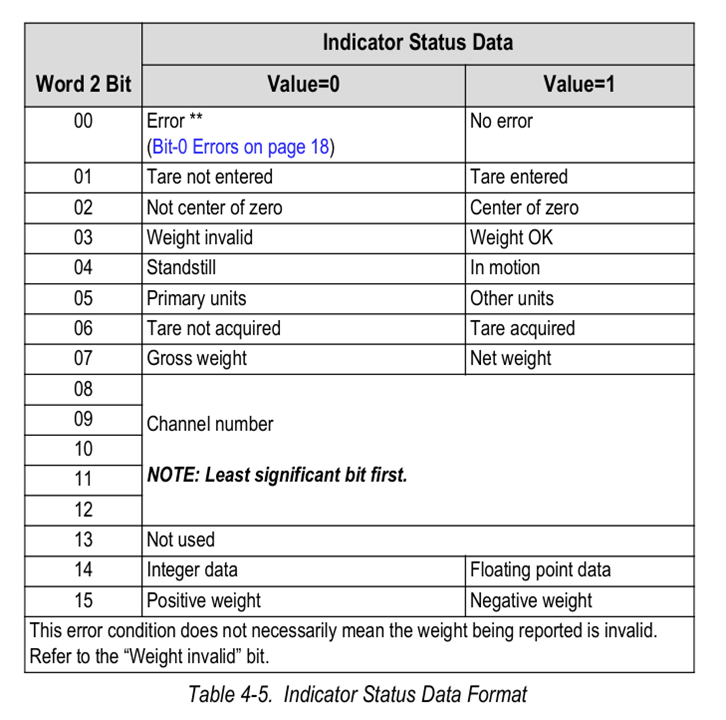
    Your log file indicates the 1280 returned a status code 269 which in hex would be 0x010d or 0000 0001 0000 1101 in binary.

    According to the user guide, that means:

    No error,
    tare not entered, 
    center of zero,
    weight OK,
    standstill, primary units, tare not acquired, gross weight,
    first channel (I don't know if that means channel 0 or channel 1).

    Anyway, perhaps this is now too much detail, since it's already clear the TCP connection to the 1280 did successfully, and that's all you requested. However, the test case shows that the actual Modbus TCP protocol layer is successfully being received and sent by the 1280 (from experience/being burnt with various protocols, I wanted the simulation to include Modbus TCP; there are plenty of situations where a TCP connect alone is simply insufficient to be sure that the next layer will pass).

    image

    • Cancel
    • Vote Up 0 Vote Down
    • Sign in to reply
    • Cancel
  • shabaz
    shabaz 2 months ago in reply to colporteur

    Hi Sean,

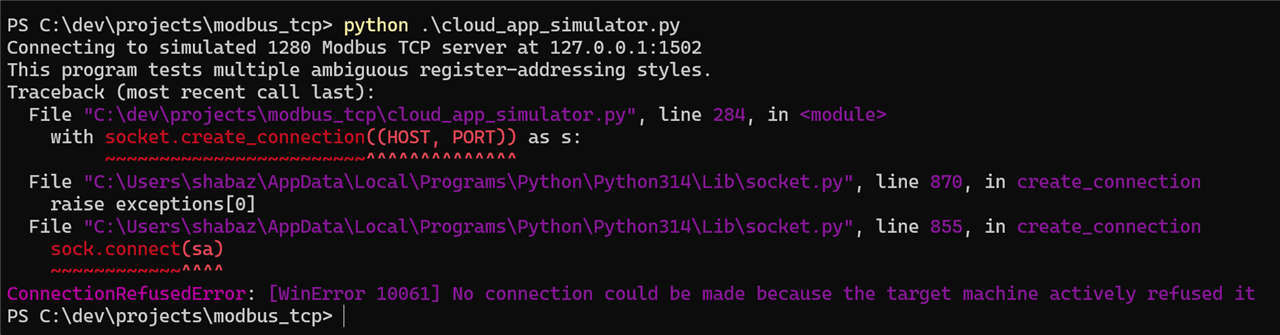
    Your output is successful. Here is what you'd see if there was no TCP connection at all:

    image

    And this is what would be seen if the TCP connect occurred, but there was no response data from the 1280 end; it would just hang on Step 1 of the first test case (which has three steps):

    image

    However in your client_output file, I see this, so it got past step 1 (and 2 and 3) and all of the first test case was successful.

    image

    Your log file stops on the second test case step 1. I'm guessing you've got the real 1280 device attached, and it simply doesn't like the second test case (which is fine, since the test cases were written based on the ambiguous user guide, so the second test case happens to attempt a register that the real 1280 doesn't like. The log file shows that second test case was using a read register # 40257, that's the only difference from the first test case. So, since it's now confirmed your real 1280 doesn't use 40257, that could be deleted from the list inside the cloud_app_simulator.py file if you wished. But it's already confirmed that the 1280 end did respond with TCP data during the first test case.

    • Cancel
    • Vote Up +2 Vote Down
    • Sign in to reply
    • Cancel
element14 Community

element14 is the first online community specifically for engineers. Connect with your peers and get expert answers to your questions.

  • Members
  • Learn
  • Technologies
  • Challenges & Projects
  • Products
  • Store
  • About Us
  • Feedback & Support
  • FAQs
  • Terms of Use
  • Privacy Policy
  • Legal and Copyright Notices
  • Sitemap
  • Cookies

An Avnet Company © 2026 Premier Farnell Limited. All Rights Reserved.

Premier Farnell Ltd, registered in England and Wales (no 00876412), registered office: Farnell House, Forge Lane, Leeds LS12 2NE.

Follow element14

  • X
  • Facebook
  • linkedin
  • YouTube