


INTRODUCTION
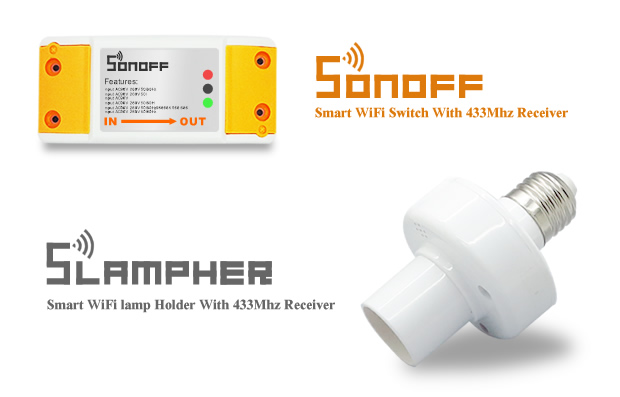
Itead Studio has launched a indiegogo campaign to help bring one of their new products to market. Itead Studio has been working on a WiFi enabled switch for easy home automation. They have specifically been working on two products, one that fits into a light fixture (Slampher) and one that is spliced into any cable (Sonoff). The catch behind these two products is their incredible low price (~$7 per unit) and their easy of use.
HOW I ARRIVED AT THIS POINT
I was contacted through one of my reviews on Element14 by Itead Studio concerning a new product they are looking to launch. I was asked if I was interested in reviewing a WiFi switch of theirs and to give them some feedback. As I have played around with passing data over WiFi (see my Plot.ly project) I was intrested how this may work to control something in a smart home, so I promptly responded YES! After a shipping delay the package of one Sonoff, one slampher and a 433 MHz remote were on my way.
It took a short altercation with DHL and some kind help from customs to have my package firmly in my grasp.
INITIAL SETUP (NO INSTRUCTIONS)
Having arrived on a Thursday I decided to wait for the weekend to try everything out as I figured it may take some time to look into everything that interested me about this product. When I did start to play with the units I decided to start without looking at any instructions, if I can get most. if not all the way through using a product then I’m willing to keep going with it. I started by downloading the app from the Google Play store and tried from there to get something started. In all to get the slampher working took 5 minutes without instructions, for some unknown reason the Sonoff took a bit longer but eventually it worked as well. The next step was to get the 433 MHz remote working. With some fiddling around the Lamphor connected to button A on the remote but there was no way I was getting the Sonoff to connect to button B. After trying various more things and figuring the unit was a bust I decided to read the instructions… It didn’t take more than 30 seconds after doing that to connect the Sonoff to the remote's button B.
SETUP WITH INSTRUCTIONS (THE CORRECT WAY)
The correct procedure, this time following the instructions would be:
If you would like to simply turn on/off your device without using the remote or app then you can quickly press the “set” button on slampher/sonoff once to do so.
Pair with 433Mhz RF remote controller without WiFi .
Press the “set” button on Sonoff and Slampher twice quickly and the red LED on Sonoff/Slampher will flash one time.
Now press button “A”, ”B”, ”C” or ”D” on the controller to pair with the remote. If you pair it with “A”, then pressing “A” will turn on/off your device.
If you would like to remove the pairing, press the"set" button on Sonoff/Slampher quickly 3 times.
APP Operation
1. Download and install the app on your smartphone
2. Register a new account, you’ll need to enter your phone No. and password (at least 8 letters, must contain number, lowercase and uppercase letters). A code will be sent to your phone via SMS, enter the verification code to register.
3. Login with your account.
4. Add devices.
4A. Before adding a device, you must turn on the WiFi on your phone, then press and hold the “set” button until the green LED indicator blinks quickly.
4B. In the app click “+” to add devices followed by “Start searching”, it will auto-search and connect the “ITEAD10000xxx” WiFi around you.
4C. Then select your WiFi account and enter password, click remember so that next time you don’t need to fill in again.
4D. Click “next” to name your device, then “next” you will add the device successfully.
Note: If you see the new added device is offline, please wait for a moment. If it keeps offline, please power off the device, then power it up, if everything is ok, it will become online.
5. Delete devices
If you would like to remove a device, you need to go to the devices list, then slide the device name from right to left. You will see the delete icon, just press it to delete your device.
7.Manage Group
Click the top right corner button on device list interface. You’ll see”Manage Group””Exit Account””Exit e-Welink”. Click “Manage Group” to add or delete group. After adding group, you can long press to select the device and move it under your group. If you delete a group, the devices belong to this group will still exist.
8.Share devices
Enter the device you want to share, click icon “share” then enter the Phone number you want to share with, this phone No. should register and login first and remain online. That number will then receive an invitation message, by accepting the invitation, that user will have the authority to control the device you share. Only the owner of the devices has right to share devices.
e-WeLink APP
The app packs a lot of functionality even if it may be in its initial stages of release. The first feature that is very much appreciated and may be taken for granted is the status update. Whenever the status of the device is changed, the app will reflect this change. That is, if a shared user changes the status or someone uses the remote or if someone presses the button on the device directly, any of these changes will be reflected in the app. This quickly and easily allows a user to know the status and change it and verify that change if needed.
Another nice feature is the timer feature, considering a basic timer will run you ~$20 this is one big deal. There are a number of timers that can be set (the exact number is untested at this point). But not only can a timer be set once or repeatedly but, there is a countdown timer as well. This is a nice feature for someone leaving their house or getting ready for bed. The timer could be set to turn off the light after a specified amount of time without the need to remember to do so once you have left the house or gone to bed.
As this is an app on a smartphone it would not be complete if it was not possible to share control with another user. This too has been included and is easily done. Once shared the other user can easily turn on and off the device and use it the same as the main user. For this feature it would be nice if in a future release of the app if the level of control could be chosen so that a secondary user could not remove timers or maybe could only turn on/off a device but not the other way around.
Itead has definitely thought of this as a large scale project in that they are hoping that you will deploy this across many locations, to make this easier they have introduced groups A group allows a user to put all devices, say in their home, in one group so that finding the standing lamp in your dining room will be relatively easy without needing to go through all the devices at the cottage, office, etc.
Overall the app is intuitive and very easy to use. Itead has kept the user interface simple and clean allowing for a great user experience, and with fast update times on a device's status change the app keeps you always informed as to what your devices are doing.
Power Consumption
One of the things that concerns me about using a device that is always plugged in is the ongoing power consumption. The idea here is partly to reduce power consumption and potentially save money. I was therefore wondering what the power consumption of the Sonoff was. It should be noted that currently there is nothing to compare this value to but hopefully in the near future this will be added.
As can be seen in the graphs below the power consumption appears to be sitting below 1 Watt for half of the duration and above 1 watt for the remainder. It should be noted that the blips that exceed these values are when the unit was on and powering a fluorescent lamp.
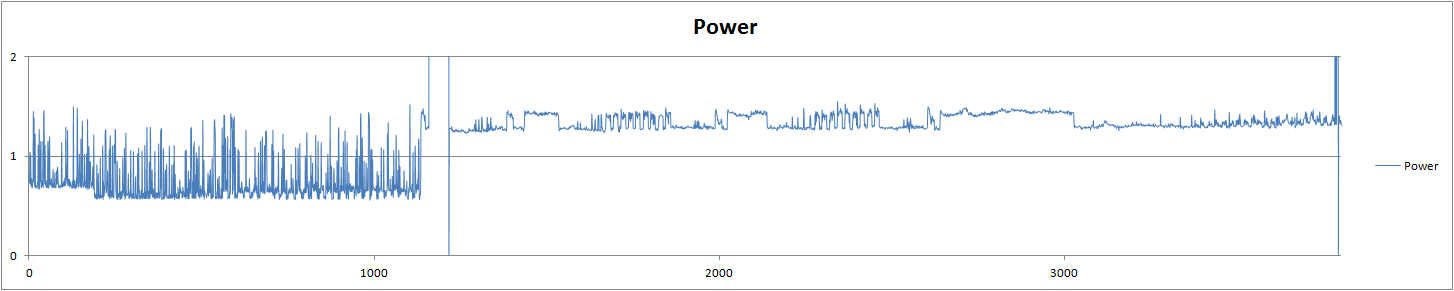
Figure 1. Power consumption measured in watts
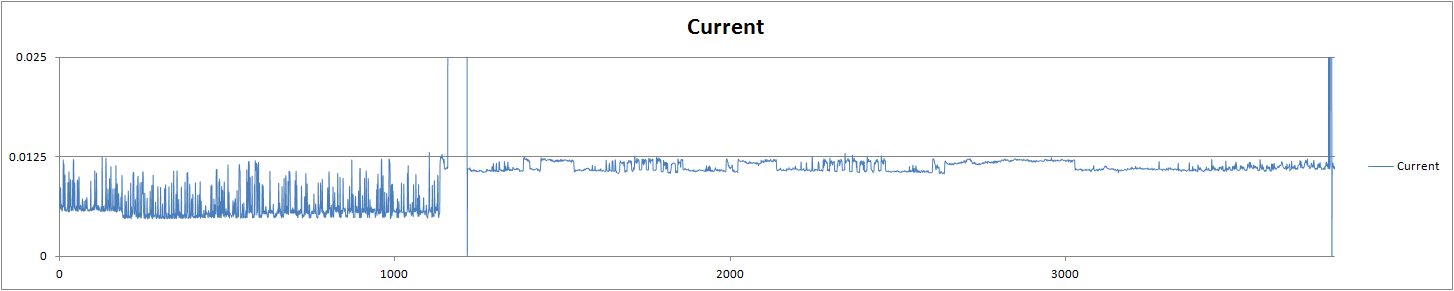
Figure 2. Current measured in amperes
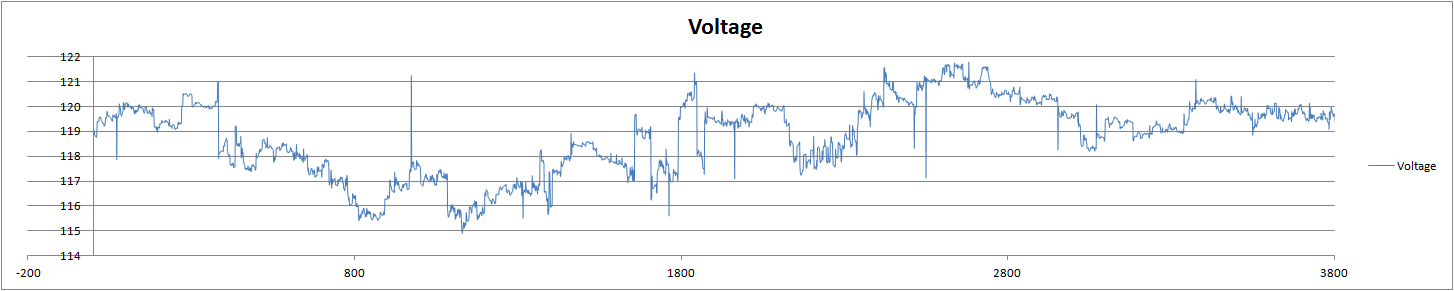
Figure 3. Voltage measured in volts
The issue here is the overall cost of having a unit connected all the time if there was away for Itead to reduce the overall power consumption this would make for an even better product.
That being said there are two HUGE factors to take into account regarding my measurements. The first is I was using two multimeters logging at one second intervals to a laptop over bluetooth and this may not provide the best results. If the unit only wakes up every 200 ms and is on for 20 ms to listen for WiFi or 433 MHz signals the power savings would be tremendous but the multimeters would not see that and report a higher than real power consumption. The second issue is the lack of comparable data, without anything to compare my measurements too only a small fraction of the data is being shown. For this to be useful I would need to take measurements on other time switches as well as other comparable devices, such as those from Belkin. In a later post I will try look at a time switch to be able to at least give another data point.
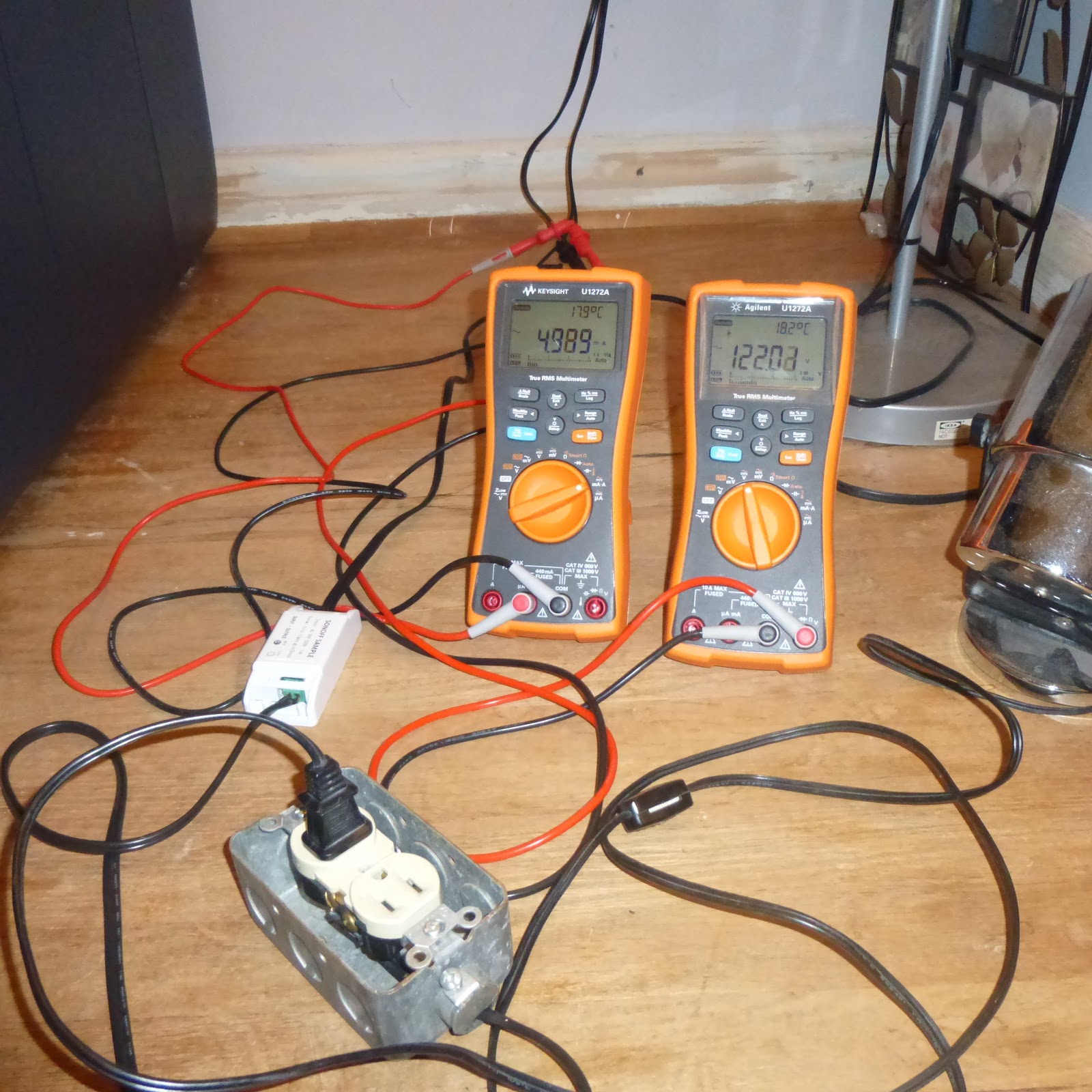
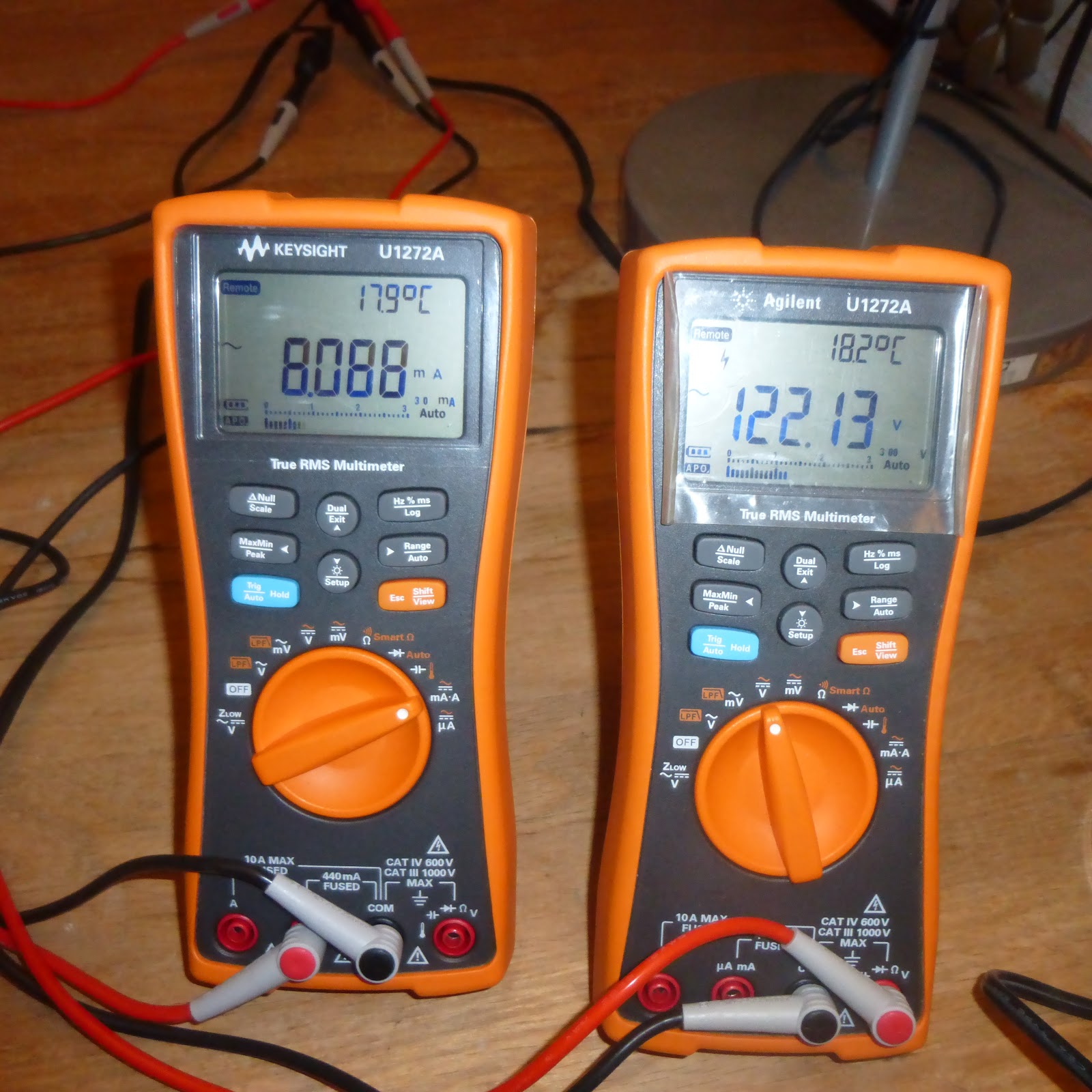
Figure 4. Setup used to measure voltage and current to arrive at power consumption
I am hoping to look more into the power consumption as well as some of the irregularities that can be seen in the first half of the graphs in a later blog entry. I would also like to look into what the power consumption is of both the sonoff and the slampher in relation to other timing/standby products to get a better understanding of how the efficiency of these products compares to other such products.
CONCERNS
After working with this product for a few days I have tried a few different things and feel I have enough basic experience to give my feedback both positive and some less so. Starting with the less so, I would say the app needs some work. Currently the network password for your home network is stored in plain text and is always available I have been assured that this will be fixed in a later release of the app and is a “known issue”. It would also be nice if I did not have to go into each individual light to see its state but rather if the entry page could display that information directly.
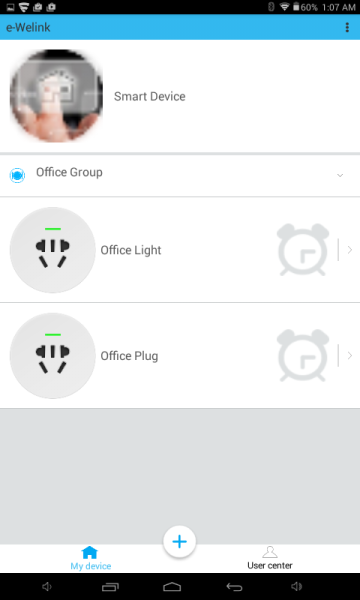
Figure 5. Itead app home page
The next concern I have is the longevity of the unit. Since all the units only work through Itead’s servers, should this fail for some reason all the units would no longer be useable unless someone else decided to take that on or if Itead would make all their code publicly available. Currently I do not see this as an immediate issue as Itead appears to be taking this product very seriously
Lastly is the issue of form factor, both the slampher and sonoff could be more discreet. The slampher adds a decent amount of length to the average light bulb preventing this from being used in a closed light fixture or any fixture that may have a length limit. As for the sonoff the form factor is pretty good, but one person noted if it could be smaller it could be inserted in light or socket fixtures. Maybe the real solution to that is for Itead to increase their product range by offering a light switch or conventional plug. Overall I did not have any issue with the sonoff other than a possible missing connection point for a ground wire connection when using a three prong plug.
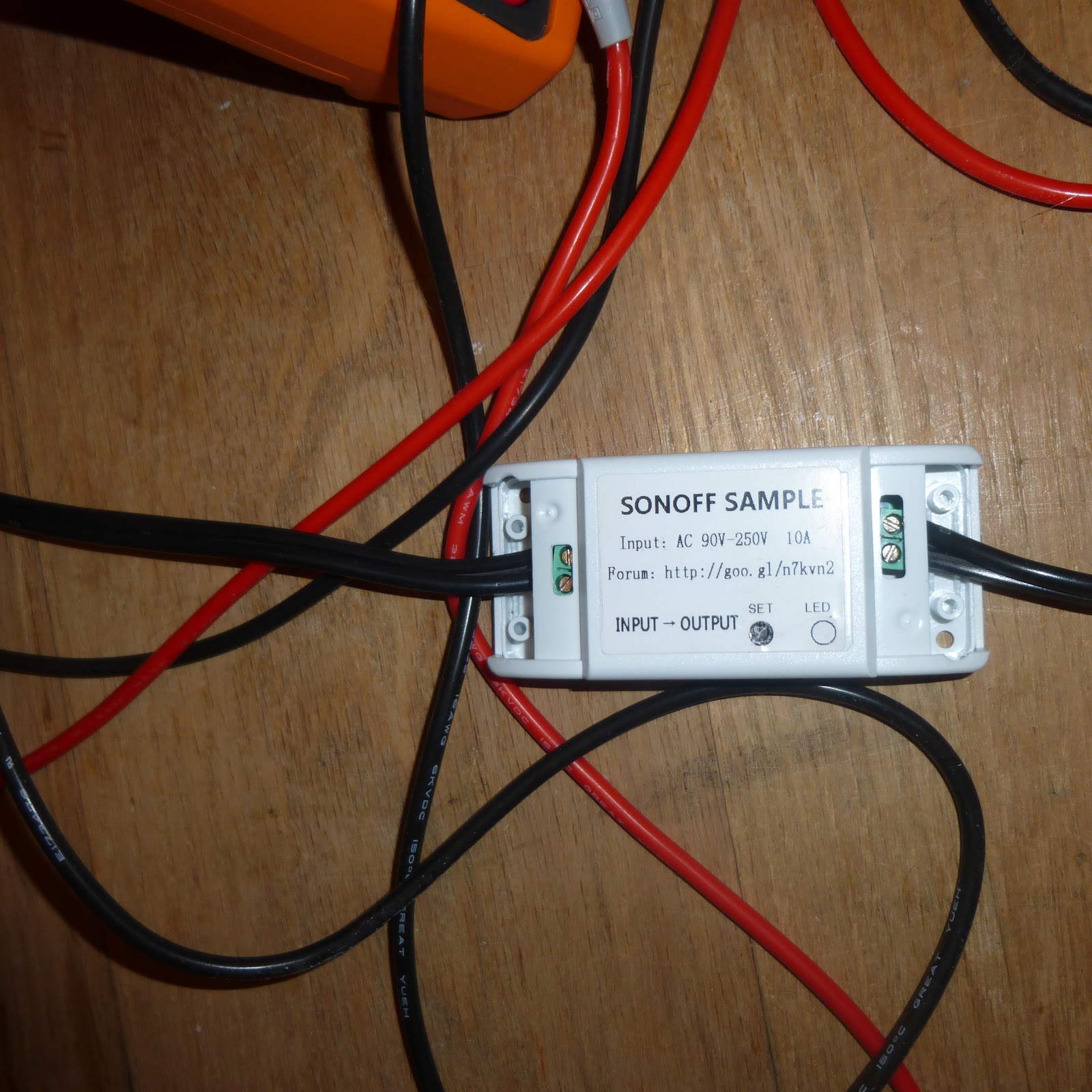
Figure 6. Sonoff with two connection points
POSITIVES
For Itead’s offerings the positives outweigh the cons. Firstly it should be noted that the price point per unit for Itead’s system is significantly less than that offered by the competitors, at ~$7 per unit or ~$22 for 4 units the cost is very low.
The next positive is ease of use, the simplicity in the units setup and control make it easily usable by anyone on any level of technical knowledge. The clean interface in the app allows for easy and quick control of any device be it in your home network or in another location network. The overall system also adds a decent amount of convenience as well as security with the ability to remotely turn on lights and well as check their status remotely. This would be great for someone coming home late and would like to have their home illuminated before entering either for comfort or security. This system would also allow for light to be turned on should motion be detected somewhere or a noise heard without the need to go to that location.
I also found the design of both units, while maybe cumbersome in form, easy to you. The slampher simply fits into an existing light fixture and then a bulb is inserted into it. While the sonoff has two connection points and is agnostic as to how the wires are connected. This allows for anyone to connect a device by splicing the wires with only the need to ensure they keep each wire going in connected to itself at the exit. While I have not checked that both wire are disconnected when the sonoff is turned off, I would imagine that this would be so to ensure the end device (lamp, fan , etc.) is not live with only the ground wire disconnected.
These devices potentially also have the ability to reduce power costs as the devices can be turned off remotely. This means if a light/device was left on or may have been left on the app can be checked and if indeed the light/device was indeed left on it can be turned off remotely thus saving power and money.
MOVING FORWARD
I have chosen to further support Itead’s campaign buy buying 4 Slamphers for use around the home. I have done so for a few reasons. Firstly the level of support I have received shows that there is active development and knowledgeable people behind this development. Secondly, I have samples in hand this shows that they have something that works that is ready for feedback and lastly Itead is a functioning and thriving online store. This would imply they have both the knowledge and ability to bring this product to fruition. While there may be some concerns, overall I believe it is relatively small payout for a potentially amazing and growing product.
Indiegogo Campaign
https://www.indiegogo.com/projects/sonoff-slampher-low-cost-smart-home-solution/#/
Blog on standby Power
http://goughlui.com/2015/12/23/standbyno-load-power-consumption-are-we-doing-it-right/
Other Blogs On Itead Slampher & Sonoff Reviews (in no specific order)
http://matthewcmcmillan.blogspot.ca/2015/12/product-review-itead-studio-wifi.html?showCom
http://blog.brianmoses.net/2015/12/sonoff-and-slampher-home-automation-review.html
http://misc.ws/2015/12/11/itead-studios-smart-home-switches/
http://electronicopensource.blogspot.ca/2015/11/itead-sonoff-wifi-wireless-switch.html
http://nfriedly.com/techblog/2015-12-16-itead-sonoff-slampher-review/
https://giovanniorgantini.wordpress.com/2015/12/22/home-automation/
Top Comments
-

mcb1
-
Cancel
-
Vote Up
0
Vote Down
-
-
Sign in to reply
-
More
-
Cancel
-

e14 Contributor
in reply to mcb1
-
Cancel
-
Vote Up
0
Vote Down
-
-
Sign in to reply
-
More
-
Cancel
-

mcb1
in reply to Robert Peter Oakes
-
Cancel
-
Vote Up
+1
Vote Down
-
-
Sign in to reply
-
More
-
Cancel
-

Robert Peter Oakes
in reply to mcb1
-
Cancel
-
Vote Up
+1
Vote Down
-
-
Sign in to reply
-
More
-
Cancel
-

kas.lewis
in reply to e14 Contributor
-
Cancel
-
Vote Up
0
Vote Down
-
-
Sign in to reply
-
More
-
Cancel
-

e14 Contributor
in reply to kas.lewis
-
Cancel
-
Vote Up
0
Vote Down
-
-
Sign in to reply
-
More
-
Cancel
-

kas.lewis
in reply to e14 Contributor
-
Cancel
-
Vote Up
+2
Vote Down
-
-
Sign in to reply
-
More
-
Cancel
Comment-

kas.lewis
in reply to e14 Contributor
-
Cancel
-
Vote Up
+2
Vote Down
-
-
Sign in to reply
-
More
-
Cancel
Children