element14 Community
element14 Community
    Register Log In
  • Site
  • Search
  • Log In Register
  • Community Hub
    Community Hub
    • What's New on element14
    • Feedback and Support
    • Benefits of Membership
    • Personal Blogs
    • Members Area
    • Achievement Levels
  • Learn
    Learn
    • Ask an Expert
    • eBooks
    • element14 presents
    • Learning Center
    • Tech Spotlight
    • STEM Academy
    • Webinars, Training and Events
    • Learning Groups
  • Technologies
    Technologies
    • 3D Printing
    • FPGA
    • Industrial Automation
    • Internet of Things
    • Power & Energy
    • Sensors
    • Technology Groups
  • Challenges & Projects
    Challenges & Projects
    • Design Challenges
    • element14 presents Projects
    • Project14
    • Arduino Projects
    • Raspberry Pi Projects
    • Project Groups
  • Products
    Products
    • Arduino
    • Avnet & Tria Boards Community
    • Dev Tools
    • Manufacturers
    • Multicomp Pro
    • Product Groups
    • Raspberry Pi
    • RoadTests & Reviews
  • About Us
  • Store
    Store
    • Visit Your Store
    • Choose another store...
      • Europe
      •  Austria (German)
      •  Belgium (Dutch, French)
      •  Bulgaria (Bulgarian)
      •  Czech Republic (Czech)
      •  Denmark (Danish)
      •  Estonia (Estonian)
      •  Finland (Finnish)
      •  France (French)
      •  Germany (German)
      •  Hungary (Hungarian)
      •  Ireland
      •  Israel
      •  Italy (Italian)
      •  Latvia (Latvian)
      •  
      •  Lithuania (Lithuanian)
      •  Netherlands (Dutch)
      •  Norway (Norwegian)
      •  Poland (Polish)
      •  Portugal (Portuguese)
      •  Romania (Romanian)
      •  Russia (Russian)
      •  Slovakia (Slovak)
      •  Slovenia (Slovenian)
      •  Spain (Spanish)
      •  Sweden (Swedish)
      •  Switzerland(German, French)
      •  Turkey (Turkish)
      •  United Kingdom
      • Asia Pacific
      •  Australia
      •  China
      •  Hong Kong
      •  India
      • Japan
      •  Korea (Korean)
      •  Malaysia
      •  New Zealand
      •  Philippines
      •  Singapore
      •  Taiwan
      •  Thailand (Thai)
      • Vietnam
      • Americas
      •  Brazil (Portuguese)
      •  Canada
      •  Mexico (Spanish)
      •  United States
      Can't find the country/region you're looking for? Visit our export site or find a local distributor.
  • Translate
  • Profile
  • Settings
Internet of Things
  • Technologies
  • More
Internet of Things
Blog Using the ESP8266 the easy way
  • Blog
  • Forum
  • Documents
  • Quiz
  • Events
  • Polls
  • Members
  • Mentions
  • Sub-Groups
  • Tags
  • More
  • Cancel
  • New
Join Internet of Things to participate - click to join for free!
  • Share
  • More
  • Cancel
Group Actions
  • Group RSS
  • More
  • Cancel
Engagement
  • Author Author: Former Member
  • Date Created: 27 Oct 2014 5:45 PM Date Created
  • Views 4193 views
  • Likes 3 likes
  • Comments 28 comments
  • esp8266
  • bypic
  • microcontroller
  • iot
  • arduino
Related
Recommended

Using the ESP8266 the easy way

Former Member
Former Member
27 Oct 2014

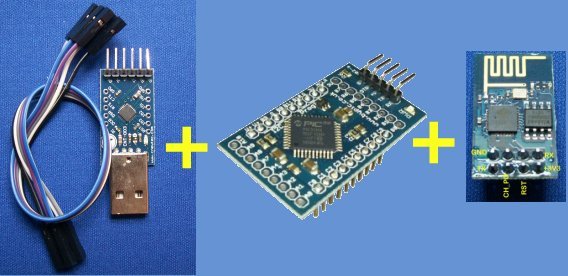
As far as I am concerned the ESP8266 is a bit of a game changer for the internet an microcontrollers and so I have put it together with the ByPic (the what?). Okay I will start again. ByPic is an interactive language that works through a serial interface using a simple USB to serial converter: So:
image

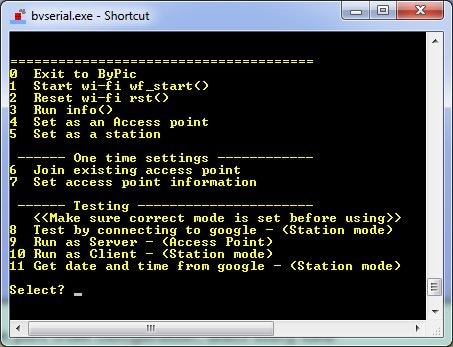
Will give:

image

Really, this is the output from the Mini-Max, pressing 11 will use the HTTP protocol to get the head sent by google that contains the current date and time. What is shown as the main menu is an interface to the underlying library. To use the library direct then press 0 to get out of the main menu and yo gen an OK prompt.

This is an example of a session:

wf_start()    result = Nothing, this will initialise the hardware

mode(1)  result = 10

join("yourssid","yourpassword") result = 1 if okay. This is the SSID and password to the network you oen, i.e your home or work network. 

info()  result = a list of information, if there are errors then try rst(), you must have an IP address at this point if not it means that it can't connect with the given network so is the SSID and password correct?

get("www.google.com","/",80)  result = 1 if okay or time out if the page was too big to fit into the serial buffer. If it says there is no connection with the site then check the spelling of google and also make sure there is an IP address using info.

see1()  will show the received data which will be the 'head' data from the google server.


Of course that is just one way of using this wonderful device. If you have less then £20 to spare you could get an evaluation kit which will do all of the above. If you just want to see how it works in detail the tutorial is here. And the library for the ESP8266 is here. The software contains a HTTP client and also a HTTP server.

I hope you find it interesting.

  • Sign in to reply

Top Comments

  • Robert Peter Oakes
    Robert Peter Oakes over 11 years ago in reply to Problemchild +1
    The ESP8266 has its own AT command set already, a buddy of mine has it up and running with Arduinos in his home control system, see here for details: https://scargill.wordpress.com/2014/10/05/esp8266-working…
  • Problemchild
    Problemchild over 11 years ago in reply to shabaz +1
    Yeah, I think this was the point of using the Bypic system. The ESP device is a little awkward and the other CPU provides a good way of demarcating the application and the communications side of the application…
  • scargill
    scargill over 11 years ago in reply to shabaz +1
    Parsing the AT commands is a doddle in C on the Arduinos - I suggest it better that they get a little more stable before anyone puts TOO much work into it - and of course any such library would be easy…
Parents
  • Problemchild
    Problemchild over 11 years ago

    This is Great Jim do you have many example projects based on this gear?

    Also what are the At commands you used ?

    • Cancel
    • Vote Up 0 Vote Down
    • Sign in to reply
    • More
    • Cancel
Comment
  • Problemchild
    Problemchild over 11 years ago

    This is Great Jim do you have many example projects based on this gear?

    Also what are the At commands you used ?

    • Cancel
    • Vote Up 0 Vote Down
    • Sign in to reply
    • More
    • Cancel
Children
  • Problemchild
    Problemchild over 11 years ago in reply to Problemchild

    Is the MiniMax a good choice for IOT?  I see that is has it's own programming language  is there a development environment and examples for the Language?

    • Cancel
    • Vote Up 0 Vote Down
    • Sign in to reply
    • More
    • Cancel
  • Robert Peter Oakes
    Robert Peter Oakes over 11 years ago in reply to Problemchild

    The ESP8266 has its own AT command set already, a buddy of mine has it up and running with Arduinos in his home control system, see here for details:


    https://scargill.wordpress.com/2014/10/05/esp8266-working/

    and

    ESP8266 Woes… a Ray of Light | My Tech Weblog


    enjoy

    • Cancel
    • Vote Up +1 Vote Down
    • Sign in to reply
    • More
    • Cancel
  • Problemchild
    Problemchild over 11 years ago in reply to Problemchild

    A tutorial on the Chip's most useful At commands would be useful!

    • Cancel
    • Vote Up 0 Vote Down
    • Sign in to reply
    • More
    • Cancel
  • Former Member
    Former Member over 11 years ago in reply to Robert Peter Oakes

    Sorry my fault, I should have made it clear this is NOT an Arduino. The Adruino is a FIXED system whereas ByPic is an INTERACTIVE system, you can type the name of the function you have created and it will run it. So for example in the library there is a function called info(). Typing this function calls several AT commands and formats the output so in one go it lets you see the firmware version, the mode the ESP8266 is in, the SSID, IP address and Timeout, plus some other information.

    Typing the AT commands by themselves is very laborious, so the idea is to write a simple function for the job, the library contains the most common uses. See the example for the get() function, this uses several AT commands but more importantly sends the text in the correct HTTP format so that an external server will respond. The response will be in the UART buffer, to see it again just type see().

    I was able to construct a basic HTTP web server just using a few simple functions which I can contact using a web browser (example here) -- and use the web browser to turn on and off an LED, This is all done using the ByPic Mini-Max. Using a FIXED system where you need to write, compile, download and see results would have taken MUCH longer and be far less flexible.


    Out with the old in with the new, INTERACTIVE is the way to go:

    ByPic the end of Write Compile Download and See?

    • Cancel
    • Vote Up 0 Vote Down
    • Sign in to reply
    • More
    • Cancel
  • Problemchild
    Problemchild over 11 years ago in reply to Former Member

    Jim I think we could all do with a tutorial on this Bypic thing ...are you up for doing one ?

    • Cancel
    • Vote Up 0 Vote Down
    • Sign in to reply
    • More
    • Cancel
element14 Community

element14 is the first online community specifically for engineers. Connect with your peers and get expert answers to your questions.

  • Members
  • Learn
  • Technologies
  • Challenges & Projects
  • Products
  • Store
  • About Us
  • Feedback & Support
  • FAQs
  • Terms of Use
  • Privacy Policy
  • Legal and Copyright Notices
  • Sitemap
  • Cookies

An Avnet Company © 2025 Premier Farnell Limited. All Rights Reserved.

Premier Farnell Ltd, registered in England and Wales (no 00876412), registered office: Farnell House, Forge Lane, Leeds LS12 2NE.

ICP 备案号 10220084.

Follow element14

  • X
  • Facebook
  • linkedin
  • YouTube