


The WizFi250 EVB is the evaluation board for testing WizFi250 and prototyping development. WizFi250 EVB is composed of a WizFi250 evaluation board and a WizFi250 module.
Feature Identification
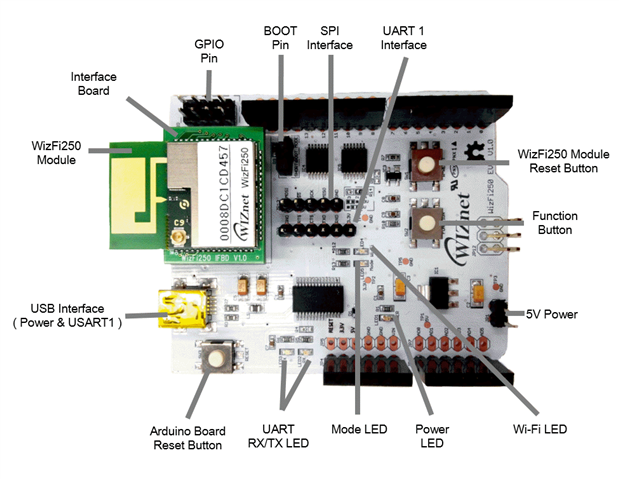
Button Description
| WizFi250 Reset | Through this button, user can restart WizFi250 module. |
| Function | Through the function button, user can enter specific mode without AT Command.  Factory Recovery : When doing Boot or Reset, press the button over 3.5 seconds AP Mode : When module is working, press it once. OTA Mode : When module is working, press it twice. Factory Default : When module is working, press it three times. Factory Recovery : When doing Boot or Reset, press the button over 3.5 seconds AP Mode : When module is working, press it once. OTA Mode : When module is working, press it twice. Factory Default : When module is working, press it three times. |
| Arduino Board Reset | With this button, user can restart Arduino board. |
LED Description
| UART RX/TX | Indicate UART RX/TX Status |
| Power LED | Indicate Power On/Off of WizFi250 |
| Mode LED | Indicate Data/Command Mode LOW(ON) : Data Mode HIGH(OFF) : Command Mode |
| Wi-Fi LED | Indicate Wi-Fi Association LOW(ON) : Wi-Fi is associated HIGH(OFF) : Wi-Fi is not associated |
Pin Description
| BOOT | Enter boot mode SHORT : Start in boot mode OPEN : Start in application mode |
| 5V Power | Alternative choice for 5V power supply |
| GPIO Pin | Through this pin, user can use GPIO signal |
Interface Description
| UART1 Interface | Alternative choice for Serial interface. |
| SPI Interface | Through these pins, user can control SPI interface. |
| USB Interface | This provides power supply & Serial interface Default serial information: Baud rate : 115200 Data rate : 8 Stop bits : 1 Parity : None Flow control : None |
Interface Board Dimension
for more infomration