element14 Community
element14 Community
    Register Log In
  • Site
  • Search
  • Log In Register
  • Community Hub
    Community Hub
    • What's New on element14
    • Feedback and Support
    • Benefits of Membership
    • Personal Blogs
    • Members Area
    • Achievement Levels
  • Learn
    Learn
    • Ask an Expert
    • eBooks
    • element14 presents
    • Learning Center
    • Tech Spotlight
    • STEM Academy
    • Webinars, Training and Events
    • Learning Groups
  • Technologies
    Technologies
    • 3D Printing
    • FPGA
    • Industrial Automation
    • Internet of Things
    • Power & Energy
    • Sensors
    • Technology Groups
  • Challenges & Projects
    Challenges & Projects
    • Design Challenges
    • element14 presents Projects
    • Project14
    • Arduino Projects
    • Raspberry Pi Projects
    • Project Groups
  • Products
    Products
    • Arduino
    • Avnet & Tria Boards Community
    • Dev Tools
    • Manufacturers
    • Multicomp Pro
    • Product Groups
    • Raspberry Pi
    • RoadTests & Reviews
  • About Us
  • Store
    Store
    • Visit Your Store
    • Choose another store...
      • Europe
      •  Austria (German)
      •  Belgium (Dutch, French)
      •  Bulgaria (Bulgarian)
      •  Czech Republic (Czech)
      •  Denmark (Danish)
      •  Estonia (Estonian)
      •  Finland (Finnish)
      •  France (French)
      •  Germany (German)
      •  Hungary (Hungarian)
      •  Ireland
      •  Israel
      •  Italy (Italian)
      •  Latvia (Latvian)
      •  
      •  Lithuania (Lithuanian)
      •  Netherlands (Dutch)
      •  Norway (Norwegian)
      •  Poland (Polish)
      •  Portugal (Portuguese)
      •  Romania (Romanian)
      •  Russia (Russian)
      •  Slovakia (Slovak)
      •  Slovenia (Slovenian)
      •  Spain (Spanish)
      •  Sweden (Swedish)
      •  Switzerland(German, French)
      •  Turkey (Turkish)
      •  United Kingdom
      • Asia Pacific
      •  Australia
      •  China
      •  Hong Kong
      •  India
      • Japan
      •  Korea (Korean)
      •  Malaysia
      •  New Zealand
      •  Philippines
      •  Singapore
      •  Taiwan
      •  Thailand (Thai)
      • Vietnam
      • Americas
      •  Brazil (Portuguese)
      •  Canada
      •  Mexico (Spanish)
      •  United States
      Can't find the country/region you're looking for? Visit our export site or find a local distributor.
  • Translate
  • Profile
  • Settings
Open Source Hardware
  • Technologies
  • More
Open Source Hardware
Blog Paws on with the BeagleBone
  • Blog
  • Forum
  • Documents
  • Events
  • Polls
  • Members
  • Mentions
  • Sub-Groups
  • Tags
  • More
  • Cancel
  • New
Join Open Source Hardware to participate - click to join for free!
  • Share
  • More
  • Cancel
Group Actions
  • Group RSS
  • More
  • Cancel
Engagement
  • Author Author: fustini
  • Date Created: 9 Mar 2013 12:30 AM Date Created
  • Views 1437 views
  • Likes 2 likes
  • Comments 7 comments
  • openhardware
  • oshw
  • angstrom
  • BeagleBone
  • arm
  • ti
  • linux
  • opensource
Related
Recommended

Paws on with the BeagleBone

fustini
fustini
9 Mar 2013

image

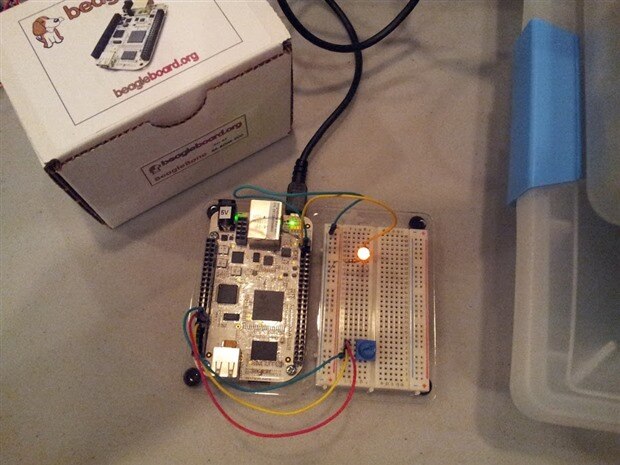
I recently started working the BeagleBoneBeagleBone, an Open Source Hardware Single Board Computer (SBC).  For those not familiar:

BeagleBone is a low-cost credit-card-sized Linux computer that connects with the Internet and runs software such as Android 4.0 and Ubuntu. With plenty of I/O and processing power for real-time analysis provided by the TI SitaraTm AM335x ARMRegistered CortexTm-A8 processor, BeagleBone can be complemented with cape plug-in boards which augment BeagleBone’s functionality.

source: BeagleBone Quick Start Guide


The BeagleBone 101 slideshow does a good job of introducing the BeagleBoard, the BeagleBone and BoneScript.  I've been impressed by how easy BoneScript makes it to control physical hardware with JavaScript.  I am going to walk through some basic BoneScript examples, but first I'll describe the experience of connecting the BeagleBone to my computer for the first time.


The Bone does come with a preloaded microSD card with Angstrom (the default Linux distro for the Bone).  However, I wanted to make sure I had the latest software, so I downloaded the latest Angstrom image and flashed it onto the microSD card.  The BeagleBone Quick Start Guide has more info on how to do that.


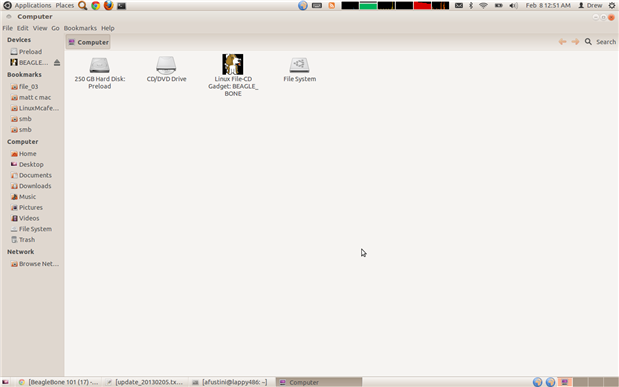
Next, I connected the BeagleBone to the USB port on my laptop (running Ubuntu Linux 12.04).  This provides power to the Bone which then boots up off the microSD card.  The BeagleBone initially shows up as a USB mass storage device:
image

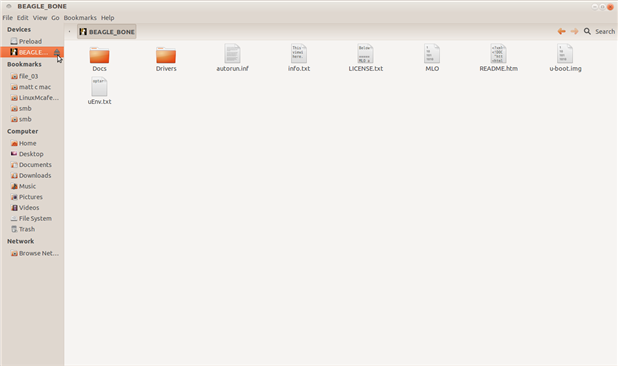
The contents include drivers for Windows users to continue with the next step.  Luckily, no additional drivers are needed for Linux:
image

Upon ejecting the BeagleBone USB mass storage device, the BeagleBone will then appear as Ethernet-over-USB interface:

afustini@lappy486:~$ ifconfig eth1

eth1      Link encap:Ethernet  HWaddr d4:94:a1:92:59:57 

          inet addr:192.168.7.1  Bcast:192.168.7.3  Mask:255.255.255.252

          inet6 addr: fe80::d694:a1ff:fe92:5957/64 Scope:Link

          UP BROADCAST RUNNING MULTICAST  MTU:1500  Metric:1

          RX packets:233 errors:0 dropped:0 overruns:0 frame:0

          TX packets:252 errors:0 dropped:0 overruns:0 carrier:0

          collisions:0 txqueuelen:1000

          RX bytes:35937 (35.9 KB)  TX bytes:66085 (66.0 KB)

The kernel messages on my laptop:

Feb  8 00:52:15 lappy486 kernel: [211558.726102] cdc_ether 2-1.2.2:1.0: eth1: register 'cdc_ether' at usb-0000:00:1d.0-1.2.2, CDC Ethernet Device, d4:94:a1:92:59:57

Feb  8 00:52:15 lappy486 kernel: [211558.760561] ADDRCONF(NETDEV_UP): eth1: link is not ready

Feb  8 00:52:15 lappy486 kernel: [211558.760784] ADDRCONF(NETDEV_UP): eth1: link is not ready

Feb  8 00:52:16 lappy486 kernel: [211558.786409] ADDRCONF(NETDEV_CHANGE): eth1: link becomes ready

Feb  8 00:52:16 lappy486 kernel: [211558.787311] martian source 192.168.7.1 from 192.168.7.2, on dev eth1

Feb  8 00:52:18 lappy486 kernel: [211560.786518] martian source 255.255.255.255 from 192.168.7.2, on dev eth1

Feb  8 00:52:18 lappy486 kernel: [211560.792507] martian source 255.255.255.255 from 192.168.7.2, on dev eth1

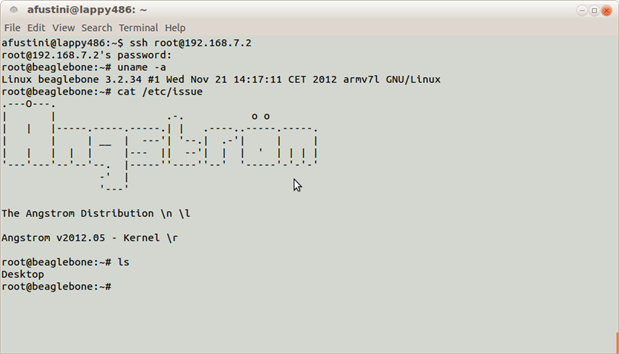
This allowed me to then ssh into the BeagleBone:

afustini@lappy486:~$ ssh root@192.168.7.2

root@192.168.7.2's password:

root@beaglebone:~# uname -a

Linux beaglebone 3.2.34 #1 Wed Nov 21 14:17:11 CET 2012 armv7l GNU/Linux

root@beaglebone:~# cat /etc/issue

.---O---.                                          

|       |                  .-.           o o       

|   |   |-----.-----.-----.| |   .----..-----.-----.

|       |     | __  |  ---'| '--.|  .-'|     |     |

|   |   |  |  |     |---  ||  --'|  |  |  '  | | | |

'---'---'--'--'--.  |-----''----''--'  '-----'-'-'-'

                -'  |

                '---'


The Angstrom Distribution \n \l


Angstrom v2012.05 - Kernel \r


root@beaglebone:~# ls

Desktop


Here's a screenshot:
image

The BeagleBone also presents it's self as a USB serial device, too.  A terminal emulator (I use gtkterm on Linux) can then connect to the BeagleBone's console.


In my next post, I'll show the slick built-in web-based IDE, Cloud9, and how Javascript can be used to control circuits connected to the BeagleBone using the BoneScript library.


Cheers,

Drew

  • Sign in to reply

Top Comments

  • jkridner
    jkridner over 12 years ago in reply to johnbeetem +2
    You can also start development without an operating system. See http://beagleboard.org/project for a lot of starting points. With BeagleBoard or BeagleBoard-xM, you'd probably start with u-boot or puppybits…
  • johnbeetem
    johnbeetem over 12 years ago in reply to DAB +1
    A good starting point for the full kennel of Beagle boards is http://beagleboard.org/ . There are quite a few Linux distros, including Android, plus RISC OS and QNX. I've only used Ångström myself. The…
Parents
  • DAB
    DAB over 12 years ago

    Hi Drew,


    What is your end project for the Beagle?

    Are there other OS made for the Beagle line or is it strictly a Linix end board?


    I am curious about other uses for the board set other than Linix applications.


    Just a thought,

    DAB

    • Cancel
    • Vote Up 0 Vote Down
    • Sign in to reply
    • More
    • Cancel
  • johnbeetem
    johnbeetem over 12 years ago in reply to DAB

    A good starting point for the full kennel of Beagle boards is http://beagleboard.org/.


    There are quite a few Linux distros, including Android, plus RISC OS and QNX.  I've only used Ångström myself.  The original BeagleBoard only had 128MB DRAM so Ångström's small footprint gave it a decided advantage.

    • Cancel
    • Vote Up +1 Vote Down
    • Sign in to reply
    • More
    • Cancel
Comment
  • johnbeetem
    johnbeetem over 12 years ago in reply to DAB

    A good starting point for the full kennel of Beagle boards is http://beagleboard.org/.


    There are quite a few Linux distros, including Android, plus RISC OS and QNX.  I've only used Ångström myself.  The original BeagleBoard only had 128MB DRAM so Ångström's small footprint gave it a decided advantage.

    • Cancel
    • Vote Up +1 Vote Down
    • Sign in to reply
    • More
    • Cancel
Children
  • jkridner
    jkridner over 12 years ago in reply to johnbeetem

    You can also start development without an operating system. See http://beagleboard.org/project for a lot of starting points.


    With BeagleBoard or BeagleBoard-xM, you'd probably start with u-boot or puppybits if you wanted to work without Linux or an RTOS.


    With BeagleBone or the next-gen BeagleBone, you'd probably start with StarterWare.


    The support for the virtual Ethernet over USB is in the distro (you have to have the distro load the g_ether driver). On the shipping Angstrom for BeagleBone, you need to "Eject" the drive to tell the distro to unload the g_mass_storage driver and to load the g_ether driver. Next Angstrom release should make it simpler with g_multi that does the mass storage and ether at the same time. On Ubuntu, you can lookup the right way to do a 'modprobe g_ether' from the serial port to start the driver (and later put it in your start-up files).

    • Cancel
    • Vote Up +2 Vote Down
    • Sign in to reply
    • More
    • Cancel
element14 Community

element14 is the first online community specifically for engineers. Connect with your peers and get expert answers to your questions.

  • Members
  • Learn
  • Technologies
  • Challenges & Projects
  • Products
  • Store
  • About Us
  • Feedback & Support
  • FAQs
  • Terms of Use
  • Privacy Policy
  • Legal and Copyright Notices
  • Sitemap
  • Cookies

An Avnet Company © 2025 Premier Farnell Limited. All Rights Reserved.

Premier Farnell Ltd, registered in England and Wales (no 00876412), registered office: Farnell House, Forge Lane, Leeds LS12 2NE.

ICP 备案号 10220084.

Follow element14

  • X
  • Facebook
  • linkedin
  • YouTube