


Unboxing the Multicomp Pro Professional Thermal Imager : A First Look
The fine (and clearly very patient) folks of the element14 Community somehow concluded that my particular brand of Halloween-themed tinkering deserved to win this year’s Halloween Hackathon (Please pass on my thanks cstanton). Armed with my spoils - a Multicomp Pro Thermal Imaging Camera - I naturally decided the only sensible thing to do was conduct my own completely unofficial, uncommissioned, and enthusiastically uninvited road test of the camera.
There’s something undeniably exciting about opening a box that contains hardware you know is going to reveal the invisible. The Multicomp Pro MP780922, a professional-grade thermal imaging camera, promises exactly that - engineering-friendly insights into heat, airflow, energy loss, and electronics diagnostics. I excitedly sliced through the seal the second it arrived on my doorstep, and here’s what greeted me inside.
First Impressions: Premium Kit for Serious Makers
Lifting the lid feels like opening a rugged toolkit rather than a flashy gadget box. The camera sits in high-density foam, and right away its build quality stands out: IP65 enclosure, rubberised grip, and an industrial design that says “drop-tested, field-ready.” If you’ve ever used lightweight hobby-level thermal devices, this is a dramatic step up.
Alongside the camera are:
A USB-C cable for data and charging
32GB Kingston microSD card
A 30-page manual
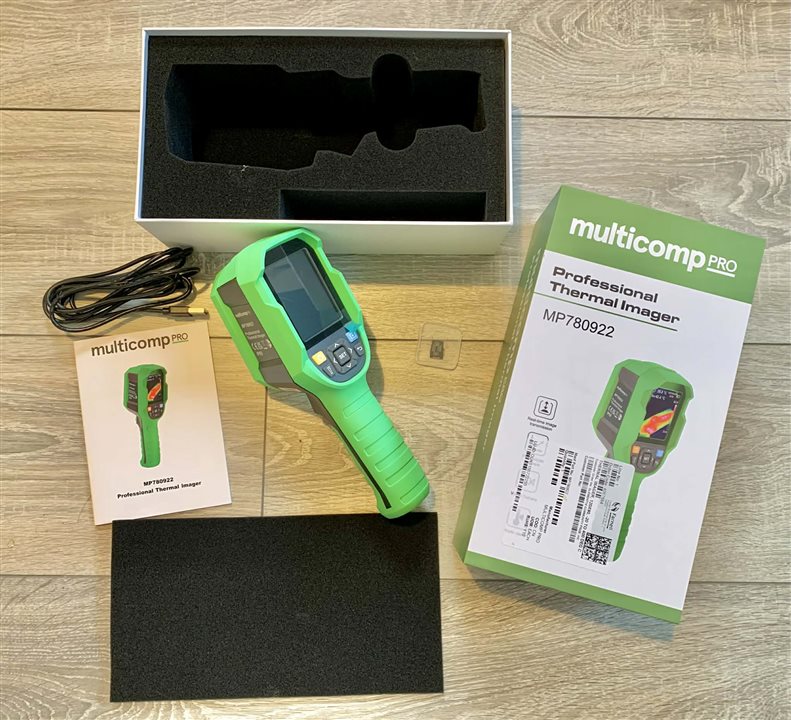
Everything is neatly arranged and gives you the feeling that the manufacturer actually expects you to use this in the field - not just admire it.
In the Hand: Built Like a Lab Instrument
Picking it up, the camera feels reassuringly solid. The rear features a bright 8" TFT display with crisp colour gradients and a refresh rate fast enough to track movement without smearing. The buttons are tactile, with a rubber membrane ideal for gloved operation - nice for winter outdoor projects or workshops where solder fumes and stray screws wander freely.
The bottom of the handle has a 1/4-inch tripod mount – extremely handy when you want to make use of the PC Interface (more on that later…).
The top of the camera has, squirreled away behind a weatherproof panel, a USB-C port and a microSD slot.
The sensor housing at the front sits behind a protective lens and recessed to avoid knocks and scratches, something you normally only see on higher-end cameras. It’s the kind of fit-and-finish that tells you this device wasn’t aimed at hobbyists - but will make makers very, very happy.
Powering On: A Feast of Heat
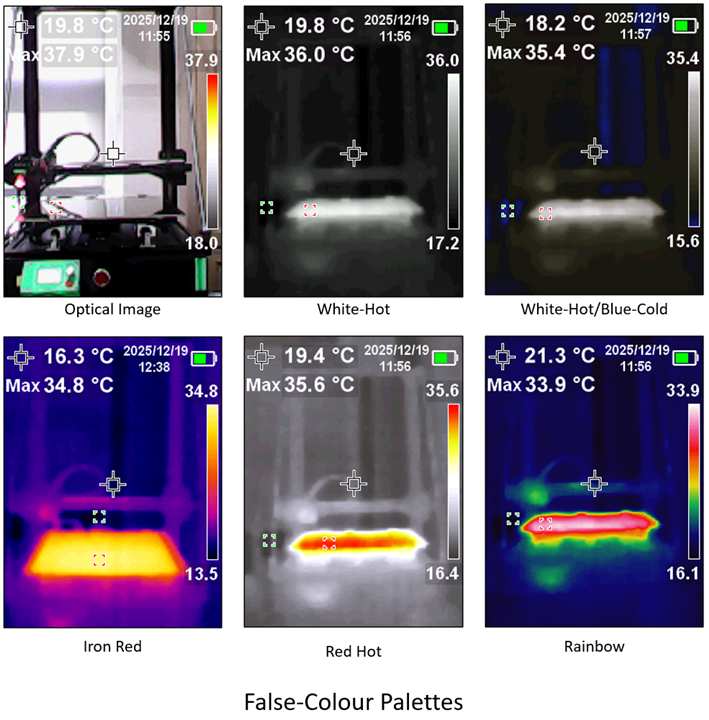
Boot time is a mildly irritating eight seconds but once it wakes up, the interface wastes no time being refreshingly sensible. Seconds later you’re swimming in silky false-colour palettes: White Hot, Red Hot, Iron Hot, and Rainbow, all of them tailor-made for poking at electronics and pretending you’re in a thermal lab.
Pointed at a Raspberry Pi centred project (A home-brew Christmas lights controller), it immediately spilled its secrets.
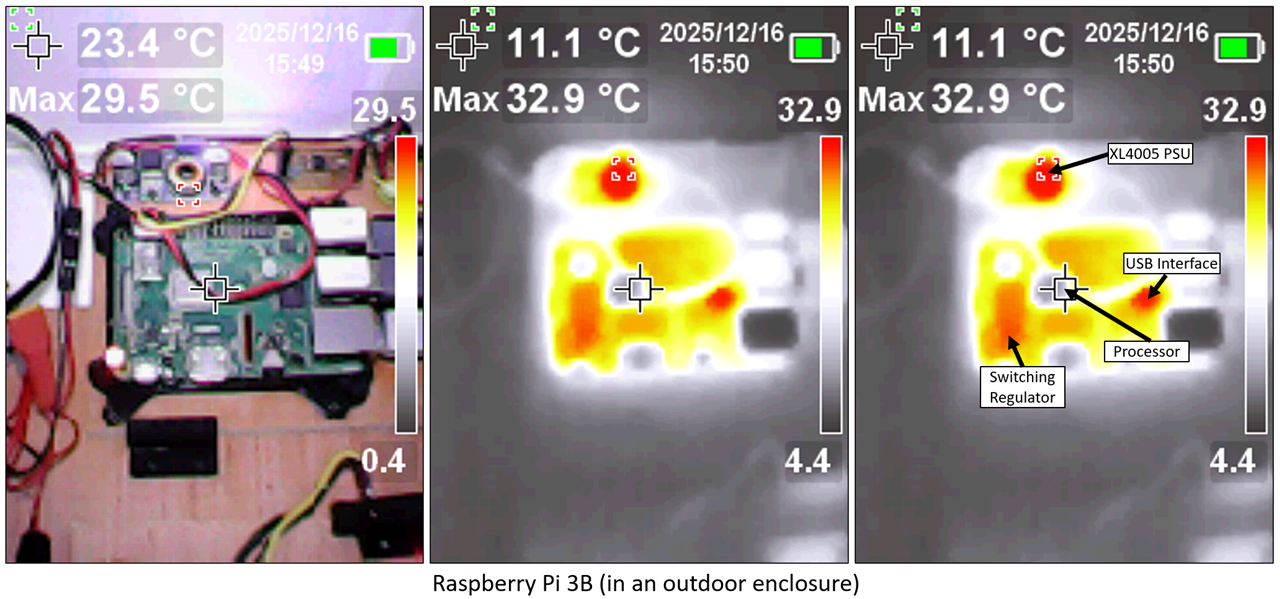
The USB ports were clearly doing some cardio, the power supply circuitry radiated a comfortable warmth, and the processor itself appeared suspiciously chilled. To be fair, the board was sitting outside in wintry temperatures, and the CPU was clearly taking the evening off with a mulled wine when I snapped the shot. Catch it mid-workout and I suspect the thermal story would look very different.
A peek inside the entire project enclosure also revealed the sloths and the athletes in the chaotic jungle of my wiring.
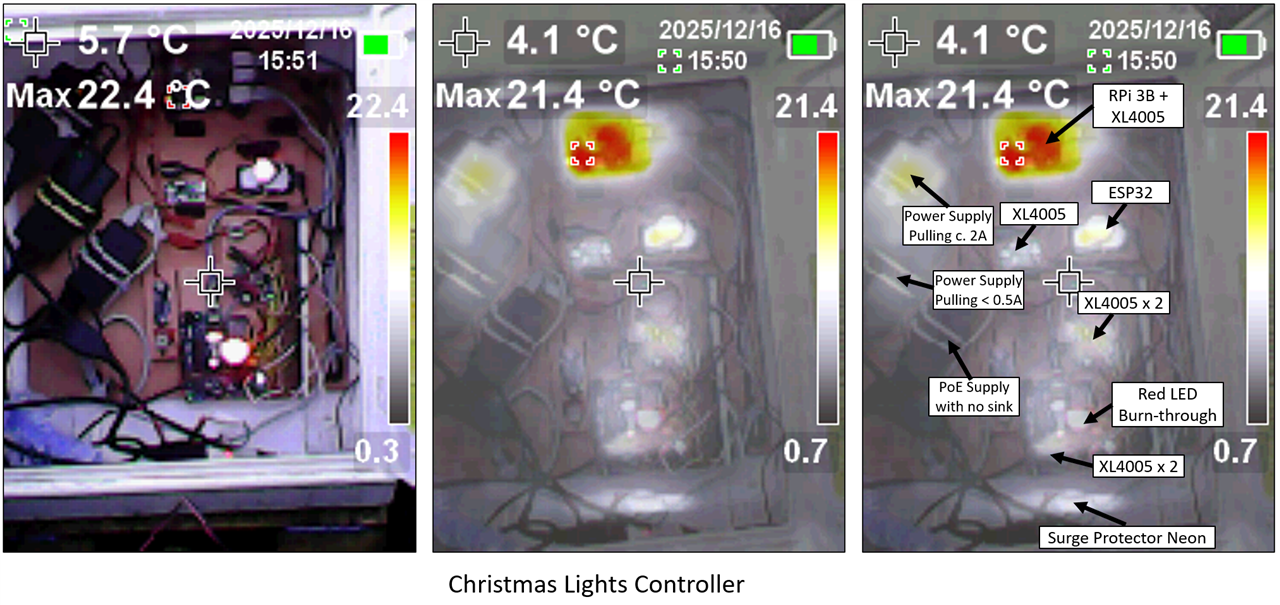
The level of detail is the sort you normally expect from serious lab gear or stern regulatory equipment - not something you casually wave around while grinning at your latest build.
What Stands Out So Far
- Crisp, Fast Thermal Imaging
The 120x90 IR resolution gives detailed maps, with the variable opacity enabling you to see the pure IR image or a mix of optical and IR. This allows you to manage the bleed through of colour from optical images where the optical colour influences the colour maps.
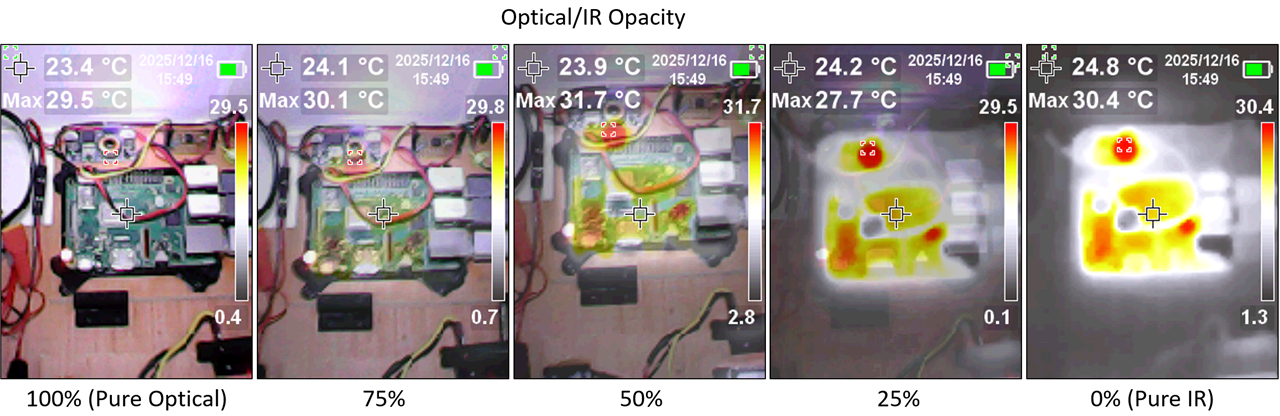
- Crisp Illumination for those dark corners
The built-in flashlight and 100% Optical mode really helps throw light into the darkest of corners, allowing you to frame the shot perfectly before switching on the IR witchcraft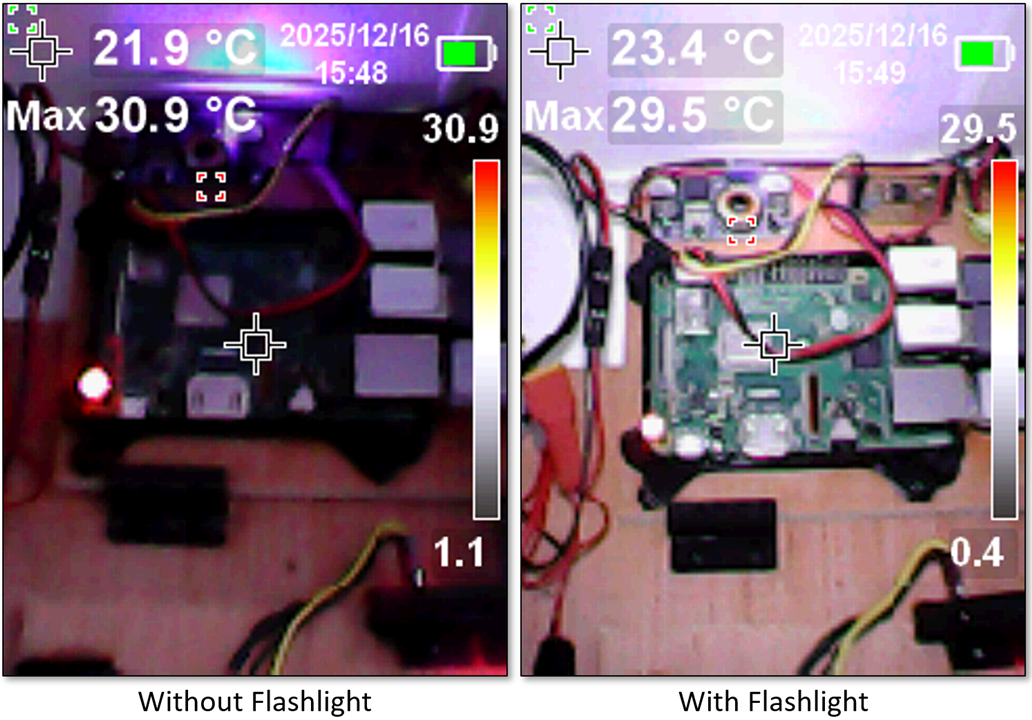
- Maker-Friendly Controls
Customizable measurement cursors, temperature spot tracking, and quick palette switching make it ideal for electronics debugging and thermal profiling - Built Like a Rock
This is a tool meant to survive the tinkerer’s bench, the workshop, and probably the occasional drop from a ladder (well, a 2m ladder according to the spec sheet!).
What’s been a frustration
- Mandatory Auto-ranging
There doesn’t appear to be an option to lock the temperature range, which means you can’t take two different views of the same object (e.g. front and back of a PCB.... of left and right of a dog, in my example!!) and directly compare the images. The temperature range auto-scales to the hottest and coldest parts of an image, and the colour scale graduates accordingly

- PC Camera Interface
Allegedly the camera supports a USB Camera interface, however when connected to a Windows PC the camera presents itself as a Serial COM Port. I’m assuming it’s a CSI interface, but I haven’t been able to confirm it. Either way, I’ve not been able to successfully connect it to a Windows machine in Camera mode. Also, the PC Software mentioned in the product listing appears to be in-hiding (maybe worried that I'm going to make it look at my dog collection!)
- No Black-hot
The spec sheet confidently announces support for “Iron Red, Rainbow, White Hot, Red Hot, Black Hot”… except Black Hot has apparently decided not to turn up. In its place is a White Hot variant that swaps black for blue at the cold end of the scale.
This isn’t a personal tragedy - I’m still in the awkward phase of discovering my palette identity (Iron Red, since you asked) - but it’s worth flagging if Black Hot is your thermal comfort zone. If that’s your hill to die on, you may find yourself engaged in a surprisingly emotional staring contest with a very blue cold spot.
Tinkering opportunities
Assuming the camera interface is CSI, then there’s a real opportunity for experimentation, especially when connected into a Pi for real-time thermal streaming! Suddenly every project you own will develop a heat problem that must be investigated immediately. You can profile regulators that are quietly cooking themselves, spot short circuits before they announce their presence with smoke, and finally confirm that yes, that linear regulator really was a terrible idea. Add a bit of Python and you’ve got automated thermal logging, time-lapse heat maps, or a Pi that shouts when your 3D printer’s MOSFET starts impersonating a space heater. It’s the kind of setup that turns sensible debugging into gleeful thermal obsession - and once you’ve watched electrons misbehave in false colour, it’s very hard to go back.
The Verdict (First Impressions Only)
At first glance, the Multicomp Pro thermal imager lands squarely in the “serious tool that makers will absolutely misuse for fun” category. Let’s be clear: this is just a first look, and I am not a certified thermal imaging consultant (TIC), so take everything here with the appropriate pinch of salt—and perhaps a thermal glove. What I can say is that it feels rugged, fast, and delivers the kind of crisp thermal detail usually reserved for lab benches with paperwork attached, while still being approachable enough to start poking at Raspberry Pi’s and other hobbyist electronics within minutes.
Yes, there are a few eyebrow-raising quirks - auto-ranging that refuses to be tamed, a mysteriously absent Black Hot mode, and a PC interface that’s currently more promise than practice - but none of them manage to overshadow the core experience. What you get is a field-ready thermal camera that practically begs to be aimed at every PCB, power supply, and vaguely warm object in your workshop, turning everyday debugging into a colourful, mildly obsessive hunt for heat.
In short, it’s an impressive first impression for makers and tinkerers alike - just remember, I’m still figuring all of this out, and a professional might raise a perfectly arched eyebrow at my methods. But for the rest of us, it’s delightfully addictive.


