Originally meant to house a MP3 player, Seeed Studio instead fitted a fully functional Oscilloscope inside. Based on an ARM Cortex M3, a 320x240 pixel display, SD card storage, USB, and best of this O-scope has rechargeable batteries. Meaning, you can do a spot test on the fly, anywhere, and store the wave form. With a sampling rate of 1Mhz, this is a great tool for small circuitry design. In fact an associate of mine bought one of these solely to test output of micro controller projects. He said it has come in handy countless times.
My immediate opinion of the build quality is it feels cheap, but solidly put together, no cracking or squeaking plastic. It’s quite light weight, I was afraid I might break it at first.
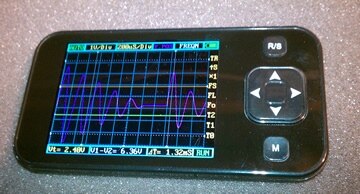
It took about a half hour of reading the manual and tinkering to get operational. All operations are done via two buttons and a D-pad. I did find myself touching the DSO Nano’s screen to operate. I suppose I am a victim of the recent touch screen revolution. But, I’m fine with the buttons. Navigation is easy and clear.
Before this, I had bought a USB based O-scope that needed a computer/laptop to run. I was happy with its mobility, but soon found that having to be near AC outlets to power the laptop and scope to be annoying at times. The DSO nano, does away with all tethering issues. For example, I took it over to a box of components I have laying around, hooked it up to the output of a stepper motor and sampled pulse I generated by spinning the motor by hand (below), easy and quick is the only way to define the experience. As you can see, the motor generated about 2.5V.
The fact that I was able to quickly set up the test, save the file, and return to my PC makes me wish I had one of these years ago. Being tethered to an aging, large O-scope in the same old testing area is a bit inconvenient, now that I think about it. Now the testing lab can be anywhere, anytime, I want.
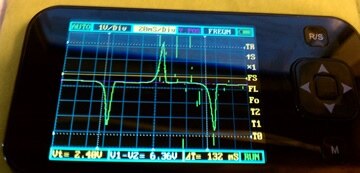
The only bad experience I had was the screen produced some artifacts that stayed on the screen during the stepper motor test the whole time. It didn’t get in the way of seeing the wave form, but I just didn’t like seeing the errors. I reset the DSO Nano and the problem was cleared. I assume the next firmware update will solve this issue.
Within minutes I put this O-scope to use. Walked away from my workbench, took a sample, saved the wave for, and returned. This alone gets my seal of approval. If you are just a hobbyist, tinkerer, hacker, or a salaried design engineer, I whole heartedly recommend the DSO Nano Oscilloscope. It will satiate your gadget lust, at least for a little while. MSRP $89 USD
All we need now is the same technology on our touchscreen phones.
Cabe
Features:
Display | 2.8″ Color TFT LCD |
Display Resolution | 320×240 |
Display Color | 65K |
Analog bandwidth | 0 - 1MHz |
Max sample rate | 1Msps 12Bits |
Sample memory depth | 4096 Point |
Horizontal sensitivity | 1uS/Div~10S/Div (1-2-5 Step) |
Horizontal position | adjustable with indicator |
Vertical sensitivity | 10mV/Div~10V/Div (with ×1 probe) |
0.5V/Div~100V/Div (with ×10 probe) | |
Vertical position | adjustable with indicator |
Input impedance | >500KΩ |
Max input voltage | 80Vpp (by ×1 probe) |
Coupling | DC |
Trig modes | Auto, Norma, Single, None and Scan |
Functionalities: | Automatic measurement: frequency, cycle, duty, Vpp, Vram, Vavg and DC voltage |
Precise vertical measurement with markers | |
Precise horizontal measurement with markers | |
Rising/falling edge trigger | |
Trig level adjustable with indicator | |
Trig sensitivity adjustable with indicator | |
Hold/run feature | |
Test signal | Built-in 10Hz~1MHz (1-2-5 Step) |
Waveform storage | SD card |
PC connection via USB | as SD card reader |
Upgrade | by bootloader via USB |
Power supply | 3.7V Chargeable Lithium battery / USB |
Dimension (w/o probe) | 105mm X 53mm X 8mm |
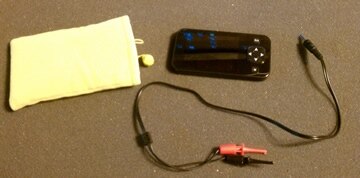
What you get when you buy a DSO Nano. The O-scope, one set of test leads, and a velvet bag to carry it in.