element14 Community
element14 Community
    Register Log In
  • Site
  • Search
  • Log In Register
  • Community Hub
    Community Hub
    • What's New on element14
    • Feedback and Support
    • Benefits of Membership
    • Personal Blogs
    • Members Area
    • Achievement Levels
  • Learn
    Learn
    • Ask an Expert
    • eBooks
    • element14 presents
    • Learning Center
    • Tech Spotlight
    • STEM Academy
    • Webinars, Training and Events
    • Learning Groups
  • Technologies
    Technologies
    • 3D Printing
    • FPGA
    • Industrial Automation
    • Internet of Things
    • Power & Energy
    • Sensors
    • Technology Groups
  • Challenges & Projects
    Challenges & Projects
    • Design Challenges
    • element14 presents Projects
    • Project14
    • Arduino Projects
    • Raspberry Pi Projects
    • Project Groups
  • Products
    Products
    • Arduino
    • Avnet & Tria Boards Community
    • Dev Tools
    • Manufacturers
    • Multicomp Pro
    • Product Groups
    • Raspberry Pi
    • RoadTests & Reviews
  • About Us
  • Store
    Store
    • Visit Your Store
    • Choose another store...
      • Europe
      •  Austria (German)
      •  Belgium (Dutch, French)
      •  Bulgaria (Bulgarian)
      •  Czech Republic (Czech)
      •  Denmark (Danish)
      •  Estonia (Estonian)
      •  Finland (Finnish)
      •  France (French)
      •  Germany (German)
      •  Hungary (Hungarian)
      •  Ireland
      •  Israel
      •  Italy (Italian)
      •  Latvia (Latvian)
      •  
      •  Lithuania (Lithuanian)
      •  Netherlands (Dutch)
      •  Norway (Norwegian)
      •  Poland (Polish)
      •  Portugal (Portuguese)
      •  Romania (Romanian)
      •  Russia (Russian)
      •  Slovakia (Slovak)
      •  Slovenia (Slovenian)
      •  Spain (Spanish)
      •  Sweden (Swedish)
      •  Switzerland(German, French)
      •  Turkey (Turkish)
      •  United Kingdom
      • Asia Pacific
      •  Australia
      •  China
      •  Hong Kong
      •  India
      • Japan
      •  Korea (Korean)
      •  Malaysia
      •  New Zealand
      •  Philippines
      •  Singapore
      •  Taiwan
      •  Thailand (Thai)
      • Vietnam
      • Americas
      •  Brazil (Portuguese)
      •  Canada
      •  Mexico (Spanish)
      •  United States
      Can't find the country/region you're looking for? Visit our export site or find a local distributor.
  • Translate
  • Profile
  • Settings
Test & Tools
  • Technologies
  • More
Test & Tools
Documents Agilent U1600 Series Handheld Oscilloscopes & PC link software down load web link and instructions
  • Blog
  • Forum
  • Documents
  • Files
  • Members
  • Mentions
  • Sub-Groups
  • Tags
  • More
  • Cancel
  • New
Join Test & Tools to participate - click to join for free!
Actions
  • Share
  • More
  • Cancel
Engagement
  • Author Author: dsohal
  • Date Created: 31 Jan 2012 3:09 PM Date Created
  • Last Updated Last Updated: 8 Oct 2021 4:47 AM
  • Views 1454 views
  • Likes 0 likes
  • Comments 0 comments
Related
Recommended

Agilent U1600 Series Handheld Oscilloscopes & PC link software down load web link and instructions

imageimageimage

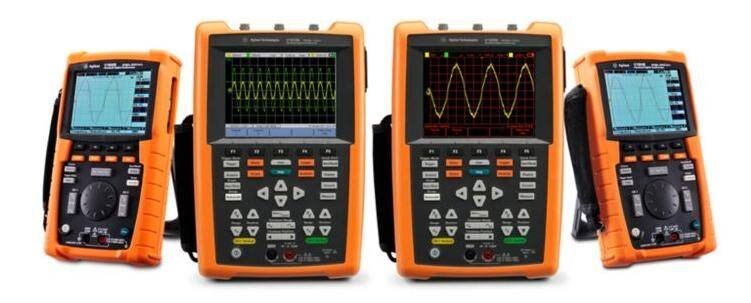
U1600 Series Handheld Oscilloscopes
image

image

U1600 Series Handheld Oscilloscopes

The Agilent U1600 series handheld digital oscilloscope is full featured  handheld oscilloscope that offers maximum versatility for current and  future needs.

The U1602B and U1604B are dual channel 20 MHz and 40 MHz oscilloscopes  that have built in DMM and recorder functions. They were voted No. 1  Product of the Year by readers of the German-language Elektronik  Magazine in 2006. Read about the award.

The NEW U1610A/U1620A oscilloscope include two  isolated input channels, certified to CAT III 600 V, that protect users  and prevent damages to devices when performing floating measurements.

The U1610A has a 100 MHz bandwidth and 1 GSa/s sampling rate while the  U1620A provides 200 MHz bandwidth and 2 GSa/s sampling rate. With a  maximum memory depth of 2 Mpts, users can capture non-repeating signals  such as motor start up sequence and transient waveforms without  sacrificing signal details. The 5.7-inch (diagonal) sunlight viewable  screen uses VGA TFT LCD technology with enhanced color intensity to  clearly distinguish waveform details. Its benchtop-like display and dual  window zoom function allow users to easily identify problem areas and  zoom in for more detailed analysis. Both models feature three viewing  modes: indoor, outdoor and night vision. Each mode uses predefined  contrast levels to help engineers and technicians to analyze waveforms  under all lighting conditions.


Features

  • CATIII 600V isolated channels
  • Up to 2GSa/s sampling rate
  • Up to 2Mpts recording length
  • 5.7 inch VGA TFT LCD display (640x320 resolution)
  • 3 viewing mode display (indoor, outdoor, night-vision)
  • Dual window zoom and math functions
  • 10,000 counts digital multimeter
  • Datalogger capability
  • USB2.0 full speed IO interface


Optional Feature

USB Host Capability with Option 001 - Allows you to connect to a USB Memory Device and download waveforms instantaneously. (For U1602B and U1604B only)

Please find data sheet and user manual  below

Applications

Phoenix Launch Video
http://wireless.agilent.com/videos/u1620A/index.html
 
Floating Measurement with Isolated Channel Handheld Scope
Learn why the handheld oscilloscope with isolated channels is so critical when making floating measurement
http://cp.literature.agilent.com/litweb/pdf/5990-9777EN.pdf
 
How to Select the Right Handheld Oscilloscope
Learn the key considerations when selecting the right handheld oscilloscopes for your debugging tasks
http://cp.literature.agilent.com/litweb/pdf/5990-9752EN.pdf
 
Field Applications for the Agilent U1610/20A Handheld Oscilloscope
Learn tips and tricks on how the Agilent U1610A/20A handheld oscilloscopes are able to help you complete your field tasks.
http://cp.literature.agilent.com/litweb/pdf/5990-9820EN.pdf
Some other useful Agilent web links
http://www.home.agilent.com/agilent/facet.jspx?c=174523.i.1&to=80029.k.0&cc=GB&lc=eng

The scope link software is not shipped with the instrument. It can be downloaded from the following link.


http://www.home.agilent.com/agilent/software.jspx?ckey=894352&lc=eng&cc=GB&nid=-33166.1000383&id=894352

Attachments:
imageU1610-90040.pdf
image5990-9523EN.pdf
  • down
  • series
  • pc
  • web
  • &
  • and
  • oscilloscopes
  • handheld
  • load
  • u1600
  • instructions
  • link
  • software
  • agilent
  • Share
  • History
  • More
  • Cancel
  • Sign in to reply
element14 Community

element14 is the first online community specifically for engineers. Connect with your peers and get expert answers to your questions.

  • Members
  • Learn
  • Technologies
  • Challenges & Projects
  • Products
  • Store
  • About Us
  • Feedback & Support
  • FAQs
  • Terms of Use
  • Privacy Policy
  • Legal and Copyright Notices
  • Sitemap
  • Cookies

An Avnet Company © 2026 Premier Farnell Limited. All Rights Reserved.

Premier Farnell Ltd, registered in England and Wales (no 00876412), registered office: Farnell House, Forge Lane, Leeds LS12 2NE.

ICP 备案号 10220084.

Follow element14

  • X
  • Facebook
  • linkedin
  • YouTube