


Hello guys,
Before I start, apologies for not responding to your comments, although I've been going through them I couldn't reply to you guys have been running on a tight schedule.
Previously in Bluetooth Unleashed....
With no clue on recognizing facial expressions our hero was struggling to find a good API and finally ended in way to detect smiles and proceeded further.....
Now on Bluetooth Unleashed
Still unhappy with results and working with APIs in Parallel, I found out Google Vision to be satisfactory.
They have a very good documentation and found this YouTube Video to be much easier.
What I've done here is:
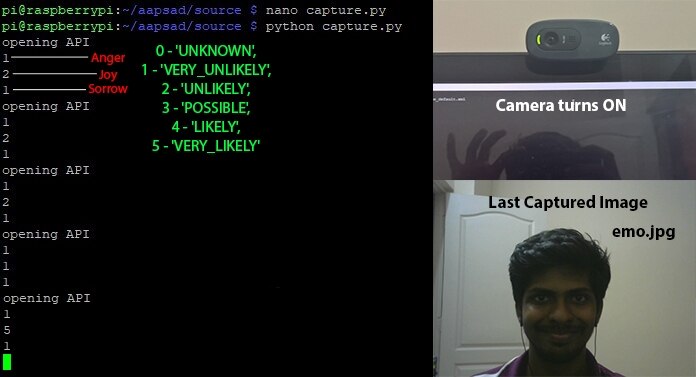
1) I've used OpenCV and a python script to capture an image and save it locally as emo.jpg, and call another python script (the Vision API).
2) This one Upload to the GCloud and returns a json response from which emotions could be fetched.
capture.py
import cv2
import numpy as np
import sys
import time
import os
facePath = "haarcascade_frontalface_default.xml"
faceCascade = cv2.CascadeClassifier(facePath)
cap = cv2.VideoCapture(0)
cap.set(3,640)
cap.set(4,480)
sF = 1.05

while True:
  ret, frame = cap.read()
  img = frame
  gray = cv2.cvtColor(frame, cv2.COLOR_BGR2GRAY)
  faces = faceCascade.detectMultiScale(
    gray,
    scaleFactor= sF,
    minNeighbors=8,
    minSize=(55, 55),
    flags=cv2.CASCADE_SCALE_IMAGE
  )
  if (len(faces)):
     cv2.imwrite(filename = 'emo.jpg', img=frame)
    print('opening API')
    os.system('python emotion.py')
    time.sleep(10)
  c = cv2.waitKey(7) % 0x100
  if c == 27:
        break
cap.release()
This calls for the emotion.py which in turn return emotion values.
The next part is to play a soothing visual with a audio according. Will be using omxplayer to run them, I'm yet to find the proper visuals and audios. For now 3 music videos each emotions.
modified the emotion.py to play videos.
emotion.py
import io
import os

# Imports the Google Cloud client library
from google.cloud import vision
from google.cloud.vision import types

# Instantiates a client
client = vision.ImageAnnotatorClient()

# The name of the image file to annotate
file_name = 'emo.jpg'

# Loads the image into memory
with io.open(file_name, 'rb') as image_file:
    content = image_file.read()

image = types.Image(content=content)

# Performs label detection on the image file
response = client.face_detection(image=image)
faces = response.face_annotations
# 0-'UNKNOWN',1-'VERY_UNLIKELY',2-'UNLIKELY',3-'POSSIBLE',4-'LIKELY',5- 'VERY_LIKELY')
for face in faces:
    anger = face.anger_likelihood
    joy = face.joy_likelihood
    sorrow = face.sorrow_likelihood
#print(anger) print(joy) print(sorrow)
if (anger >= joy) and (anger >= sorrow):
   emo = 'a'
elif (joy >= anger) and (joy >= sorrow):
   emo = 'j'
else :
   emo = 's'

if emo == 'a' :
  os.system('omxplayer Anger.mp4')
  os.system('killall omxplayer.bin')
if emo == 'j' :
  os.system('omxplayer Joy.mp4')
  os.system('killall omxplayer.bin')
if emo == 's' :
  os.system('omxplayer Sorrow.mp4')
  os.system('killall omxplayer.bin')
I just ran the capture.py from putty and within 2seconds this came up on the Rpi screen
Here's a short clip on the output...
Top Comments