element14 Community
element14 Community
    Register Log In
  • Site
  • Search
  • Log In Register
  • Community Hub
    Community Hub
    • What's New on element14
    • Feedback and Support
    • Benefits of Membership
    • Personal Blogs
    • Members Area
    • Achievement Levels
  • Learn
    Learn
    • Ask an Expert
    • eBooks
    • element14 presents
    • Learning Center
    • Tech Spotlight
    • STEM Academy
    • Webinars, Training and Events
    • Learning Groups
  • Technologies
    Technologies
    • 3D Printing
    • FPGA
    • Industrial Automation
    • Internet of Things
    • Power & Energy
    • Sensors
    • Technology Groups
  • Challenges & Projects
    Challenges & Projects
    • Design Challenges
    • element14 presents Projects
    • Project14
    • Arduino Projects
    • Raspberry Pi Projects
    • Project Groups
  • Products
    Products
    • Arduino
    • Avnet & Tria Boards Community
    • Dev Tools
    • Manufacturers
    • Multicomp Pro
    • Product Groups
    • Raspberry Pi
    • RoadTests & Reviews
  • About Us
  • Store
    Store
    • Visit Your Store
    • Choose another store...
      • Europe
      •  Austria (German)
      •  Belgium (Dutch, French)
      •  Bulgaria (Bulgarian)
      •  Czech Republic (Czech)
      •  Denmark (Danish)
      •  Estonia (Estonian)
      •  Finland (Finnish)
      •  France (French)
      •  Germany (German)
      •  Hungary (Hungarian)
      •  Ireland
      •  Israel
      •  Italy (Italian)
      •  Latvia (Latvian)
      •  
      •  Lithuania (Lithuanian)
      •  Netherlands (Dutch)
      •  Norway (Norwegian)
      •  Poland (Polish)
      •  Portugal (Portuguese)
      •  Romania (Romanian)
      •  Russia (Russian)
      •  Slovakia (Slovak)
      •  Slovenia (Slovenian)
      •  Spain (Spanish)
      •  Sweden (Swedish)
      •  Switzerland(German, French)
      •  Turkey (Turkish)
      •  United Kingdom
      • Asia Pacific
      •  Australia
      •  China
      •  Hong Kong
      •  India
      • Japan
      •  Korea (Korean)
      •  Malaysia
      •  New Zealand
      •  Philippines
      •  Singapore
      •  Taiwan
      •  Thailand (Thai)
      • Vietnam
      • Americas
      •  Brazil (Portuguese)
      •  Canada
      •  Mexico (Spanish)
      •  United States
      Can't find the country/region you're looking for? Visit our export site or find a local distributor.
  • Translate
  • Profile
  • Settings
Design For A Cause 2021
  • Challenges & Projects
  • Design Challenges
  • Design For A Cause 2021
  • More
  • Cancel
Design For A Cause 2021
Blog ACE - Stuff happens
  • Blog
  • Forum
  • Documents
  • Polls
  • Files
  • Mentions
  • Sub-Groups
  • Tags
  • More
  • Cancel
  • New
  • Share
  • More
  • Cancel
Group Actions
  • Group RSS
  • More
  • Cancel
Engagement
  • Author Author: amgalbu
  • Date Created: 25 Apr 2021 4:35 PM Date Created
  • Views 1275 views
  • Likes 9 likes
  • Comments 8 comments
  • ace
  • design_for_a_cause_2021
Related
Recommended

ACE - Stuff happens

amgalbu
amgalbu
25 Apr 2021

This was not a planned blog post, but I bricked the Arduino Nano and may be my experience could be useful to anyone else who may have the same kind of problem in the future


What happened

While testing low-power modes, I created an application that put to sleep the Arduino Nano's Cortex M0 CPU every second... which means I had no enough time to download a different application from the Arduino IDE...


What I did

The only option you have when nothing else works is a low-level interface like JTAG or the even simpler SWD. The latter is the default in-circuit programming interface for ARM devices so it is supported by all the ARM processors.

I had in my lab an STLink/V2 programmer, which is supposed to support both SWD and JTAG interfaces but for some reason I was unable to connect to the board

Luckily I found one amazing open source project called OpenOCD which can work on different debuggers and microcontrollers, having configuration files of almost all available ARM Cortex SoC and the best part is that it has support for Raspberry PI GPIO bit-bang programmer profile. This means we can use Raspberry Pi GPIOs to behave as a programmer pins and connect it to our microcontroller to flash bootloaders.


Prepare the hardware

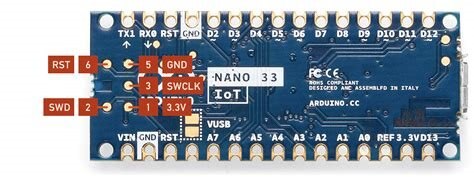
You need to connect only two wires: SWD (pin 2) and SWCLK (pin3)
image


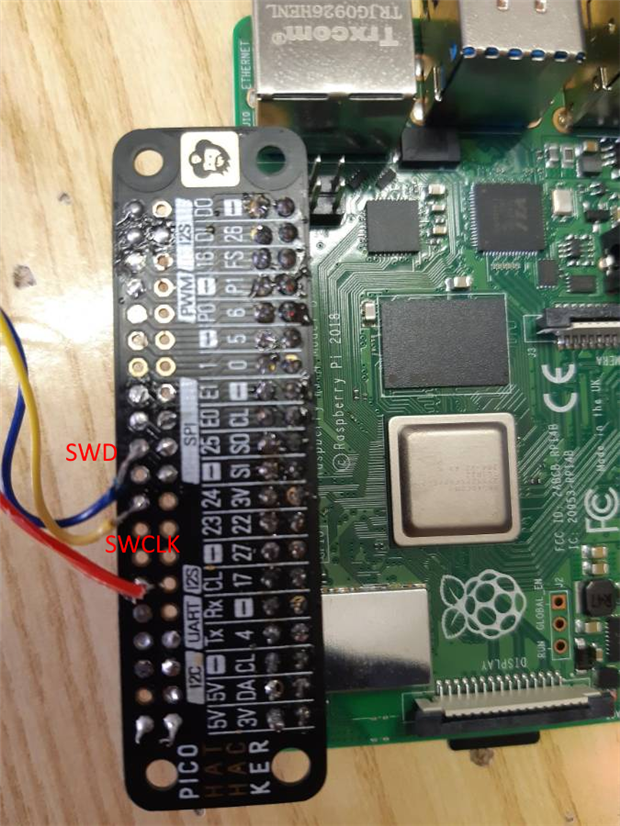
I connected SWCLK to GPIO 25 of the Raspberry Pi and SWD to GPIO 24 (see picture below). Blu wire is connected to SWD, the yellow wire to SWCLK. The red wire is the reset, but looks like it is not strictly required
 

image


I powered up the Arduino board using a USB cable connected to Raspberry Pi so that extra ground wiring is not required


Install openOCD

  • sudo apt-get install autoconf libtool libusb-dev
  • git clone --recursive git://git.code.sf.net/p/openocd/code openocd-code
  • cd openocd-code


Build openOCD

  • ./bootstrap
  • ./configure --enable-bcm2835gpio
  • make
  • sudo make install


Prepare a config file

  • cd ~
  • mkdir openocd-config
  • cd openocd-config
  • nano openocd.cfg
  • Paste the following content


interface bcm2835gpio

# Raspi1 peripheral_base address
# bcm2835gpio_peripheral_base 0x20000000
# Raspi2 and Raspi3 peripheral_base address
bcm2835gpio_peripheral_base 0x3F000000

# Raspi1 BCM2835: (700Mhz)
# bcm2835gpio_speed_coeffs 113714 28
# Raspi2 BCM2836 (900Mhz):
# bcm2835gpio_speed_coeffs 146203 36
# Raspi3 BCM2837 (1200Mhz): 
bcm2835gpio_speed_coeffs 194938 48

# SWD GPIO set: swclk swdio
bcm2835gpio_swd_nums 25 24

transport select swd

set CHIPNAME at91samd21
source [find target/at91samdXX.cfg]

# Uncomment & lower speed to address errors
# adapter_khz 1000

init
targets
reset halt

  • save and close


Download bootloader file

The bootloader file for Arduino Nano 33 IoT can be download from https://github.com/arduino/ArduinoCore-samd/blob/master/bootloaders/nano_33_iot/samd21_sam_ba_arduino_nano_33_iot.bin

Copy the file in the folder you created (~/openocd-config) and name it bl.bin


Launch openOCD

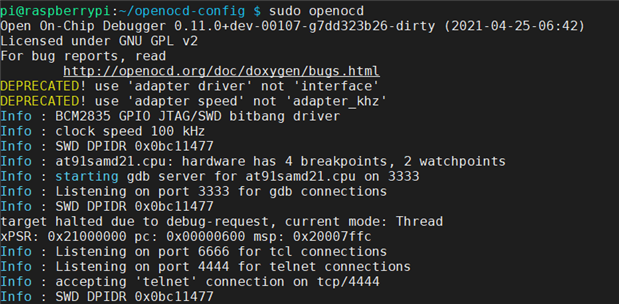
In a shell window, run the command

     cd ~/openocd-config

     sudo openocd
 

image


Install and launch Telnet

  • install Telnet (this tool is not available by default on Raspberry Pi)

          apt-get install telnet

  • launch telnet

     telnet localhost 4444


Erase flash and install bootloader

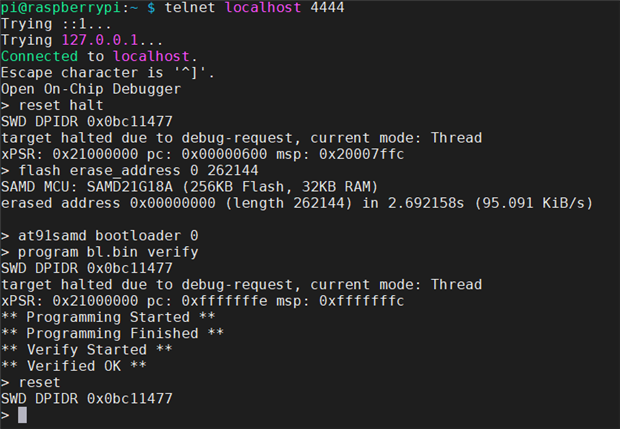
  • from the telnet prompt, enter the following commands

     reset halt

     flash erase 0 262144

     at91samd bootloader 0

     program bl.bin verify

     reset

     run
 

image


Hope this help!

  • Sign in to reply

Top Comments

  • colporteur
    colporteur over 4 years ago in reply to amgalbu +1
    Thanks for the response. I will repeat in my own words and some that I copied from research. Your sketch impacted the serial interface. Without the serial interface there is no means to load another sketch…
Parents
  • javagoza
    javagoza over 4 years ago

    Thank you very much for your contribution.

    I have a Segger J-Link EDU J-Link EDUJ-Link EDU

    https://wiki.segger.com/Arduino_Nano_33_IOT

    • Cancel
    • Vote Up 0 Vote Down
    • Sign in to reply
    • More
    • Cancel
Comment
  • javagoza
    javagoza over 4 years ago

    Thank you very much for your contribution.

    I have a Segger J-Link EDU J-Link EDUJ-Link EDU

    https://wiki.segger.com/Arduino_Nano_33_IOT

    • Cancel
    • Vote Up 0 Vote Down
    • Sign in to reply
    • More
    • Cancel
Children
No Data
element14 Community

element14 is the first online community specifically for engineers. Connect with your peers and get expert answers to your questions.

  • Members
  • Learn
  • Technologies
  • Challenges & Projects
  • Products
  • Store
  • About Us
  • Feedback & Support
  • FAQs
  • Terms of Use
  • Privacy Policy
  • Legal and Copyright Notices
  • Sitemap
  • Cookies

An Avnet Company © 2026 Premier Farnell Limited. All Rights Reserved.

Premier Farnell Ltd, registered in England and Wales (no 00876412), registered office: Farnell House, Forge Lane, Leeds LS12 2NE.

ICP 备案号 10220084.

Follow element14

  • X
  • Facebook
  • linkedin
  • YouTube