element14 Community
element14 Community
    Register Log In
  • Site
  • Search
  • Log In Register
  • Community Hub
    Community Hub
    • What's New on element14
    • Feedback and Support
    • Benefits of Membership
    • Personal Blogs
    • Members Area
    • Achievement Levels
  • Learn
    Learn
    • Ask an Expert
    • eBooks
    • element14 presents
    • Learning Center
    • Tech Spotlight
    • STEM Academy
    • Webinars, Training and Events
    • Learning Groups
  • Technologies
    Technologies
    • 3D Printing
    • FPGA
    • Industrial Automation
    • Internet of Things
    • Power & Energy
    • Sensors
    • Technology Groups
  • Challenges & Projects
    Challenges & Projects
    • Design Challenges
    • element14 presents Projects
    • Project14
    • Arduino Projects
    • Raspberry Pi Projects
    • Project Groups
  • Products
    Products
    • Arduino
    • Avnet & Tria Boards Community
    • Dev Tools
    • Manufacturers
    • Multicomp Pro
    • Product Groups
    • Raspberry Pi
    • RoadTests & Reviews
  • About Us
  • Store
    Store
    • Visit Your Store
    • Choose another store...
      • Europe
      •  Austria (German)
      •  Belgium (Dutch, French)
      •  Bulgaria (Bulgarian)
      •  Czech Republic (Czech)
      •  Denmark (Danish)
      •  Estonia (Estonian)
      •  Finland (Finnish)
      •  France (French)
      •  Germany (German)
      •  Hungary (Hungarian)
      •  Ireland
      •  Israel
      •  Italy (Italian)
      •  Latvia (Latvian)
      •  
      •  Lithuania (Lithuanian)
      •  Netherlands (Dutch)
      •  Norway (Norwegian)
      •  Poland (Polish)
      •  Portugal (Portuguese)
      •  Romania (Romanian)
      •  Russia (Russian)
      •  Slovakia (Slovak)
      •  Slovenia (Slovenian)
      •  Spain (Spanish)
      •  Sweden (Swedish)
      •  Switzerland(German, French)
      •  Turkey (Turkish)
      •  United Kingdom
      • Asia Pacific
      •  Australia
      •  China
      •  Hong Kong
      •  India
      •  Korea (Korean)
      •  Malaysia
      •  New Zealand
      •  Philippines
      •  Singapore
      •  Taiwan
      •  Thailand (Thai)
      • Americas
      •  Brazil (Portuguese)
      •  Canada
      •  Mexico (Spanish)
      •  United States
      Can't find the country/region you're looking for? Visit our export site or find a local distributor.
  • Translate
  • Profile
  • Settings
Design For A Cause 2021
  • Challenges & Projects
  • Design Challenges
  • Design For A Cause 2021
  • More
  • Cancel
Design For A Cause 2021
Blog Automatic Medicine Vendor | Android App  - Blog #2
  • Blog
  • Forum
  • Documents
  • Polls
  • Files
  • Mentions
  • Sub-Groups
  • Tags
  • More
  • Cancel
  • New
  • Share
  • More
  • Cancel
Group Actions
  • Group RSS
  • More
  • Cancel
Engagement
  • Author Author: aniketdhole
  • Date Created: 26 May 2021 4:41 AM Date Created
  • Views 410 views
  • Likes 3 likes
  • Comments 0 comments
  • firebase
  • android
  • flutter
  • servo-motor
  • arduino nano 33 iot
Related
Recommended

Automatic Medicine Vendor | Android App  - Blog #2

aniketdhole
aniketdhole
26 May 2021

The Moblie App is made in Flutter which is a framework for making IOS and Android Apps.


For the database I have used FIrebase Database


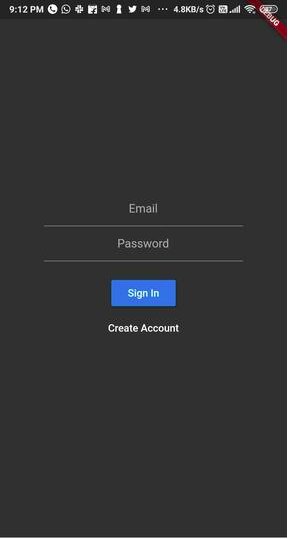
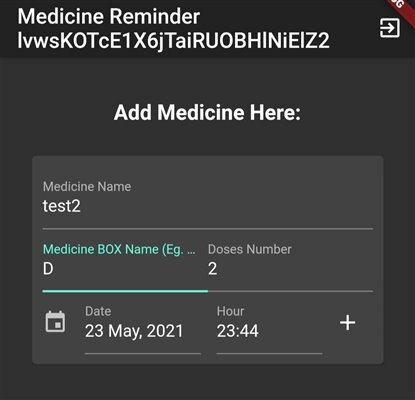
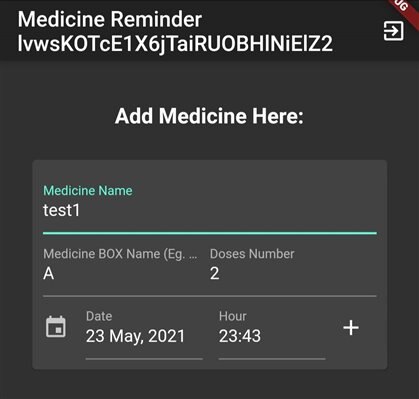
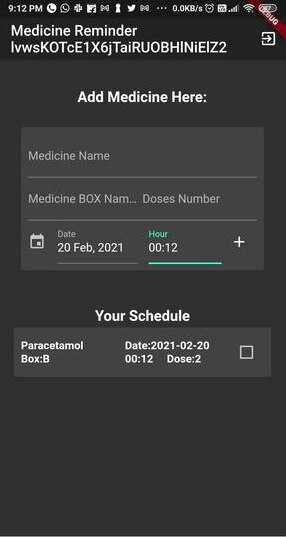
Here is the design of the App

UI:
imageimage


Adding Medicine UI

imageimage


Database

The Firebase Database used is NoSQL Database which consist of Collection and Key Value Pair. We get the data from user through the app and Access it from Arduino


Data Location at firebase using Key, UUID and Collection Name  :

const MediCard({ 
     Key key, 
     this.medi, 
     this.firestore, 
     this.uid, })


Adding the Data to Firebase

Database(firestore: widget.firestore).addMed(
     uid: widget.auth.currentUser.uid,
     content: _textController.text.trim(),
     box: _textController2.text.trim(),
     date: _controller2.text.trim(),
     dose: _textController3.text.trim());
)


Authentication

The App is made for authenticated users, whenever he logs in he will be able to view his own medicine schedule.

The Authentication is Done using Firebase Auth ,

The user will get Login/Register Screen at start of screen. If user is logged in he will see the home page.


Code: https://drive.google.com/file/d/1Khr2C9got68OOUWm15pOgMcSzTMO8G9k/view?usp=sharing


APK Link: https://drive.google.com/file/d/1xZlYK8pBdPKphXoFNgiDwXRTJD0_b4Wh/view?usp=sharing

  • Sign in to reply
element14 Community

element14 is the first online community specifically for engineers. Connect with your peers and get expert answers to your questions.

  • Members
  • Learn
  • Technologies
  • Challenges & Projects
  • Products
  • Store
  • About Us
  • Feedback & Support
  • FAQs
  • Terms of Use
  • Privacy Policy
  • Legal and Copyright Notices
  • Sitemap
  • Cookies

An Avnet Company © 2025 Premier Farnell Limited. All Rights Reserved.

Premier Farnell Ltd, registered in England and Wales (no 00876412), registered office: Farnell House, Forge Lane, Leeds LS12 2NE.

ICP 备案号 10220084.

Follow element14

  • X
  • Facebook
  • linkedin
  • YouTube