


Packet loss diagnostics
In the previous post, transmission test using 192 meter UTP cable was presented. During the test data transmission was established but some packet loss was observed (which was an interesting case - problem was also present on very short cable distance).
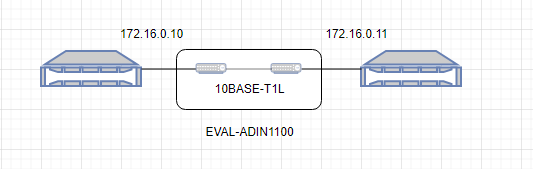
To further pinpoint the problem, setup like in my Broadcom optical transceiver was established, consisting of two Dell servers running Debian GNU/Linux, each equipped with Intel 82576 1000Base-T adapter.
Initial tests
Ping test was successful:
PING 172.19.0.11 (172.19.0.11) 56(84) bytes of data.
64 bytes from 172.19.0.11: icmp_seq=1 ttl=64 time=0.561 ms
64 bytes from 172.19.0.11: icmp_seq=2 ttl=64 time=0.523 ms
64 bytes from 172.19.0.11: icmp_seq=3 ttl=64 time=0.533 ms
64 bytes from 172.19.0.11: icmp_seq=4 ttl=64 time=0.523 ms
64 bytes from 172.19.0.11: icmp_seq=5 ttl=64 time=0.545 ms
64 bytes from 172.19.0.11: icmp_seq=6 ttl=64 time=0.539 ms
64 bytes from 172.19.0.11: icmp_seq=7 ttl=64 time=0.544 ms
64 bytes from 172.19.0.11: icmp_seq=8 ttl=64 time=0.554 ms
Iperf3 TCP results were as below:
client side
iperf3 -c 172.19.0.11 -b 10M
Connecting to host 172.19.0.11, port 5201
[ 5] local 172.19.0.10 port 35668 connected to 172.19.0.11 port 5201
[ ID] Interval Transfer Bitrate Retr Cwnd
[ 5] 0.00-1.00 sec 1.30 MBytes 10.9 Mbits/sec 0 50.9 KBytes
[ 5] 1.00-2.00 sec 1.12 MBytes 9.44 Mbits/sec 0 50.9 KBytes
[ 5] 2.00-3.00 sec 1.22 MBytes 10.3 Mbits/sec 0 50.9 KBytes
[ 5] 3.00-4.00 sec 1.12 MBytes 9.38 Mbits/sec 0 50.9 KBytes
[ 5] 4.00-5.00 sec 1.12 MBytes 9.38 Mbits/sec 0 50.9 KBytes
[ 5] 5.00-6.00 sec 1.12 MBytes 9.38 Mbits/sec 0 50.9 KBytes
[ 5] 6.00-7.00 sec 1.12 MBytes 9.38 Mbits/sec 0 50.9 KBytes
[ 5] 7.00-8.00 sec 1.12 MBytes 9.38 Mbits/sec 0 50.9 KBytes
[ 5] 8.00-9.00 sec 1.12 MBytes 9.38 Mbits/sec 0 50.9 KBytes
[ 5] 9.00-10.00 sec 1.12 MBytes 9.38 Mbits/sec 0 50.9 KBytes
- - - - - - - - - - - - - - - - - - - - - - - - -
[ ID] Interval Transfer Bitrate Retr
[ 5] 0.00-10.00 sec 11.5 MBytes 9.63 Mbits/sec 0 sender
[ 5] 0.00-10.08 sec 11.3 MBytes 9.37 Mbits/sec receiveriperf Done.
server side:
iperf3 -s
-----------------------------------------------------------
Server listening on 5201
-----------------------------------------------------------
Accepted connection from 172.19.0.10, port 35656
[ 5] local 172.19.0.11 port 5201 connected to 172.19.0.10 port 35668
[ ID] Interval Transfer Bitrate
[ 5] 0.00-1.00 sec 1.07 MBytes 9.01 Mbits/sec
[ 5] 1.00-2.00 sec 1.12 MBytes 9.42 Mbits/sec
[ 5] 2.00-3.00 sec 1.12 MBytes 9.41 Mbits/sec
[ 5] 3.00-4.00 sec 1.12 MBytes 9.42 Mbits/sec
[ 5] 4.00-5.00 sec 1.12 MBytes 9.42 Mbits/sec
[ 5] 5.00-6.00 sec 1.12 MBytes 9.42 Mbits/sec
[ 5] 6.00-7.00 sec 1.12 MBytes 9.42 Mbits/sec
[ 5] 7.00-8.00 sec 1.12 MBytes 9.41 Mbits/sec
[ 5] 8.00-9.00 sec 1.12 MBytes 9.42 Mbits/sec
[ 5] 9.00-10.00 sec 1.12 MBytes 9.42 Mbits/sec
[ 5] 10.00-10.08 sec 90.5 KBytes 9.32 Mbits/sec
- - - - - - - - - - - - - - - - - - - - - - - - -
[ ID] Interval Transfer Bitrate
[ 5] 0.00-10.08 sec 11.3 MBytes 9.37 Mbits/sec receiver
And iperf3 UDP
client
Connecting to host 172.19.0.11, port 5201
[ 5] local 172.19.0.10 port 42566 connected to 172.19.0.11 port 5201
[ ID] Interval Transfer Bitrate Total Datagrams
[ 5] 0.00-1.00 sec 1.19 MBytes 10.0 Mbits/sec 863
[ 5] 1.00-2.00 sec 1.19 MBytes 9.97 Mbits/sec 861
[ 5] 2.00-3.00 sec 1.14 MBytes 9.57 Mbits/sec 826
[ 5] 3.00-4.00 sec 1.14 MBytes 9.56 Mbits/sec 825
[ 5] 4.00-5.00 sec 1.14 MBytes 9.57 Mbits/sec 826
[ 5] 5.00-6.00 sec 1.14 MBytes 9.57 Mbits/sec 826
[ 5] 6.00-7.00 sec 1.14 MBytes 9.56 Mbits/sec 825
[ 5] 7.00-8.00 sec 1.14 MBytes 9.57 Mbits/sec 826
[ 5] 8.00-9.00 sec 1.14 MBytes 9.57 Mbits/sec 826
[ 5] 9.00-10.00 sec 1.14 MBytes 9.56 Mbits/sec 825
- - - - - - - - - - - - - - - - - - - - - - - - -
[ ID] Interval Transfer Bitrate Jitter Lost/Total Datagrams
[ 5] 0.00-10.00 sec 11.5 MBytes 9.65 Mbits/sec 0.000 ms 0/8329 (0%) sender
[ 5] 0.00-10.08 sec 11.4 MBytes 9.52 Mbits/sec 0.014 ms 0/8285 (0%) receiver
server
Accepted connection from 172.19.0.10, port 48540
[ 5] local 172.19.0.11 port 5201 connected to 172.19.0.10 port 42566
[ ID] Interval Transfer Bitrate Jitter Lost/Total Datagrams
[ 5] 0.00-1.00 sec 1.09 MBytes 9.13 Mbits/sec 0.299 ms 0/788 (0%)
[ 5] 1.00-2.00 sec 1.14 MBytes 9.57 Mbits/sec 0.307 ms 0/826 (0%)
[ 5] 2.00-3.00 sec 1.14 MBytes 9.57 Mbits/sec 0.021 ms 0/826 (0%)
[ 5] 3.00-4.00 sec 1.14 MBytes 9.56 Mbits/sec 0.019 ms 0/825 (0%)
[ 5] 4.00-5.00 sec 1.14 MBytes 9.57 Mbits/sec 0.024 ms 0/826 (0%)
[ 5] 5.00-6.00 sec 1.14 MBytes 9.56 Mbits/sec 0.024 ms 0/825 (0%)
[ 5] 6.00-7.00 sec 1.14 MBytes 9.57 Mbits/sec 0.018 ms 0/826 (0%)
[ 5] 7.00-8.00 sec 1.14 MBytes 9.57 Mbits/sec 0.019 ms 0/826 (0%)
[ 5] 8.00-9.00 sec 1.14 MBytes 9.56 Mbits/sec 0.015 ms 0/825 (0%)
[ 5] 9.00-10.00 sec 1.14 MBytes 9.57 Mbits/sec 0.022 ms 0/826 (0%)
[ 5] 10.00-10.08 sec 93.3 KBytes 9.64 Mbits/sec 0.014 ms 0/66 (0%)
- - - - - - - - - - - - - - - - - - - - - - - - -
[ ID] Interval Transfer Bitrate Jitter Lost/Total Datagrams
[ 5] 0.00-10.08 sec 11.4 MBytes 9.52 Mbits/sec 0.014 ms 0/8285 (0%) receiver
As can be seen, no data loss so far.
This observation was also verified by looking at net adapter's error counters:
inet 172.19.0.11 netmask 255.255.0.0 broadcast 172.19.255.255
inet6 fe80::225:90ff:fe3a:1730 prefixlen 64 scopeid 0x20<link>
ether 00:25:90:3a:17:30 txqueuelen 1000 (Ethernet)
RX packets 4010912 bytes 5725615220 (5.3 GiB)
RX errors 0 dropped 0 overruns 0 frame 0
TX packets 1865313 bytes 565506418 (539.3 MiB)
TX errors 0 dropped 0 overruns 0 carrier 0 collisions 0
device memory 0xc15a0000-c15bffff
inet 172.19.0.10 netmask 255.255.0.0 broadcast 172.19.255.255
inet6 fe80::225:90ff:fe39:8fb0 prefixlen 64 scopeid 0x20<link>
ether 00:25:90:39:8f:b0 txqueuelen 1000 (Ethernet)
RX packets 1865234 bytes 565502452 (539.3 MiB)
RX errors 0 dropped 0 overruns 0 frame 0
TX packets 4011112 bytes 5725623976 (5.3 GiB)
TX errors 0 dropped 0 overruns 0 carrier 0 collisions 0
device memory 0xc15a0000-c15bffff
no errors after transferring 5GB and 500MB back (after bulk file transfer test)
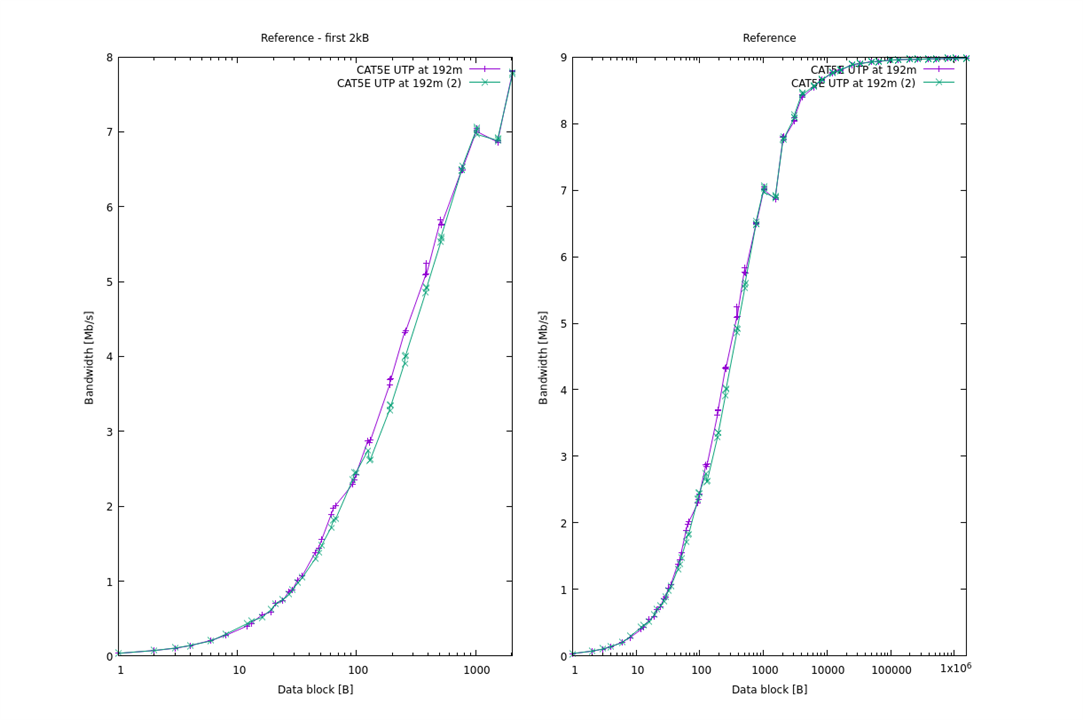
Netpipe test shows transfer curve as below, very good, no packet loss symptoms - observed slight drop of transfer near 1kB frame size was identified before as a behavior of the Intel network card used.
Reverse pair connection
As 10Base-T1 interface has defined polarity ('DATA+' and 'DATA-''), next test performed was polarity reversal test
After reversing wires in the pair nothing spectacular occured.
Link still goes up, ping works:
64 bytes from 172.19.0.11: icmp_seq=1 ttl=64 time=0.543 ms
64 bytes from 172.19.0.11: icmp_seq=2 ttl=64 time=0.551 ms
64 bytes from 172.19.0.11: icmp_seq=3 ttl=64 time=0.570 ms
64 bytes from 172.19.0.11: icmp_seq=4 ttl=64 time=0.522 ms
Iperf3 performance is unaffected:
client:
Connecting to host 172.19.0.11, port 5201
[ 5] local 172.19.0.10 port 38580 connected to 172.19.0.11 port 5201
[ ID] Interval Transfer Bitrate Total Datagrams
[ 5] 0.00-1.00 sec 1.19 MBytes 10.0 Mbits/sec 863
[ 5] 1.00-2.00 sec 1.19 MBytes 9.97 Mbits/sec 861
[ 5] 2.00-3.00 sec 1.14 MBytes 9.57 Mbits/sec 826
[ 5] 3.00-4.00 sec 1.14 MBytes 9.56 Mbits/sec 825
[ 5] 4.00-5.00 sec 1.14 MBytes 9.57 Mbits/sec 826
[ 5] 5.00-6.00 sec 1.14 MBytes 9.57 Mbits/sec 826
[ 5] 6.00-7.00 sec 1.14 MBytes 9.56 Mbits/sec 825
[ 5] 7.00-8.00 sec 1.14 MBytes 9.57 Mbits/sec 826
[ 5] 8.00-9.00 sec 1.14 MBytes 9.57 Mbits/sec 826
[ 5] 9.00-10.00 sec 1.14 MBytes 9.56 Mbits/sec 825
- - - - - - - - - - - - - - - - - - - - - - - - -
[ ID] Interval Transfer Bitrate Jitter Lost/Total Datagrams
[ 5] 0.00-10.00 sec 11.5 MBytes 9.65 Mbits/sec 0.000 ms 0/8329 (0%) sender
[ 5] 0.00-10.08 sec 11.4 MBytes 9.52 Mbits/sec 0.022 ms 0/8284 (0%) receiver
server:
Accepted connection from 172.19.0.10, port 39240
[ 5] local 172.19.0.11 port 5201 connected to 172.19.0.10 port 38580
[ ID] Interval Transfer Bitrate Jitter Lost/Total Datagrams
[ 5] 0.00-1.00 sec 1.09 MBytes 9.13 Mbits/sec 0.303 ms 0/788 (0%)
[ 5] 1.00-2.00 sec 1.14 MBytes 9.57 Mbits/sec 0.306 ms 0/826 (0%)
[ 5] 2.00-3.00 sec 1.14 MBytes 9.57 Mbits/sec 0.028 ms 0/826 (0%)
[ 5] 3.00-4.00 sec 1.14 MBytes 9.56 Mbits/sec 0.019 ms 0/825 (0%)
[ 5] 4.00-5.00 sec 1.14 MBytes 9.57 Mbits/sec 0.010 ms 0/826 (0%)
[ 5] 5.00-6.00 sec 1.14 MBytes 9.57 Mbits/sec 0.020 ms 0/826 (0%)
[ 5] 6.00-7.00 sec 1.14 MBytes 9.56 Mbits/sec 0.021 ms 0/825 (0%)
[ 5] 7.00-8.00 sec 1.14 MBytes 9.57 Mbits/sec 0.020 ms 0/826 (0%)
[ 5] 8.00-9.00 sec 1.14 MBytes 9.57 Mbits/sec 0.020 ms 0/826 (0%)
[ 5] 9.00-10.00 sec 1.14 MBytes 9.56 Mbits/sec 0.014 ms 0/825 (0%)
[ 5] 10.00-10.08 sec 91.9 KBytes 9.50 Mbits/sec 0.022 ms 0/65 (0%)
- - - - - - - - - - - - - - - - - - - - - - - - -
[ ID] Interval Transfer Bitrate Jitter Lost/Total Datagrams
[ 5] 0.00-10.08 sec 11.4 MBytes 9.52 Mbits/sec 0.022 ms 0/8284 (0%) receiver
And Netpipe graph is as below (comparing direct and reversed connection)
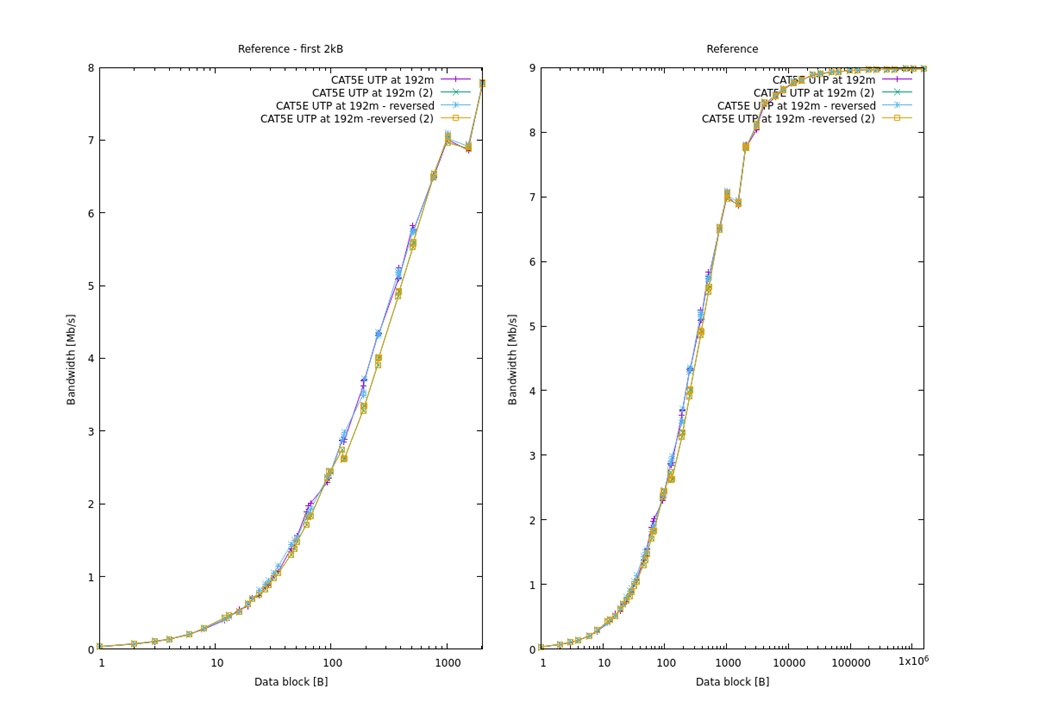
As can be seen, when using ADIN1100 PHY, connector reversal in the pair is not affecting transfer rate.
Packet loss evaluation
After series of tests Ethernet frame counters are still zero:
inet 172.19.0.10 netmask 255.255.0.0 broadcast 172.19.255.255
inet6 fe80::225:90ff:fe39:8fb0 prefixlen 64 scopeid 0x20<link>
ether 00:25:90:39:8f:b0 txqueuelen 1000 (Ethernet)
RX packets 2219550 bytes 883187824 (842.2 MiB)
RX errors 0 dropped 0 overruns 0 frame 0
TX packets 4373812 bytes 6055720865 (5.6 GiB)
TX errors 0 dropped 0 overruns 0 carrier 0 collisions 0
device memory 0xc15a0000-c15bffff
inet 172.19.0.11 netmask 255.255.0.0 broadcast 172.19.255.255
inet6 fe80::225:90ff:fe3a:1730 prefixlen 64 scopeid 0x20<link>
ether 00:25:90:3a:17:30 txqueuelen 1000 (Ethernet)
RX packets 4373611 bytes 6055712233 (5.6 GiB)
RX errors 0 dropped 0 overruns 0 frame 0
TX packets 2219630 bytes 883191660 (842.2 MiB)
TX errors 0 dropped 0 overruns 0 carrier 0 collisions 0
device memory 0xc15a0000-c15bffff
PHY monitoring also doesn't detect any errors:
MSE -37.2 dB Rx 3178421, Err 0
MSE -37.2 dB Rx 3178421, Err 0
MSE -37.2 dB Rx 3178421, Err 0
MSE -37.2 dB Rx 3178421, Err 0
MSE -37.2 dB Rx 3178421, Err 0
MSE -37.2 dB Rx 3178421, Err 0
MSE -37.2 dB Rx 3178421, Err 0
MSE -37.2 dB Rx 3178421, Err 0
MSE -37.2 dB Rx 3178421, Err 0
MSE -37.2 dB Rx 48231, Err 0
MSE -37.2 dB Rx 48231, Err 0
MSE -37.2 dB Rx 48231, Err 0
MSE -37.2 dB Rx 48231, Err 0
MSE -37.2 dB Rx 48231, Err 0
So frame loss that was observed during previous tests was definitely not connected to the cable used.

