


Hi again, it’s Hambreros and Tamadillo. Last post the robot learned to roll Post 1 - The wheels are turning (mostly). This post it learned to make noise — sound effects, an air raid siren, an announcement system, and it can even talk now. Getting there was way more of an adventure than the wheels were, mostly because the bug wasn’t actually a bug, it was a whole container we didn’t know existed.
What we’ve actually built
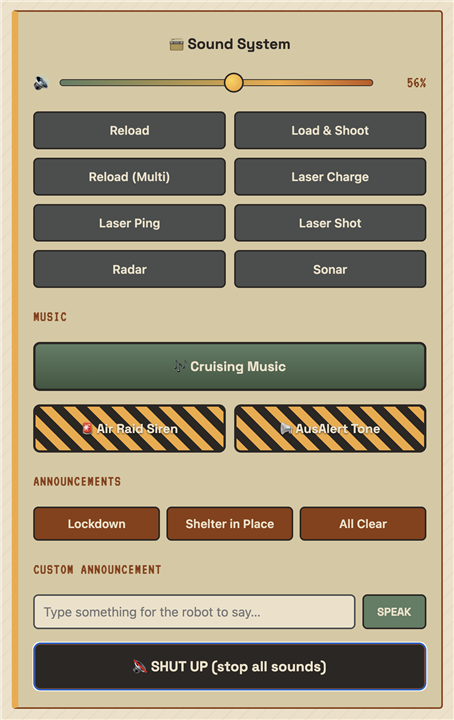
The control web page now has a “Sound System” panel underneath the wheel controls:
- A grid of sound effects like laser blasts and guns reloading
- An Air Raid Siren, and an AusAlert tone (853Hz and 960Hz played together) inspired by Australia’s emergency phone-alert system
- Text-to-speech (TTS) announcements — inspired by “Giant Voice” systems we’ve seen in videos from Middle East conflict zones and school lockdown drills, telling you to “shelter in place”. Partly inspired by the new Arduino App Lab update, which mentions TTS bricks.
- A volume slider, and a big SHUT UP button, because once you give a robot a siren you will absolutely need a way to make it stop
And most recently: cruising music, so it can play a track while it drives around. More on why that one was trickier than it sounds in a minute.
Hardware distraction
The Braitenberg vehicle chassis we’re using is inherently unstable. Two wheels and a stopper meant it would often tip during testing. Inspired by the pantographs on trains that pass our back yard, as well as drones that can land and stick to a moving object, we tried to build a self-correcting leg system for our EV.


https://www.instagram.com/p/DboDwK_gXT7 credit Zaruba
This took a bunch of experimenting and time. In the end the results weren’t that good, and we realised that once we finally attached a camera to the setup, we’d also need to compensate and auto-correct the camera to point at the horizon.

In the end we dropped the idea and moved on with a couple of wooden blocks.

TTS no work
As the UNO Q updated to the latest firmware of Arduino App Lab, we got briefly excited that there might also be a neural text-to-speech option built in (an actual AI voice model instead of the classic robot monotone) — and there is one, arduino:tts. Got all the way to testing it before finding out it’s built specifically for the new Ventuno Q board and not supported by the UNO Q.
Turns out Arduino just announced the VENTUNO Q. Our UNO Q has 2GB of RAM and no AI chip. VENTUNO Q packs a Qualcomm Dragonwing IQ‑8275 — a proper 40 TOPS neural processor — plus 16GB of RAM, specifically so it can run real local AI: computer vision, offline AI assistants running local speech models, that kind of thing. The neural TTS brick we found needs that NPU to run at all, so on our board it was never going to work — not a bug, just the wrong hardware for the job. There are a couple of overview videos from embedded world if you want to see it in action: developer walkthrough, demo reel. But let’s not let the inspiration of TTS go to waste, after scrounging around we worked out we can use the unix espeak-ng for the talking instead.
Here’s where it got interesting. The siren and the AusAlert tone worked first try. Wav/MP3 Sound effects and text-to-speech? Dead silent. No errors, no sound, nothing.
First theory: volume. Turned out to be half right — the board’s speaker volume genuinely was too low by default, and cranking it with amixer fixed some of it. But effects and TTS still didn’t work, even after that.
Second theory, once we actually looked: the programs we needed (mpg123 for mp3s, espeak-ng for the talking) just weren’t installed. Fair enough, we thought — sudo apt-get install them and done. Except we did that, and which mpg123 on the board clearly showed it existed. So why couldn’t our own code find it?
Turns out: the robot’s Python code doesn’t actually run directly on the board’s Linux. It runs inside a Docker container — basically a little sealed box with its own separate copy of everything. We’d installed the programs onto the board itself, not into the box our code was actually running in. Two completely different places, both called “the board” if you’re not paying attention. Once we docker exec‘d into the actual container and installed things there instead, everything clicked into place — almost. Even that had one more gotcha: the container’s default user isn’t allowed to install anything (Permission denied on a folder called apt/lists/partial, if you’re curious), so it needed:
docker exec -u root hall-w-ev-main-1 apt-get install -y espeak-ng
-u root = “no really, let me actually install this.” Small thing, cost us an hour.
Finding the good stuff
While we were down in that container digging around, we found something way better than what we were looking for: Arduino ships their own official audio tools baked right in — arduino.app_peripherals.speaker.Speaker. It’s a proper Python class for playing sound directly, no external programs needed at all.
As mentioned above, the VENTUNO Q’s TTS brick was kind of cool to stumble into by accident while debugging a sound effect — but a dead end for now. We’re sticking with the classic robot voice, which honestly suits an emergency-siren robot better anyway.
Since the TTS brick’s code is public, we went and actually read it out of curiosity, and it turns out it does basically the same chunk-and-check-cancelled trick we were about to build by hand, just with a lot more going on underneath:
- It doesn’t run the AI voice model in the same program at all — it makes a network request to a separate always-on service and streams the audio back as the model generates it, piece by piece, instead of waiting for the whole sentence to finish.
- Long text gets split at up to 1024 characters, cut on the last
./!/?it can find before the limit, so it doesn’t chop a sentence in half — smarter than our “just cut it off at 300 characters and hope.” - Cancelling has to happen in two places: locally (stop feeding audio to the speaker) and remotely (tell the AI service currently mid-sentence over the network to actually stop generating).
- There’s even a “warmup” — the instant it starts up, it quietly synthesizes the word “ok” to itself, just so the neural network is already loaded by the time you need it for real, instead of your first sentence being the slow one.
Kind of validating, honestly. The “cut it into pieces, check a flag between each one” idea wasn’t a hack we made up — it’s the same shape of solution the actual Arduino engineers reached for. Theirs just has a neural network and a network request bolted on the front of it.
The Speaker class was the real win though. The simple way to use it plays a whole sound start-to-finish with no way to interrupt it — fine for a short laser blast, useless for “stop the siren right now.” So instead we feed it small chunks (a tenth of a second each) in a loop, and check “should I stop?” between every single chunk:
def _stream_pcm(speaker, sample_rate, channels, samples, stop_event):
    chunk_len = max(1, int(sample_rate * 0.1)) * channels
    for i in range(0, len(samples), chunk_len):
        if stop_event.is_set():
            break
        speaker.play(samples[i:i + chunk_len])
That’s the whole trick behind the SHUT UP button, and behind “press the siren again while it’s already going” restarting it cleanly instead of two sirens fighting each other.
Making espeak-ng actually stick around
Remember that docker exec -u root ... apt-get install espeak-ng fix from earlier? It worked great — for one restart. Then we rebooted the board again and it was just gone. Turns out installing something into a running container by hand doesn’t actually stick — the container gets rebuilt from scratch every time you redeploy, and “by hand” doesn’t survive being rebuilt. Cool, so our talking robot’s voice box was actually a ticking time bomb this whole time.
We did not want to just re-run that command forever every time we updated the code. So: real fix time.
We remembered seeing a brick_compose.yaml mentioned in Arduino’s own code while we were poking around earlier, and it turns out there’s a whole custom bricks feature for exactly this — you can package up your own little service, container and all, as part of your app. Every example of it we could find online only used pre-built images though, never a Dockerfile you write yourself, so we genuinely didn’t know if that part actually worked or if we’d be wasting an evening.
Quick test first: a throwaway folder with just a Dockerfile that installs espeak-ng and then does nothing (sleep infinity), wired up as a brick. Restarted the app to see what would happen.
It built the Dockerfile. For real. Docker log spam and everything, right there in the deploy output — our own robot, building its own container image, from a text file we wrote, installing a package with full root access and zero permission drama, because this time it’s happening at build time, not sneaking in through docker exec afterward.
So we built the actual thing: a tiny container that does nothing but run espeak-ng behind a dead-simple web server —
# POST /synthesize {"text": "...", "voice": "en-us+m3", "speed": 150}
result = subprocess.run(
    ['espeak-ng', '--stdout', '-v', voice, '-s', speed, text],
    capture_output=True, timeout=10,
)
# ...and send result.stdout back as the response body
— and now the main robot code just sends it a sentence over the network and gets a WAV file back, instead of running espeak-ng itself. Since the whole container gets rebuilt from that same Dockerfile every single time we deploy, there’s nothing left to mysteriously vanish. Tested it properly too — full restart, both containers rebuilt from nothing, and the robot could talk again immediately, no manual fixing required. That’s the actual fix, not a “seems fine for now.”
Cruising music (without a 50MB file)
Last thing: we wanted the robot to play a music track while driving around — cruising music. Obvious approach: convert the song to the same format as the sound effects. Except the effects are only a few seconds long, and this song is almost 5 minutes — converted the “simple” way, it would’ve turned a 7MB mp3 into something like 50MB sitting on the robot for no reason.
So instead of converting the whole song upfront, it gets decoded a tiny piece at a time, right as it’s needed, and each piece goes straight into the same chunk-player from before. The song is never sitting fully unpacked in memory or on disk, and we get to reuse all the cancel/restart logic we’d already built.
the sound board controls
What’s next
- Camera + remote driving — the “puppy on a leash from your phone” post


