


Recap:
I’m developing a smart solar monitoring system that uses a clean reference panel to eliminate weather effects and directly quantify dust-induced losses in real time. With edge AI and environmental sensing, the goal is to predict the right moment to cleanbefore efficiency drops enough to matter.
- SolarSense - Part 1 - Introduction, The POC Built and The Plan
- SolarSense - Part 2 - Can Arduino CAN?
Sunday Arrives, Time for a leisurely writing session. The Data collection unit has to survive the forces unleashed by mother nature. I am not talking about hurricane but since i am living in Kerala, India where the weather ranges from dry to 100% humidity, heavy monsoon rainfall, temperatures upto 50deg C (which means inside a casing it can go upto even 60deg). TO me this project is close to heart and therefore i decided to invest in a good PCB. In this Post I shall walk you through the design of the schematics.
Sheet 1: Panel Current Measurement and MPTT Charger
The Primary aim would be to measure the current of the clean and unclean panel under different environmental sensor reading. Ideally, if a solar panel is uniformly soiled, only the current output should decreased as opposed to reduction in voltage, only when one of the cells inside it is covered, the voltage produced by that drops leading to a drop in the overall voltage output of the panel. SO under that assumption, i am gonna wire the 3 panels in parallel with an SS14 Diode to prevent the clean panels output back-powering the unclean one. The Current is measured by a 100mOhm 1% resistor, 2W 2512 Package. Using INA219B (not INA219A) which has a differential output of +-320mV, it can measure upto 3.2mA, with each panel expected upto 300mA, it is way over the necessary point.
The INA219 in 12-bit mode with PGA = /1 (32 mV full-scale differential) will provide - full-scale / 2^15 = 3.2 A / 32768 = 97.6 µA per LSB (appx)
To Charge the LiPo for self powering, I am using the popular CN3791. Not the best, but fastest to source. The key specification is that it regulates the panel input to approximately 80 % of the open-circuit voltage
Programming the charging current:
The charge current is set by a resistor on the PROG pin: R_PROG = 2800 / I_CHG (Ω) For a 1 A charge current: R_PROG = 2.8 kΩ -> use 2.7 kΩ standard.
For a 500 mA charge current: R_PROG = 5.6 kΩ. I am targeting 500 mA for now because the panel I have is small, so R_PROG = 5.6 kΩ.
Panel input capacitor:
The CN3791 datasheet recommends a bulk cap on VIN. A 47 µF electrolytic in parallel with 100 nF ceramic. The CN3791 has a relatively slow MPPT loop, so you need enough bulk capacitance to stop the input rail from collapsing during transients. I will be adding that electrolytic cap soon.

Sheet 2: Power Management
Starting off with MAX17048 to keep track of the LiPo to ensure that the system is having enough power. Based on a crude calculations, using a 2000mAH battery should have enough power to run the system for roughly 30~40 hours. So It should get two session with sunshine, hopefully enough to charge it. In case the Battery drops low, i will get to know via the comms and then i can go swap it out, For the HX94C requires an excitation voltage between 6~30V and i decided to go with 12V and so i use a TPS6104 To boost the LiPo to 12V, and for enough efficiency, AP2112 for the 3.3V rail. Also added in a TPS63020 circuit to test it out. it is not an important part to this circuit but i wanted to trial the circuit for another project. :D

Sheet 3: STM32L476RGT6
This Choice of MCU was thankfully easy, as i had many STM32s on hand and STM32L476RGT6 was the best suited MCU with CAN Controller. I am using a CR2032 Battery for RTC Power for the STM32 to keep track of time.

Sheet 4: Communications and Display
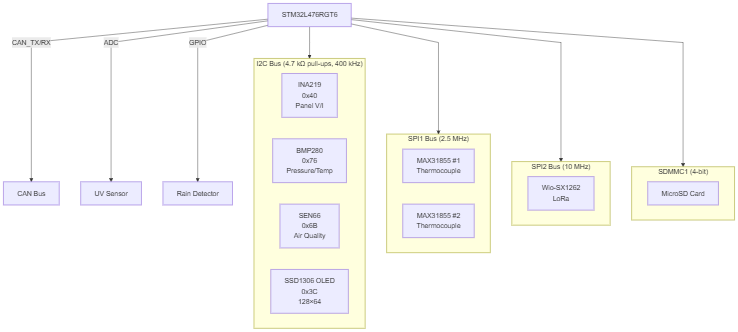
I am using the Waveshare RS485/CAN shield for initial prototyping and have broken out the CAN_TX and CAN_RX lines as global labels connected to the STM32 FDCAN peripheral. For long term storage, as a backup in case comms fail, i am using a Micro SD Card, will be using the SDMMC mode rather than the SPI mode. This will be new to me so I am excited to make the code for it. The OLED is only for Debug purposes and not for actual deployment. Thinking few months down the line, i do want to deploy a few of the panels in different locations to actually test the AI model. It will be remote enough that i cant pull a CAN bus to it, So i have added support for WioSX1262 Lora. With a Power usage of 120mA (396mW) it still is comfortable within the limit of my power budget.
Why am i use CAN if i can use Lora? For making an AI model the more data i have it is better, and to figure out the best feature extraction parameters, i need to experiment with the RAW data, which means lots of Frequent Data, Lora is not built for that, but while deploying the AI model, features are calculated and classification done on the edge device, LORA only transmits the status updates, not the entire data. Therefore LoRa will work there.

Sheet 5: Sensors
To Interface the OmegaDwyer 5SRTC-TT-K-24-72 Thermocouple, K, 0 °C, 260 °C, 80 ", 2 m (Pack of 5) sensors i am using MAX31855. For now i am gonna be using only 1 to keep track of the temperature of one solar panel, but i put in more of this as DNP just to ensure future use. Maybe LiPO temperature? BMP280 to Keep track of Pressure. Thankfully looking at the I2C Addesses, there does not seem to be any conflicts and i can keep all of them in one I2C bus, there is an issue that SEN66 communicates only at 100 kHz I2C only. but that's alright it can be handled in the code. I an extra I2C connector for future use.
OmegaDwyer Humidity Sensor, CURRENT, 30V, W/4P CONN requires a sense resistor for each Relative Humidity and Temperature. This sensor is one of the best for both RH and Temperature even though Temperature can be measured by BMP and SEN66. As per their Datasheet to get a ADC reading between 0-3.3V i have use 150Ohm Resistors.
I also added a rain detector connector with a digital and analog pin capability again in case i need to extend the model further - The rain detection module is like https://arduinogetstarted.com/tutorials/arduino-rain-sensor
Last but not the least, as a secondary source of Incident light, an alternative for clean panel is the UV Sensor which works on Analog. I added a connector to it,
0x3C — SSD1306 OLED
0x40 — INA219 (panel current/voltage)
0x6B — SEN66 (air quality)
0x76 — BMP280 (pressure, ambient temperature)

Sheet 0: The Root Sheet gluing everything together

Here is the final architecture
Final Notes
This PCB is a leap of faith, usually i breadboard some of the circuits before i make a PCB and in particular i have not used the HX94C sensor yet, but no first design of PCB is perfect, so let's bank on one more round of PCB design. I am gonna verify the circuit again before layout and Fab. Tomorrow I will finish the CAN receiver and benchmark the data speeds and throughput.
Update: PCB Layout and Routing
Hey, I managed to place and route all the components, I gave the order to manufacture via PCB Way in white Soldermask. I chose white because, it would absorb heat less and therefore should remain cool(er)


