


Bake Mate - Pi Chef Blog #10 - Bake Mate gets smarter
In the last blog post Bake Mate - Pi Chef Blog #9 - Mixing hardware & software , I demoed Bake Mate in action. The project is now almost complete - the weighing scale and thermocouple have been integrated into the application & I'm now working on the finishing touches.
This blog post will cover what I've added since the last post. These include:
- Automatic unit conversion for weights - oz & lb are automatically converted to gm. The 'addm' screen displays the weight in gm (I'm going to add oz & lb soon), and the weight of the ingredeint added at the current steps in percent and the progressbar.
- Automatic unit conversion for volumes - cups and litres are converted to weights. The densities of commonly used ingredients like oil, water, milk, flour, butter and cocoa powder have been stored, which allows the application to convert the volumes to weights.
- Automatic unit conversion for temperatures: GasMark and Fahrenheit get converted to C.
- BakePage countdown timer
Automatic unit conversion for weights:
#read the value and unit of next ingredient
    #step ingr unit
    thisrecipe.cur_step_ingrUnit = (data["Steps"][(thisrecipe.cur_step)]["ingrUnit"])
    #step ingr value
    thisrecipe.cur_step_ingrValue = (data["Steps"][(thisrecipe.cur_step)]["ingrValue"])

if (thisrecipe.cur_step_ingrUnit=="lb"):
        print("Detected lb. converting to gm")
        thisrecipe.cur_step_ingrUnit = "gm"
        thisrecipe.cur_step_ingrValue = str(round(float(con.LbtoGm(int(thisrecipe.cur_step_ingrValue)
The first 2 statements parse data from the json file: the unit and value of the ingredient. If the unit is 'lb', it calls 'LbtoGm', which converts values from Lb to Gm.
'LbtoGm', along with all the other conversion formulae are defined in converter.py.
def LbtoGm(lb):
    return (lb*453.592)
Automatic unit conversion for volumes:
if (thisrecipe.cur_step_ingrUnit=="cups"):
        print("Detected lb. converting to gm")
        if (thisrecipe.cur_step_ingr=="Water"):
            thisrecipe.cur_step_ingrValue = str(round(float(con.CuptoML(int(thisrecipe.cur_step_ingrValue))*1.0)))
        if (thisrecipe.cur_step_ingr=="Milk"):
            thisrecipe.cur_step_ingrValue = str(round(float(con.CuptoML(int(thisrecipe.cur_step_ingrValue))*1.033)))
        if (thisrecipe.cur_step_ingr=="Oil"):
            thisrecipe.cur_step_ingrValue = str(round(float(con.CuptoML(int(thisrecipe.cur_step_ingrValue))*0.95)))
This section of the code detects the unit & if it is a volume (cup, liter etc), converts it to gm. The 'if' statements are used to detect the type of ingredient and if it's a commonly used one like water, milk, oil etc, it converts it weight be using the density (the values that it is multiplied by at the end of the statement).
If the density of the ingredient isn't known, Bake Mate doesn't convert volume into weight and displays the amount that needs to be added, without any modification. The user will need to measure out the volume and add it (like it was done in the old days - before the Bake Mate  )
)
def CuptoML(cup):
    return (cup*236)
def GallontoMl(gallon):
    return (gallon*3785)
CuptoML is defined in converter.py, with other conversion functions.
I'll be changing how density calculations & volume conversions are handled. The current method of 'if' statements is easy and quick to implement, but isn't easy to modify (when I need to add more densities) and it doesn't scale well. I'll be defining a lookup table with ingredient densities, which will be referred to by the program. This makes everything 'neater' because it'll be easy to add densities without making modifications to the actual code.
Automatic unit conversion for temperatures:
thisrecipe.cur_step_bakeTemp = (data["Steps"][(thisrecipe.cur_step)]["bakeTemp"])
    thisrecipe.cur_step_bakeTempUnit = (data["Steps"][(thisrecipe.cur_step)]["bakeTempUnit"])
    if(thisrecipe.cur_step_bakeTempUnit == "GasMark"):
        #convert it to C - the real unit :)
        tempC = con.GasMarktoC(int(thisrecipe.cur_step_bakeTemp))
        thisrecipe.cur_step_bakeTemp = round(tempC,2)
        thisrecipe.cur_step_bakeTempUnit = "C"
    if(thisrecipe.cur_step_bakeTempUnit == "F"):
        #convert it to C - the real unit :)
        tempC = con.FtoC(int(thisrecipe.cur_step_bakeTemp))
        thisrecipe.cur_step_bakeTemp = round(tempC,2)
        thisrecipe.cur_step_bakeTempUnit = "C"
This parses the value and unit of the baking temperature and converts it to Centigrade. However, the Bake Page shows all 3 units - Centigrade, Fahrenheit and Gas Mark to make it convenient for the user.
BakePage countdown timer:
The editor on the e14 website is buggy for some reason, so I'm only posting the important code.
def startclk(self):
        self.runtimer = 1
        print ("start clock")
        print ("run timer idasds " + str(self.runtimer))


    def updatetxt(self):
        self.durVar.set(thisrecipe.cur_step_bakeTime+" minutes")
        self.tempVar.set(str(thisrecipe.cur_step_bakeTemp)+ " C")

        self.mins = thisrecipe.cur_step_bake_m
        self.hours = thisrecipe.cur_step_bake_s
        print("mins is " + str(thisrecipe.cur_step_bake_m))

            thisrecipe.cur_step_bake_s -=1

        if (thisrecipe.cur_step_bake_s == 0):
            thisrecipe.cur_step_bake_s = 60
            thisrecipe.cur_step_bake_m -=1
            if (thisrecipe.cur_step_bake_m ==0):
                thisrecipe.cur_step_bake_h -=1
                thisrecipe.cur_step_bake_m = 60

        self.timeVar.set(str(math.floor(thisrecipe.cur_step_bake_h))+":"+str(thisrecipe.cur_step_bake_m)+":"+str(thisrecipe.cur_step_bake_s))
The startclk() function gets called when the 'Start' button the on BakePage is clicked. This sets the 'runtimer' variable to 1, which enables the count (there is an if statement that decrements the counter only if runtimer = 1). The countdown operations are calculated using the 'if' statements, which first decrements minutes when seconds hits zero. It also resets seconds back to 60 and decrements the hour count if minutes hits zero.
updatetxt() is called every second using the tkinter 'after' method:
self.after(self.TimerInterval,self.updatetxt)
self.TimerInterval = 1000
        self.updatetxt()
The 'after' method calls the 'updatetxt; method after 1 second. The 'after' statement is in the updatetxt() method, so once it's called, it automatically calls itself every second. This method is also used for updating the GUI on pages where the values change (the weight in AddM and temperature & time in BakePage).
This code is in the module that parses data from the recipe json file:
thisrecipe.cur_step_bake_m = (int(thisrecipe.cur_step_bakeTime)%60)-1
    thisrecipe.cur_step_bake_h = (int(thisrecipe.cur_step_bakeTime)/60)
    thisrecipe.cur_step_bake_s = 60
I selected minutes as the unit for storing baking time in the json file, so I need to convert the minutes to hours, minutes and seconds to display the timer. The three lines of code do that.
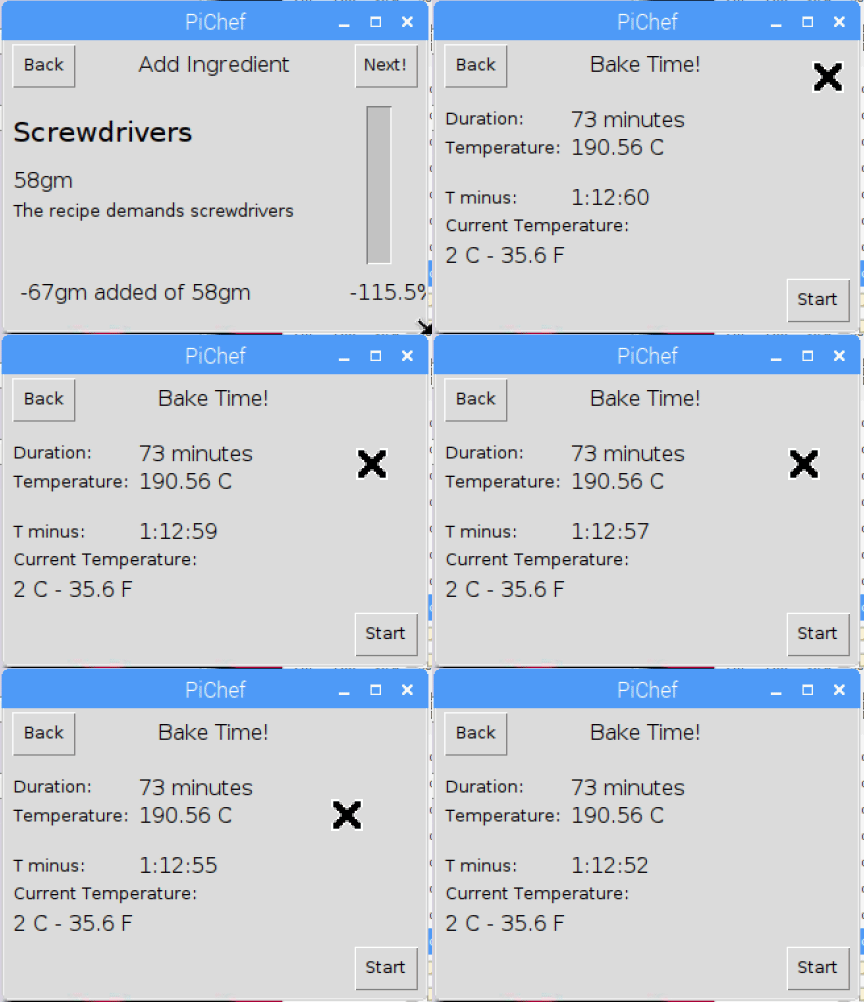
For example, "bakeTime": "73" in the json file is 73 minutes, which needs to be displayed as 1 hour & 13 minutes.To find hours, I used the division operator, and to find minutes I used the modulus operator (which gives the remainder of a division operation) minus 1, because one minute gets converted to 60 seconds.
Next on the list:
With the 'smarts' added, Bake Mate is a step closer to being complete.
- I've already done some work on the mobile notification system that generates alerts when the oven temperature exceeds an acceptable range and when the countdown timer hits zero. I'm using IFTTT's webhooks service for this, and getting notifications (with a little payload data) to works was straightforward. I'll cover this in an upcoming blog post (I plan on automatically setting an alarm on the user's phone too!).
- Stretch goal 1: Using the Sense HAT
Top Comments